

Automatic categorization for recurring and variable spending.
AI Expense Tracker for Faster Category Control and Better Planning
Vala helps users track expenses automatically, detect category risk early, and convert trends into practical actions.
Why People Choose Vala
AI-driven alerts for unusual patterns and overspend risk.
Weekly trend visibility with actionable next-step prompts.
Integrated savings and planning workflows for better outcomes.
Who This Helps Most
Users replacing manual transaction tagging with automated workflows.
Households identifying recurring spend leaks and category drift quickly.
Budgeters connecting tracking data to savings and debt priorities.
Insight Cards for Better Decisions
Insight Card: Burn-Rate Monitoring
Track category pace against days remaining for better in-month correction.
Insight Card: Recurring Cost Drift
Review recurring charges monthly to prevent hidden category leakage.
Insight Card: Response Discipline
The best tracking outcomes come from acting on alerts quickly each week.
AI Expense Tracking Performance Signals (Illustrative)
| Tracking Signal | What It Measures | Why It Matters |
|---|---|---|
| Category burn-rate variance | Spend pace vs days remaining | Improves early correction timing. |
| Recurring charge drift | Changes in subscription/bill totals | Protects monthly cash flow from silent increases. |
| Alert response rate | How often users act on insights | Predicts long-term budget consistency improvements. |
How to Use Ai Expense Tracker Data in a Real Budget Plan
People search for "ai expense tracker" because they want an honest starting point, not guesswork. National averages help set expectations, but they become useful only when mapped to your local costs, income pattern, and household priorities. A strong budget planner starts with benchmark ranges, then adjusts those ranges to your real behavior so monthly decisions stay practical.
Vala helps users who need faster insight into category drift and recurring expense patterns convert expense benchmarks into day-to-day actions. You can track actual category performance, review recurring obligations, and compare your spending trend against your plan every week. This creates a clearer process than static spreadsheets and supports better follow-through for both short-term bills and long-term savings targets.
H3: Start with benchmark ranges, then personalize
Use average cost data to build your first category limits, then personalize each category after one full month of real transactions.
H3: Use trend visibility instead of one-time snapshots
A one-month snapshot can be misleading. Trend analysis across multiple weeks gives a more accurate view of where your budget is drifting.
- Use national ranges as planning baselines, not strict rules.
- Adjust for local cost of living and household size.
- Track variance weekly so corrections happen early.
Where Category Benchmarks Usually Break
Average-cost guides are useful, but many users still overspend because they do not separate fixed costs, variable essentials, and discretionary behavior. Housing and insurance may be stable, while food, transport, and subscriptions can change quickly. Without this separation, people set one blended target that looks fine on paper but fails in real life.
An expense tracker and expense manager workflow solves this by assigning each category a control style. Fixed categories are monitored for billing accuracy, variable essentials are monitored for weekly burn rate, and discretionary categories are monitored for opportunity cost. This structure improves cash-flow stability and makes budget updates faster when prices change.
- Separate fixed and variable categories before setting targets.
- Use weekly burn-rate checks for volatile categories.
- Create category-specific alert thresholds for faster correction.
Building a Practical Monthly Control System
A high-performing money saver system has three layers: planning, tracking, and action. Planning defines category targets, tracking shows where reality differs, and action closes gaps before month-end. Users who skip the action layer usually review data but still miss their goals because there is no repeatable decision rule after each alert.
Vala links these layers in one mobile workflow. You can use the expense tracker view to set category limits, rely on the expense manager layer for live visibility, and move excess spend back toward your ai budgeting app goals with guided prompts. This process helps users protect budget consistency during both normal and high-spend months.
- Planning: define realistic limits before spending begins.
- Tracking: monitor category trend changes each week.
- Action: reallocate quickly when thresholds are crossed.
Cost-of-Living Differences and Regional Planning
National average spending data hides major regional differences. Housing, transport, and grocery prices can vary widely across states and metro areas. The best practice is to start with broad U.S. ranges, then normalize your categories using local receipts, lease costs, and utility history. This reduces unrealistic planning and improves confidence in category targets.
If your region is above national benchmarks, your monthly strategy should focus on reducing avoidable leakage in flexible categories instead of forcing impossible cuts in fixed obligations. If your region is below average, use the margin to accelerate debt payoff or savings goals. This type of local adaptation turns benchmark content into practical results.
- Adjust benchmark costs using local billing history.
- Protect fixed essentials, optimize flexible categories first.
- Route any savings margin into debt or goal milestones.
Insight Card Workflow for Weekly Decisions
Insight cards are most useful when tied to concrete decisions: where to reduce spending, which recurring costs to audit, and how much to redirect into savings this week. Generic alerts create noise; actionable insight cards create momentum. Each card should include category context, change magnitude, and a recommended next action users can apply in less than five minutes.
This is where AI budgeting app workflows can outperform manual tracking. Instead of scanning every transaction manually, users get prioritized recommendations that focus on the categories with the highest impact. Over time, these weekly adjustments compound into lower stress, fewer billing surprises, and stronger progress toward financial goals.
- Prioritize high-impact categories first.
- Attach each insight to one clear action.
- Measure progress weekly and refine thresholds monthly.
How to Turn Benchmarks Into Savings Momentum
Benchmark-driven planning is only valuable if it improves savings behavior. After setting category targets, assign a default transfer rule so each avoided dollar is redirected to a defined goal. Without a transfer rule, savings often disappear back into discretionary spending. With a transfer rule, small category wins become visible long-term progress.
Use a goal tracker framework to map each saving objective to a timeline and recurring contribution amount. Keep one primary goal and one secondary goal to reduce complexity. Then review category mappings and recurring charges monthly so your plan stays realistic while still pushing forward. This approach helps users build consistency without burnout.
H3: Savings consistency beats savings intensity
Most households get better outcomes from smaller recurring transfers than from large, irregular transfers that are hard to sustain.
- Define one primary and one secondary savings goal.
- Redirect category savings immediately after each review.
- Keep contributions realistic and sustainable month to month.
Trust, Accuracy, and Financial Decision Quality
Financial content should be transparent about what averages can and cannot do. Averages are directional tools for planning, not guarantees. The right way to use them is as a benchmark layer combined with your own transaction history and recurring obligations. This keeps decisions realistic and reduces the risk of overcorrecting based on generic internet advice.
Vala pages use this trust-first approach by pairing benchmark guidance with practical workflow steps, clear disclaimers, and app-based action paths. Users can move from information to implementation using built-in download CTAs and category controls. That balance improves both SEO quality signals and conversion quality because expectations remain aligned with product reality.
- Use averages as directional guidance, not fixed outcomes.
- Combine benchmark data with your own transaction history.
- Keep plan messaging accurate: free and premium capabilities can coexist.
30-60-90 Day Measurement Framework
Use a 30-60-90 day framework to evaluate whether benchmark-based planning is improving your results. In the first 30 days, measure consistency: weekly reviews completed and alerts acted on. In 60 days, measure behavior change: lower category leakage, better bill timing, and fewer avoidable spikes. In 90 days, measure strategic outcomes: improved savings rate and stronger confidence in monthly planning.
This structure helps users avoid vague goals and focus on measurable progress. A good budget planner and expense manager system should make these metrics easy to review. In practice, the biggest unlock comes from repeating simple actions reliably: track, adjust, and reallocate. Over time, that rhythm supports better financial outcomes than one-time budget resets.
- 30 days: execution consistency and response rate.
- 60 days: category control and behavior adjustment.
- 90 days: measurable savings growth and planning confidence.
Action Plan: What to Do This Week
Start by setting category targets based on the data table on this page. Then review your actual spending and flag your top three variance categories. Use insight cards to select one high-impact adjustment this week. Finally, route the resulting savings into your primary goal tracker target. Keep the process simple and repeatable.
If you want a fast workflow, use Vala to centralize your budget planner, expense tracker, split bills app needs, and savings app actions in one place. The combination of benchmarks, alerts, and guided reallocation helps users build a sustainable system. Use AI tracking insights to free budget capacity for savings goals so your progress remains visible and motivating.
- Set benchmark-based category limits today.
- Pick one meaningful adjustment for the current week.
- Move gains into a named goal to preserve progress.
Install Vala and Start Today
Return to the Vala homepage for full product details, or jump directly to the download section.
Helpful Internal Finance Tools
Benefits of AI Budgeting with Vala
Faster category decisions
AI insights highlight where to adjust spending before month-end pressure builds.
Stronger savings consistency
Connect spending reductions to recurring goal contributions with less manual work.
Clear shared-money workflows
Split bills and track household expenses with practical visibility and reminder support.
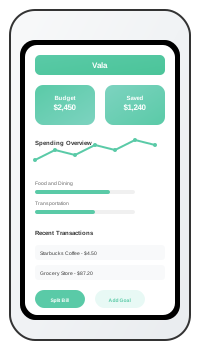
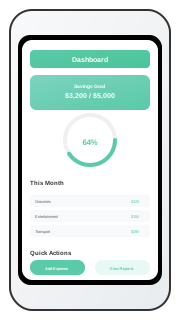
Vala App Screenshots
What Users Say About Vala
“Finally a budget app I keep using.”
“The insight cards make weekly decisions easy. I save more consistently now.”
“Shared budgeting is much clearer.”
“Split bills and reminders removed most of our monthly money confusion.”
“Great for building better habits.”
“I can see category trends and adjust before I overspend.”
FAQs for This Topic
Yes. Automation reduces classification overhead and speeds weekly review decisions.
Weekly checks with monthly category cleanup is a strong baseline cadence.