

Compare Android apps on planning, tracking, bank connectivity, and recurring expenses.
Best Budget App for Android: Compare the Top Options
Compare Android budget planner apps by setup, bank sync, expense tracking, recurring costs, shared-money support, and the daily workflow each one fits.
No credit card for the website check. Secure bank connection through Plaid is used in the app when you want automatic transaction insights.
Why People Choose Vala
Check data freshness, category controls, reminders, and manual-entry support.
Evaluate shared finances and cross-platform access when more than one person is involved.
Confirm current Google Play availability, trial terms, and pricing before subscribing.
Who This Helps Most
Android users choosing their first budget planner app.
People replacing a spreadsheet or an app that requires too much upkeep.
Couples and households comparing shared-cost support across Android apps.
What matters in an Android budget planner app
A useful Android budgeting app should make the common actions fast: checking available cash, reviewing recent expenses, correcting a category, seeing upcoming bills, and understanding whether the plan is still on track.
Look for readable screens, accessible controls, clear sync states, and a manual fallback. Push notifications should be relevant and configurable rather than the main reason to open the app.
Bank sync, categories, and recurring expenses
Bank connectivity can save time, but institution coverage and refresh timing vary. The app should expose stale data, avoid double-counting transfers or credit card payments, and let users correct transaction categories.
For bills and subscriptions, compare reminder timing, recurring-charge visibility, and whether the app gives enough evidence to review an item. Detection alone is less useful than a clear next action.
Android, iOS, and shared-finance support
If a partner uses a different phone, verify iOS or web availability as well as Android support. Shared subscription access, household collaboration, and split-expense tracking are different features, so choose the model that matches how you manage money together.
Vala is available on Android and iOS and includes split-expense workflows alongside personal budgets, bills, recurring costs, goals, and FutureMe projections.
How to choose without overpaying
Start with the problem you want solved, then compare current trial and subscription terms in Google Play or the official provider page. Do not pay for broad reporting if you only need a simple plan, and do not choose a narrow tracker if you need bills, goals, or shared expenses too.
The best Android budget app is not one universal winner. It is the option whose data coverage, planning method, and weekly effort fit your needs.
Install Vala and Start Today
Return to the Vala homepage for full product details, or jump directly to the download section.
Latest Budgeting Guides
New practical money-management articles you can apply right away.
Streaming Subscription Management: Track, Rotate, Cancel
Manage streaming subscriptions in one routine: list every service, cancel the right way, rotate what you watch, and split shared plans fairly. Steps included.
Read GuideStudent Loan Budgeting: How to Fit Repayment Into Your Month
Learn student loan budgeting step by step: build a monthly plan, use the 50/30/20 rule, choose which loan to pay first, and know what...
Read GuideHow to Merge Finances After Marriage: A Practical Plan
Merge finances after marriage without the stress. Compare joint, separate and hybrid setups, split bills fairly, and follow a step-by-step plan for newlyweds.
Read GuideBenefits of AI Budgeting with Vala
Faster category decisions
AI insights highlight where to adjust spending before month-end pressure builds.
Stronger savings consistency
Keep savings goals and progress visible while you adjust spending decisions.
Clear shared-money workflows
Split bills and track household expenses with practical visibility and reminder support.
Vala App Screenshots
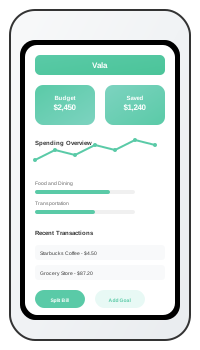
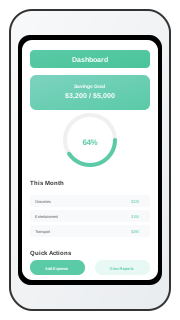
Android Budgeting App Comparison
| App | Android focus | Budget and tracking approach | Shared money | Pricing approach |
|---|---|---|---|---|
| Vala | Native mobile workflow with optional connected data or manual planning | Budgets, expense analysis, recurring costs, bills, goals, and FutureMe outlook | Split-expense workflows; also available on iOS | In-app trial and SaverPro subscription |
| YNAB | Android app with web and iOS access | Structured plan-every-dollar method, targets, and direct import | YNAB Together shared subscription access | Trial followed by a paid subscription |
| Monarch Money | Android app with web and iOS access | Account aggregation, flexible budgets, reporting, and goals | Household collaboration | Trial followed by a paid subscription |
| Rocket Money | Android and iOS mobile apps | Connected spending, budgets, recurring charges, and bill-focused services | Not primarily positioned around split expenses | Free features with optional Premium |
FAQs for This Topic
The best choice depends on whether you want a structured budgeting method, broad account reporting, recurring-cost help, or an action-led workflow. Compare current features and pricing against that primary job.
Yes. Manual entry keeps the plan useful when a bank is unsupported, data is delayed, or you prefer not to connect an account.
It can when the provider also supports iOS, web access, or an appropriate shared-money feature. Confirm how data and subscriptions are shared before choosing.