
The fastest way to identify unnecessary recurring expenses is a single, timeboxed 30-minute audit across four channels: bank and credit card statements, digital wallets, app-store subscriptions, and your email inbox. Most people who run this audit for the first time recover $100–$250 per month in charges they had completely forgotten about.
Here is what to check first:
- Forgotten streaming services you signed up for during a free trial and never canceled
- Duplicate cloud storage across Google One, iCloud, and Dropbox running simultaneously
- Unused SaaS tools still billing monthly after a project ended or a team member left
Run the audit once and you will have a clear list of candidates to cancel or downgrade, plus a realistic estimate of $100–$250 per month that you can reclaim.
Table of Contents
- How do you run a 30-minute audit to find recurring charges?
- What should you cancel, keep, or downgrade?
- How do you actually cancel and handle retention friction?
- How do you stop subscription creep from coming back?
- Which tools help you track and stop recurring charges?
- How much can you realistically save, and how long does it take?
- Key Takeaways
- Why a timeboxed audit beats perpetual tinkering
- Valapoint makes the audit automatic for busy people
- Useful sources and further reading
How do you run a 30-minute audit to find recurring charges?
A 30-minute review of the last three months of statements is the single most reliable method for surfacing forgotten subscriptions. The timebox matters. Open-ended reviews stall because people get distracted by unrelated transactions. A hard 30-minute window keeps you moving and prevents overanalysis.

Go back at least 90 days, not 30. A 90-day minimum catches quarterly and annual charges that a single-month check will miss entirely.
| Channel | Where to look | Action | Time |
|---|---|---|---|
| Bank statements | Transactions list, 90-day view | Flag every recurring charge by merchant name | 10 min |
| Credit card statements | Statement history, 90-day view | Cross-reference with bank list; note duplicates | 5–7 min |
| Digital wallets (PayPal, Apple Pay, Google Pay) | Automatic payments or recurring billing section | Cancel or note any active recurring authorizations | 4–5 min |
| App stores (Apple App Store / Google Play) | Settings → Subscriptions | Review every active subscription and its renewal date | 4–5 min |
| Amazon subscriptions page | Account → Memberships & Subscriptions | Check Subscribe & Save, Prime add-ons, digital subscriptions | 3–4 min |
| Email inbox | Search “auto-renew,” “billing,” “subscription,” “receipt” | Flag upcoming renewals; go back six months | 4–5 min |
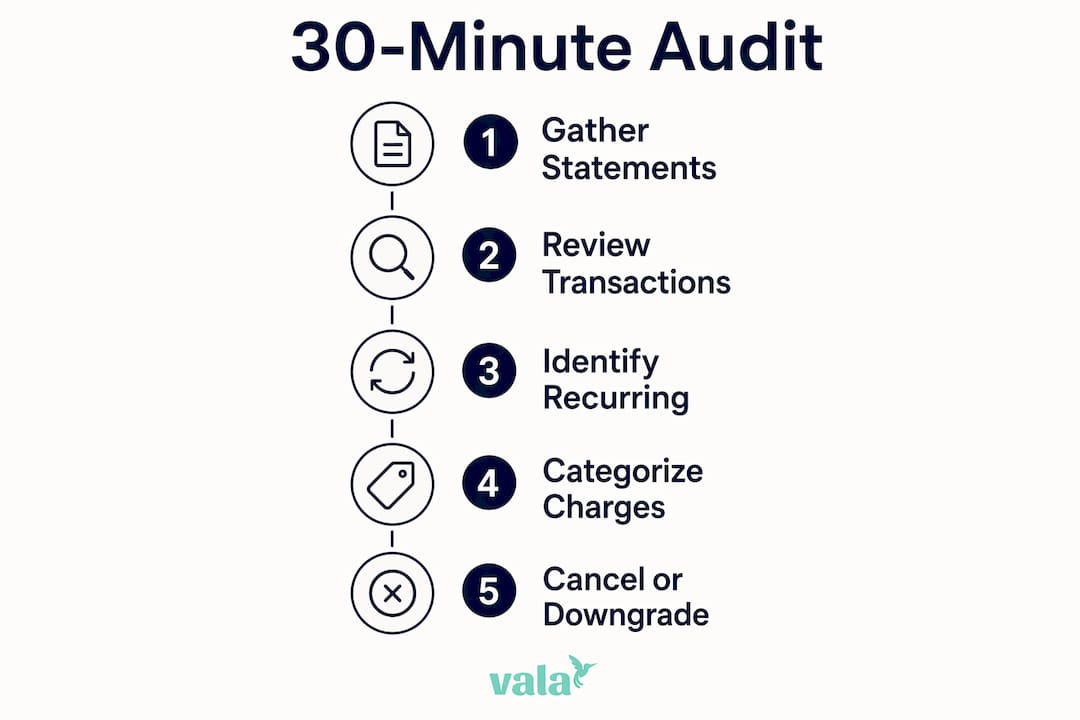
Check vendor-specific dashboards like the Amazon subscriptions page and the PayPal automatic payments dashboard. Many recurring charges appear on bank statements under a generic parent-company name that tells you nothing about the actual service.
Pro Tip: When you see a cryptic merchant descriptor on your statement, copy the exact string and search it online before calling your bank. Most of the time, a quick search reveals the real service behind the charge — saving you a 20-minute hold.
One more rule worth following: deleting an app does not cancel its subscription. Charges continue until you cancel through the app-store account settings or the vendor’s own platform. Always confirm cancellation in both places.
What should you cancel, keep, or downgrade?
Once you have your list, sort every recurring charge into one of three buckets.
Essential: Rent, utilities, insurance, and any subscription directly tied to income (a business tool you use daily). These stay.
Valued but negotiable: Services you use regularly but could get cheaper. Think annual billing discounts, lower tiers, or a competitor’s free plan. These get renegotiated or downgraded.
Nonessential: Anything you have not used in the past 30 days and would not miss. These get canceled immediately.
For each item on your list, run through this quick decision checklist:
- When did you last use it?
- How often do you actually use it per month?
- What is your cost per use? (Monthly fee ÷ uses per month)
- Is there a free or cheaper alternative that covers 80% of what you need?
- For business managers: is this a personal expense or a legitimate business cost?
Here is a quick priority-ranking example to show how this works in practice:
- $14.99/month fitness app, last used 4 months ago. Cost per use: infinite. Cancel immediately.
- $9.99/month music streaming, used daily. Cost per use: $0.33. Keep, but check if a family plan or annual billing saves money.
- $29/month project management tool, used once a week by one person. Check if a free tier covers the actual usage before the next billing cycle.
Two psychological traps slow people down here. Status quo bias makes you assume the current setup is fine because changing it feels like effort. Sunk cost fallacy makes you keep a subscription because you “already paid for it” rather than asking whether you will use it going forward. The fix is simple: evaluate each service only on future value, not past spend.
Ramit Sethi’s approach frames this well. Cut ruthlessly on services that deliver no real value so you can spend freely on what you genuinely love. The goal is not to minimize spending across the board. It is to stop funding things you do not care about.
How do you actually cancel and handle retention friction?
Cancellation flows are often designed to be difficult — extra confirmation screens, hidden buttons, and retention offers that appear only after you click “cancel.” Knowing the order to try saves time.
Best order to follow:
- Online self-service portal (fastest, leaves a paper trail)
- App-store subscription manager (for any app-store billing)
- Vendor account settings page
- Phone or email with a script (for services that require it)
Use this script when you need to contact a vendor directly:
For retention negotiations, the same call often works in your favor. If a representative offers a discount to stay, ask specifically for three months free, a 20–30% rate reduction, or a switch to annual billing at a lower per-month rate. Get any offer confirmed by email before ending the call.
On refunds: most services will refund the most recent charge if you ask within 7–14 days of billing. Keep your bank statement showing the charge date and the cancellation confirmation email as evidence.
Pro Tip: Before you cancel a service you are unsure about, try pausing it first. Many streaming and software services offer a 1–3 month pause. If you do not miss it during the pause, cancel permanently. If you do miss it, you have your answer without losing your account history.
How do you stop subscription creep from coming back?
The audit clears the backlog. These habits keep it clear going forward.
- Set a calendar alert 2–3 days before any trial or promotional period ends. Consumer Reports recommends this as the single most effective way to prevent unwanted trial conversions. Pair it with bill reminders so nothing slips through.
- Use one dedicated card for free trials only. When a trial converts unexpectedly, you catch it immediately because that card has no other charges.
- Schedule a 15-minute quarterly subscription review. Put it on your calendar now. Four times a year is enough to catch anything new that crept in.
- Store all subscription credentials in a single password manager. This makes it easy to audit and cancel without hunting for login details.
The one-trial rule is worth adopting as a default: when you sign up for any trial, either cancel immediately and set a reminder to resubscribe if you want it, or set a reminder 2–3 days before the trial ends. Never let a trial convert passively.
Pro Tip: When a service offers a retention discount to keep you from canceling, accept it only if you were planning to keep the service anyway. A 40% discount on something you do not use is still a 60% waste.
On privacy: subscription-manager apps that connect to your bank account typically request read-only access to transaction data. Read-only is the minimum acceptable permission level. Never grant an app full account access or the ability to initiate transfers on your behalf.
Which tools help you track and stop recurring charges?
You have four main approaches, each with different trade-offs.
| Approach | Discovery speed | Cancellation convenience | Privacy trade-off | Cost |
|---|---|---|---|---|
| Account-connect subscription managers | Fast (automated scan) | High (one-tap cancel) | Requires bank read access | Free to low monthly fee |
| Bank-built recurring detection | Moderate (flags known merchants) | Low (manual cancel required) | Minimal (already in your bank) | Free with account |
| Manual spreadsheet tracking | Slow (manual entry) | None (you handle it) | None | Free |
| Corporate expense controls / vendor management | Moderate to fast | Moderate (admin approval flow) | Internal only | Varies by platform |

For individuals comfortable with automation, account-connect subscription managers scan your transactions and surface recurring charges in minutes. The trade-off is granting read access to your financial accounts. For anyone uncomfortable with that, a manual spreadsheet works just as well and costs nothing.
A basic manual spreadsheet needs five columns: Vendor, Monthly Cost, Last Used, Category (essential / valued / nonessential), and Next Renewal Date. Review it quarterly and update it whenever you add a new subscription.
Business managers handling multiple vendor subscriptions benefit from small business expense tracking software that centralizes vendor billing, flags duplicate seat licenses, and routes cancellation requests through an approval workflow. For teams processing high volumes of statements, accounting-focused statement extraction tools can pull and categorize recurring line items automatically.
Valapoint’s automated expense tracking detects recurring patterns across categories and surfaces them in real time, which removes the need to manually scan statements every quarter.
How much can you realistically save, and how long does it take?
Most people are surprised by what they find. Audits typically uncover 3–5 forgotten services on a first pass, and the dollar amounts add up faster than expected.
Conservative scenario (individual): Cancel two streaming services and one unused app subscription. Savings: $30–$50/month, or $360–$600/year.
Moderate scenario (individual): Cancel or downgrade four to six services, negotiate one annual billing switch. Savings: $75–$150/month.
Aggressive scenario (individual or small business): Full audit including duplicate SaaS seats, unused vendor tools, and negotiated rate reductions. Savings in the range of $100–$250/month are common.
Time investment:
- Initial 30-minute audit: one time
- Cancellation and negotiation calls: 10–30 minutes per vendor
- Quarterly follow-up review: 15 minutes
Use Valapoint’s subscription cost calculator to see the annual impact of any recurring charge before you decide whether to keep it.
Fastest wins (low effort, immediate savings):
- Forgotten streaming trials still billing
- Duplicate cloud storage tiers
- Unused app-store subscriptions
Higher effort, higher reward:
- Negotiating annual billing discounts with SaaS vendors
- Auditing business vendor contracts for unused seats
- Disputing charges from services canceled months ago
Key Takeaways
A single 30-minute, channel-by-channel audit is the most reliable way to identify unnecessary recurring expenses and reclaim $100–$250 per month in forgotten charges. Audits typically uncover 3–5 forgotten services on a first pass, and the dollar amounts add up faster than expected.
| Point | Details |
|---|---|
| Run the 30-minute audit now | Check bank statements, credit cards, digital wallets, app stores, and email for the past 90 days. |
| Cancel nonessentials immediately | Use the 30-day cancel test for anything marginal — resubscribe only to what you genuinely miss. |
| Block future creep | Set trial-end calendar alerts, use one dedicated card for trials, and schedule a quarterly 15-minute review. |
| Negotiate before you cancel | Ask for a rate reduction or annual billing switch; many vendors offer 20–30% discounts to retain customers. |
| Valapoint automates the work | Valapoint’s AI detects recurring charges in real time, so you skip the manual statement scan entirely. |
Why a timeboxed audit beats perpetual tinkering
Most personal finance advice tells you to “track your spending” as an ongoing habit. That advice is not wrong, but it sets up a task with no finish line. Open-ended reviews rarely get completed because there is no clear moment of success.
A 30-minute audit with a defined scope does the opposite. You sit down, you work through four channels, and you finish. The completion itself builds confidence, which makes the quarterly follow-up feel manageable rather than daunting.
The savings data supports this framing. Audits typically uncover 3–5 forgotten services and $100–$250 per month in forgotten charges. That is not a small number. Over a year, it is $1,200–$3,000 redirected toward something you actually chose.
For people who want to skip the manual work entirely, automation tools like Valapoint handle the detection layer continuously. But even if you use an app, running the manual audit once gives you a baseline understanding of your own spending patterns that no algorithm can fully replace. The expense tracking best practices that stick long-term are the ones you understand, not just the ones running in the background.
Valapoint makes the audit automatic for busy people
Manually scanning statements works well once. Doing it every quarter, across multiple accounts, while managing everything else in your life is where most people fall off.
Valapoint gives you a faster path. The app automatically detects recurring charges across your accounts, categorizes them, and surfaces patterns you would otherwise miss. You get real-time alerts when a new recurring charge appears, a clear view of what is billing monthly versus annually, and simple workflows to flag charges for review or cancellation.

Busy individuals and small-business managers with multiple vendor subscriptions get the most out of it. Instead of a quarterly manual audit, you have a live picture of your recurring spend at any point. Start with Valapoint’s personal finance app to connect your accounts and see your recurring charges in one place.
Useful sources and further reading
- How to Find and Cancel Unwanted Online Subscriptions (Consumer Reports) — Step-by-step instructions for setting trial reminders and canceling through app stores and vendor portals.
- Subscription Audit: How to Find and Cancel Hidden Subscriptions (Deep Learning Finance) — Detailed audit methodology, the 90-day statement window, and realistic savings ranges.
- Subscriptions Are Hard to Cancel and Easy to Forget (NerdWallet) — Explains cancellation friction patterns and how vendors design retention flows.
- How To Track All Subscriptions (Axis Intelligence) — Multi-channel audit approach with guidance on reading cryptic merchant descriptors.
- How To Cut Expenses: 13 Proven Strategies (Ramit Sethi / I Will Teach You To Be Rich) — Prioritization mindset for cutting low-value spending and the behavioral framework behind it.
- How to Find and Cancel Subscriptions You’re Not Using (SchoolsFirst FCU) — Practical timing guidance for quick statement reviews.
- How to Identify and Eliminate Unnecessary Expenses (First Community Credit Union) — Credit union guidance on categorizing and eliminating recurring costs.
- How to Cut Expenses: 12 Ways to Lower Monthly Spending (InCharge) — Broader expense-reduction strategies including subscriptions, utilities, and debt consolidation.