
Hidden monthly spending leaks are recurring or irregular expenses that drain your finances without you noticing them. Most people experience a visibility problem, not a spending problem. A systematic 60–90 minute audit of your last three months of transactions can uncover $200–$500 in recoverable monthly costs. The industry term for this process is a spending audit, and it works by surfacing patterns that individual line items never reveal. This guide shows you exactly how to find hidden monthly spending leaks, fix them permanently, and keep them from coming back.
What are the common categories of hidden spending leaks?
Knowing where leaks hide is the first step toward stopping them. Most people scan their bank statements and miss the real culprits because they look at individual charges instead of categories.
The six most common leak categories are:
- Recurring subscriptions and auto-renewals. Streaming services, gym memberships, and software trials that converted to paid plans without a reminder are the biggest offenders. Free trials billed under different names are especially easy to miss.
- Small daily convenience expenses. Coffee runs, delivery tips, and impulse purchases feel minor individually. Across a month, they compound into a significant budget leak.
- Bank fees, credit card interest, and overdraft charges. These are predictable and avoidable, yet they recur because most people never set up alerts to catch them.
- Insurance and warranty policies. Policies purchased years ago rarely get re-evaluated. Rates increase quietly, and coverage often no longer matches your actual needs.
- SaaS and digital service overages. The average SaaS tool costs 15–30% more than its advertised price due to mandatory add-ons, contact tier overages, and onboarding fees. This applies to personal tools like cloud storage and productivity apps too.
- Annual or irregular charges. Annual memberships, domain renewals, and car maintenance costs don’t show up every month. A single-month review will miss them entirely.
Pro Tip: Search your email inbox for the word “receipt” and sort by sender. You’ll surface annual charges and forgotten subscriptions faster than any bank statement review.
What tools and preparations do you need for a spending audit?
A spending audit works best when you prepare before you start reviewing transactions. Walking in without the right materials turns a 90-minute task into a frustrating afternoon.
What to gather before you start
Pull at least 90 days of statements from every bank account and credit card you use. A 90-day transaction review captures irregular expenses and spending drift that a single month snapshot misses. Annual memberships, car maintenance, and quarterly software fees only appear when you look across multiple months.
Tools that speed up the process
| Tool type | What it does | Time saved |
|---|---|---|
| Budgeting app with AI categorization | Sorts transactions automatically into needs, wants, and savings | 40–60 minutes per audit |
| Subscription register (spreadsheet or app) | Tracks every subscription’s cost, renewal date, and cancellation path | Prevents future leaks |
| Calendar reminders | Flags upcoming renewals 7 days in advance | Stops auto-renewals |
| Spending alerts | Notifies you when a category exceeds a set threshold | Catches drift in real time |
Budgeting apps with AI-enabled categorization reduce manual effort and miscategorization compared to traditional spreadsheet methods. They also surface patterns across months that you would never catch by reading statements line by line.
The 50/30/20 rule gives you a clear framework for evaluating what you find. Experts recommend allocating 50% of take-home pay to needs, 30% to wants, and 20% to savings. Pair this with weekly 10–15 minute check-ins to catch new leaks before they compound.
Pro Tip: Focus your audit on categories with inconsistency, not every line item. If your grocery spending varies by more than $100 month to month, that category deserves a closer look.
How to conduct a step-by-step spending audit
A spending audit follows a clear sequence. Skipping steps reduces accuracy and leaves money on the table.
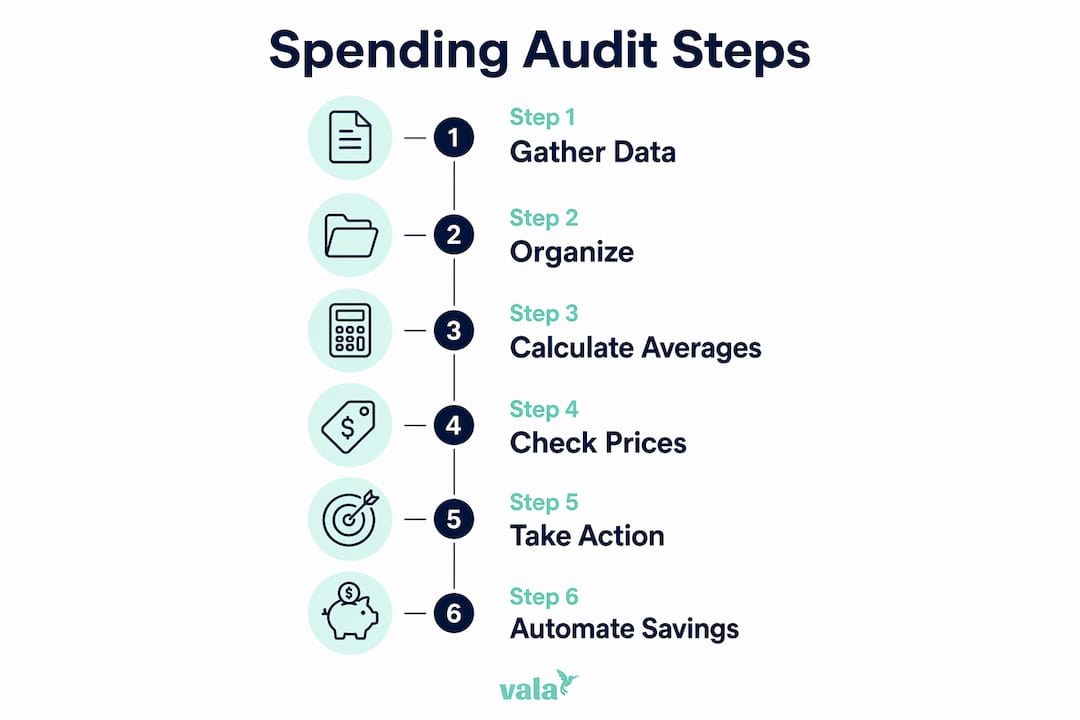
Step 1: Pull and organize your transaction data
Download 90 days of statements from all accounts. Export them to a spreadsheet or import them into a budgeting app. Group transactions by category: food delivery, dining out, subscriptions, entertainment, fees, and miscellaneous.

Step 2: Flag unknown or suspicious charges
Scan every recurring charge and mark any you cannot immediately identify. Subscriptions billed under different names and cancelled services that kept billing are common finds. Look specifically for:
- Charges under $15 that appear monthly (easy to ignore, hard to justify)
- Charges from companies you don’t recognize
- Duplicate charges for the same service
- Annual charges that hit without warning
Step 3: Calculate category averages
Add up each category across all three months and divide by three. This gives you a true monthly average that accounts for irregular spending. Most people are surprised by their food delivery and dining totals. The gap between what you remember spending and what you actually spent is driven by frictionless payment methods like tap-to-pay and one-click purchases that your memory under-records.
Step 4: Check for price increases and hidden add-ons
Review each subscription for price changes since you signed up. Currency conversion fees and automatic annual price increases are common overlooked costs. A streaming service that started at $9.99 may now bill at $15.99. A cloud storage plan may have added a paid feature you never requested.
Step 5: Decide and act on each leak
For every flagged item, choose one of three actions: cancel, renegotiate, or downgrade. Set a deadline of 48 hours to act. Decisions left open tend to stay open.
Step 6: Automate what you recover
Every dollar you recover from a cancelled subscription or eliminated fee should move automatically to savings or debt repayment. Set up an auto-transfer the same day you cancel. This step is what separates a one-time audit from a lasting financial improvement.
What mistakes should you avoid when plugging spending leaks?
Most people cut back on spending for a few weeks and then drift back to old habits. That is patching, not plugging. Patching spending rarely lasts. Plugging leaks requires structural and automated changes that remove the decision entirely.
The most common mistakes are:
- Canceling nothing, just spending less. If the subscription is still active, the charge will return the moment your attention shifts.
- Relying on willpower instead of automation. Auto-transfers to savings work because they remove the choice. Willpower does not scale.
- Running a single audit and stopping. New leaks appear constantly. A subscription you signed up for in march will show up as a leak by june if you don’t track it.
- Ignoring annual charges in monthly reviews. A single-month snapshot misses quarterly and annual fees. Multi-month reviews catch spending drift and irregular expenses that monthly snapshots miss entirely.
“The key to uncovering leaks is consistent, centralized visibility focused on problematic categories rather than manual line-by-line scrutiny. Systems beat willpower every time.”
Maintaining a central subscription register with each service’s actual cost, renewal date, and cancellation path is the single most effective habit for preventing future leaks. Update it every time you sign up for a new service.
Pro Tip: Set a recurring calendar event every 90 days labeled “Spending Audit.” Treat it like a bill payment. Missing it costs you money.
Key Takeaways
Finding and fixing hidden monthly spending leaks requires a 90-day transaction audit, a clear categorization framework like the 50/30/20 rule, and automated systems that remove the need for willpower.
| Point | Details |
|---|---|
| Audit 90 days, not 30 | A single month misses annual fees, irregular charges, and spending drift. |
| Use the 50/30/20 rule | Allocate 50% to needs, 30% to wants, and 20% to savings as your baseline. |
| Flag and act within 48 hours | Decisions left open stay open. Cancel, renegotiate, or downgrade immediately. |
| Automate recovered funds | Set up auto-transfers the same day you cancel a subscription. |
| Repeat every 90 days | New leaks appear constantly. A one-time audit is not enough. |
The mindset shift that actually makes this stick
I’ve looked at a lot of personal budgets over the years, and the pattern is almost always the same. People think they have a spending problem. They actually have a visibility problem. The moment you can see exactly where your money goes, the decisions become obvious. You don’t need a stricter budget. You need a clearer picture.
What surprises most people is how small the individual leaks are. A $12.99 subscription here, a $4.99 add-on there. None of it feels significant. But when you add them up across a year, you’re looking at real money. The math is not complicated. The hard part is making yourself sit down and look.
The other thing I’ve learned is that strict budgets fail because they require constant effort. Automation wins because it requires none. Once you cancel the subscriptions you don’t use and redirect that money automatically to savings, you don’t have to think about it again. The system does the work. That’s not restriction. That’s financial clarity, and it feels completely different.
The readers I’ve seen make the most progress are not the ones who cut the most aggressively. They’re the ones who set up the right systems and then check in every 90 days to catch new drift. Consistent, light-touch visibility beats intense, short-lived willpower every time.
— SaverStride
How Valapoint helps you track and stop spending leaks
Valapoint’s personal finance app handles the parts of a spending audit that most people skip because they’re tedious.

Valapoint automatically categorizes your transactions, tracks every subscription’s renewal date, and sends alerts when a category exceeds your set limit. The app applies the 50/30/20 framework to your real spending data, so you can see at a glance where your money is going. You can also set up budget goal tracking to redirect recovered funds automatically. For a full overview of what Valapoint offers, visit the personal finance app page and see how it fits your financial habits.
FAQ
How much money can a spending audit recover?
A systematic 90-day spending audit typically uncovers $200–$500 in recoverable monthly expenses. The exact amount depends on how many active subscriptions and recurring fees you have.
How long does a spending audit take?
A thorough spending audit covering 90 days of transactions takes 60–90 minutes. Using a budgeting app with automated categorization cuts that time significantly.
What is the 50/30/20 rule in budgeting?
The 50/30/20 rule allocates 50% of take-home pay to needs, 30% to wants, and 20% to savings. It gives you a clear benchmark for identifying which spending categories are out of balance.
How do I find hidden subscription charges?
Review 90 days of bank and credit card statements and flag any recurring charge you cannot immediately identify. Search your email for “receipt” or “billing” to surface subscriptions billed under unfamiliar names.
How often should I audit my spending?
Run a full spending audit every 90 days. New subscriptions, price increases, and spending drift appear regularly, and a quarterly review catches them before they compound into significant losses.