
An intelligent budget is a financial plan that an AI system builds and updates automatically. It ingests your transaction data, categorizes every dollar, forecasts future spending, flags anomalies, and recommends smarter allocations — all without you touching a spreadsheet. The core difference from a traditional budget: it learns from your actual behavior and adjusts in real time, rather than sitting static until you remember to update it.
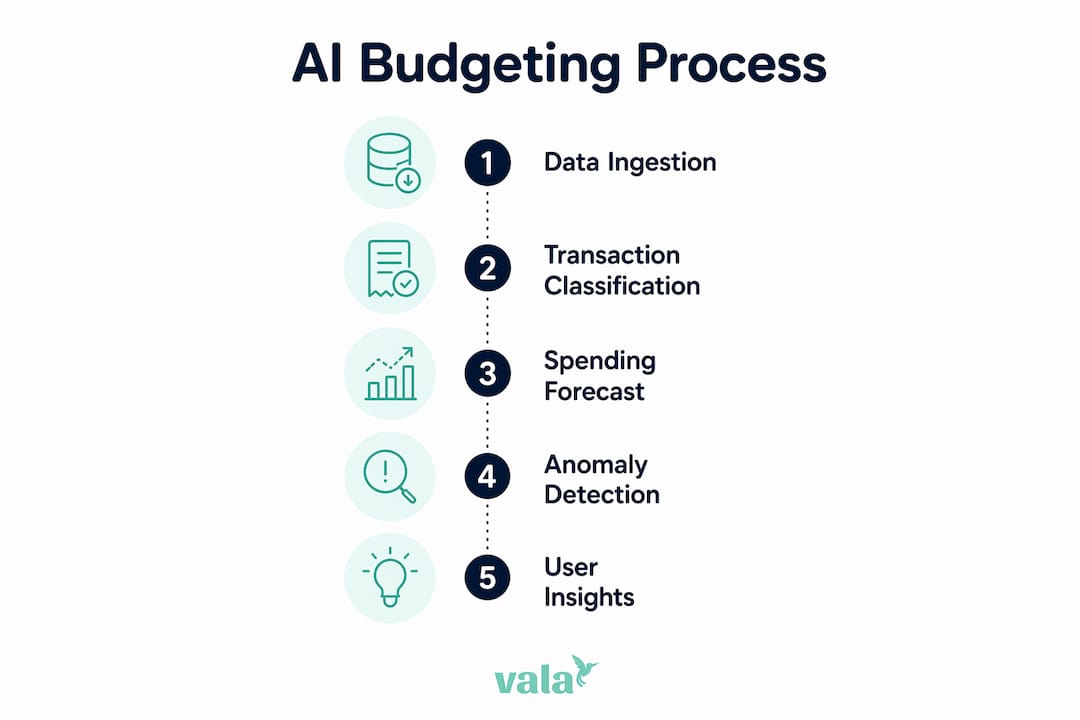
Here is how the system works at a glance:
- Data ingestion: The app connects to your bank, credit cards, and payroll via secure APIs and pulls transactions automatically, often within minutes of a purchase.
- Auto-categorization: A classification model sorts each transaction into a spending category (groceries, utilities, subscriptions, etc.).
- Forecasting: A time-series or regression model predicts future spending based on your history and seasonal patterns.
- Anomaly detection: The system flags charges that fall outside your normal range — a subscription price hike, a duplicate charge, or an unusual restaurant bill.
- Optimization and recommendations: The AI suggests reallocation, savings targets, or spending cuts based on your goals.
Intelligent budgets are most useful when your income or expenses vary month to month, when you want real-time nudges rather than end-of-month surprises, or when you are trying to align daily spending to a specific savings goal.
Table of Contents
- Why does data + AI budgeting outperform guesswork?
- Common budgeting mistakes and how intelligent budgeting fixes them
- What data does an intelligent budget actually need?
- What AI techniques actually power an intelligent budget?
- Which tools should you use for intelligent budgeting?
- How to set up an intelligent budget step by step
- Real-world examples of intelligent budgeting in action
- What metrics should you track to know if it is working?
- Privacy, security, and governance for U.S. users
- How Vala maps to the intelligent budget pattern
- Key Takeaways
- When should you use an app versus building in BI?
- Valapoint makes it easy to start your intelligent budget today
- Useful sources and further reading
Why does data + AI budgeting outperform guesswork?
The primary reason intelligent budgets work is continuous, behavior-aware forecasting paired with proactive alerts. A traditional budget is a snapshot. An AI-driven one is a live feed.
“Organizations moving from spreadsheets to intelligence reported forecast accuracy exceeding 90% after integrating continuous data feeds and machine learning models.”
That accuracy gain matters because most budget failures are not planning failures — they are data failures. When the model sees every transaction as it happens, it catches cash-flow timing problems before they become overdrafts. It spots the month your utility bill spikes every winter. It notices that your grocery spend creeps up 15% in November and December.
Static rules like the 50/30/20 framework apply the same percentages to everyone. AI personalizes recommendations by analyzing your actual transaction history and seasonal patterns, adjusting allocations as your habits change. That is a fundamentally different kind of plan — one that fits your life, not a textbook example.
The speed advantage is real too. AI-driven systems also compress planning cycles. What used to take a finance team days of spreadsheet reconciliation can run in minutes when data feeds are live and models are pre-trained.
Common budgeting mistakes and how intelligent budgeting fixes them
The root causes of most bad budgets are the same: data gaps, manual reconciliation delays, and rules that never update. Here is how AI-driven budgeting addresses each one directly.
- Stale forecasts. You set a budget in January and never touch it. By March, your income changed and three subscriptions increased. Fix: continuous sync and auto-updated forecasts that reflect your current situation, not last quarter’s.
- Missed irregular bills. Annual insurance premiums, quarterly taxes, and semi-annual subscriptions wreck budgets that only plan month to month. Fix: predictive scheduling and sinking funds that spread irregular costs across the months before they hit.
- Hidden subscriptions. Recurring-subscription discovery is one of the highest-impact features in AI budgeting apps — the system flags every recurring charge and alerts you when a price changes.
- Impulse overspend in one category. Static envelope budgets require you to notice and stop yourself. Fix: real-time category alerts that notify you when you are approaching a limit, before you cross it.
- No savings automation. Willpower-based saving rarely sticks. Fix: automated savings triggers that move safe-to-save amounts into a savings account based on your balance and upcoming bills.
Pro Tip: During your first week with an intelligent budgeting app, focus on correcting miscategorized transactions rather than adjusting spending. The model learns from your corrections, and accurate categories are the foundation everything else builds on.
What data does an intelligent budget actually need?
The single most important data requirement is comprehensive, continuous transaction data. Partial data produces partial insights. Connect every active account from day one.

Pro Tip: Start with your primary checking account, primary savings account, and the credit card you use most often. Once those are synced and categories look clean, add secondary cards and investment accounts. An incremental rollout beats a messy all-at-once connection.
Here is the full list of data sources worth connecting:
- Checking accounts: the core transaction feed for daily spending
- Savings accounts: needed to track transfers and savings rate
- Credit cards: often where discretionary spending lives; missing these creates a blind spot
- Payroll or direct deposit records: confirms income timing and amount for cash-flow forecasting
- Recurring subscriptions and bills: streaming services, utilities, insurance, rent
- Invoices and variable income sources: freelance payments, side income, reimbursements
- Calendar or HR inputs: pay-frequency patterns, bonus timing, leave periods that affect income
True intelligent budgeting apps use a pull-model connection via secure APIs, updating balances and transactions within minutes of activity. That eliminates the manual CSV upload problem entirely.
For data hygiene, follow this integration checklist:
- Verify category mapping after the first week and correct errors
- Set a reconciliation cadence (weekly is enough for most individuals)
- Confirm that the app uses encrypted connections and token-based access, not stored credentials
- Review your data retention policy — know how long transaction history is stored and who can access it
- Use financial document automation tools to extract invoice and billing data from PDFs or emails and feed them into your budget system automatically
What AI techniques actually power an intelligent budget?
The AI stack in a modern budgeting system runs in sequence: auto-categorization feeds forecasting, forecasting feeds anomaly detection, and optimization layers on top with narrative explanations from a large language model (LLM).
Three core machine-learning techniques drive most of the features you see:
- Classification sorts each transaction into a category. The model learns your specific merchants over time, so “Trader Joe’s” always lands in Groceries, not Miscellaneous.
- Regression and time-series forecasting predict future spending by analyzing historical patterns, pay cycles, and seasonal variation. The longer you use the system, the more accurate these predictions become.
- Anomaly detection compares each new transaction to your baseline and flags statistical outliers — a charge 3x your normal restaurant spend, or a subscription that jumped $10 without notice.
| Technique | Best for | When it fires |
|---|---|---|
| Classification | Categorizing new transactions | Every transaction, in real time |
| Time-series forecasting | Predicting next month’s spend by category | Weekly or monthly planning cycles |
| Anomaly detection | Catching unusual charges or price changes | Immediately on transaction ingestion |
| Optimization | Recommending reallocation to hit a goal | Goal-setting and monthly review |
| LLM recommendations | Explaining insights in plain language | On-demand or as nudge notifications |
LLMs serve as a guiding beacon for users who lack financial planning experience, providing economically sound starting points for budget allocation. Think of them as the layer that translates model outputs into sentences you can act on: “You spent $340 more on dining this month. Shifting $150 to your emergency fund would keep you on track for your 6-month goal.”
Pro Tip: No AI model is perfectly unbiased. If the system consistently miscategorizes a type of transaction, correct it manually. Your corrections feed back into the model and improve accuracy over time — the human-in-the-loop is a feature, not a workaround.
Which tools should you use for intelligent budgeting?
Dashboards and budgeting apps play different roles. BI platforms like Microsoft Power BI and Tableau are built for exploration, custom reporting, and scenario modeling across large datasets. Specialized budgeting apps are built for continuous automation, real-time alerts, and behavioral nudges. Most individuals and small teams need the latter, not the former.

Microsoft Power BI connects to dozens of financial data sources and lets you build custom dashboards, run what-if scenarios, and visualize spending trends across time. It is powerful for a finance professional who wants to model multiple budget scenarios or present data to stakeholders. The Microsoft Dynamics 365 Finance platform goes further, using machine learning to generate budget proposals directly from historical data — an enterprise-grade implementation of the intelligent budget pattern.
Tableau excels at visual data exploration. A small finance team can use it to spot category drift, compare actuals to forecasts, and build shareable reports. It requires a data source and some setup, so it suits teams with a data analyst or someone comfortable with data prep.
Specialized AI budgeting apps (like Vala) handle the full cycle automatically: connect accounts, categorize, forecast, alert, and recommend. No data engineering required.
Stack recommendations by user type:
- Individual or couple: A specialized budgeting app covers 95% of needs. Add a BI tool only if you want custom scenario modeling.
- Small finance team: A budgeting app for day-to-day automation, plus Power BI or Tableau for reporting and board-level presentations.
- Ownership: The data engineer owns the pipeline; the analyst owns the dashboard; the end user owns the goal settings and alert thresholds.
How to set up an intelligent budget step by step
The minimal viable intelligent budget takes four steps: connect your accounts, verify your categories, set a goal, and enable alerts. Everything else builds on that foundation.
- Connect core accounts (Day 1). Link your primary checking, savings, and most-used credit card. Use the app’s secure API connection — never enter full banking credentials into a third-party form.
- Review and correct categories (Days 2–7). Spend 10 minutes a day for the first week checking that transactions landed in the right categories. Fix errors immediately; the model learns from each correction.
- Set one specific goal (Week 1). Pick a single, measurable goal: “Save $3,000 for an emergency fund by December.” Specific goals give the optimization layer a target to work toward.
- Enable spending alerts (Week 1). Set category thresholds (e.g., 80% of your dining budget triggers a notification). Low-balance alerts are worth enabling from day one.
- Automate a savings transfer (Week 2). Set up an automatic transfer to savings after each paycheck. Even a small fixed amount builds the habit and the balance.
- Review forecasts weekly (Ongoing). Check the upcoming-bills forecast every week. Adjust if a large irregular expense is coming up — annual subscriptions, insurance renewals, estimated taxes.
- Run a monthly review (Month 1+). Compare actuals to forecasts by category. Identify the two or three categories with the largest variance and decide whether to adjust the budget or the behavior.
Owner roles and cadence:
- Daily: The app handles transaction ingestion and alerts automatically.
- Weekly: You review category accuracy and upcoming forecasts (10–15 minutes).
- Monthly: You run the full review, adjust goals, and check model accuracy.
Real-world examples of intelligent budgeting in action
The typical measurable outcomes from switching to an intelligent budget include reduced category overspend, a higher savings rate, and shorter time spent on monthly planning. Here are three short examples that show what that looks like in practice.
Individual with irregular income (freelancer): Before using an intelligent budget, a freelance designer manually tracked income in a spreadsheet and consistently underestimated quarterly tax obligations. After connecting all income sources and enabling predictive scheduling, the system flagged estimated tax due dates 45 days in advance and automatically set aside the projected amount each month. Overspend on discretionary categories dropped because the system showed exactly how much was “safe to spend” after tax reserves.
Couple splitting shared expenses: Two partners with separate accounts and a shared rent payment struggled to reconcile who owed what each month. After connecting both accounts to a shared budget, the app auto-categorized joint expenses, calculated each person’s share, and sent weekly summaries. The time spent on the monthly money conversation dropped from an hour to about 10 minutes.
Small team with seasonal revenue: A small business with revenue that peaks in Q4 used AI-driven forecasting to model cash flow across the full year. The system identified that operating expenses in Q1 and Q2 consistently exceeded available cash, and recommended building a reserve during Q4. The team used that forecast to time vendor payments and avoid a line-of-credit draw.
Outcomes depend on data completeness and consistent human review — the AI surfaces the insight, but the behavior change is yours to make.
What metrics should you track to know if it is working?
The most important KPIs for an intelligent budget are forecast accuracy, category drift, false-positive anomaly rate, and active account coverage. Track these from month one.
- Forecast accuracy: How close were predicted category totals to actual spend? Aim for within 10% on major categories after the first 60 days.
- Category drift: Are transactions consistently landing in the wrong category? High drift means the model needs more corrections or the category structure needs simplification.
- False-positive anomaly rate: If the system flags too many normal transactions as unusual, you will start ignoring alerts. A healthy rate means alerts feel meaningful, not noisy.
- Active account coverage: What percentage of your actual spending flows through connected accounts? Below 80% and the forecasts are unreliable.
Sample alert thresholds worth setting:
- Low-balance warning: trigger when checking balance drops below 2x your average weekly spend
- Subscription price change: alert on any recurring charge that increases by more than $2
- Category overspend: notify at 80% of monthly budget for dining, shopping, and entertainment
For model quality, check backtest accuracy monthly: compare last month’s forecast (made at the start of the month) to what actually happened. A user correction rate above 20% in any category signals the model needs more labeled data in that area. Automated expense tracking that captures every transaction is the single biggest driver of forecast improvement over time.
Privacy, security, and governance for U.S. users
The top security requirement is a secure API connection with least-privilege access. The app should request read-only access to your accounts — never write access, and never your full banking password.
Security checklist for connecting accounts:
- Encryption in transit and at rest: Confirm the app uses TLS 1.2 or higher for data in transit and AES-256 (or equivalent) for stored data.
- SOC 2 Type II certification: This is the baseline audit standard for U.S. financial apps. Check the vendor’s security page for the report.
- Token-based access: The app should use OAuth tokens with defined expiration periods, not stored credentials.
- Consent flows: You should be able to see exactly which accounts are connected and revoke access at any time.
- Audit logging: The app should log every data access event so you can verify no unauthorized reads occurred.
- Retention policy: Know how long your transaction history is stored and whether it is used to train shared models.
Pro Tip: Minimize scope to your active accounts only. Do not connect dormant accounts or investment accounts you do not actively manage. Fewer connections mean a smaller attack surface and cleaner data for the model.
For U.S. users specifically: financial data aggregators operating in the U.S. are increasingly subject to Consumer Financial Protection Bureau (CFPB) open banking rules under Section 1033 of the Dodd-Frank Act, which gives consumers the right to access and share their own financial data. Verify that any app you use complies with these standards and discloses how your data is shared with third parties.
How Vala maps to the intelligent budget pattern
Vala implements the full intelligent-budget stack: automated account connections, category intelligence, trend detection, and goal-based nudges. Here is how each component maps to the technical pattern covered above.
| Intelligent budget component | How Vala addresses it |
|---|---|
| Data ingestion | Secure bank integration via API; real-time transaction sync across checking, savings, and credit accounts |
| Auto-categorization | AI-powered category detection that learns your merchants and spending patterns over time |
| Forecasting and optimization | Trend detection and spending insights that surface patterns and suggest goal-aligned allocations |
| Alerts and nudges | Bill reminders, low-balance warnings, subscription change alerts, and savings goal progress notifications |
| Group and shared expenses | Automated expense splitting for couples and groups, with per-person summaries |
| Security and governance | Encrypted connections, read-only access, and secure credential handling |
Vala’s freemium tier lets you connect accounts, enable auto-categorization, and set a savings goal at no cost. The premium subscription unlocks advanced AI insights, recurring subscription review, and full shared-expense management — the features that deliver the most value once your data foundation is solid.
User workflow:
- Week 1: Connect your primary checking, savings, and credit card accounts. Review auto-categorized transactions daily and correct any errors.
- Week 2: Set your first savings goal using Vala’s goal tracking tools and enable category spending alerts.
- Month 1: Review your forecast vs. actuals report. Check which categories drifted and adjust your budget or behavior accordingly.
- Month 2+: Enable automated savings transfers and use the subscription review feature to identify and cancel charges you no longer need.
Vala’s AI expense analysis surfaces spending patterns that most people never notice — the kind of money leaks that add up to hundreds of dollars a year.
Key Takeaways
Intelligent budgets work because they replace static, manual plans with continuous AI-driven analysis that learns your behavior, forecasts accurately, and alerts you before problems occur.
| Point | Details |
|---|---|
| Core mechanism | AI ingests transaction data, auto-categorizes, forecasts, detects anomalies, and recommends allocations in real time. |
| Data completeness is critical | Connect all active accounts from day one; partial data produces unreliable forecasts and missed alerts. |
| Forecast accuracy benchmark | Organizations integrating continuous data feeds reported forecast accuracy exceeding 90% after adopting ML models. |
| Key monitoring KPI | Track forecast accuracy by category monthly; a variance above 10% signals the model needs more corrections or data. |
| Start with Valapoint | Vala’s free tier covers account connection, auto-categorization, and goal setup — the minimum viable intelligent budget. |
When should you use an app versus building in BI?
For individuals and small teams, a packaged budgeting app is almost always the right starting point. The setup takes minutes, the model is pre-trained, and you get value in the first week. Building a custom BI solution requires a data pipeline, a trained model, and ongoing maintenance — overhead that makes no sense unless you have complex, organization-specific scenarios that no packaged app can handle.
Here is a practical decision framework:
- Use a packaged app if: You want to start this week, your needs are personal or small-team finance, and you do not need custom data sources or bespoke reporting.
- Use BI tools (Power BI, Tableau) if: You need to model multiple budget scenarios for stakeholders, combine financial data with operational data, or build reports that a packaged app cannot produce.
- Use both if: You run a small business where a budgeting app handles personal and operational cash flow, and a BI tool handles board-level reporting.
On migration: start with the app. Once you have 12 months of clean, categorized data, you can export it into Power BI or Tableau and build custom models on top of a solid foundation. Trying to build the BI layer first, without clean historical data, is the most common reason custom implementations fail.
The free budgeting tools available today cover most individual needs without any BI investment. Reserve the custom build for when you have genuinely outgrown what a packaged app can do.
Valapoint makes it easy to start your intelligent budget today
Most people know they should budget more carefully. The gap is not motivation — it is the friction of setting up a system that actually works. Valapoint’s Vala app removes that friction by handling the data connections, categorization, and forecasting automatically, so you spend your time making decisions, not entering data.

Here is what to do right now:
- Download Vala and connect your primary checking and savings accounts.
- Spend five minutes reviewing your auto-categorized transactions from the past 30 days.
- Set one savings goal and enable a low-balance alert.
- Check back in seven days to see your first forecast vs. actual comparison.
The free tier covers everything you need to get started. When you are ready for advanced AI insights, subscription auditing, and shared expense splitting, the personal finance app premium plan unlocks the full feature set. You can also use Vala’s personal finance tools to run budget and savings calculations before you commit to any plan.
Useful sources and further reading
These sources informed the article’s claims and are worth bookmarking if you want to go deeper:
- How AI Budgeting Apps Work (And Why They Beat Spreadsheets) — SuperMoney: Covers the pull-model connection, the three core ML techniques (classification, regression, anomaly detection), and practical rollout advice. The primary technical reference for this article.
- Optimized Financial Planning: Integrating Individual and Cooperative Budgeting Models with LLM Recommendations — MDPI: Research on how LLMs provide feasible initialization bounds for budget optimization models. Relevant for the AI techniques section.
- From spreadsheets to intelligence: how AI is redefining financial planning and budgeting — Finextra: Case study evidence on forecast accuracy improvements and the maturity stages from reactive reporting to predictive planning.
- Intelligent budget proposal in Dynamics 365 Finance — Microsoft Learn: Enterprise-grade documentation on ML-driven budget proposals, useful for finance professionals evaluating platform-level implementations.
- Making a Budget — consumer.gov: U.S. government baseline on budget fundamentals. A useful reference for readers who want to understand traditional budgeting before layering in AI.
- Popular Budgeting Strategies — Penn Student Financial Services: Covers the 50/30/20, zero-based, and envelope frameworks that AI systems improve upon.
- Automate Financial Data Extraction: 2026 Guide — DocuPow: Practical guidance on automating extraction of financial documents and feeding them into budgeting systems.
This article is general information, not financial advice. Confirm current rules, rates, and product features with the relevant provider or a qualified financial professional for your specific situation.