Cancel with the merchant first. If the merchant won’t cooperate or you can’t find a cancel button, revoke your automatic payment authorization through your bank or card issuer instead.
- Cancel through the merchant’s account settings, or through Apple’s or Google Play’s subscription panel if you signed up on mobile.
- Save the confirmation number and a screenshot the moment you cancel.
- Give it 48 to 72 hours before assuming it stuck, then check your next statement.
Unused subscriptions quietly drain hundreds of dollars a year from the average household budget. You don’t need a financial degree to fix that. You need forty-five minutes and a checklist.
Key Takeaways
Canceling directly with the merchant stops most unwanted charges outright, while revoking bank or card authorization through your bank is the necessary backup when a merchant won’t cooperate.
| Point | Details |
|---|---|
| Cancel with the merchant first | This resolves most subscription charges without needing bank involvement at all. |
| Sweep six to twelve months of statements | Quarterly and annual billing cycles hide in a single-month scan. |
| Revoke authorization if merchants stall | Notify your bank in writing; the CFPB requires banks to honor these requests. |
| Don’t rely on canceling your card | Card-updater services can forward new numbers to merchants, and the charge continues. |
| Automate ongoing monitoring | Vala’s subscription tracker flags new recurring charges as they appear, not months later. |
Table of Contents
- How to Cancel Unused Subscriptions You Forgot You Had
- How Do You Cancel a Subscription by Payment Channel?
- What If a Company Won’t Let You Cancel?
- When Should You Cancel to Avoid One Last Charge?
- How Subscription Tracking Apps Find Your Recurring Charges
- Your One-Page Subscription Cancellation Checklist
- Why Hidden Subscriptions Keep Coming Back
- How Vala Helps You Cancel and Track Subscriptions
- Sources
How to Cancel Unused Subscriptions You Forgot You Had
You can’t cancel what you can’t find. Most people have multiple active subscriptions, but they can usually name only some from memory. The rest hide in old statements, app-store accounts, and inboxes you never scroll back through.
Here’s a reliable order of operations for tracking them all down:
- Pull six to twelve months of bank and credit card statements. A single month rarely tells the full story, since plenty of services bill quarterly or annually. Consumer Reports recommends this longer lookback specifically because annual charges slip past anyone doing a quick, single-cycle scan.
- Check your app-store subscription hub. On an iPhone, that’s Settings, then your name, then Subscriptions. On Android, it’s the Google Play Store app, then your profile icon, then Payments & Subscriptions.
- Open PayPal’s Automatic Payments page. Any merchant billing you through PayPal shows up there, even ones that never appear by name on your card statement.
- Search your email for words like “receipt,” “renewal,” or “your subscription.” Recurring billing emails follow predictable subject-line patterns, which makes this search faster than it sounds.
- Log everything in one simple list: merchant name, monthly cost, billing cadence, and which login you used to sign up.
Pro Tip: Search your card statement for the merchant’s billing name, not the product name. A gym app might charge you under a payment processor’s name you’ve never heard of, which is exactly why it survives audit after audit.
Once you’ve got that list in front of you, the hidden recurring charges most people miss tend to jump out immediately: the trial you forgot to cancel, the streaming service you swapped for another one, the gym membership from a New Year’s resolution three years back.
How Do You Cancel a Subscription by Payment Channel?
The exact cancellation path depends entirely on where the charge originates, and guessing wrong wastes time.
Direct merchant accounts are the cleanest route when available. Log in, look for a section usually labeled “Billing,” “Membership,” or “Manage Plan,” and cancel there. Always request or screenshot a confirmation number and effective cancellation date before you close the tab. That date matters. Some companies charge one more cycle if you cancel a day past their cutoff.
Apple App Store and Google Play work almost identically for anything you bought through a mobile app. On iOS or macOS, open Settings or the App Store app, tap your profile, then Subscriptions, and select Cancel Subscription. On Android, the Play Store app’s Payments & Subscriptions menu shows every active plan with a cancel option next to each one. The Verge’s walkthrough of these panels covers both mobile and desktop versions if you get stuck.
PayPal and digital wallets need a separate step most people skip. Canceling a PayPal billing agreement stops PayPal from sending the merchant money, but it often doesn’t cancel your account with that merchant. The company may still consider you an active customer and try billing you a different way, or send your account to collections for nonpayment. Cancel with the merchant directly, then cut off the PayPal authorization as a backup.
Third-party billing through your phone carrier, Amazon, or a cable provider usually requires logging into that specific account, not the app that sold you the service. Carrier-billed subscriptions show up on your phone bill under a section often called “Premium Services” or “Third-Party Charges.”
What If a Company Won’t Let You Cancel?
Some merchants make cancellation deliberately hard: phone-only cancellation lines with long holds, buried menus, or accounts that simply won’t process the request. When that happens, you still have real options.
- Notify your bank or card issuer in writing that you’re revoking authorization for that specific merchant to charge your account. The CFPB confirms banks must honor these revocation requests and can supply a sample letter if you ask.
- Request a stop-payment order for checking-account or debit-based charges. This usually costs a small fee and stops one specific future transaction, though it needs to be filed before the payment processes.
- File a formal dispute on credit card charges instead, since card networks generally handle unauthorized or contested recurring charges through a structured investigation process rather than a one-off stop order.
Don’t reach for canceling your credit card as the first move. It feels decisive, but card-updater services used by many merchants can automatically forward your new card number to them, and the charge shows up again next month like nothing happened.
Stopping the payment isn’t the same as ending the contract. If a gym or software company considers you still enrolled, an unpaid balance can eventually land in collections even after you’ve blocked every payment method they have on file. Always send the actual cancellation request to the merchant, in writing, with a timestamp, even if you also revoke bank authorization the same day.
Pro Tip: Keep a simple log of the merchant name, transaction date, dollar amount, and any cancellation confirmation you received. If you end up disputing a charge with your card issuer, that record speeds up their investigation considerably.
If a merchant still refuses to stop billing you after all this, your state consumer protection office or the Federal Trade Commission is the next stop.
When Should You Cancel to Avoid One Last Charge?
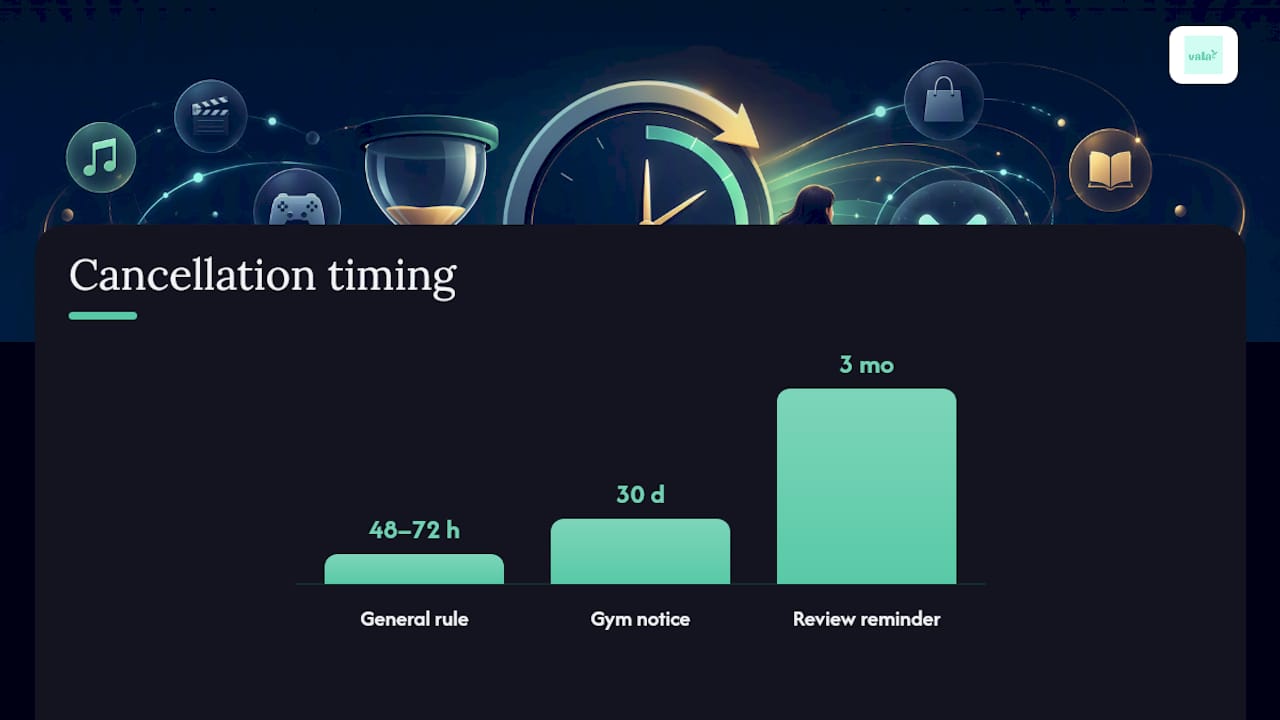
Timing trips up more people than the cancellation process itself. Cancel at least 48 to 72 hours before your renewal date as a general rule, since many billing systems queue up the charge in advance rather than processing it the moment your term technically ends.
That said, some merchants require far more lead time. Gym memberships in particular often carry 30-day notice requirements buried in the original contract you signed. Before you assume a same-week cancellation will work, check the specific terms for that service.
- Read the cancellation policy in the account settings, not just the marketing page, since notice periods live in the fine print.
- Send a short, direct written request if there’s no self-service cancel button: state your account email, the service name, and the exact date you want the cancellation effective.
- Ask for a refund only when you were charged after requesting cancellation in writing, and reference that date directly in your message.
- Escalate to your card issuer’s dispute process if the merchant refuses a reasonable refund request.
- Set a recurring calendar reminder every three months to review your subscription list before renewal dates sneak up again.
Running the numbers on what you’re actually paying across every service makes the stakes concrete. Vala’s subscription cost calculator totals it up in a few minutes, which tends to be more motivating than any warning ever could.
How Subscription Tracking Apps Find Your Recurring Charges
Subscription trackers work by scanning your linked transaction history and flagging repeat charges from the same merchant at a consistent interval, whether that’s monthly, quarterly, or annually. That pattern recognition is what catches the $4.99 charge you’d otherwise scroll right past.
Before connecting any app to your accounts, check a few things:
- Confirm the app uses read-only access, not the ability to move money.
- Look for clear encryption standards and a privacy policy that spells out what data gets shared and with whom.
- Weigh the app’s own cost, if any, against what you’ll actually save in year one.
Vala’s subscription tracker applies this same pattern-detection approach, then layers ongoing monitoring on top so a new charge gets flagged the month it appears rather than six months later. If your subscription list is short, a manual quarterly review works fine. Once you’re juggling more than a handful of recurring charges across multiple cards, automated tracking starts paying for itself fast.
Your One-Page Subscription Cancellation Checklist
Work through this in one sitting using the Monthly Personal Budget Builder to help organize your subscription management efficiently:
- Identify every active subscription using your six to twelve month statement sweep, app-store panels, and PayPal history.
- Cancel directly with each merchant, saving a confirmation number for every one.
- Verify the cancellation shows up correctly on your next statement.
- Revoke bank or card authorization for any merchant that won’t process your cancellation.
- Document everything: dates, amounts, confirmation numbers, and screenshots.
- Set reminders every three months to repeat the sweep.
Copy-ready line for a merchant email: “Please cancel my subscription under account [email], effective immediately, and confirm in writing with a cancellation reference number.”
Why Hidden Subscriptions Keep Coming Back
Most people don’t lose money to one dramatic subscription mistake. They lose it to a slow accumulation of small ones: a free trial that quietly converted, a plan upgrade nobody asked for, a service that raised its price by two dollars a month for three years running without anyone noticing.
Vala’s own users consistently show the same pattern once they run their first audit: forgotten trials, duplicate streaming services, and gym memberships tied to cards they stopped using. Subscription housekeeping isn’t a one-time fix. It works best as a habit, reviewed on the same schedule every few months, the same way you’d check your bank balance.
— SaverStride
How Vala Helps You Cancel and Track Subscriptions
Once you’ve run through the manual steps above, keeping subscriptions in check gets a lot easier with a tool built specifically for it. Vala’s personal finance app is the direct alternative to spreadsheet tracking for finding and canceling unused subscriptions: it scans your linked accounts for recurring charges automatically, so you’re not relying on memory or a once-a-year statement dig.

Getting started takes a few minutes. Connect your bank and card accounts, let Vala flag every recurring charge it finds, and review the list it builds for you. The free tier covers basic subscription detection and budget tracking, while premium unlocks deeper spending insights, shared expense splitting, and savings goal tools if you’re managing money with a partner or roommates. Vala uses encrypted, read-only bank connections, meaning it can see your transactions but never move your money.
If you want a clearer picture of exactly what your current subscriptions are costing you before you start canceling, Vala’s personal finance tools include a calculator built for that. Try Vala free and see what it finds in your own accounts.
Sources
- How do I stop automatic payments from my bank account? | CFPB
- How to manage subscriptions on iOS, macOS, Android and the web | The Verge
- How to Find and Cancel Unwanted Online Subscriptions | Consumer Reports
- How To Cancel Recurring Payments in 4 Ways | PayPal US
- Will cancelling a credit card stop recurring payments? | LegalClarity