Real-time budgeting means your budget updates as your bank transactions happen, not days later, so you always know the exact amount you can safely spend right now. The main payoff is a live “safe-to-spend” number instead of a raw account balance that hides upcoming bills. Not every app that claims “real-time” actually delivers it. Some just sync your balance faster while still treating every dollar in your account as spendable.
TL;DR:
- A truly real-time budgeting app updates your available balance instantly by automatically reserving funds for upcoming bills and obligations before showing what is safe to spend.
- Handling pending transactions accurately is critical, as delays in showing these charges can cause overspending; the best apps update these within a few hours.
- Features like automatic bill reservation, forward-looking cash flow forecasts, and shared expense support improve financial clarity and prevent budget failures caused by confusion.
- Sync frequency depends on your bank’s data update schedule, not just the app’s design, so some discrepancies in real-time tracking can occur.
- Effective tools should explicitly state their handling of pending transactions and refresh cadence, avoiding vague marketing claims of “real-time” without supporting infrastructure.
Table of Contents
- What Is Real-Time Budgeting, and Why Does It Matter?
- Core Features to Expect From a Genuine Real-Time Budgeting Tool
- How Real-Time Budgeting Actually Works Behind the Scenes
- Who Benefits Most From Budgeting in Real Time
- How to Choose a Real-Time Budgeting Tool
- Getting Started: Your First 30 Days With Real-Time Budgeting
- How Vala Builds Real-Time and Intelligent Budgets
- What Real-Time Budgeting Can’t Fix on Its Own
- Try Real-Time Budgeting With Vala
- Sources
What Is Real-Time Budgeting, and Why Does It Matter?
Most people overspend not because they’re careless, but because they’re staring at the wrong number. Your bank app shows $1,400 in checking. That looks like $1,400 you can spend. In reality, $600 of it is already committed to rent due in four days, $80 to a streaming bundle you forgot about, and $150 to a credit card payment that posts Thursday. You don’t have $1,400 to spend. You have $570.
This is the single-balance trap, and it’s the core problem real-time budgeting is built to solve. A genuine real-time system doesn’t just show your balance faster. It reserves money for bills and obligations before telling you what’s actually safe to spend.
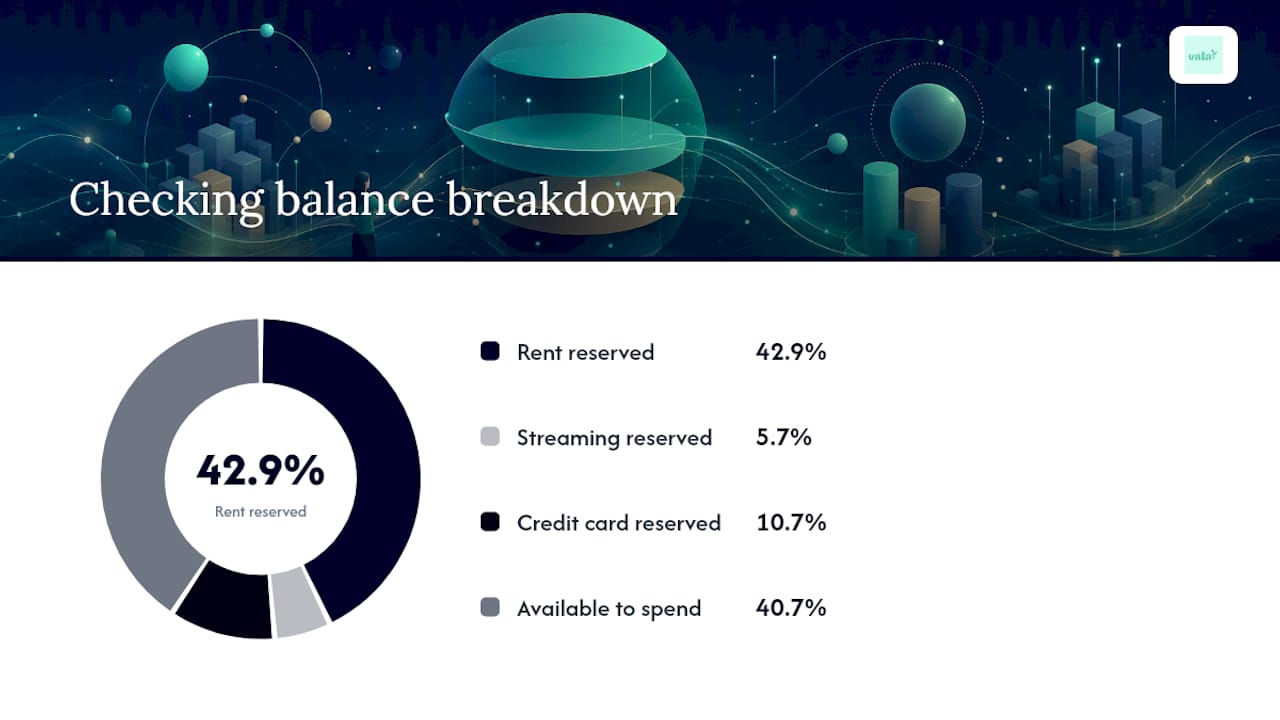
The behavioral case for this is straightforward, as shown in building a financial dashboard in Power BI that finance teams trust. When people can see a true “available to spend” figure instead of a raw balance, they naturally overspend less, because the temptation to treat reserved money as free money disappears. Confusion between balance and availability is one of the most common reasons budgets fail. Not lack of discipline. Lack of clarity.
Bills timing makes this worse than most people realize. A subscription that renews on the 3rd, a car payment due the 15th, and a quarterly insurance premium due the 28th all pull from the same pool of money, but your bank statement doesn’t organize them for you. Without a system that reserves those funds ahead of time, you’re mentally tracking five or six due dates while your balance quietly misleads you.
Here’s what changes when a budget updates continuously instead of retroactively:
- You see the impact of a purchase within minutes, not at the end of the week when it’s too late to adjust.
- Reserved bill money gets subtracted automatically, so your “safe-to-spend” number never includes cash you already owe someone else.
- Pending charges show up before they clear, closing the gap where people spend twice against the same money.
- Irregular expenses (annual renewals, quarterly payments) get flagged early instead of surprising you the week they hit.
None of this requires more willpower. It requires better information delivered at the moment you need it, which is exactly the gap that dynamic budgeting methods are designed to close.
Core Features to Expect From a Genuine Real-Time Budgeting Tool
“Real-time” gets used loosely in app marketing. Some tools apply the label to features that are closer to next-day reporting than live tracking. Knowing what to actually look for keeps you from picking a tool based on branding instead of function.
A real-time expense tracking system worth paying for should include:
- Automatic bank sync with a defined refresh cadence. Not “syncs periodically.” A specific interval, whether that’s near-instant or every few hours.
- Pending transaction visibility. The app should show charges that haven’t posted yet, not just cleared ones, because pending charges are where safe-to-spend numbers usually break down.
- Bills reservation or envelope-style buckets. Money for rent, subscriptions, and debt payments gets set aside automatically before it shows up as available.
- Forward-looking cash flow forecasts. A useful tool tells you what your balance will look like after your next three bills hit, not just what it looks like today.
- Shared or group budget support: if you split costs with a partner, roommate, or family member.
- Spending controls, including alerts when you’re close to a limit and the ability to lock or reserve funds for a specific goal.
The pending-transaction piece deserves extra attention because it’s where a lot of “real-time” claims quietly fall apart. A charge that shows as pending on your bank’s own app but doesn’t show up in your budgeting tool for a day or two isn’t giving you real-time information. It’s giving you yesterday’s information with a live-looking interface. Real-time expense management depends on catching that gap, not just displaying a fast-updating balance.
Product roundups that test and rank budgeting apps tend to evaluate exactly these traits: sync reliability, forecasting accuracy, and how well a tool handles joint accounts. That’s a useful shortlist to run any tool through before you commit to it.
Pro Tip: Test pending-transaction handling before you trust an app with your full budget. Make a small purchase, then check how long it takes to appear as “pending” versus how long until it affects your safe-to-spend number. A gap of more than a few hours is a sign the sync isn’t as live as advertised.
How Real-Time Budgeting Actually Works Behind the Scenes
Understanding the mechanics helps you set realistic expectations, because “real-time” in personal finance software is a spectrum, not a switch you flip on.
- Bank connectivity runs through an aggregator. Most apps don’t talk to your bank directly. They connect through a data aggregation layer, similar to the Plaid-style aggregation that many modern finance apps use to pull transaction data from thousands of institutions. Manual entry still exists in some tools, but it defeats the purpose of “real-time” if you have to type in every purchase yourself.
- Pending and posted transactions are handled differently. A pending transaction is a charge your bank has authorized but hasn’t finalized. A posted transaction has cleared and is final. Good budgeting software factors in both, because waiting for a charge to post before it counts against your budget means you could overspend in the gap.
- Refresh cadence varies by bank, not just by app. Some financial institutions push data to aggregators multiple times a day. Others batch updates once every 24 hours. This means two people using the same app can get noticeably different “real-time” experiences depending on which bank they use, since refresh cadence still depends on bank data availability on the institution’s end, not just the app’s design.
- Your “available to spend” figure is calculated, not observed. The app takes your raw balance, subtracts reserved bill money, subtracts pending charges, and factors in scheduled transfers. That math is what makes the number trustworthy, and it’s also where cheaper tools cut corners.
- Security checks matter before you connect anything. Confirm the app uses bank-level encryption, doesn’t store your actual bank login credentials in plain text, and has a clear data-sharing policy. If you can’t find this information in under two minutes on their website, that’s worth noting.
Some well-known finance tools, like Mint’s tracking and insights model, were built around monthly categorization and after-the-fact review rather than a live safe-to-spend calculation. That’s not a knock on those tools. It just means they solve a different problem than real-time budgeting does.
Who Benefits Most From Budgeting in Real Time
Real-time budgeting helps everyone to some degree, but the benefit scales sharply for certain financial situations where a delayed or static budget actively causes problems.
- Gig workers and variable-income earners benefit most from real-time forecasting, since income arrives unevenly and a live cash flow view prevents committing to spending before a payment actually clears.
- Couples managing shared expenses need shared budget visibility above almost everything else. Without it, one partner can unknowingly spend money the other has already mentally allocated to rent or a joint goal.
- Students on tight, fixed budgets get the most value from bill reservation and low-balance alerts, since a single missed subscription cancellation can wipe out a week’s worth of spending room.
- People juggling five or more recurring subscriptions benefit most from automatic recurring-payment detection, because manually tracking that many renewal dates is where most budgets quietly break down.
Consider two people with the same monthly income. One checks their bank balance before buying groceries and sees an amount that seems available, so they feel fine spending a small extra amount. The other checks a real-time budget that already subtracted rent, a car payment, and three subscriptions, and sees a lower available amount. Same income, same bank, completely different decision, because one number was actually accurate and the other wasn’t. If you split costs with roommates or a partner, a tool built for tracking group spending closes that same gap for shared accounts.
How to Choose a Real-Time Budgeting Tool
Picking the right tool comes down to asking the right questions before you connect your bank account, not after you’ve already committed a month of transaction history to it.
Selection criteria that actually matter
- Data refresh reliability. Does the app specify how often it pulls new transactions, or does it just say “automatically”?
- Pending-transaction accuracy. Are pending charges reflected in your safe-to-spend number, or only after they post?
- Bills reservation logic. Can you set up recurring bills to be automatically set aside before they’re due?
- Privacy and security practices. Is bank-level encryption clearly stated, and is there a readable privacy policy?
- Shared budgeting support. If you split expenses, does the app handle joint visibility without forcing a single shared login?
- Support quality. Is there a real support channel, or just a help center with generic articles?
Questions to ask before you commit
Ask directly: “How often does your data refresh?” and “How do you treat pending transactions?” A tool that can’t answer both clearly in its FAQ or support documentation probably hasn’t built real infrastructure around either one.
Red flags worth walking away from
- Marketing language that says “real-time” but the app’s own help documentation never mentions pending transactions at all.
- Manual-only transaction entry marketed as a modern budgeting solution.
- Fee structures that aren’t listed clearly on the pricing page, or that require you to enter payment information before you see any pricing.
- Vague or missing answers about data encryption and how your bank credentials are stored.
The “real-time” label itself has become common enough in app store listings that it’s lost some of its meaning. That’s exactly why running a tool through these specific questions matters more than trusting the name of the app.
Pricing usually breaks down one of two ways. Freemium models let you track basic spending and see a simple balance for free, then charge for automatic bank sync, forecasting, or shared budgets. Straight subscription models charge from the start but typically include the full feature set immediately. Free tiers of many popular tools limit automatic syncing or forecasting, which is worth checking before you assume a free plan covers what you actually need. If you want a broader sense of how pricing tends to shake out across the market, a full budgeting app comparison is a useful next read.
Roundups that rank budgeting apps consistently use sync reliability and forecasting accuracy as their core evaluation metrics rather than relying on marketing descriptions, which tells you those are the two traits worth testing yourself before you pay for anything.
Getting Started: Your First 30 Days With Real-Time Budgeting
The first month is where most people either build a habit that sticks or abandon the app within two weeks. A little structure early on makes the difference.
- Connect your accounts and set up buckets. Link your checking account, then create envelopes or buckets for rent, utilities, groceries, and any recurring subscriptions you can identify from the last statement.
- Reserve every recurring bill you can find. Go through your last 30 days of transactions and flag anything that repeats. Set each one to be automatically reserved ahead of its due date.
- Watch pending transactions closely during week one. Make a few normal purchases and track how quickly they show up as pending, then how long until they post and update your safe-to-spend figure.
- Set alerts for low balances and unusual charges. This catches both overspending and any bank connectivity hiccup before it becomes a bigger problem.
- Run a weekly review starting week two. Fifteen minutes, same day each week, checking what you spent against what you planned, and adjusting buckets that were too tight or too loose.
- Add a savings or goal nudge by week three. Once your bills are reserved and your spending categories feel accurate, direct any leftover safe-to-spend cushion toward a specific goal instead of letting it sit unassigned.
- Troubleshoot sync issues as they appear. Duplicate transactions usually mean a pending charge posted and both versions briefly showed up. Missing pending items usually mean your bank batches updates less frequently than the app refreshes, which is a bank limitation, not an app failure.
Pro Tip: Don’t try to perfect every budget category in week one. Get your bills reserved and your pending transactions tracking accurately first. Fine-tune your spending categories in week two once you trust the numbers you’re looking at.
Free calculators for budgeting, savings, and debt planning can help you rough out your bucket amounts before you even connect a bank account, which makes that first setup session faster.
How Vala Builds Real-Time and Intelligent Budgets
Vala was built around the exact gap this article has been describing: the difference between a fast-updating balance and a genuinely accurate safe-to-spend number. That distinction shapes how the app handles every piece of the criteria covered above.
Here’s how Vala’s approach maps to those selection criteria:
- Bank sync and refresh: Vala connects securely to your accounts and keeps spending data current, so your budget reflects what’s actually happening in your accounts rather than a snapshot from days ago.
- Pending transaction handling: Charges factor into your available balance as they move through your accounts, closing the lag that makes some “real-time” tools misleading in practice.
- Bills reservation: Recurring bills and subscriptions get identified and set aside automatically, which is the mechanism behind an accurate safe-to-spend figure rather than a raw balance display.
- AI-driven insights: Vala’s intelligent budgeting engine surfaces spending patterns and hidden financial leaks, like forgotten subscriptions or creeping category overspend, without requiring you to dig through months of transaction history manually.
- Shared expense tracking: Couples and groups can split and monitor shared costs without one person losing visibility into what the other has already spent.
- Privacy and security: Bank connections run through secure, encrypted infrastructure, addressing the privacy criteria that any real-time tool should meet before you connect a live account.
Every one of these features exists because the alternative, guessing at what’s “probably” safe to spend, is precisely the problem real-time budgeting was designed to fix.
What Real-Time Budgeting Can’t Fix on Its Own
Real-time budgeting removes uncertainty, but it doesn’t remove your actual financial constraints. If your expenses genuinely exceed your income, a live safe-to-spend number will tell you that clearly and immediately, which is valuable, but it’s not the same as solving the underlying gap. That still takes a change in income, spending, or both.
Technical limits are worth expecting, not treating as app failures. Banks process transactions on their own schedules, and delays of a few hours to a full day are normal, not a sign of broken software. Merchants sometimes batch charges together, which can make a single purchase show up as several smaller pending amounts before settling into one. Credit card holds, especially for hotels, gas stations, and rentals, often show a higher pending amount than what eventually posts, which can make your safe-to-spend number look tighter than it will end up being.
None of this makes real-time tracking less useful. It just means “real-time” describes the flow of information, not a guarantee that every number will be instantly perfect. The behavioral habits, checking your budget before big purchases, reviewing weekly, adjusting buckets when life changes, still do most of the actual work. The tool just makes those habits easier to sustain.
— SaverStride
Try Real-Time Budgeting With Vala
Vala gives you what a raw bank balance can’t: a live, accurate picture of what you can actually spend after bills, subscriptions, and shared expenses are already accounted for. Where other tools update your balance but leave you to do the mental math on what’s really available, Vala reserves that money automatically and shows you the number that matters.

The free tier lets you connect your accounts and start tracking spending right away, so you can see how your everyday purchases compare to a real safe-to-spend figure instead of a raw balance. Upgrading unlocks the deeper layer: AI-driven spending insights that catch subscription creep and hidden leaks, shared budgeting for couples and groups, and savings goal tracking that adjusts as your income and bills shift. If you’re ready to stop guessing and start seeing your actual available balance in real time, start with Vala’s personal finance app and connect your first account today.
Sources
- What a Real Time Budgeting App Should Do
- Best Budgeting Apps Of 2026: Tested And Ranked
- Best Free Budgeting Tools of 2026