
An expense report is a structured record that proves who spent money, what was bought, when it happened, and why. Whether you’re a freelancer tracking home-office costs, a couple splitting household bills, or a group of friends settling a weekend trip, this document is your single-source record for reimbursement, budgeting, tax substantiation, and shared-cost fairness. CFP Betsy Hutchins frames expense tracking as the keystone habit for financial control — you can’t manage what you haven’t measured. The most common reasons you’d reach for an expense report:
- Reimbursement — getting paid back for money you spent on someone else’s behalf
- Tax write-offs — substantiating deductible costs for the IRS
- Budgeting — seeing exactly where money went so you can plan better
- Shared-cost settlement — splitting group expenses fairly and without disputes
Table of Contents
- What roles do expense reports actually play?
- Why expense reports matter for individuals, couples, and small groups
- What belongs in an expense report — and the IRS basics you need to know
- Best practices for creating useful expense reports
- Manual expense reports vs. real-time automated tracking
- How Valapoint’s Vala app replaces manual expense reports
- Key Takeaways
- Tracking is the financial habit most people skip — and it shows
- Vala makes expense tracking something you’ll actually stick with
- Sources and further reading
What roles do expense reports actually play?
Expense reports do more than document spending. They perform six distinct functions, each with a real payoff for you.
1. Reimbursement. You pay out of pocket for a shared dinner or a work-related purchase. A clear record with a receipt gets you paid back accurately and fast.
2. Budgeting and category visibility. When you log every purchase by category, patterns surface quickly. A couple tracking groceries, dining, and subscriptions separately will spot budget drift in days, not months. Instant expense logging makes this even faster.
3. Tax substantiation and audit trail. The IRS requires that deductible business expenses be both ordinary and necessary, and backed by documentation. An expense report batches those records together so you’re audit-ready without scrambling.
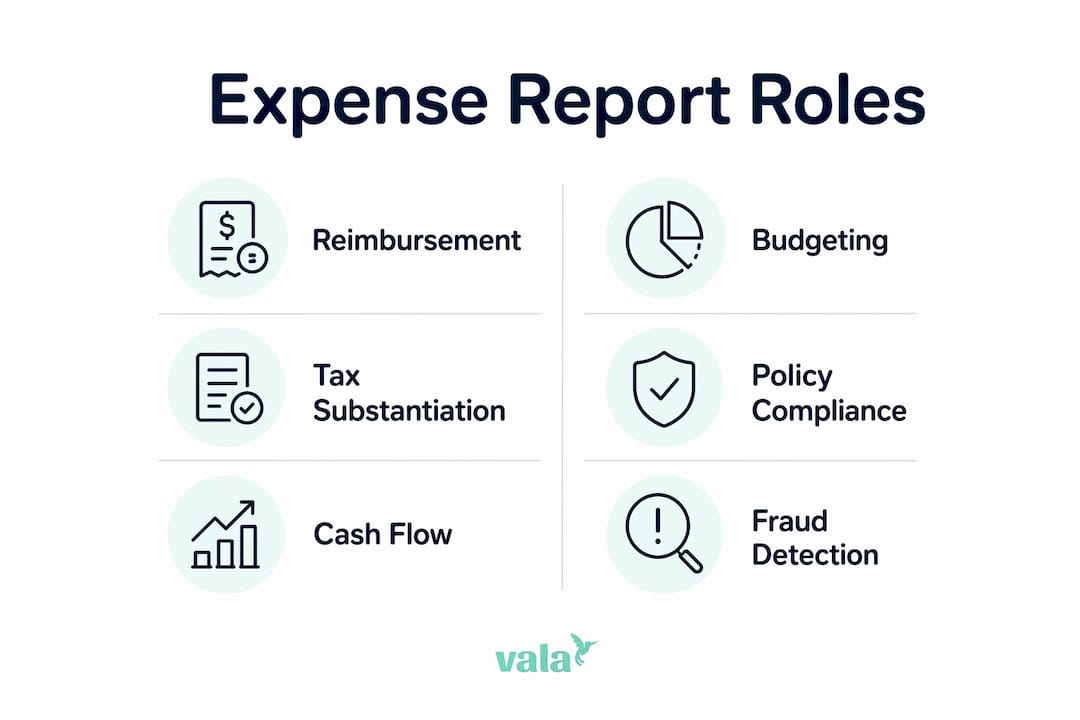
4. Policy compliance and approvals. For small groups or shared households, agreed-upon spending rules (say, a $50 cap on discretionary purchases) only work when there’s a record to check against.
5. Cash-flow and planning signals. Aggregated expense data reveals whether your monthly outflow is trending up before it becomes a problem. This is how expense reports serve budgeting and strategic planning simultaneously.
6. Fraud detection and dispute resolution. The ACFE reports that expense reimbursement fraud carries substantial median losses and long detection times in retrospective workflows. For groups, a shared log with receipts prevents “I paid more than you” disputes before they start.
Why expense reports matter for individuals, couples, and small groups
The business world invented expense reports, but the problems they solve are universal.
Side gig or home-office deductions. If you freelance or run a small business from home, the IRS expects documented proof for every deduction you claim. A well-kept expense report prevents disallowed deductions and the penalties that follow.
Split trips and roommate settlements. A weekend trip among four friends generates a tangle of Venmo requests and forgotten costs. A shared expense log with receipts attached resolves every “who paid for what” question cleanly. Digital expense splitting tools make this nearly automatic.
Couple household budgeting. Tracking shared subscriptions, groceries, and large purchases in one place gives both partners a clear view of monthly cash flow — and prevents the budget surprises that come from siloed spending.

Small-group event planning. Whether it’s a birthday dinner or a group vacation, a running expense report keeps contributions transparent and reimbursements fair.
A quick rule of thumb: use a formal expense report when you need IRS-defensible records or a reimbursement paper trail. A simple shared log or receipt photo works fine for casual group splits where no tax claim is involved.
- Formal report: freelance deductions, employer reimbursements, any tax-related claim
- Simple log: roommate splits, casual group dinners, one-time shared purchases
What belongs in an expense report — and the IRS basics you need to know
A complete expense record includes eight fields: date, merchant name, amount, payment method, category, business purpose or reason, payer’s name, and an attached receipt or proof of purchase.
The IRS is specific: business deductions require documentation showing the expense was ordinary (common in your trade) and necessary (helpful and appropriate). Missing receipts can get deductions disallowed during an audit, triggering penalties on top of the lost write-off.
Practical storage rule: Keep receipts for at least three years from the date you file the return — the standard IRS audit window. A photo with embedded metadata (date, location) is as valid as paper and far easier to store.
Match every receipt to the corresponding bank or card transaction as soon as possible. Waiting until tax season turns a 10-minute monthly task into a multi-hour reconstruction project.
Pro Tip: Use your phone’s camera immediately after a purchase. A timestamped photo paired with a one-line note (“client lunch, project X”) is all the IRS substantiation most deductions need.
Best practices for creating useful expense reports
A good expense report is built in real time, not reconstructed at month-end. Follow this checklist:
- Capture the receipt immediately — photo or digital copy within minutes of the purchase.
- Add a short contextual note — one sentence explaining the purpose (“team dinner, Q2 planning”).
- Categorize consistently — use the same category labels every time (Travel, Meals, Supplies) so comparisons across months are meaningful.
- Attach payment evidence — link the receipt to the card transaction or bank entry.
- Sync or submit before month-end — don’t let records pile up.
- Reconcile regularly — a 15-minute weekly review catches errors before they compound.
Betsy Hutchins recommends a 30-day zero-judgment tracking audit to build your baseline. Track everything for one month without changing behavior. The categories that surprise you most are exactly where your budget needs attention.
Pro Tip: Batch similar items — all travel receipts together, all meal receipts together — and set a weekly calendar reminder to sync them. Consistency beats perfection every time.
Manual expense reports vs. real-time automated tracking
The difference between manual and automated expense management isn’t just convenience. It’s a fundamentally different control model.
| Metric | Manual reports |
|---|---|
| Average processing cost | $58 per report (GBTA Foundation) |
| Average processing time | Around twenty minutes to process each manual report |
| Error rate | ~20% of reports contain errors requiring rework |
| Control model | Retrospective — problems caught after spending |
Manual reports are a retrospective control. You spend, then document, then submit, then wait. Every step is a chance for a receipt to go missing, a category to be wrong, or a duplicate to slip through.
Real-time automated tools flip that model. Pre-approved categories and spending limits set at the point of purchase prevent many issues before they require a report at all. Automated platforms also handle OCR receipt matching, transaction import, and category assignment — turning what used to be a monthly chore into a continuous background process. The automation ROI for individuals and small groups mirrors what finance teams have seen for years: less admin, fewer errors, faster decisions.
What real-time tools change for you specifically:
- Receipts captured automatically via OCR at the moment of purchase
- Shared expenses split and logged instantly among group members
- Spending limits and category rules set in advance, not enforced after the fact
- Monthly reconciliation reduced to reviewing exceptions rather than rebuilding records
How Valapoint’s Vala app replaces manual expense reports
Valapoint’s Vala app maps directly to the six roles covered earlier — without the spreadsheet.
- Instant receipt capture → IRS-ready tax substantiation, stored and searchable
- Shared wallets and split transactions → fair group settlements with no back-and-forth
- Category tracking and budget goals → real-time visibility into where money is going
- AI-driven insights → automatic detection of money leaks and recurring charges you forgot about
Scenario 1 — Weekend trip with friends. Four people, one Airbnb, multiple meals. With Vala, one person logs each shared expense, assigns it to the group, and the app calculates each person’s share instantly. No spreadsheet, no disputed math.
Scenario 2 — Couple tracking household subscriptions. Two partners connect their accounts. Vala surfaces every recurring charge, flags duplicates, and shows the combined monthly total in one dashboard. The budget tracking features make it easy to set category limits and get alerted before you overspend.
Pro Tip: Run Vala’s 30-day spending audit right after you install it. Connect your bank account, let the app categorize your transactions, and review the results at the end of the month. Most users find at least one spending category they didn’t expect.
Key Takeaways
Expense reports are your most reliable tool for reimbursement, tax substantiation, and shared-cost clarity — and real-time apps make the process nearly effortless.
| Point | Details |
|---|---|
| What an expense report proves | It documents who spent money, what was bought, when, and why — creating a defensible record for the IRS or any reimbursement request. |
| Core fields to capture | Date, merchant, amount, payment method, category, purpose, payer name, and an attached receipt. |
| Manual reporting overhead | The GBTA Foundation puts the average manual report at $58 to process and 20 minutes to complete, with a ~20% error rate. |
| Automation advantage | Real-time tools shift control to the point of purchase, eliminating most rework and reducing reconciliation to exception-handling. |
| Start with Valapoint | Install Vala, connect an account, and run a 30-day audit to surface spending patterns and replace manual reports with continuous tracking. |
Tracking is the financial habit most people skip — and it shows
Most people know they should budget. Far fewer actually track. That gap is where financial plans fall apart.
Behavioral research shows that recording purchases changes future spending behavior — the act of logging a transaction makes you more deliberate about the next one. The observer effect is real in personal finance: people who track consistently reduce discretionary spending measurably over time.
What finance teams have known for decades, individuals and couples are only starting to adopt: systematic expense records aren’t just for accountants. They’re the foundation of any real financial plan. Apps like Vala bring that discipline to your phone without the complexity of enterprise software. The 30-day audit Betsy Hutchins recommends isn’t about restriction. It’s about clarity. You can’t fix what you can’t see.
Vala makes expense tracking something you’ll actually stick with
Vala gives you the clearest picture of your spending without the admin overhead of manual reports. Connect your bank account, and Vala automatically categorizes transactions, captures receipts, splits shared costs, and surfaces the spending patterns that drain your budget quietly.

Getting started takes three steps:
- Install Vala and create your free account at valapoint.com
- Connect a bank account or card to let Vala import and categorize your transactions automatically
- Run your 30-day audit using Vala’s personal finance app to see exactly where your money goes — and where it shouldn’t
No spreadsheets. No lost receipts. Just a clear, real-time record of your finances.
Sources and further reading
- IRS substantiation guidance via Zimyo — explains the “ordinary and necessary” standard and why documented proof is required for business deductions.
- GBTA Foundation processing cost data via Corpay — source for the $58 average cost and 20-minute processing time per manual report, plus error rate and fraud risk data.
- Betsy Hutchins CFP tracking insight via SnackIQ — frames tracking as the keystone financial habit and supports the 30-day audit recommendation.
- Behavioral tracking research via Freenance — scientific basis for the observer effect in personal spending and the behavior-change case for consistent logging.
- Expense report roles overview via Emburse — covers the overlapping functions of expense reports across budgeting, compliance, and planning.