
Use the IRS Where’s My Refund? tool or the IRS2Go app for your federal refund, and your state’s own revenue portal for a state refund. The tool refreshes once every 24 hours, and most e-filed federal refunds are issued within 21 days. Paper returns take six weeks or more, and refunds that claim the EITC or ACTC are held by law until mid-February.
TL;DR:
- The tracker needs your Social Security number or ITIN, filing status, and exact refund amount; access starts after 24 hours online or four weeks after mailing.
- Check state refunds through the official revenue portal, and confirm the requested amount before retrying; four failed entries can lock you out.
- Amended returns require a separate tracker, may take up to 16 weeks to process, and can take three weeks to appear.
- The tracker refreshes every 24 hours, so check daily and respond promptly to official notices; call only when instructed or after the published wait passes.
Table of Contents
- How do you check a federal refund with Where’s My Refund?, IRS2Go, or your online account?
- How do you check a state tax refund?
- Why is a refund delayed or held?
- What if you filed an amended return or dealt with identity theft?
- What should you do if the tracker shows no change?
- How can you speed up your refund and avoid holds?
- How do direct deposit and mailed check refunds differ for tracking?
- How do joint returns affect tracking and refunds?
- What documents does the IRS ask for if it needs more information?
- Why does tracking your refund matter for your budget?
- What can you do with your refund once it arrives?
- FAQ
- Sources
How do you check a federal refund with Where’s My Refund?, IRS2Go, or your online account?
The fastest way to check a federal refund is the IRS Where’s My Refund? tool on irs.gov or the free IRS2Go mobile app. Both pull from the same system, so you will see the same status either way. If you have an IRS Individual Online Account, you can also see refund details there and update your direct deposit information when the IRS asks for it.
Before you open the tracker, gather three things:
- Your Social Security number or ITIN, the same one printed on your return.
- Your filing status, such as single, married filing jointly, or head of household.
- The exact whole-dollar refund amount shown on your return. The IRS uses it to confirm that you are the filer, so a guess or a rounded number will not work.
That last item trips people up most often. If you filed an amended return or the IRS adjusted your amount, use the figure from the return version you are checking, as the Where’s My Amended Return? page explains.
When the tracker starts showing your return
You cannot check right away. Status becomes available at these points:
- 24 hours after you e-file a current-year return.
- 3 to 4 days after you e-file a prior-year return.
- 4 weeks after you mail a paper return.
If you check earlier, you will most likely see a “we cannot find your return” message. That does not mean something went wrong. It means the system has not caught up yet.
What the three stages mean
The tracker shows three stages, and each one tells you something specific:
- Return received: the IRS has your return and is working through it. This is where most people wait the longest.
- Refund approved: the IRS has finished processing and confirmed your refund amount. You may see a personalized deposit date at this point.
- Refund sent: the money is on its way to your bank, or a paper check has been mailed. Direct deposit can take a few more days to appear in your account.
Over 80% of refunds were issued in less than 21 days during the 2026 filing season, according to the IRS refund page, which means a wait inside that window is normal, not a warning sign.
How often the tool updates
The tool updates only once every 24 hours, usually overnight. Checking repeatedly will not move your refund along or show anything new. Pick one time each day, ideally in the morning, and leave it there.
The service also has scheduled maintenance windows, typically overnight, when it may be unavailable. The IRS lists them on its availability page. If you get a “no status” result late at night or very early on a Monday, try again later in the day before you assume there is a problem.
Pro Tip: Write down your refund amount, filing status, and the date you filed the moment you submit your return. Having those three details ready makes the tracker a 30-second task.
How do you check a state tax refund?
Your federal tracker will not show a state refund. Each state’s department of revenue runs its own system, and, as USAGov explains, you need to use your state’s official portal, which usually ends in .gov. If you search for “state refund status” and land on a site that does not end in .gov, close it and start over from your state revenue department’s main page.
State portals differ in the small details, but most ask for a similar set of information:
- Your Social Security number.
- The tax year of the return.
- The refund amount you requested.
- Sometimes your filing status or ZIP code.
New York is a useful example of how strict these systems can be. The state’s online refund tool asks for the requested refund amount and locks you out after too many failed attempts. Phone representatives may not be able to read you the requested amount even after they verify your identity, so the number on your own copy of the return is the one that matters. Georgia runs a similar portal on its own revenue department site, and the pattern holds across most states: your return, your numbers, your state’s website.
When to call and when to stay online
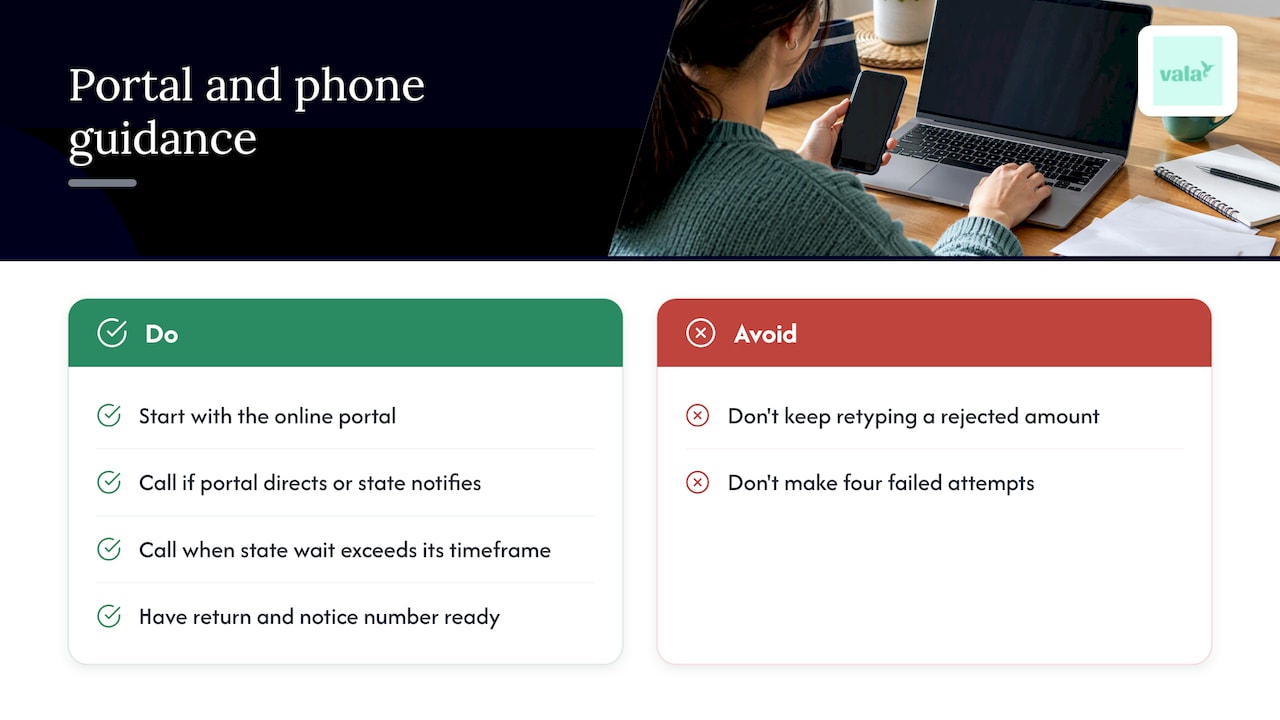
The online portal is the right first move for nearly everyone. It is available around the clock and shows the same information a representative would see in most cases. A phone call makes sense when the portal tells you to call, when you receive a notice from the state, or when the wait goes well past the timeframe your state publishes.
Keep in mind that state call centers have real limits. Wait times can be long during filing season, and representatives often cannot speed up processing. Their job is mostly to explain what the system shows. Have your return in front of you before you dial, along with any notice number you received.
Processing speed also varies by state. They can be longer when a return is flagged for review. Check your state revenue department’s own timeline rather than assuming it matches the federal one.
Pro Tip: Do not keep retyping the refund amount if the portal rejects it. After four failed attempts, you can be locked out, so stop and check your return first.
Why is a refund delayed or held?
A tracker that sits on “Return received” for a while is frustrating, but it is not always a sign of trouble. Most delays trace back to a handful of causes.
Mandatory holds for EITC and ACTC
If you claimed the Earned Income Tax Credit or the Additional Child Tax Credit, federal law requires the IRS to hold your refund. These holds exist to prevent fraud. The IRS guidance on these credits says refunds are generally not issued before early March, even for early filers who choose direct deposit. Filing in January will not get you around the hold, though filing early and accurately still puts you first in line once it lifts.
Automated filters and review
Refund trackers often show delays because automated processing filters suspend returns for a closer look. As the IRS notes in its filing season update, millions of returns are frozen this way each year, and a lack of status updates does not always mean a serious problem. The Taxpayer Advocate Service reports that common triggers include missing documentation, math errors, and identity verification needs.
Millions of returns are suspended by processing filters every year, per the National Taxpayer Advocate’s 2026 mid-year report, and most of these are resolved once the taxpayer answers an official IRS notice.
Other common causes
These are the situations we see come up most:
- Offsets: the IRS can reduce or take your refund to cover certain federal or state debts. You will get a notice explaining what was applied.
- Unfiled prior returns: a missing return from an earlier year can hold up the current one.
- Name or address mismatches: a typo or a recent name change can stall processing.
- Identity verification: the IRS may ask you to confirm who you are before it releases money.
- Math errors and missing forms: simple mistakes can send a return into manual review.
The Taxpayer Advocate Service’s page on held refunds notes that the IRS issues most refunds in fewer than 21 calendar days, but that refunds can be held or partly held for reasons like these, and that taxpayers may receive letters explaining the problem and the next step.
The key habit is simple. If the IRS sends a notice, read it and respond. The notice is the fastest path to getting your refund moving again.
What if you filed an amended return or dealt with identity theft?
Amended returns do not show up in the regular refund tracker. If you filed Form 1040-X, use the separate Where’s My Amended Return? tool. The IRS amended return guidance lays out the timeline:
- Allow up to 16 weeks for processing.
- Allow up to three weeks after filing before your amended return appears in the system.
- Watch for three stages: Received, Adjusted, and Completed.
Do not file a second amended return because the first one has not appeared yet. That only adds paper to the pile and can slow things further.
Identity theft and audit holds
If someone filed a return using your information, or your return is caught up in an identity verification or audit review, the timeline can stretch well beyond the usual numbers. These cases often involve letters, identity confirmation steps, and long waits.
In those situations, the Taxpayer Advocate Service is an independent group inside the IRS that can help taxpayers who face severe delays or financial hardship. Have your notice numbers, a timeline of what you filed and when, and any documents the IRS requested ready before you reach out.
What should you do if the tracker shows no change?
Work through these steps in order before you pick up the phone:
- Recheck what you entered. Confirm your Social Security number, filing status, and exact whole-dollar refund amount. A single wrong digit returns a confusing result.
- Wait out the window. The tool only updates every 24 hours, so daily checks are plenty. If you are using a state portal, remember that repeated failed attempts can lock you out.
- Look for mail from the IRS or your state. A notice usually explains the delay and what to do. If you received a CP53E notice, which says a direct deposit could not be completed, follow its instructions and update your banking information through your IRS Online Account. After you update it, expect system changes within days.
- Call only when told to. IRS representatives generally have the same information as the online tools. The IRS recommends calling when the tool instructs you to, when you receive an official notice, or when a reasonable waiting period has passed.
- Escalate for hardship. If the delay is causing real financial strain, contact the Taxpayer Advocate Service with your documentation and notice numbers.
Pro Tip: Keep every IRS letter and note the date you received it. When you do call or write, having the notice number in hand saves a lot of back and forth.
How can you speed up your refund and avoid holds?
You cannot control every delay, but a few habits remove the most common ones:
- E-file and choose direct deposit. Electronic filing with direct deposit is the combination that gets most people paid within the 21-day window, and it avoids the risk of a lost or stolen paper check.
- Double-check your bank details. A wrong routing or account number is a leading reason a deposit fails and a CP53E notice follows. If you get that notice, resolve it through your IRS Online Account promptly.
- File a complete return. Include every schedule and form your situation needs. Missing documents are one of the filters that can suspend a return.
- Match your names and numbers. Use your name exactly as it appears on your Social Security card, and make sure every Social Security number on the return is correct.
- Keep a record of your filing. Save a copy of the return, the refund amount, and the date you filed so you can authenticate with any tracker.
Good recordkeeping carries past tax season, too. Our guide to a simple habit for tracking receipts shows a simple routine, and our walkthrough on how to export expenses to CSV for IRS-ready records helps when you need organized numbers fast. If you are just starting out, tracking expenses: a simple guide covers the basics.
Pro Tip: Check your IRS Online Account a few days after filing to confirm your bank details are on file correctly. Catching a typo early is much easier than fixing a failed deposit later.
How do direct deposit and mailed check refunds differ for tracking?
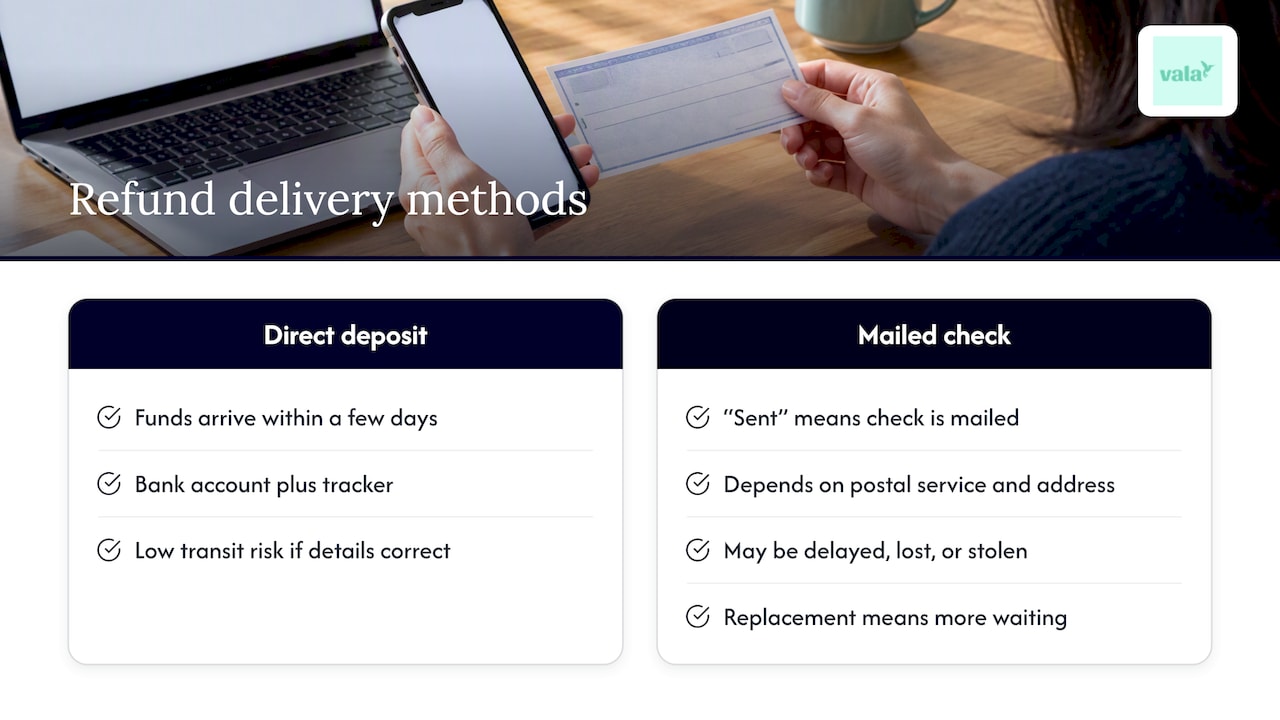
The tracker shows the same three stages either way, but what happens after “Refund sent” is different.
With direct deposit, the money usually lands in your account within a few days of the refund being sent. You can watch your bank account and the tracker together, and there is little that can go wrong in transit as long as the account details are correct.
With a mailed check, “Refund sent” means the check has been put in the mail, not that it has arrived. Delivery depends on the postal service and on whether your address is current. Checks can be delayed, lost, or stolen, and if one does not show up, you have to take extra steps to request a replacement, which adds more waiting.
That gap is the main reason we suggest direct deposit. It is faster, it is easier to confirm, and it cuts out the mailbox risk. If you filed a paper return, remember that the tracker only starts showing status four weeks after you mail it, so a mailed return paired with a mailed check is the slowest route of all.
How do joint returns affect tracking and refunds?
When you file jointly, one return covers both spouses, and the refund is issued as one payment. Either spouse can use the tracker, but the details must match the return. Use the primary filer’s Social Security number as listed, select the joint filing status, and enter the exact refund amount on the return.
A few things are worth knowing:
- The refund is a single amount, so you cannot track “your half” separately.
- If a debt owed by one spouse triggers an offset, part of a joint refund can be applied to it. Your notice will explain what happened.
- Name changes or Social Security number mismatches for either spouse can slow processing.
If you are worried about one spouse’s past debts affecting the other, check the notice you receive and the IRS guidance on your specific situation. Keeping a copy of the joint return where both of you can find it makes tracking much easier, since both of you will need to agree on the numbers.
What documents does the IRS ask for if it needs more information?
When the IRS needs more from you, it sends a letter by mail. The notice tells you exactly what to send, where to send it, and by what date. Read it closely before you gather anything, because the request is specific to your return.
Common requests include:
- Proof of identity, such as a government-issued photo ID, when the IRS needs to verify who filed.
- Income documents like W-2s or 1099s if the amounts on your return do not match its records.
- Records supporting credits you claimed, which is especially common with the EITC and ACTC.
- Corrected or missing forms and schedules.
Respond by the date on the notice and keep copies of everything you send. Include the notice number on your reply so it reaches the right team. The Taxpayer Advocate Service notes that these issues are generally resolved by answering the official notice, so a quick, complete reply is the best way to get the refund moving again.
Why does tracking your refund matter for your budget?
We think of a tax refund as part of a bigger money routine, not a one-time event. When you know roughly when it will arrive, you can plan around it: pay down a bill, rebuild a cushion, or avoid borrowing to cover a gap. When you do not know, it is easy to spend money you do not yet have.
That is why we suggest a few small habits. Keep your refund details somewhere you can find them. Confirm your direct deposit information before you file. Check the tracker once a day, not once an hour. These steps take minutes and keep you in control.
Refund tracking also fits next to everyday recordkeeping. If you already log your spending and keep your receipts, you will find the tracker takes almost no effort at all. A refund that arrives on a plan does more for you than one that shows up as a surprise.
What can you do with your refund once it arrives?
Once your refund lands, we offer one more idea that has nothing to do with refund tracking: use the money to clean up your recurring spending. Our Money Leak Check looks for forgotten subscriptions, repeat charges, and small recurring costs that quietly drain your account, so your refund can turn into lasting savings instead of disappearing into the same leaks.

We want to be clear about what this is. You should keep using the IRS and your state portal for tax refund tracking. What we do is help you see where your money goes after it arrives. You can connect your accounts securely, review what we find, and decide what to keep or cancel. You can learn how our money leak detector works, or start an analysis to see what turns up. If you want ongoing tools, our SaverPro plan is $2.99 per month.
— SaverStride
FAQ
How can you track your refund status?
For a federal refund, use the IRS Where’s My Refund? tool or the IRS2Go app with your Social Security number, filing status, and exact refund amount. For a state refund, use your state department of revenue’s official portal, since the IRS tools do not show state refunds.
How long are IRS refunds taking right now?
Most e-filed federal refunds are issued in 21 days or less, and the IRS reports that over 80% of refunds were issued in less than 21 days during the 2026 filing season. Paper returns usually take six weeks or more, and credit holds can add time.
Can you track an IRS refund before it is approved?
Yes, once your return shows up in the system. The tool begins showing status 24 hours after e-filing a current-year return and four weeks after mailing a paper return. Early on, you will see “Return received” until processing finishes.
How can you tell if your refund is being processed?
If the tracker shows “Return received,” your return is in the processing stage. A move to “Refund approved” means the IRS has confirmed your amount, and “Refund sent” means payment is on its way.
What should you do if your refund is delayed?
Check for an IRS or state notice first, and respond to it if you have one. If nothing changes after the recommended waiting period, or the tool tells you to call, contact the IRS, and consider the Taxpayer Advocate Service for hardship cases.