The easiest reliable way to track cash and card together is to pick one primary ledger, whether that’s an app or a single spreadsheet, and log cash with a fast-entry habit while your card transactions import automatically. That combination covers both weaknesses at once: cards get tracked without effort, and cash gets tracked because you’ve made it a two-second habit instead of a chore you save for Sunday. The rest of this guide walks through the methods, the setup, and the tools that make this stick.
TL;DR:
- Using an app with quick manual cash entry and automatic card import is the most effective system for frequent cash handlers, provided it encourages consistent use.
- Setting up requires about 30 minutes for initial inventory, linking accounts, creating a cash wallet, and weekly reconciliation, which can be done in just 15 minutes afterward.
- Features like one-tap entry, receipt capture, and a dedicated cash wallet significantly reduce friction, but offline modes and data export are essential for practical use and control.
- Linking bank accounts to an app involves privacy trade-offs, so limit permissions, use read-only access, and secure your device to mitigate data sharing risks.
- A simple daily habit of recording cash purchases immediately and reconciling weekly ensures the system remains reliable and sustainable over time.
Table of Contents
- Which Method Actually Works for Combining Cash and Card Tracking?
- How Do You Set Up Combined Cash and Card Tracking?
- What App Features Actually Reduce Friction?
- What Do You Give Up on Privacy When You Automate?
- How Does an App Like Vala Handle Cash and Card Together?
- A Two-Minute Ritual That Keeps This from Falling Apart
- Try the Financial DNA Test Before You Build Anything Manually
- Sources
Which Method Actually Works for Combining Cash and Card Tracking?
You have four realistic options, and the right one depends less on which app has the best reviews and more on how much cash you actually handle each week.
- App with manual cash entry. Your card and bank transactions sync automatically, and you add cash purchases yourself in seconds. This is the fastest setup for most people, though it does mean linking accounts to a third party, which comes with a privacy trade-off worth weighing.
- Hybrid app plus envelopes. You keep physical cash sorted into labeled envelopes for categories like groceries or gas, then log the envelope totals into your app weekly. This method leans on behavior, not memory. It’s harder to forget $40 is missing when the envelope is visibly lighter.
- Spreadsheet. Full control, zero data sharing, and no monthly fee. The cost is time. You’re the one entering every card transaction by hand, which works if you’re disciplined but falls apart fast if you’re not.
- Notebook or pocket ledger. The lowest-tech option and, for some people, the stickiest one. Writing “$6.50, coffee” the moment you pay creates a friction point that forces awareness. It only works if you genuinely keep it current.
If you carry cash often, prioritize the method with the lowest friction at the moment of the purchase. If you rarely touch cash, an app with occasional manual entries is probably overkill in the other direction. According to guidance from Broadview Federal Credit Union, the most effective tracking method is simply the one you’ll actually use consistently. That’s not a cop-out answer. It’s the entire game.
How Do You Set Up Combined Cash and Card Tracking?
Setting this up takes about 30 minutes once, and about 15 minutes a week after that.
- Take inventory. List every checking account, credit card, and the amount of cash you typically carry or keep on hand.
- Pick your ledger and set a cadence. Decide whether you’ll log entries immediately, daily, or weekly. Immediate is the gold standard for cash, since memory fades fast.
- Link or import your card accounts. Most budgeting apps let you connect checking and credit accounts so transactions categorize automatically, which removes the manual work for anything paid by card.
- Create a cash wallet. Set up a dedicated account inside your app or spreadsheet just for cash, and build a quick-entry shortcut, like a saved template for “coffee” or “parking,” so logging takes one tap instead of five.
- Reconcile weekly. Spend 10 to 15 minutes every week checking that your cash wallet balance matches what’s actually in your pocket, and that categories look right.
- Verify at month’s end. A five-minute check against bank statements catches anything that slipped through both systems.
Pro Tip: Build one consistent category set from day one, and create shortcuts for your five most common cash purchases. The fewer decisions you make per entry, the more likely you’ll actually make the entry.
What App Features Actually Reduce Friction?
Not every feature matters equally. Some sound useful and end up ignored within a week.
- One-tap quick entry or saved templates. Fast-entry shortcuts are consistently the feature that determines whether cash purchases get logged at all, since anything that takes more than a few seconds tends to get skipped.
- Receipt capture or OCR. Snapping a photo of a receipt and entering it later is a solid bridge when you can’t log in the moment.
- A dedicated cash wallet account. You want a clear separation between what’s in your bank and what’s in your pocket, with an easy way to move money between them.
- Tagging and split transactions. Useful when a single purchase covers two categories, like a Target run that’s half groceries and half household supplies.
- Offline mode and secure backups. A tool that only works with signal is a tool you won’t use in a parking garage.
- Export options. You should always be able to pull your data out in a usable format, not locked into one app forever.
What Do You Give Up on Privacy When You Automate?
Linking your bank and card accounts to a budgeting app means sharing transaction data with a third party, and that’s a real trade-off, not a minor detail. Automation saves time. It also means an outside company can see where you shop, how much you earn, and what you spend it on.
A spreadsheet or a local, unlinked app keeps everything on your device and skips that exposure entirely, at the cost of manual entry for every card transaction.
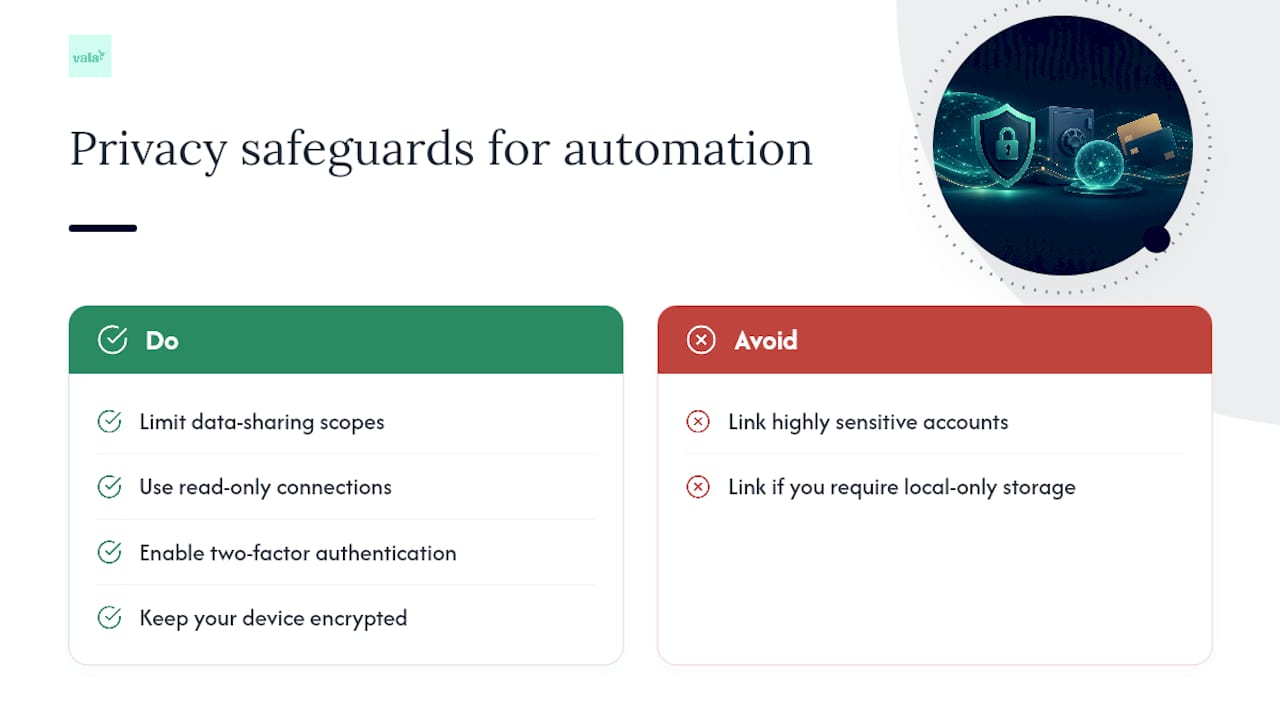
If you do link accounts, take a few concrete steps to reduce risk: limit data-sharing scopes where the app allows it, choose read-only connections instead of ones that can move money, enable two-factor authentication, and keep your device encrypted. One simple rule covers most of the risk: never link an account you use for highly sensitive or one-off large transactions.
How Does an App Like Vala Handle Cash and Card Together?
Here’s what that workflow looks like in practice, using Vala’s own tools as an example rather than a pitch. The typical setup runs like this:
- Link your checking and credit accounts so transactions categorize on their own.
- Create a cash wallet and set up quick-entry shortcuts for recurring cash purchases.
- Turn on smart categorization so the app learns your spending patterns over time.
- Run a short weekly reconcile to catch anything miscategorized or missing.
AI-driven suggestions speed this up by flagging likely categories and surfacing money-leak alerts, small recurring charges or creeping subscription costs, before they become invisible. If you’d rather test the waters first, you can start without linking any accounts, or use read-only mode, and add automation once you’re comfortable.
A Two-Minute Ritual That Keeps This from Falling Apart
Most tracking systems die from lack of habit, not lack of features. Try this: quick-add every cash purchase the moment you make it, and run your reconcile every Sunday at the same time, maybe right after coffee. Keep the app or notebook somewhere you’ll actually see it, like your phone’s home screen, not buried three folders deep. Pre-build templates for your regular purchases so Monday’s coffee takes one tap, not ten.
— SaverStride
Try the Financial DNA Test Before You Build Anything Manually
If you’d rather skip the spreadsheet setup and get a system that already handles the cash-and-card split, Vala does the linking, categorization, and cash-wallet quick entry for you from day one.

Some apps speed up exactly the steps this guide walks through by hand: connecting your accounts, sorting transactions into categories automatically, providing a dedicated cash wallet with fast-entry shortcuts, and splitting shared costs when tracking expenses with a partner or group. You can start with the free tier, or take the Financial DNA Test to see your spending style mapped out before you commit to anything. Privacy options are available from the start too. You can explore the app without linking a single account and add that automation later, on your own timeline.
Sources
For more on the habit side of this, Broadview Federal Credit Union and Finance for Beginner both cover manual logging and envelope tactics in depth. Vala’s own guide on tracking expenses and the No Spend Reset Challenge Workbook on zero-based budgeting are useful next stops.
- How to Track Spending – Broadview Federal Credit Union
- How to Track Your Monthly Expenses: 8 Tips to Try – NerdWallet