
Budgeting by paycheck means assigning every dollar of every paycheck a job the moment it lands, matching bills to the pay date before they’re due. It works best if you’re paid more than once a month, have variable income, or feel stuck living paycheck to paycheck. Your first move: write down your next pay date and every bill due before the one after it.
TL;DR:
- Automating savings transfers on the same day you receive each paycheck ensures consistent contribution and reduces reliance on willpower.
- For irregular income, budgeting based on the lowest monthly average prevents shortfalls and maintains financial stability.
- Dividing large, irregular expenses into equal parts stored in sinking funds avoids sudden financial stress or emergency bills.
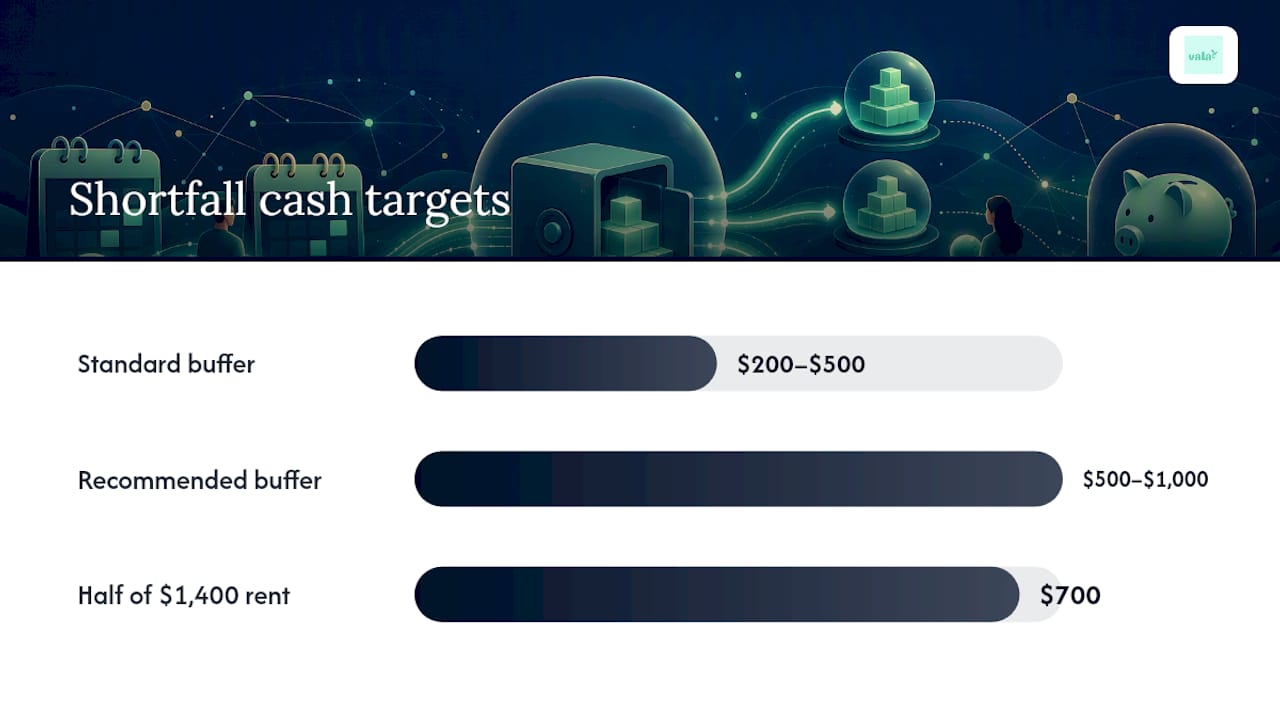
- Keeping a checking account buffer of $200 to $500 helps absorb delays, processing errors, or slight miscalculations without missing payments.
- Using apps that track pay dates, automate transfers, and send bill reminders makes the paycheck budgeting process more reliable and easier to maintain.
Table of Contents
- How to Set Up a Budget by Paycheck Method
- What Does a Real Paycheck Budget Look Like?
- How Do You Handle Variable Income or Shortfalls?
- Which Tools Actually Support This Method?
- What Mistakes Break a Paycheck Budget?
- Can an App Run This Workflow for You?
- Why the Timing Layer Changes Everything
- Automate Your Paycheck Budget with Vala
- Sources
- FAQ
How to Set Up a Budget by Paycheck Method
Building this system takes about 30 minutes the first time and five minutes every payday after that. The goal is simple: turn your pay schedule into a bill calendar so nothing sneaks up on you.
Here’s the setup sequence, start to finish:
- Pull your last two or three pay stubs. Write down your net pay (after taxes and deductions) and the exact dates you got paid. If your pay date shifts around weekends or holidays, note that too.
- List every bill with its due date and amount. Rent, utilities, car payment, subscriptions, minimum debt payments. Nothing gets skipped, even the $8 streaming charge.
- Build a bill calendar. Lay out a full month (or two, if you’re semi-monthly) and mark each bill against the calendar date it’s due.
- Assign each bill to the paycheck that arrives before its due date. If rent is due on the 1st and you get paid on the 28th, that paycheck owns rent. This is the core mechanic behind paycheck budgeting: list your pay dates, match bills to the paycheck before their due dates, transfer savings on payday, and whatever’s left becomes that period’s spending money.
- Automate your savings transfer first, not last. Set up an automatic transfer for the same day your paycheck hits, before you have a chance to spend it. This is the “pay yourself first” rule in action, and pairing it with automated savings removes the willpower problem entirely.
- Fund your sinking funds. For annual or irregular costs, like car registration, holiday spending, or an annual subscription, divide the yearly total by your number of paychecks and move that slice into a separate account every payday. A sinking fund method that divides a $600 yearly expense by 26 biweekly paychecks means moving about $23 aside each time, so the bill never feels like an emergency.
- Calculate your spending allowance. Once bills and savings are covered, whatever remains is yours to spend freely for that pay period.
- Set a checking account buffer. Keep an extra $200 to $500 sitting in checking at all times, untouched by your budget math, as a cushion against timing slips or bank processing delays.
A few habits make this stick:
- Round bill estimates up slightly for variable costs like utilities, so you’re never short.
- Recheck your bill calendar whenever a due date changes, subscriptions especially.
- Review your buffer balance monthly, not just when something feels off.
- Keep sinking funds in a separate account so you’re not tempted to “borrow” from them.
Pro Tip: Label your sinking fund transfers by name in your banking app, “Car Registration” or “Holiday Fund,” instead of one generic savings bucket. It’s much harder to raid a fund that has a specific purpose attached to it.
The U.S. federal consumer guidance on budgeting backs this same core loop: list income and expenses, plan your spending, and review monthly to make adjustments. Paycheck budgeting just adds the timing layer that tells you which paycheck covers which obligation.
What Does a Real Paycheck Budget Look Like?
Numbers make this method click faster than any explanation. Here are two full walk-throughs, one for biweekly pay and one for weekly pay, that you can copy directly into your own worksheet.
Biweekly example: $2,400 net per paycheck
Say you bring home $2,400 every other Friday. Your bill calendar might assign:
- Rent ($1,400): due the 1st, assigned to the paycheck landing closest to month’s end.
- Utilities and phone ($220): due mid-month, assigned to the second paycheck.
- Savings transfer ($200): automated the day pay lands, before anything else moves.
- Sinking fund ($75): covers car insurance, gifts, and annual renewals combined.
- Remaining discretionary allowance (~$505): groceries, gas, entertainment, everything else for the two weeks.
That $505 becomes your real spending number for the period, not a guess.
Weekly example: $650 net per paycheck
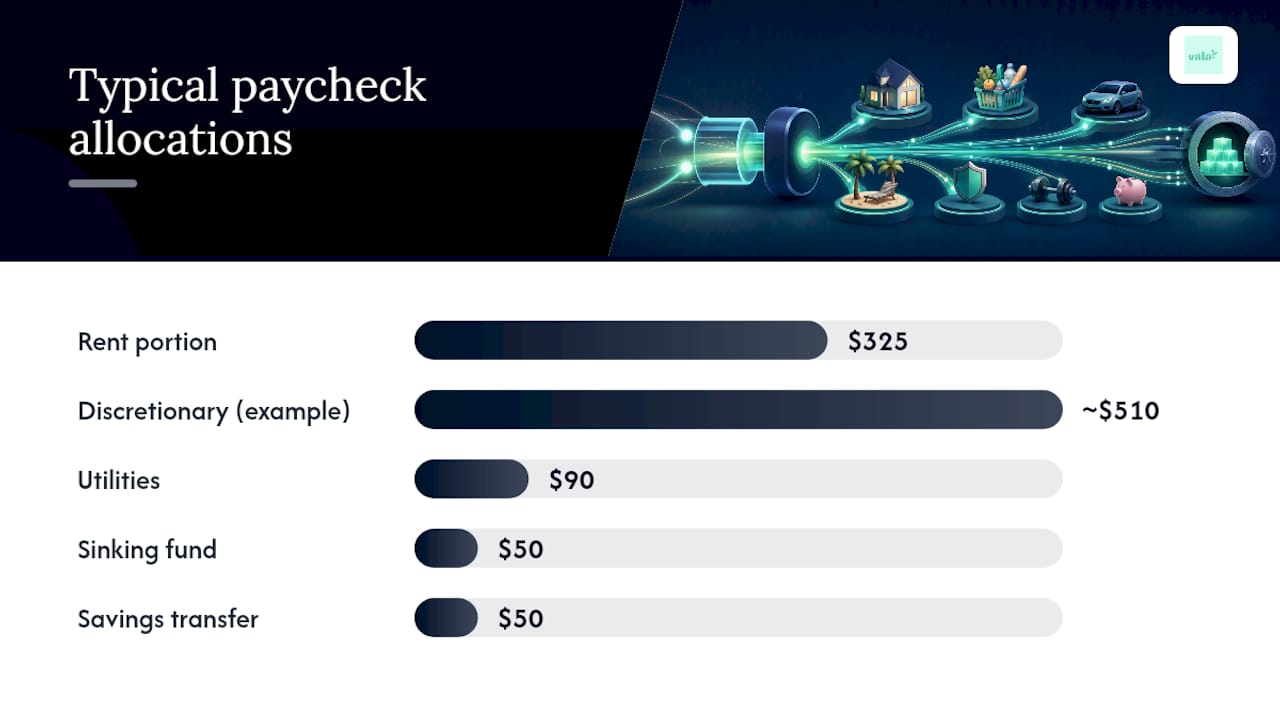
If you’re paid weekly, bills get grouped differently because four paychecks a month means more frequent, smaller assignments. A typical breakdown:
- Week 1: rent portion ($325) plus $50 into a sinking fund for annual expenses.
- Week 2: utilities ($90), $50 savings transfer, remaining ~$510 for discretionary spending.
- Week 3: rent portion ($325) again, plus $50 sinking fund.
- Week 4: groceries, gas, subscriptions, and a top-off to the buffer account.
Divide the discretionary leftover by seven for a rough daily spending cap, a trick that keeps small purchases from quietly draining the whole week’s allowance.
Both schedules eventually produce an “extra” paycheck, a third biweekly check in months with 27 pay days, or a fifth weekly check in five-week months. Treat that paycheck as a windfall, not baseline income. The strongest uses: clearing debt faster, topping off your buffer, or fully funding a sinking fund in one shot instead of stretching it across months.
Quick copyable checklist for your own worksheet: pay date, net amount, bills assigned, savings transferred, sinking fund contribution, remaining allowance. Six columns, one row per paycheck. Research on paycheck-specific worked examples shows that seeing real numbers next to real dates is what actually gets people to adopt this system instead of abandoning it after week two.
How Do You Handle Variable Income or Shortfalls?
Not every pay schedule is clean, and not every month goes as planned. Here’s how to adapt the method when things get messy.
Variable or freelance income. Instead of budgeting your best month, use a rolling average of your last three to six months of income and budget against the lowest realistic estimate. Anything earned above that average becomes windfall money, following the same rule as an extra paycheck: debt, buffer, or sinking funds first.
Splitting large bills across paychecks. A $1,400 rent payment doesn’t have to come from a single check. Open a dedicated holding account and transfer half from each paycheck as it arrives, so the full amount is sitting there before the due date without straining any one pay period.
When a paycheck can’t cover everything assigned to it. Prioritize in this order:
- Minimum payments on debt (avoid late fees and credit damage).
- True essentials: housing, utilities, groceries, transportation.
- Sinking fund contributions (pause, don’t cancel, if needed).
- Discretionary spending and extra debt payments last.
Sizing your buffer for shortfall protection. If your income varies significantly month to month, aim for a checking buffer closer to $500 to $1,000 rather than the standard $200 to $500 range. That larger cushion absorbs a light paycheck without forcing you to skip a bill assignment entirely.
When a shortfall does happen, cut discretionary categories temporarily rather than skipping savings transfers. Pausing a sinking fund contribution for one cycle is a manageable setback. Skipping rent is not.
Which Tools Actually Support This Method?
Your tool choice matters less than whether it captures pay dates as their own field, since that’s the entire mechanic this method depends on.
A solid paycheck worksheet, whether on paper or in a spreadsheet, needs these columns at minimum:
- Pay date and net amount
- Bills assigned to that paycheck, with due dates
- Savings and sinking fund transfers
- Remaining discretionary balance
- Running buffer total
Printable workbooks work well for people who want a tactile, offline system. A printable paycheck workbook organizes bills and tracks paychecks with dedicated pages for savings targets, useful if you’re just starting out and want to see the whole system on paper before trusting an app with it.
Spreadsheets give more flexibility for people comfortable building their own formulas, letting you auto-calculate remaining allowances as you fill in bill assignments.
Apps save the most time long-term because they handle the math and the memory for you. Look for pay-date fields, scheduled transfer automation, sinking fund tracking, and bill due-date reminders, the same four functions the manual worksheet covers, just automated. A bill reminder app that flags due dates against your actual pay schedule removes the single biggest point of failure in this whole method: forgetting which paycheck owns which bill.
What Mistakes Break a Paycheck Budget?
Most paycheck budgets fail from small, avoidable habits rather than the system itself being flawed.
Buffer sizing. Keep $200 to $500 in checking at minimum (more if your income varies), untouched by your spending math. This absorbs bank processing delays and rounding errors without cascading into a missed bill.
Automate everything you can. Savings transfers, sinking fund contributions, and even bill payments where possible should happen without you touching a button. Willpower is a limited resource; automation isn’t.
Don’t treat windfalls as new baseline income. That third or fifth paycheck feels like free money, but building your regular spending around it sets you up for a rough month when it doesn’t show up.
Run a monthly review. Compare what you assigned against what actually happened. Two simple metrics: did every bill get paid on time, and did your buffer stay above its minimum? If yes to both, you’re on track.
- Check your bill calendar for any due-date changes.
- Confirm sinking funds are growing, not stagnant.
- Adjust your discretionary allowance if a bill amount shifted.
Pro Tip: Set a recurring 15-minute calendar reminder for the day after each pay date. That’s your entire maintenance window, checked assignments, confirmed transfers, updated balance.
Can an App Run This Workflow for You?
Once your bill calendar and pay-date assignments are on paper, an app can take over the repetitive parts. The app lets you map your pay dates and set up scheduled transfers so savings and sinking fund contributions move automatically on payday, matching the exact workflow described above.
- Use bill reminders to flag due dates against your real pay schedule.
- Let the budget calculator estimate your remaining spending allowance after bills and savings are assigned.
- Keep your manual worksheet as a backup, checking it against the app monthly.
- Only link accounts you trust, and review connected accounts periodically for security.
Why the Timing Layer Changes Everything
Most budgeting advice tells you what percentage to spend on needs versus wants. That’s useful, but it doesn’t tell you when to move the money. Paycheck budgeting is the operational layer that turns a percentage rule into an actual transfer on an actual date. Try it for two full pay cycles before judging it. Adjust the categories, buffer size, and sinking fund amounts to fit how you actually live.
— SaverStride
Automate Your Paycheck Budget with Vala
A paper worksheet gets you organized, but it doesn’t move money for you. An app can automate the workflow this guide walks through: mapping pay dates, scheduling transfers for savings and sinking funds the moment a paycheck lands, and sending bill reminders tied to the real pay schedule instead of a generic calendar.

You still control the categories and the numbers. Such an app removes the manual re-entry every payday, tracks your buffer, flags bills before they’re due, and keeps sinking funds visibly separate so you’re never tempted to raid them. If you’ve been assigning bills to paychecks on paper and want that same system running itself, start with Vala’s personal finance app and connect your first pay cycle today.
Sources
- Consumer
- Crunch Your Dollars — Paycheck budgeting
- U.S. Bank — Living paycheck to paycheck
- Every Dollar Grows — Paycheck budget
- Budget By Paycheck workbook landing page
This article is general information, not a substitute for advice from a qualified financial advisor. Consult a qualified financial professional about your own circumstances before acting on anything here.
FAQ
What Is the 70/20/10 Budget Rule?
The 70/20/10 rule allocates 70% of income to living expenses, 20% to savings, and 10% to debt payoff or giving, a variation on percentage-based frameworks like the more common 50/30/20 split that pairs well with paycheck timing.
What Percentage of People Earning $100,000 Live Paycheck to Paycheck?
Reporting on household cash flow shows that living paycheck to paycheck isn’t limited to lower earners, and higher-income households can face the same timing squeeze when spending scales with income; a structured paycheck budgeting system helps regardless of income level.
How Do I Start a Budget by Paycheck?
List your next pay date and net amount, write down every bill due before your following paycheck, and assign each bill to the check that arrives before its due date, then automate your savings transfer on payday.
What App Can I Use to Budget Based on My Paycheck?
Vala lets you map pay dates, automate scheduled transfers, and set bill reminders tied to your actual pay schedule, replicating a manual paycheck worksheet without the weekly re-entry.