
A zero-based budget assigns every dollar a job so your income minus all allocations equals exactly $0. That one rule is what separates it from looser approaches where money just “disappears” by month’s end. Nearly 9 in 10 Americans report using a budget in some form, yet fewer than 1 in 4 follow it consistently. The gap isn’t motivation — it’s method.
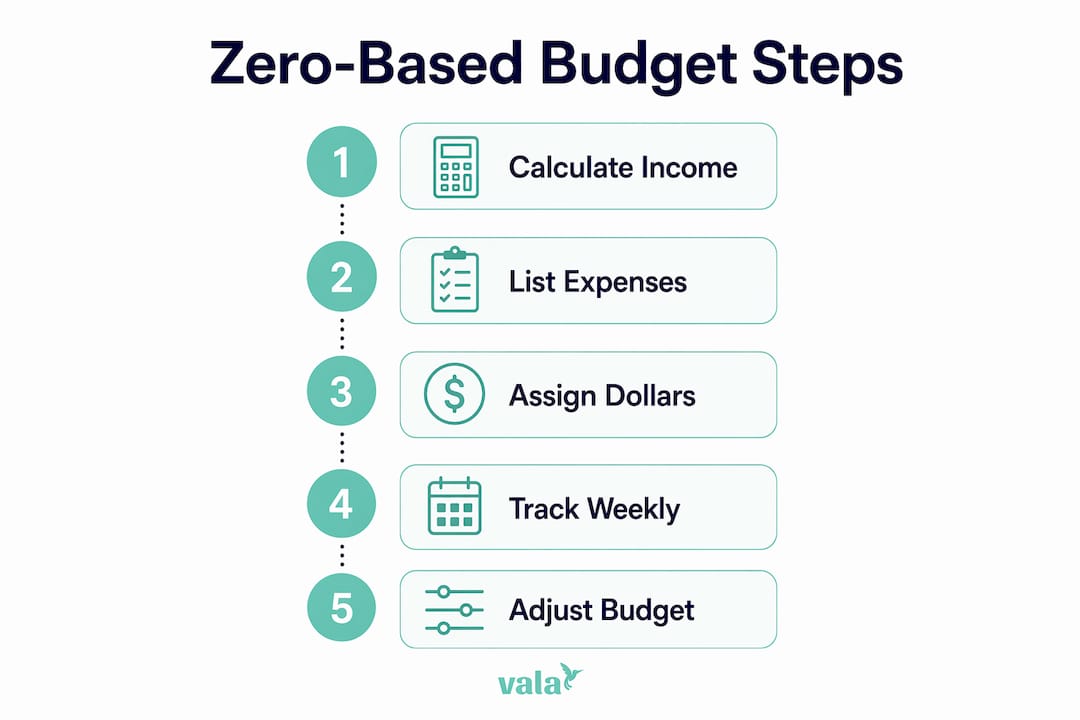
You can start your zero-based budget today with four steps:
- Calculate your net monthly income (take-home pay after taxes and deductions).
- List every expense and financial goal you expect this month.
- Assign every dollar to a category until income minus allocations equals $0.
- Track spending weekly and adjust categories before you run short.
Valapoint’s Vala app automates steps 3 and 4 with real-time transaction tagging and weekly summary alerts, but a spreadsheet or notebook works just as well to start. The system is the same regardless of tool.
Table of Contents
- What is zero-based budgeting and how does it differ from other methods?
- How do you create a zero-based budget step by step?
- What does a sample zero-based budget template look like?
- Which tracking tools make zero-based budgeting sustainable?
- How do you do an end-of-month budget review?
- What mistakes do people make with zero-based budgeting?
- Key Takeaways
- Who actually benefits most from zero-based budgeting?
- Vala gives you a smarter way to run your zero-based budget
- Useful sources and further reading
What is zero-based budgeting and how does it differ from other methods?
Zero-based budgeting assigns every dollar a job before the month begins. You’re not trying to empty your bank account — you’re giving each dollar a destination: rent, groceries, savings, debt payment, or even fun money. The goal is zero unassigned dollars, not a zero balance.
How it compares to the 50/30/20 rule and cash envelopes
The 50/30/20 rule splits your net income into three broad buckets: 50% for needs, 30% for wants, and 20% for savings and debt. It’s lower effort and works well if you’re just starting out or find detailed tracking overwhelming. Zero-based budgeting asks more of you upfront — every category gets its own line — but that precision is exactly what makes it effective for aggressive debt payoff and for finding “mystery money” you didn’t know you were spending.
Cash envelopes take the same assign-every-dollar logic but use physical cash divided into labeled envelopes. Zero-based budgeting applies the same principle digitally, which makes it easier to track without carrying cash.
Quick comparison:
- Zero-based: High control, high effort, best for debt payoff and detail-oriented people.
- 50/30/20: Low effort, broad structure, best for beginners or those who find tracking stressful.
- Cash envelopes: Tactile and strict, best for people who overspend on variable categories.
Who zero-based budgeting suits best: people rebuilding from paycheck-to-paycheck, those with specific savings goals, and anyone who wants to know exactly where every dollar goes. If itemized tracking feels like too much right now, the 50/30/20 rule is a reasonable starting point.
How do you create a zero-based budget step by step?
Step 1: Calculate your net monthly income
Start with what actually hits your bank account after taxes, health insurance, and retirement contributions. If you’re salaried, that’s straightforward. If you have side income, add it only when it’s confirmed — not projected.
Step 2: List all expenses and financial goals
Break your spending into four groups:
- Fixed: Rent/mortgage, car payment, insurance premiums, loan minimums.
- Variable: Groceries, gas, utilities, dining out.
- Periodic: Annual subscriptions, car registration, holiday gifts. Estimate these annually and divide by 12 to create a monthly sinking fund for each.
- Goals: Emergency fund contributions, extra debt payments, vacation savings.
Step 3: Assign every dollar until you reach zero
Take your net income and subtract each category one by one. If you have $200 left after covering all necessities, assign it — to savings, debt, or a fun-money category. The point is that no dollar sits unassigned.

If income minus expenses is negative, cut from discretionary categories first (dining out, subscriptions, entertainment) before touching fixed costs.
Step 4: Track and adjust weekly
Tracking throughout the month is what keeps the plan honest. Spend 15–30 minutes each week reviewing transactions, checking category balances, and moving money if one category is running low. Daily check-ins (just a quick glance) help in the first month while the habit forms.

Handling irregular income
Two approaches work well here. The first: budget from your lowest recent months as a conservative baseline, then treat any extra income as a bonus to allocate when it arrives. The second: build a one-month income buffer so last month’s earnings fund this month’s plan. Both methods prevent overspending during slow months. If you’re a freelancer or gig worker, the buffer strategy tends to feel more stable once you’ve saved enough to fund it.
When you have money left over or go over budget
Leftover money: Add it to a sinking fund, accelerate a debt payment, or boost your emergency fund. Never leave it unassigned.
Overspent: Move funds from a lower-priority discretionary category to cover the shortfall. If there’s nothing to move, note the gap and adjust next month’s allocation for that category upward.
What does a sample zero-based budget template look like?
Here’s a simple worked example based on a $4,000 monthly net income. Adjust every number to your household.
| Category | Planned ($) | Actual ($) | Variance ($) |
|---|---|---|---|
| Rent/mortgage | — | — | 0 |
| Groceries | — | — | –30 |
| Utilities | — | — | +10 |
| Transportation | — | — | –10 |
| Insurance | 200 | 200 | 0 |
| Dining out | — | — | –30 |
| Entertainment | 100 | — | +20 |
| Clothing | 50 | 0 | +50 |
| Emergency fund | — | — | 0 |
| Debt extra payment | — | — | 0 |
| Vacation sinking fund | 100 | 100 | 0 |
| Holiday gifts sinking fund | 50 | 50 | 0 |
| Personal spending | — | — | –10 |
| Buffer/misc | 100 | — | +20 |
| Total | 4,000 | 4,000 | –— |
The variance column tells you exactly where the plan broke down. In this example, groceries and dining out ran over — useful data for next month’s allocation, not a reason to quit.
To copy this template: Open Google Sheets or Excel, paste the four column headers, and fill in your own categories and planned amounts. Make sure the “Planned” column sums to your exact net income. For a ready-to-use starting point, Valapoint’s free budget planner gives you a pre-built version you can customize in minutes.
If you’re managing a household budget with a partner or family, Valapoint’s guide on zero-based budgeting for families covers shared categories and split-cost tracking.
Which tracking tools make zero-based budgeting sustainable?
The best tool is the one you’ll actually use every week. Here are the main options:
- Manual notebook or printout: Low friction to start, no setup required. Works well for a first month to understand your spending before committing to an app.
- Spreadsheet (Google Sheets, Excel, or a tool like ExpressSheet): Flexible, free, and easy to customize. You control every formula and category. Good for people who like to see the full picture at once.
- Dedicated budgeting apps: Apps with zero-based features let you assign dollars to categories, link bank accounts, and get alerts when a category runs low. Valapoint’s Vala app does this with automated transaction categorization and AI-powered spending insights.
- Cash envelopes: Physical cash divided by category. Strict and effective for variable spending, but inconvenient for online purchases.
Automation tips that reduce manual work
- Schedule recurring transfers on payday so savings and sinking fund contributions move automatically before you can spend them.
- Split your direct deposit if your employer allows it — send a fixed amount straight to savings and the rest to checking.
- Use categorical rules in your app to auto-tag recurring transactions (Netflix, gym, utilities) so you’re not manually sorting them every week.
Tracking throughout the month lets you catch overspending in real time rather than discovering it at month’s end. When you’re starting out, a daily 2-minute glance at your app or spreadsheet builds the habit fast. Once you’re comfortable, a weekly 15–30 minute session is enough.
Pro Tip: Set a recurring calendar reminder for the same day and time each week — Sunday evening works well for most people. Treat it like a standing appointment, not an optional task.
How do you do an end-of-month budget review?
The month-end review is where the real learning happens. It takes about 20–30 minutes and sets up next month’s plan.
Reconciliation checklist:
- Pull your bank and credit card statements and match every transaction to a budget category.
- Flag any unidentified charges and categorize them (or dispute them if needed).
- Calculate the variance for each category: planned minus actual.
- Note which categories ran over consistently and which had leftover funds every month.
Action rules based on what you find:
- Consistently over in a category: Raise the allocation next month. Underfunding groceries by $50 every month is a planning problem, not a willpower problem.
- Consistently under in a category: Redirect the surplus to a sinking fund or debt payment rather than leaving it unassigned.
- One-time spike: Keep the allocation the same and note the reason. A car repair isn’t a reason to permanently increase your “dining out” budget.
Treat your first month as a test run. Overspending is data, not failure — it tells you where your planned amounts didn’t match reality. Most people need two or three months before their categories feel accurate.
What mistakes do people make with zero-based budgeting?
The three most common pitfalls
Trying to build a perfect budget in one long session. This leads to burnout before you’ve even started. Experts recommend 15–30 minutes per week of short, repeated practice rather than one exhausting setup marathon. Build the skill incrementally.
Forgetting periodic expenses. Annual subscriptions, holiday gifts, car registration, and back-to-school costs don’t show up every month, so they’re easy to skip. Estimate each one annually, divide by 12, and fund a named sinking fund category every month. When the bill arrives, the money is already there.
Treating overspending as failure. This is the most common reason people abandon the system. Reframe it: overspending is a test result that tells you your allocation was off. Use it to refine next month’s numbers rather than quitting.
How to recover from an overspent month
- Identify which categories ran over and by how much.
- Move funds from lower-priority discretionary categories (entertainment, clothing) to cover the shortfall.
- If there’s nothing to move, add a small buffer category (around $50–$100) to absorb minor surprises.
- Document the reason for the overspend and adjust the relevant category for next month.
Pro Tip: Pre-fund your sinking funds on the first of the month, right when income arrives. Waiting until the end of the month means the money is usually already spent.
Key Takeaways
Zero-based budgeting works because it forces a conscious decision for every dollar, eliminating untracked spending and accelerating debt payoff and savings goals.
| Point | Details |
|---|---|
| Assign every dollar | Income minus all allocations must equal $0 — no dollar stays unassigned. |
| Build sinking funds | Divide annual periodic expenses by 12 and fund a named category each month to prevent surprises. |
| Track weekly | Spend 15–30 minutes each week reviewing transactions and adjusting category balances. |
| Treat month one as a test | Expect to refine allocations for two to three months before categories feel accurate. |
| Use Valapoint’s Vala | Vala automates transaction categorization, sinking fund tracking, and weekly alerts to keep your zero-based budget on track. |
Who actually benefits most from zero-based budgeting?
Zero-based budgeting rewards people who are willing to put in a little time each week in exchange for a lot of clarity. If you’re detail-oriented, motivated by seeing exactly where your money goes, or actively paying down debt, this method tends to click quickly. The same goes for people who’ve been living paycheck-to-paycheck and want to understand why — the assign-every-dollar rule surfaces spending patterns that looser methods hide.
That said, it’s not the right fit for everyone. If you find detailed tracking stressful or your schedule doesn’t allow for a weekly check-in, a simpler approach like the 50/30/20 rule may serve you better as a starting point. There’s no shame in that. You can always layer in more detail later once the habit is established.
Ask yourself three questions before committing:
- Can you set aside 15–30 minutes each week to review your spending?
- Is your income steady, or does it vary month to month?
- Do you prefer to automate as much as possible, or do you like manual control?
If your income is irregular, the conservative baseline or one-month buffer approach described earlier makes zero-based budgeting workable even without a fixed paycheck. And if you prefer automation, pairing zero-based budgeting with an app that handles transaction tagging removes most of the manual friction.
Zero-based budgeting also pairs well with other methods. Some people use the 50/30/20 rule as a broad framework and apply zero-based logic only within the “wants” bucket to control discretionary spending. Others use a pay-yourself-first approach for savings and then zero-base the rest. Mixing methods is fine — the goal is a system you’ll actually use.
Vala gives you a smarter way to run your zero-based budget
Spreadsheets and notebooks work — but they require you to do all the categorization manually, every week. Vala, Valapoint’s AI-powered personal finance app, handles the repetitive parts automatically so you can focus on the decisions, not the data entry.

With Vala, you get automated transaction categorization, custom budget categories you build once and reuse every month, sinking fund tracking with recurring transfer support, and weekly summary alerts that flag when a category is running low. The AI spending insights surface patterns you’d likely miss in a spreadsheet — the kind of “mystery money” that quietly drains your budget month after month. If you want to see how AI can sharpen your category allocations, Valapoint’s guide on AI-powered spending pattern detection explains how it works.
Spreadsheets, envelope systems, and notebooks are all valid tools — Vala is simply the faster path to the same outcome. Ready to put your zero-based budget on autopilot? Start with Vala’s personal finance app and have your first month’s categories set up in under 10 minutes.
Budgeting methods vary by household and income type. For a family or irregular-income angle, Valapoint’s blog has dedicated guides to help you adapt the system to your situation.
Useful sources and further reading
The sources below were used to build this guide. They’re worth bookmarking for templates, deeper comparisons, and method explanations.
- Ramsey Solutions — How to Make a Zero-Based Budget: Practical walkthrough with sinking fund guidance and category examples.
- Investopedia — How to Build a Monthly Budget That Actually Fits Your Life: Covers habit-building, consistency data, and the reframe-overspending approach.
- Fidelity Learning Center — Zero-Based Budgeting: Explains the irregular income buffer strategy in plain language.
- Experian — 6 Types of Budget Plans: Useful comparison of budgeting methods including 50/30/20 and zero-based.
- The Penny Hoarder — 7 Budgeting Methods Compared: Side-by-side look at methods with notes on who each suits best.
- I Will Teach You to Be Rich — Zero-Based Budgeting: Clear definition and the “mystery money” framing.
- consumer.gov — Making a Budget: Federal consumer resource with a free budget worksheet and plain-language steps.
- Valapoint Free Budget Planner: Downloadable template you can copy into a spreadsheet to start your first zero-based budget.
These sources are provided as references and templates — they are not endorsements of any single paid product or service.