
The most effective way to organize group expense categories is to build a clear hierarchy: broad groups first, then specific categories underneath each one. Think of it as a two-level system where “Food” is the group and “Groceries” and “Dining Out” are the categories inside it. This structure, used in tools ranging from Tiller spreadsheets to enterprise platforms, keeps every shared expense traceable and every member accountable. The ExpenseSplit calculator is one practical starting point for groups that want a ready-made framework for dividing and categorizing shared costs fairly.
Getting this right reduces disputes, speeds up reconciliation, and makes it obvious at a glance who owes what. Here is what effective group expense organization looks like in practice:
- Clear hierarchy: Group (broad bucket) > Category (specific type) > individual transaction
- Unique category names: no two categories share a name, even across groups
- One category per expense: every transaction belongs to exactly one category
- Agreed definitions: all group members use the same category names and rules
- Regular reviews: categories get updated as the group’s spending patterns change
How to create and organize group expense categories step by step
Setting up shared expense categories takes about 30 minutes upfront and saves hours of confusion later. Follow these steps to build a system your whole group will actually use.
-
Define the group’s goals. Before creating a single category, agree on what you are tracking and why. A road trip group needs different categories than a household of four splitting monthly bills.
-
List every shared expense you expect. Spend five minutes brainstorming with your group. Write down every cost you anticipate sharing: rent, groceries, gas, streaming subscriptions, restaurant meals, and anything else that comes up regularly.
-
Sort those expenses into broad groups. Cluster similar items together. Rent and utilities belong in Housing. Groceries and restaurant tabs belong in Food. Gas and rideshares belong in Transportation. These broad groups are your top-level buckets.
-
Create specific categories within each group. Break each group into named categories. Budget targets are set per category, not per group, so the more precise your categories, the better your spending control. “Food” as a group might contain “Groceries,” “Dining Out,” and “Coffee.”
-
Give every category a unique name. Two categories cannot share a name, even if they sit in different groups. Ambiguity is where disputes start.
-
Assign each expense to one category only. A transaction belongs to exactly one category. If an expense feels like it could fit two places, pick the more specific one and document the rule.
-
Write down your category definitions. A shared document with a one-sentence definition for each category prevents the “but I thought that was Dining Out” argument three months from now.
-
Choose a tool to host your category list. A shared spreadsheet works for small groups. Purpose-built apps with real-time syncing work better for larger or more active groups. Microsoft Dynamics Business Central shows how enterprise software handles this with posting groups and policy rules per category.
-
Set spending rules or limits per category. Decide whether any category has a cap. Knowing that “Entertainment” is capped at $50 per person per month removes a lot of guesswork.
-
Schedule a monthly review. Group spending patterns shift. A category that made sense in january may be irrelevant by june. A short monthly check keeps your system accurate.
Common group expense categories you should be using
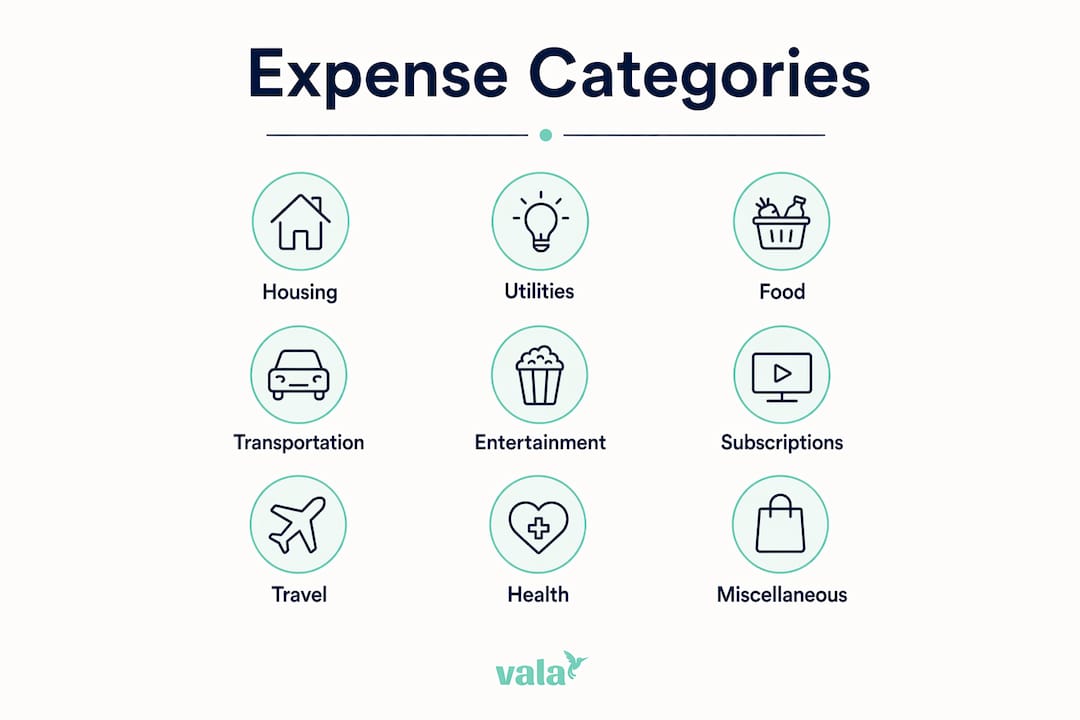
Most groups need the same core categories, even if the specific amounts differ. Microsoft Learn’s expense management documentation confirms that categories like Meals, Travel, and Office Supplies appear across virtually every business and personal expense system. Here are the categories worth building into your group’s setup from day one.
1. Housing
Rent, mortgage contributions, property taxes, and home insurance all belong here. For shared households, this is usually the largest single group. Subcategories like “Rent,” “Utilities,” and “Home Maintenance” keep the detail you need for fair splits.
2. Utilities
Electricity, gas, water, and trash collection deserve their own group when housing costs are split separately. Some groups fold utilities into Housing; others track them separately to catch spikes in usage quickly.
3. Food
This group almost always splits into at least two categories: “Groceries” for household staples and “Dining Out” for restaurant meals. A third category, “Coffee and Snacks,” is worth adding if your group spends regularly at cafes. The distinction matters because grocery costs are usually split evenly while restaurant bills often get split per person.
4. Transportation
Gas, parking, tolls, rideshares, and public transit passes all land here. For road trips or groups with a shared vehicle, subcategories like “Gas,” “Parking,” and “Maintenance” give you the granularity to split costs fairly based on who used what.
5. Entertainment
Movie tickets, concerts, sporting events, and group activities belong in this category. Setting a monthly limit here is one of the easiest ways to prevent overspending in a group setting, since entertainment costs tend to creep up without anyone noticing.
6. Shared services and subscriptions
Streaming platforms, internet service, cloud storage, and software subscriptions that the whole group uses go here. This category is easy to overlook but often adds up to a meaningful monthly amount when you total every shared subscription.
7. Travel and accommodation
For groups that take trips together, a dedicated Travel group with subcategories for “Flights,” “Hotels,” and “Activities” keeps trip costs separate from everyday spending. This makes post-trip reconciliation far cleaner.
8. Health and personal care
Shared first-aid supplies, group gym memberships, or household health products fit here. This category is optional for some groups but worth including for households or long-term travel groups.
9. Miscellaneous
Every system needs a catch-all. Use this category sparingly and review it monthly. If the same type of expense keeps landing in Miscellaneous, it probably deserves its own category.
What makes group expense management hard, and how to fix it
The biggest challenge in managing shared expenses is not the math. It is inconsistency. When one person logs a dinner under “Dining Out” and another logs the same type of expense under “Entertainment,” your reports become unreliable and disputes follow.
Here are the most common problems groups face, paired with direct fixes:
- Inconsistent categorization: Fix this with a shared reference document that defines each category in one sentence. Review it at your monthly meeting.
- Unclear communication: Agree on categories before the first expense occurs, not after. Retroactive reclassification creates friction.
- Disputes over payments: Transparent, real-time tracking removes the “I didn’t know I owed that” excuse. Digital expense splitting apps give every member visibility into the current balance at any time.
- Manual entry errors: Manual input is the largest source of accounting errors, and AI-powered receipt scanning captures data at the point of sale, cutting reconciliation time from hours to minutes.
- Tracking delays: Expenses logged days after the fact are often miscategorized or forgotten entirely. Real-time entry, ideally from a mobile app, solves this.
Pro Tip: Set up your expense categories before your first shared purchase, not after. Groups that agree on categories upfront spend less time arguing about where a charge belongs and more time actually tracking their spending.
Practical tips to keep group expense tracking on track
Consistent tracking habits matter as much as the category structure itself. These tips help groups stay accurate and avoid the slow drift toward “we’ll sort it out later.”
- Use automated receipt scanning. AI receipt scanning captures merchant name, amount, and date automatically, removing the most common source of manual errors. Apps with this feature let you photograph a receipt the moment you pay.
- Sync in real time. A shared app where every member sees every transaction as it happens prevents the end-of-month surprise. Real-time group tracking keeps everyone on the same page without requiring a group chat update every time someone pays for something.
- Set category-level spending limits. Platforms like SAP Concur use intelligent expense categorization with real-time policy checks to flag overspending before it becomes a problem. You can replicate this in any group by agreeing on a monthly cap per category.
- Automate policy flags. Tools that automatically flag policy violations, like Expensify’s automated categorization feature, reduce the need for manual review and catch errors before they compound.
- Hold a short reconciliation check-in monthly. Even 15 minutes reviewing the current balances prevents small discrepancies from turning into larger disagreements.
- Keep the category list short enough to use. A system with many categories sounds thorough but nobody uses it consistently. sounds thorough but nobody uses it consistently. Aim for 10–15 categories across 4–6 groups.
Pro Tip: Use an AI-powered expense tracker to auto-assign categories based on merchant data. This cuts manual categorization time and keeps your records consistent even when different group members are logging expenses.
How to reconcile and settle balances within your group
Reconciliation is the process of comparing what each person spent against what they owe, then settling the difference. Done monthly, it takes minutes. Done quarterly, it can take an evening and a lot of patience.

The cleanest method is the “minimize transactions” approach. Rather than having every person pay every other person directly, one person calculates the net balance for each member and identifies the fewest transfers needed to zero everyone out. If three people each owe the fourth person $30, that is three separate payments. But if the math works out differently, a single transfer between two members might settle the whole group.
Digital tools handle this calculation automatically. The ExpenseSplit calculator, for example, takes each member’s contributions and outputs the exact transfers needed to settle the group. Manual spreadsheets can do the same with a simple formula: total each person’s share of expenses, subtract what they actually paid, and the result is what they owe or are owed.
A few rules make reconciliation smoother. First, freeze the expense log before you start calculating. Adding new expenses mid-reconciliation creates errors. Second, settle in one currency and one payment method to avoid conversion confusion. Third, document the final balances and confirm with every member before any money moves.
How to agree on expense categories with your whole group
The best category system fails if half the group ignores it. Getting everyone aligned upfront is the step most groups skip, and it is the one that causes the most friction later.

Start with a brief group conversation before any shared spending begins. Present a draft category list and ask two questions: does anything feel missing, and does anything feel unclear? Most groups reach consensus quickly when the list is short and the definitions are plain.
Put the agreed categories in a shared document everyone can access. A Google Doc or a note in your group chat works fine. The goal is a single reference point so nobody has to guess where a charge belongs.
Assign one person to maintain the category list. This does not mean they control it. It means they are the one who updates definitions when the group agrees to a change and flags when a new type of expense keeps landing in Miscellaneous. Rotating this role every few months keeps it from feeling like a burden.
When disagreements come up, and they will, resolve them by asking one question: which category definition fits this expense most closely? If the answer is genuinely ambiguous, update the definition to cover the edge case. Clear rules and consistent category use are what separate groups that track expenses successfully from those that give up after two months.
Try Valapoint to manage your group expenses

Valapoint’s personal finance app gives your group a single place to track expenses, assign categories, split costs, and see real-time balances. The AI-powered categorization assigns merchant transactions to the right category automatically, so your records stay consistent even when different members are logging expenses at different times.
You can set up custom expense groups, define category rules, and get instant visibility into where your shared money is going. Whether you are splitting a household, planning a group trip, or managing a shared project budget, Valapoint keeps the numbers clear and the conversations short.
Key Takeaways
Organizing group expense categories into a clear Group > Category hierarchy, with agreed definitions and consistent use, is the single most effective way to prevent disputes and speed up reconciliation.
| Point | Details |
|---|---|
| Use a two-level hierarchy | Structure expenses as Group (broad bucket) then Category (specific type) for clear tracking. |
| Set budget targets per category | Category-level budgets give more precise spending control than group-level targets alone. |
| Automate receipt capture | AI receipt scanning reduces manual entry errors and cuts reconciliation time significantly. |
| Agree on categories before spending | Groups that define categories upfront avoid the most common source of disputes and miscategorization. |
| Reconcile monthly, not quarterly | Monthly check-ins keep balances small and prevent minor discrepancies from becoming major conflicts. |