
The best way to get free, hands-on budget management right now is to start with an AI-powered freemium app that connects to all your active accounts for a complete picture. Skip the spreadsheets. Try Vala’s free tier today and get accurate, automated insights within minutes of linking your checking, savings, and primary credit card accounts.
Here is why this fits your situation:
- Automation does the work. Vala connects to your bank accounts, categorizes every transaction, and flags spending patterns without any manual entry.
- Shared budgeting is built in. Whether you are splitting costs with a partner or a small group, the free tier handles shared expense tracking out of the box.
- No cost to start. The freemium model means you get real, useful features before you ever consider paying.
Key Takeaways
A free AI-powered budgeting app covers the core needs of most individuals, couples, and small groups in the U.S., with no cost required to start tracking, splitting, and saving.
| Point | Details |
|---|---|
| Start free, start fast | Vala’s free tier includes auto-categorization, shared splitting, and alerts with no subscription needed. |
| Link all active accounts | Connecting checking, savings, and your main credit card gives the AI a complete picture for accurate insights. Partial data produces partial insights. |
| Set one goal first | Pick one specific budget target in the first week; one focused goal builds the habit faster than five vague ones. |
| Check security before linking | Confirm read-only connections, data deletion controls, and encryption before connecting any bank account. |
| Upgrade only when you need it | Paid features are worth it when you need predictive forecasting, automation, or unlimited shared groups. |
Table of Contents
- What do free AI budgeting apps actually give you?
- How does AI actually improve your daily budgeting?
- How do you set up a free AI budgeting app in the first week?
- What should you check before linking your bank accounts?
- When is the free tier enough, and when should you upgrade?
- Why starting with a freemium AI budgeting app makes sense
- Vala is a strong free starting point for individuals, couples, and groups
- Useful resources and trusted partners
- Sources
What do free AI budgeting apps actually give you?
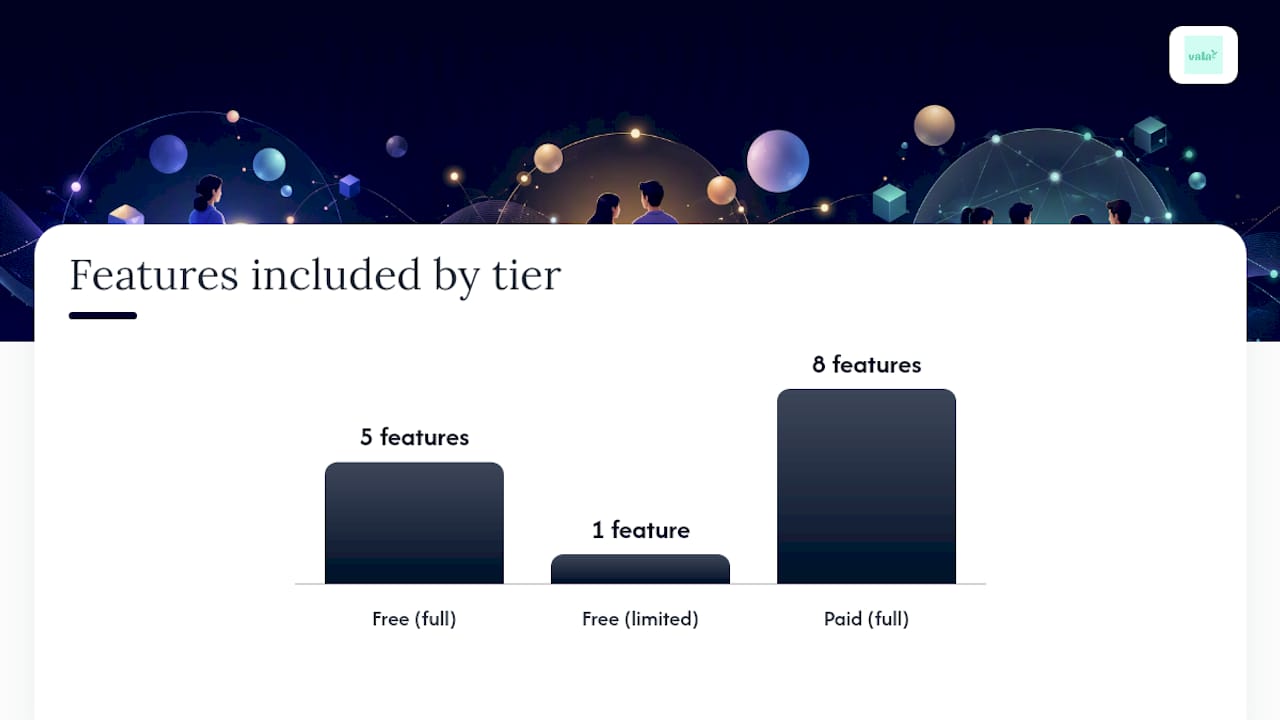
A free tier on an AI-powered app is not a stripped-down demo. Most free tiers include automatic account linking, transaction categorization, basic budget creation, shared expense splitting, and spending alerts. According to SuperMoney’s breakdown of how AI budgeting apps work, these apps use machine learning to connect to your accounts and generate personalized recommendations without any manual data entry.
What typically sits behind a paywall: advanced forecasting, automated recurring transfers, unlimited shared groups, and premium goal optimization tools.
| Feature | Free Tier | Paid Tier |
|---|---|---|
| Automatic account linking | ✓ | ✓ |
| Transaction categorization | ✓ | ✓ |
| Basic budget tracking | ✓ | ✓ |
| Shared expense splitting | ✓ (limited groups) | ✓ (unlimited) |
| Spending alerts | ✓ | ✓ |
| Predictive forecasting | Limited | ✓ |
| Automated recurring transfers | ✗ | ✓ |
| Advanced goal optimization | ✗ | ✓ |
GreenPath Financial Wellness notes that AI budgeting apps are most effective when paired with consistent habits or support from certified counseling, such as NFCC- or HUD-aligned services.
How does AI actually improve your daily budgeting?
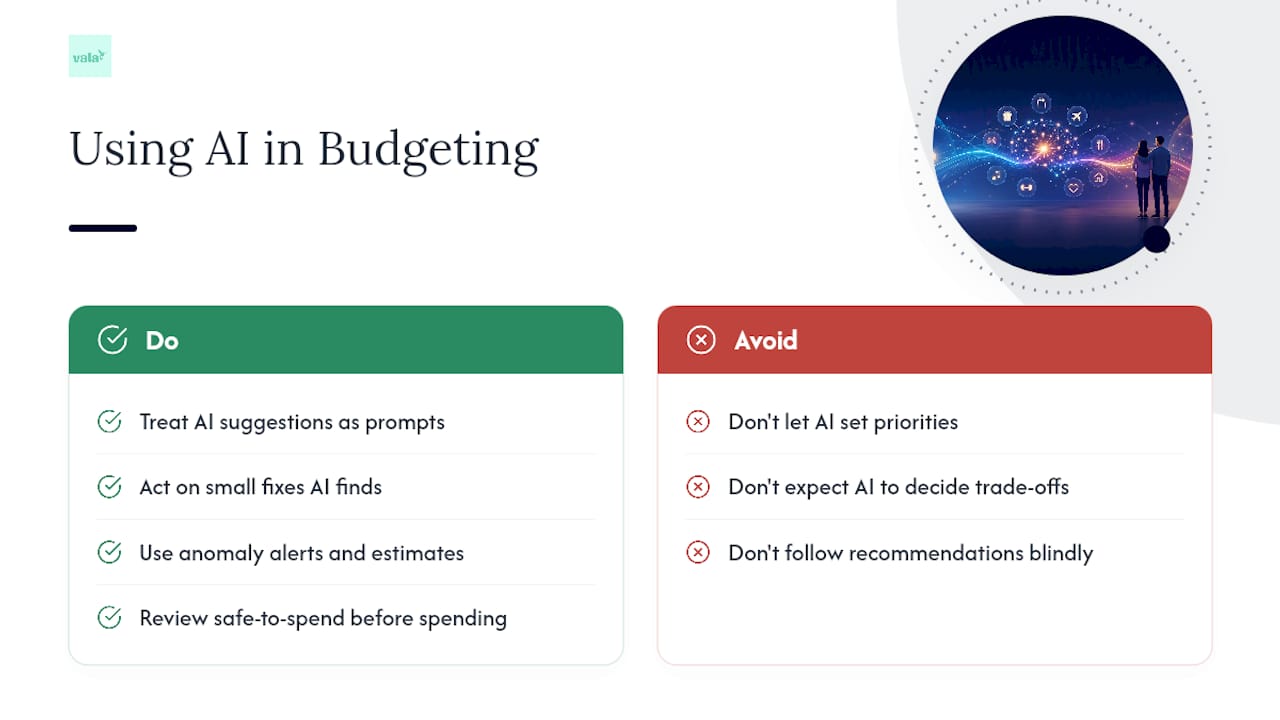
AI does four things well in a budgeting app: it categorizes transactions automatically, detects spending patterns over time, sends anomaly alerts when something looks off, and calculates a safe-to-spend figure based on your upcoming bills. Research from Jumpp Finance confirms that AI budgeting tools analyze past transactions and recurring expenses to predict upcoming costs and suggest real-time budget adjustments.
Where AI stops short: it cannot set your personal priorities, weigh a career change against a savings goal, or make judgment calls about trade-offs that only you understand. USA Today’s personal finance coverage makes this clear: AI automates tracking and pattern detection, but it cannot replace human decision-making.
Pro Tip: Treat AI recommendations as suggestions, not directives. When the app flags that you spent more on dining this month, use that as a prompt to decide whether to set a weekly limit, not as an automatic rule to follow.
AI can often suggest specific, small actions—like canceling a forgotten $14/month subscription or capping weekly takeout at $60—that may produce real, immediate results. The insight is only useful when you act on it.
Vala’s approach to AI-personalized budgets goes further by surfacing spending patterns and savings opportunities specific to shared and personal budgets, not just generic category averages.
How do you set up a free AI budgeting app in the first week?
Getting started is typically quick. Here is the sequence that gets you useful results fast.
- Pick your app and confirm bank support. Check that your primary bank is supported before you sign up. Most apps list compatible institutions on their website or during onboarding.
- Link your primary accounts. Connect your checking account, savings account, and main credit card. Partial data produces partial insights, so connecting every active account gives the AI a complete picture. “Read-only” means the app can see your transactions but cannot move money.
- Set one concrete goal and one budget category. Pick something specific: save $200 this month, or keep dining under $150. One focused target beats five vague ones.
- Enable alerts and invite others. Turn on weekly summary emails and spending alerts. If you are budgeting with a partner or group, send the invite now so shared expenses sync from day one.
Do in the first week:
- Review your categorized transactions once and correct any miscategorized items.
- Check the spending pattern summary after 5–7 days.
- Act on one AI suggestion, even a small one.
Avoid in the first week:
- Linking accounts and then ignoring the app for two weeks.
- Setting more than two budget categories before you see how the first one tracks.
What should you check before linking your bank accounts?
Security is the right thing to check before you connect any financial account. Here is what matters for U.S. users:
- Bank-level encryption. Look for strong encryption standards such as 256-bit AES or equivalent language in the app’s security documentation.
- Read-only connections. Apps that use Plaid-type integrations connect to your institution without the ability to initiate transfers. Confirm this before linking.
- Independent security audit compliance (e.g., SOC 2). Apps that undergo recognized security audits demonstrate higher standards of data protection.
- Data deletion controls. A trustworthy app lets you delete your data and revoke account access at any time. Check the privacy policy for a clear deletion process.
- Purpose limitation. The privacy policy should state that your transaction data is used for your budgeting, not sold to third parties.
Before you link any account, open the app’s privacy policy and search for “data deletion” and “third-party sharing.” If either section is vague or missing, that is a signal to look elsewhere.
For guidance beyond the app itself, NFCC-certified and HUD-approved counselors offer free or low-cost financial counseling across the U.S. and can help you turn app insights into a real financial plan.
When is the free tier enough, and when should you upgrade?
For most individuals and couples just starting out, the free tier covers everything you need for the first three to six months. Three clear signs it is time to consider paid:
- You are splitting costs across more than one group regularly. Free tiers typically cap shared groups. If you manage household expenses with a partner and also split costs with roommates or friends, you will hit that limit quickly.
- You want predictive forecasting. If you need the app to project next month’s cash flow based on recurring bills and income patterns, that feature is almost always paid.
- You want automated recurring transfers. Manually moving money to savings every payday works, but automation removes the friction entirely, and that feature lives in paid tiers.
Pro Tip: Before upgrading, list the two or three paid features you would actually use. If you cannot name them specifically, the free tier is still the right choice.
For individuals on a tight budget, the free tier plus a free AI-enabled spreadsheet template covers most planning needs without any subscription cost.
Why starting with a freemium AI budgeting app makes sense
The biggest barrier to consistent budgeting is not knowledge. It is friction. A freemium AI app removes that friction by doing the categorization, pattern detection, and alerting automatically. You get to focus on the decisions, not the data entry.
Small wins matter more than perfect systems. Catching one unnecessary subscription, staying under your dining budget for two weeks, or simply knowing your actual monthly spending for the first time, these are the habits that compound. The app makes them visible. You make them stick.
Vala is a strong free starting point for individuals, couples, and groups
Vala gives you real budgeting power without a subscription. The free tier includes automatic transaction categorization, shared expense splitting, safe-to-spend alerts, and goal tracking, all backed by bank-level encryption and read-only account connections.

For individuals who want to track spending and catch money leaks, the Vala personal finance app is the place to start. For couples and small groups, shared expense splitting is available on the free tier from day one. Vala also supports users who want to connect their budgeting to NFCC- or HUD-aligned counseling resources for deeper financial guidance.
Want to explore the full toolkit? Vala’s personal finance tools include budget calculators, savings trackers, and debt tools that complement the app’s automated insights.
Useful resources and trusted partners
- How AI Personalizes Budgets for Smarter Money Management — Vala Blog: deeper reading on AI categorization and personalized spending insights.
- Vala Blog: Budgeting Tips and Money Management Guides — full library of budgeting and expense tracking articles.
- GreenPath Financial Wellness: AI Budgeting & Credit Apps — consumer guidance on using AI apps alongside certified financial counseling.
- SuperMoney: How AI Budgeting Apps Work — plain-language explanation of how these apps connect to accounts and generate insights.
- USA Today: Can AI Replace Budgeting? — balanced look at what AI can and cannot do in personal finance.
- AI Excel Budget Template — partner resource for users who want a spreadsheet export or offline planning option alongside their app.
This article is general information, not a substitute for advice from a qualified financial advisor. Consult a qualified financial professional about your own circumstances before acting on anything here.
Sources
- Should you use AI for your personal budget?
- AI Budgeting & Credit Apps: What Consumers Need to Know – Greenpath Financial Wellness
- How AI Budgeting Apps Work (And Why They Beat Spreadsheets) – SuperMoney
- What Are AI Budgeting Tools and How Do They Actually Work?