
The budget calendar method maps every paycheck and bill onto actual dates so you can see, days in advance, whether your balance will cover what’s due. It works best for anyone whose cash flow is tight or unpredictable, because it exposes timing problems that a monthly total never shows. The payoff is simple: fewer overdrafts, fewer missed payments, and a clear view of exactly which paycheck pays which bill.
TL;DR:
- The calendar method is most beneficial for those with irregular income, helping prevent overdrafts by precisely scheduling bills and transfers based on actual pay dates.
- Building a 90-day calendar involves mapping recent bank statements, paychecks, fixed bills, sinking funds, and variable spending caps while adjusting for timing gaps to avoid negative balances.
- Regular weekly and payday routines, including reconciling transactions and confirming deposits, are essential to keep the calendar accurate and prevent it from drifting out of sync.
- Using automation tools like Vala’s forecasting features simplifies maintenance, automatically updating projections and scheduling transfers, making the method more sustainable over time.
- Tracking irregular income with a calendar includes setting conservative income floors, using holding accounts, and planning large bills across multiple paychecks to avoid cash flow surprises.
Table of Contents
- What Is the Budget Calendar Method and Why Does Timing Matter?
- How Do You Build Your First 90-Day Budget Calendar?
- Should You Use Paper, a Spreadsheet, or an App?
- How Do You Manage Irregular Income With a Calendar?
- What Weekly and Payday Routines Keep the Calendar Accurate?
- Why This Method Works: Evidence and How Vala Fits In
- What Actually Breaks This Method (And How to Avoid It)
- Try the Calendar Method With Vala’s Forecasting Tools
- Templates and Guides Worth Bookmarking
- Sources
- FAQ
What Is the Budget Calendar Method and Why Does Timing Matter?
Most budgets work in categories: $400 for groceries, $150 for gas, $200 for entertainment. That works fine on paper, but it says nothing about when the money shows up or leaves. A budget calendar fixes that by plotting income and expenses onto specific dates, then forecasting your running balance day by day.
That shift from “how much” to “when” sounds small, but it changes everything about how you catch problems. A category budget might tell you that you’re within your monthly grocery limit while your checking account still overdrafts on the 12th because rent hit before your paycheck landed. A calendar shows that gap before it happens, not after the overdraft fee.
This date-first approach shines in three specific situations. If your income arrives irregularly, whether from freelance work, commissions, or shift-based pay, a calendar lets you see exactly which weeks are thin and plan around them. If you’ve ever paid an overdraft fee because two bills cleared the same day your paycheck was two days late, a calendar catches that collision in advance. And if you’re building sinking funds for irregular costs like car repairs or annual insurance premiums, a calendar tells you precisely when to schedule small transfers so the money is there when the bill lands.
The core mechanic is a projected running balance: starting balance, plus every paycheck, minus every bill, tracked day by day rather than lumped into a monthly summary. Payday-to-payday planning, thinking in terms of “what do I need to cover before my next check arrives” rather than “what do I need to cover this month”, is what makes the difference for anyone living close to the edge of their balance. Calendar-first budgeting is especially useful for irregular income because it shows the timing gaps a monthly average always hides.

How Do You Build Your First 90-Day Budget Calendar?
Building your first calendar takes about an hour if you gather everything up front. Following an 8-step setup that mirrors what most practical guides recommend, here’s the order that works:
- Pull your last two months of bank statements. You need real numbers, not guesses, for both income and recurring bills.
- List every pay date for the next 90 days. If your pay is regular, this is easy. If it isn’t, use your last three pay dates to estimate the pattern.
- Note the net amount you actually take home, not gross salary. This is the number that matters for cash flow.
- Plot each paycheck on the calendar first, before anything else. These are your anchor points.
- Add every fixed bill and assign it to the paycheck that will cover it. Rent goes under the check that lands before the due date, not just “sometime this month.”
- Set a weekly or biweekly cap for variable spending like groceries and gas, and place that cap right on the calendar alongside the bills.
- Create sinking funds for irregular expenses (car maintenance, gifts, annual subscriptions) and schedule a specific contribution date for each one, ideally right after a payday.
- Reconcile and adjust weekly. A calendar that isn’t checked against real transactions drifts out of accuracy within two weeks.
Once bills are assigned, look for timing gaps, spots where a bill’s due date falls before the paycheck meant to cover it arrives. This is where you split a large bill into two smaller payments, ask a biller to move the due date closer to payday, or pull from a small buffer you’ve built specifically for this purpose. A 90 day window keeps the plan short enough to stay accurate; starting with a shorter forward horizon prevents the paralysis of trying to project six months out with imperfect data.
Before you close out the setup, run a finishing checklist: confirm every bill has an assigned paycheck, check that no single week dips below zero on the projected balance, set a recurring weekly reminder to reconcile, and flag any month with an extra paycheck or unusual expense for a closer look later.
Pro Tip: Assign sinking fund transfers to happen automatically the same day your paycheck lands, before you have a chance to spend that money elsewhere. Money moved on autopilot never feels like a sacrifice the way a manual transfer does.
Should You Use Paper, a Spreadsheet, or an App?
The right tool depends on how much automation you want versus how much you want to see and touch your plan physically. A wall calendar and colored sticky notes give you immediate visibility, you glance at the wall and know what’s due this week, but they don’t forecast anything or update automatically when a bill amount changes. A spreadsheet sits in the middle: more calculation power, still manual entry. A dedicated app trades some of that hands-on feel for automatic recurring transactions and forecasted balances that update themselves.
A few starting points work well regardless of which direction you lean:
- A printable month grid with space to write paydays, bills, and running balance by hand.
- A Google Sheets paycheck-to-paycheck template with columns for date, transaction, amount, and running total.
- Color-coded calendar labels (one color for income, one for fixed bills, one for sinking fund transfers) if you’re using a physical or digital calendar app you already have.
If you decide to move to a dedicated app, look for a specific set of features rather than picking based on design alone. Common features worth checking for include:
- Recurring transaction support so you don’t re-enter the same rent payment every month
- A forecasted balance view that projects forward, not just a snapshot of today
- Bill reminders tied to specific due dates, not just generic monthly alerts
- Sinking-fund scheduling that lets you automate small recurring transfers
- Manual override so you can adjust for one-off expenses without breaking the automation
Start simple. If you’re new to this method, a printable planner or simple spreadsheet is enough to prove the concept works for your specific cash flow before you invest time learning a new app. Once the weekly habit is stable, an app that automates the recurring pieces saves real time.
How Do You Manage Irregular Income With a Calendar?
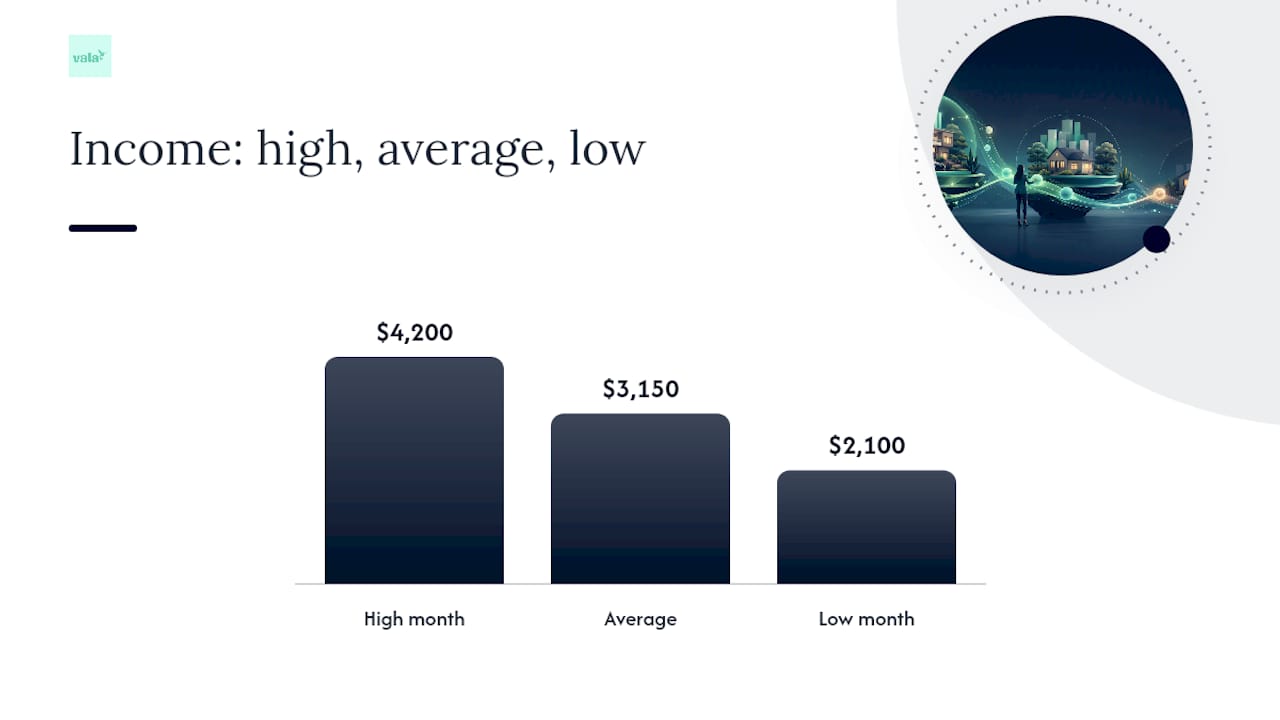
Irregular income is where the calendar method earns its keep, because averages lie to you. If you made $4,200 one month and $2,100 the next, budgeting off the $3,150 average sets you up to overspend in the low months. Set a conservative income floor instead, based on your three lowest recent months or a rolling low average, and build your essential bills around that number only.
One tactic worth borrowing directly: use an intermediate “holding” account for irregular deposits, then transfer a consistent salary amount from that account to your checking account on a fixed schedule. This turns unpredictable income into predictable, calendar-friendly deposits, even when the underlying pay pattern is anything but steady.
A few more tactics stabilize the picture further:
- Split large bills (insurance premiums, property tax) into smaller pre-funded amounts spread across multiple paydays.
- Build a small buffer, even $200 to $300, specifically to absorb the gap when a paycheck arrives a few days late.
- Treat any “extra” paycheck month (common with biweekly pay, which produces two extra paychecks a year) as a planned event, not a windfall.
Pro Tip: When an extra paycheck month hits, decide in advance where it goes, extra debt payment, buffer top-up, or a sinking fund, rather than letting it absorb into regular spending. Deciding ahead of time removes the temptation entirely.
What Weekly and Payday Routines Keep the Calendar Accurate?
A calendar that isn’t maintained becomes fiction within a few weeks. The fix is a short, repeatable routine tied to two moments: every week, and every payday.
- Weekly check (10 to 15 minutes): Reconcile actual transactions against what the calendar predicted, adjust the next seven days for anything unexpected, and flag any gap where a bill might outrun available funds.
- Payday routine (about 20 minutes): Confirm the deposit landed and matches your projection, pay every bill assigned to that check, move scheduled amounts into sinking funds, and update your running balance for the days ahead.
- Monthly deep review: Look at irregular expenses from the past 30 days, update sinking fund targets if a cost changed, and plan for any large expense you can already see coming in the next 60 to 90 days.
Short weekly reviews are the recommended cadence across most practical guides on this method, and 10 to 15 minutes is genuinely enough once the calendar is set up correctly. Calendar notifications or app alerts remove the burden of remembering to check manually, so set them once and let them carry the routine going forward.
Why This Method Works: Evidence and How Vala Fits In
The evidence behind calendar-first budgeting isn’t complicated: apps built specifically for this method market forecasting and future-balance visibility as their primary selling point, because that visibility is what actually prevents overdrafts and late fees. A category budget can be technically balanced and still fail you on a specific Tuesday. A calendar can’t hide that failure.
Vala’s forecasting tools map onto this method’s steps directly: recurring transactions handle the fixed-bill assignment step automatically, the Money Leak Check surfaces subscriptions and recurring charges you might have forgotten to place on the calendar at all, and forecasted balance views show projected low-cash days before they arrive, the same gap-spotting a hand-built calendar accomplishes, just automated.
The single biggest advantage of a calendar over a monthly budget isn’t the math. It’s that a calendar tells you the exact day a problem will happen, not just that a problem exists somewhere this month.
Scheduling sinking-fund transfers to fire automatically on payday, then checking a forecast for the week’s lowest projected balance, replicates the entire manual routine in minutes instead of an hour.
What Actually Breaks This Method (And How to Avoid It)
The most common failure isn’t a bad calendar. It’s overcomplicating it before the habit sticks, tracking twelve categories in week one instead of just paydays and fixed bills. The second most common failure is skipping reconciliation for two or three weeks; by then the calendar is guessing, not tracking.
Put the calendar somewhere you’ll actually see it, on your phone’s lock screen widget, taped to the fridge, whatever matches your existing habits. Tie your review to something you already do weekly, like a Sunday grocery trip or a Monday coffee, so it doesn’t need its own willpower. Start with paydays and fixed bills only. Add sinking funds and variable caps once that foundation holds for a month. Automation comes last, after you’ve proven the workflow by hand.
— SaverStride
Try the Calendar Method With Vala’s Forecasting Tools
Building a 90-day calendar by hand proves the method works, but keeping it updated by hand every week is where most people quit. Vala’s forecasting tools take the manual reconciliation out of the picture: recurring bills auto-populate, sinking fund transfers can run automatically on payday, and the Money Leak Check flags subscriptions and recurring charges that would otherwise throw off your projected balance.

If you’re managing irregular income specifically, Vala’s real-time tracking shows your projected balance the same way a hand-built calendar does, just updated automatically as transactions post instead of requiring a weekly manual entry session. That’s the practical difference between the DIY version you just learned and an automated one: same method, less upkeep. The Money Leak Check is free to run, so start there to see what’s already draining your calendar before you commit to anything more. From there, SaverPro unlocks the full forecasting and sinking-fund automation for a monthly subscription fee if the free tools prove the workflow is worth keeping.
Templates and Guides Worth Bookmarking
A few resources are worth keeping on hand as you build out your own system: a breakdown of how budget calendars work for the core mechanic, a step-by-step setup guide for the build process, and a deep dive on irregular income tactics for pre-funding and holding-account strategies. For weekly spending caps specifically, Vala’s guide on building a weekly spending plan pairs well with the calendar structure outlined above.
Sources
FAQ
What Is the 70-10-10-10 Budget Rule?
The 70-10-10-10 rule splits take-home pay into 70% for living expenses, 10% for savings, 10% for debt payoff or investing, and 10% for giving or fun spending. It’s an allocation framework, meaning it tells you how much to spend in each category, while the calendar method tells you exactly when that spending happens. The two work well together: use 70-10-10-10 to set your category amounts, then place those amounts on a calendar to see the timing.
What Is Dave Ramsey’s 50/30/20 Rule?
The 50/30/20 rule allocates 50% of income to needs, 30% to wants, and 20% to savings and debt repayment. Like the 70-10-10-10 split, it’s a category framework rather than a timing tool, so it doesn’t show you which paycheck covers which bill on its own. Pairing it with a calendar fills that gap by mapping each category’s spending onto actual due dates.
How Can I Save $5,000 in Three Months With Biweekly Paychecks?
There’s no single guaranteed formula for this, since it depends entirely on your income and existing expenses, but a calendar can help you find the room. Map every paycheck and bill for the next 90 days, identify true surplus after fixed costs, and schedule automatic transfers to savings on the same day surplus appears rather than waiting until month-end. Extra paycheck months (common with biweekly pay) are a natural place to direct a larger chunk toward a savings goal like this.
What Is the 4-3-2-1 Rule in Finance?
Definitions of the 4-3-2-1 rule vary depending on the source, and it’s less standardized than budgeting frameworks like 50/30/20. Rather than guess at a specific breakdown, it’s more reliable to build your allocation around your own fixed costs and savings goals, then use a calendar to schedule when each piece gets funded.
Does Vala Cost Money to Use?
Vala offers a free Money Leak Check with no published price to help you find recurring charges and spending leaks right away. For full calendar-style forecasting, sinking fund automation, and shared expense tools, SaverPro is available for $2.99 per month.