
For most beginners, the Federal Reserve Education’s Budgeting 101 is the single best starting point: it’s free, structured around practical modules like goal-setting and tracking, and requires no prior financial knowledge. If you want to go further, here are three quick picks:
- Federal Reserve Education — Budgeting 101 (Free, beginner, self-paced, no certificate): Best free starter; covers goals, tracking, and irregular expenses in a clear roadmap format.
- Coursera budgeting specializations (Free audit or paid with certificate, beginner to intermediate, self-paced): Best if you want a verified credential or a structured multi-week program with graded projects.
- Goodbudget 101 (Free, beginner, self-paced, no certificate): Best for hands-on envelope budgeting practice using a real app, with no spreadsheet required.
- Udemy personal budgeting courses (Low one-time fee, beginner, self-paced, lifetime access): Best for learners who want downloadable templates and short video modules they can revisit anytime.
Nearly 9 in 10 Americans use some form of budgeting, yet fewer than 1 in 4 follow it consistently. A structured budget course closes that gap by giving you a method, not just a spreadsheet.
Key Takeaways
The most effective approach to learning budgeting is to pick one structured course, apply it with real tools within 30 days, and treat the first three months as a test run rather than a performance.
| Point | Details |
|---|---|
| Start with a free course | Federal Reserve Education’s Budgeting 101 and Consumer.gov’s worksheet cost nothing and cover every core beginner module. |
| Match the course to your goal | Choose paid and certified (Coursera) for career credentials; choose free or low-cost (Udemy) for personal skill-building. |
| Apply within 30 days | Build a real monthly budget, set up one sinking fund, and run a weekly check-in before the course ends. |
| Treat month one as a test | Most budgets fail because initial numbers are unrealistic; adjust categories rather than quitting when targets are missed. |
| Valapoint reinforces the habit | Vala’s expense tracking and AI insights keep your course work active after the final lesson, turning learning into a daily routine. |
Table of Contents
- 1. Federal Reserve Education — Budgeting 101
- 2. Goodbudget 101
- 3. Coursera budgeting courses and specializations
- 4. Consumer.gov — Making a Budget
- 5. Udemy personal budgeting courses
- 6. Fidelity — How to Budget in 7 Simple Steps
- How to choose the right budget course for your goals
- What budget courses actually teach you
- Free vs. paid budgeting courses: which one fits your situation
- Your 30-day plan to apply what you learn
- The part most budget courses don’t tell you
- Pair your course with a tool that keeps you on track
- Sources
1. Federal Reserve Education — Budgeting 101
- Price: Free
- Level: Beginner
- Duration: 1–2 hours (self-paced)
- Format: Self-paced reading and worksheets
- Certificate: None
- Hands-on practice: Yes — goal-setting and tracking worksheets
- Tools required: None (printable worksheets)
The Federal Reserve’s Budgeting 101 roadmap is the most authoritative free resource available. It maps directly to the modules most paid courses charge for: setting financial goals, tracking income and expenses, and planning for irregular costs like car repairs or annual subscriptions. No login, no upsell.
2. Goodbudget 101
- Price: Free
- Level: Beginner
- Duration: 1–3 hours (self-paced)
- Format: Self-paced tutorials inside the Goodbudget app
- Certificate: None
- Hands-on practice: Yes — live envelope budgeting inside the app
- Tools required: Goodbudget app (free tier available)
Goodbudget 101 teaches the envelope method by having you actually use it. You set up virtual envelopes for spending categories, assign income, and track in real time. For learners who find spreadsheets intimidating, this is the fastest path from theory to practice.
3. Coursera budgeting courses and specializations
- Price: Free to audit; paid certificate options typically $49–$79/month with financial aid available
- Level: Beginner to intermediate
- Duration: 4–10 weeks depending on specialization
- Format: Instructor-led video, quizzes, and guided projects
- Certificate: Yes (paid or financial aid)
- Hands-on practice: Yes — graded assignments and projects
- Tools required: Google Sheets or Microsoft Excel (course-dependent)
Coursera aggregates budget-related courses and specializations from universities and financial institutions, many with free preview lessons. If a certificate matters to you — for a career pivot or a resume line — this is the most credible path at a reasonable cost. Financial aid is genuinely available; the application takes about 15 minutes.
4. Consumer.gov — Making a Budget
- Price: Free
- Level: Beginner
- Duration: Under 1 hour
- Format: Self-paced worksheet and step-by-step guide
- Certificate: None
- Hands-on practice: Yes — downloadable budget worksheet
- Tools required: None (printable)
The U.S. government’s consumer budgeting guide walks you through gathering pay stubs and bills, filling in a budget worksheet, and reviewing monthly spending. It’s the most practical “day one” resource for someone who has never written a budget before.
5. Udemy personal budgeting courses
- Price: $10–$20 one-time (frequent sales); lifetime access
- Level: Beginner
- Duration: 1–4 hours of video content
- Format: Self-paced video modules with downloadable worksheets
- Certificate: Completion certificate (not accredited)
- Hands-on practice: Yes — templates and monthly budget assignments
- Tools required: Microsoft Excel or Google Sheets
Udemy courses like Learn How To Budget are built for people who want a structured video experience without a monthly subscription. Lifetime access means you can revisit the material when your income or expenses change — which they will.
6. Fidelity — How to Budget in 7 Simple Steps
- Price: Free
- Level: Beginner to intermediate
- Duration: 30–60 minutes
- Format: Self-paced reading with allocation examples
- Certificate: None
- Hands-on practice: Partial — allocation examples and goal-setting prompts
- Tools required: None
Fidelity’s seven-step budgeting framework covers goal identification, spending tracking, realistic allocation, and consistency. It’s particularly useful for learners who want a structured mental model before they open a spreadsheet. The allocation examples give concrete numbers to work from, not just abstract percentages.
How to choose the right budget course for your goals
Not every course fits every learner. Before you enroll, run through this checklist:
Criteria to weigh:
- Time commitment: Can you realistically finish this in four weeks given your schedule? A 10-week specialization you abandon at week three teaches you nothing.
- Hands-on practice: Does the course include templates, worksheets, or projects you build yourself? Passive video watching rarely changes behavior.
- Certificate value: For personal finance skill-building, a certificate adds little. For a career in financial planning or accounting, a Coursera verified credential from a recognized institution carries more weight. The Bureau of Labor Statistics notes that personal financial advisors typically hold formal degrees and licenses, so a course certificate alone won’t substitute for professional credentials.
- Instructor credentials: Look for courses taught by certified financial planners (CFPs), CPAs, or university faculty. A course with no instructor bio is a red flag.
- Reviews and ratings: Filter for reviews that mention specific outcomes (“I built my first budget,” “I paid off a credit card”) rather than generic praise.
- Free preview or sample lesson: Any reputable course offers at least one free lesson. If there’s no preview, skip it.
- Refund policy: Udemy offers a 30-day refund. Coursera has a 14-day refund window on most paid plans. No refund policy is a red flag.
Red flags to avoid:
- No syllabus or module list published before enrollment
- No sample lesson or free preview
- Reviews that are all five stars with no specifics
- Vague certificate terms (“certificate of completion” with no issuing institution named)
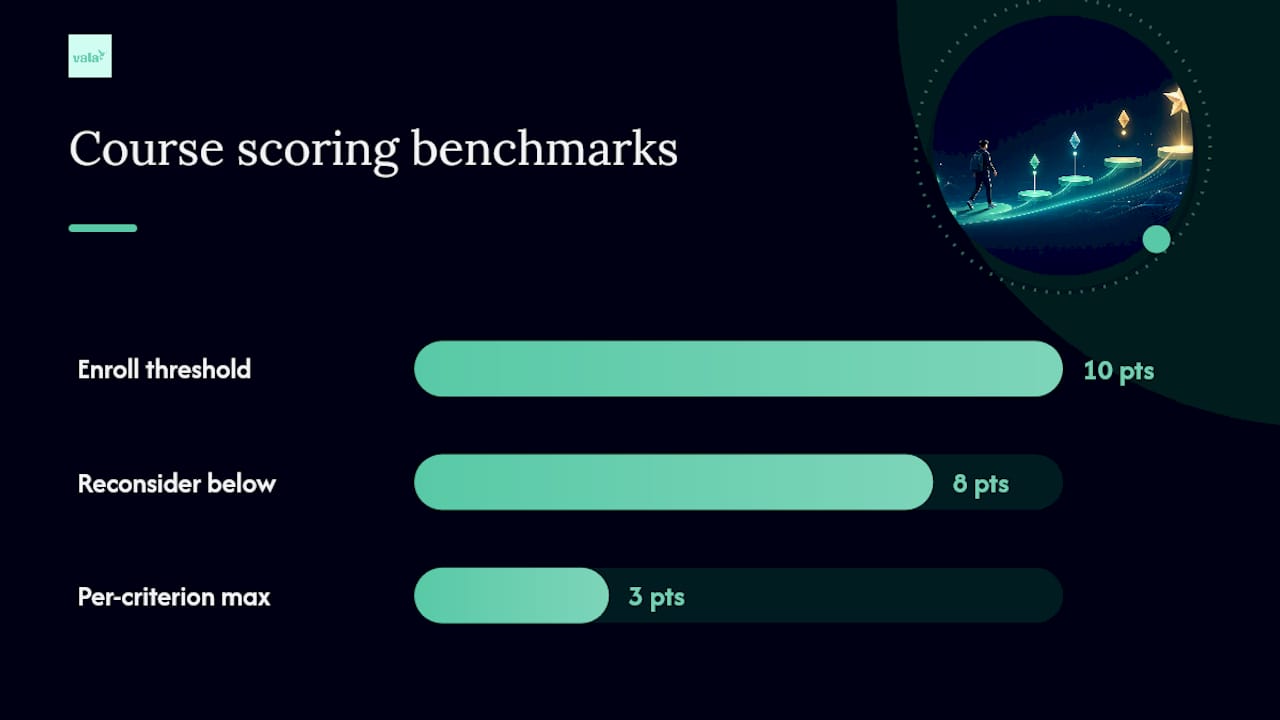
A simple scoring method: Rate each course you’re considering on four criteria — time fit, hands-on practice, instructor credibility, and review quality — using a 1–3 scale. Any course scoring 10 or above is worth enrolling in. Below 8, keep looking.
Experts recommend treating the first three months of budgeting as a test run, adjusting categories that consistently miss the mark rather than abandoning the process. Choose a course that gives you enough structure to run that experiment, not one that overwhelms you before you start.
What budget courses actually teach you
Most personal finance courses follow a similar module sequence, regardless of platform. Here’s what you can expect:
Common modules:
- Income and cash flow (what comes in, when, and how reliably)
- Expense categorization (fixed vs. variable, needs vs. wants)
- Emergency fund basics (how much, where to keep it)
- Debt payoff strategies (avalanche vs. snowball methods)
- Sinking funds for irregular expenses (car maintenance, annual subscriptions, holiday gifts)
- Automation setup (auto-transfers, bill pay, savings contributions)
- Weekly and monthly review routines
Budgeting methods you’ll encounter:
- 50/30/20: 50% to needs, 30% to wants, 20% to savings and debt. Good starting framework for most beginners.
- Zero-based budgeting: Every dollar gets assigned a job until income minus expenses equals zero. Teaches intentionality; requires more tracking effort.
- Envelope method: Cash or virtual envelopes for each spending category. Spending stops when the envelope is empty. Goodbudget 101 teaches this directly.
- Pay-yourself-first: Savings contribution comes out immediately after each paycheck; you spend what’s left. Works well for people who struggle with willpower.
The best method is the one you’ll actually maintain for at least three months. Personal preference matters more than technical elegance.
Typical course projects:
- Build a one-month zero-based budget from scratch
- Set up a sinking fund schedule for three to five irregular expenses
- Create a Google Sheets or Excel spending tracker
- Run a weekly 20-minute money check-in for four consecutive weeks
Consumer.gov’s budget worksheet is a practical starting point for the first project, and Fidelity’s allocation examples help you set realistic category targets before you fill in the numbers.
Free vs. paid budgeting courses: which one fits your situation
| Dimension | Free courses | Paid courses |
|---|---|---|
| Price | $0 | $10–$79+ (one-time or monthly) |
| Level | Mostly beginner | Beginner to intermediate |
| Duration | 1–3 hours | 4–40+ hours |
| Format | Self-paced reading/worksheets | Video modules, instructor-led, or cohort |
| Certificate | Rarely | Often (accredited on Coursera; completion-only on Udemy) |
| Hands-on practice | Worksheets only | Templates, graded projects, guided exercises |
| Tools required | None or printable | Google Sheets, Microsoft Excel |
When to choose free:
- You want to build basic habits before committing money to a course.
- You’re testing whether budgeting instruction works for your learning style.
- You don’t need a certificate.
When to choose paid:
- You want structured accountability and graded feedback.
- You need a certificate for a resume or career development.
- You want downloadable templates and lifetime access to revisit material.
Coursera offers financial aid on most paid specializations, which effectively makes them free for qualifying learners. Apply before you assume a course is out of budget.
On the certificate question: for personal finance skill-building, a completion certificate from Udemy carries no professional weight. A verified credential from a Coursera university partner carries more, but still doesn’t substitute for a CFP designation if you’re pursuing a career in financial advising. For most readers, the skills matter more than the paper.
Your 30-day plan to apply what you learn
Finishing a course is step one. Applying it is where the habit actually forms.
Week 1 — Set up:
- Complete your chosen course’s first two modules.
- Gather your last three pay stubs and two months of bank statements.
- Fill in a Consumer or download a free template from Valapoint’s free budget planner.
Week 2 — Track:
- Categorize every expense from the past 30 days into your budget categories.
- Identify your top three spending categories and compare them to your targets.
- Set up your Google Sheets or Excel tracker using your course template.
Week 3 — Adjust:
- Revise any category that was off by more than 20% in week two.
- Create one sinking fund for a predictable irregular expense (car insurance renewal, holiday gifts).
- Run your first weekly 20-minute money check-in.
Week 4 — Automate:
- Set up one automatic transfer to savings immediately after your next paycheck.
- Review recurring subscriptions and cancel any you haven’t used in 30 days.
- Schedule your monthly budget review as a recurring calendar event.
Tools to use:
- Google Sheets or Microsoft Excel: Build your tracker from your course template. Free and flexible.
- Washington State DFI worksheets: Free calculators and budgeting worksheets from a state financial regulator, useful for sinking fund planning.
- Valapoint’s personal finance tools: Calculators for budget, savings, and debt that complement course projects and help you set measurable goals.
- AI-assisted budgeting workflows: Practical examples of how automation reduces the manual tracking burden once your categories are set.
Pro Tip: Treat your first month as a data-collection experiment, not a performance test. Your goal is to learn what your actual spending looks like, not to hit every target perfectly. Use your course assignments to populate your tracking tool, so the work you do for the course becomes the foundation of a real, ongoing budget.
Experts consistently recommend treating the first three months as a test run and adjusting categories that miss the mark rather than scrapping the whole system. That mindset is what separates people who build lasting habits from people who try once and quit.
The part most budget courses don’t tell you
Most courses teach you the mechanics of budgeting correctly. Where they fall short is in preparing you for the psychology of it.

The real obstacle isn’t knowing what a sinking fund is. It’s the second month, when your numbers are still messy and you’re tempted to conclude that budgeting “doesn’t work for you.” Investopedia’s research shows that most budgets fail because they’re rigid or unrealistic, not because the person lacks discipline. That’s a design problem, not a character flaw.
The learners who make progress treat their budget like a draft document. They pick a method, run it for 90 days, and adjust what doesn’t fit rather than abandoning the whole thing. Consistency over three months matters far more than choosing the “right” method on day one. A zero-based budget you actually maintain beats a perfectly optimized spreadsheet you open twice.
Start small. One category, one week, one check-in. The habit compounds faster than you expect.
Pair your course with a tool that keeps you on track
Learning to budget is one thing. Keeping it going after the course ends is another. Valapoint’s Vala app is built for exactly that gap: it tracks your expenses automatically, surfaces spending patterns you’d miss in a spreadsheet, and sends reminders before bills hit. You can set up budget categories that mirror your course assignments, so the work you did in week one doesn’t disappear into a folder you never open again.

Vala’s free tier covers basic tracking and expense categorization. The paid plan adds AI-driven insights, recurring subscription review, shared expense splitting for couples or roommates, and savings goal tracking — features that turn course theory into a daily habit without extra effort. For learners who want to go further, Valapoint’s budget goal tracker connects your sinking funds and savings targets to real account data, so you can see progress in real time. A budgeting app supports your learning, but it doesn’t replace a structured course if you need guided instruction or a credential. Use both. Start tracking free with Vala and let your course give you the framework.
Sources
- How To Build a Monthly Budget That Actually Fits Your Life
- Budgeting 101: A Roadmap to Financial Success
- Making a Budget
- Best Budget Courses & Certificates 2026
This article is general information, not a substitute for advice from a qualified financial advisor. Consult a qualified financial professional about your own circumstances before acting on anything here.