The fastest fix for a stopped bank sync is to check the app’s last sync timestamp, confirm you can log into your bank directly, then run the app’s Update Login or Reauthorize flow with your multi-factor code ready. Most connections resume within 10 to 30 minutes. If the feed still won’t refresh, you’ll likely need to reconnect the account or import a statement manually.
TL;DR:
- Reauthorizing your bank connection routinely reactivates tokenized links, which are more reliable and less prone to breakage than older screen-scraping methods.
- Check your bank’s status and login success first before attempting to fix sync issues, ensuring the problem isn’t on the bank’s side.
- Reconnect accounts only after failed login attempts or errors persist despite reauthorization, and wait a few minutes to an hour for sync to resume.
- Export and import statements if reauthorization doesn’t recover missing history, and verify transactions by cross-checking recent activity and account balances.
- Using tokenized, API-based links combined with regular monitoring helps prevent future sync failures and reduces manual troubleshooting.
Table of Contents
- Step-by-step diagnostics to confirm what stopped syncing
- Exact reconnection steps to restore your feed
- Root causes behind most sync failures
- Fixing missing or duplicate transactions
- How to verify transactions after the fix
- Reducing future sync interruptions
- What to include when you contact support
- Where this troubleshooting guidance comes from
- Why tokenized connections are worth prioritizing
- How Vala helps you stay ahead of sync problems
- Sources
- FAQ
Step-by-step diagnostics to confirm what stopped syncing
Before you touch any settings, figure out where the problem actually lives. It could be your app, your bank, or an expired login. A few minutes of checking saves you from repeating fixes that were never going to work.
- Open your app and find the last successful sync timestamp, plus any error code or feed status flag next to the account.
- Visit your bank’s website or status page to check for scheduled maintenance or a reported outage.
- Try logging into your bank’s site or app directly to confirm your credentials work and watch for a new MFA prompt.
- Write down the exact error text, the account name, and the last transaction you expected to see before you change anything.
Pro Tip: Screenshot the error message before you retry the connection. Support teams resolve tickets faster when they can see the exact wording instead of your description of it.
If your bank’s site logs you in without issue, the problem sits with the sync connection itself, not your credentials. That points you straight to the reconnection steps below instead of a password reset that won’t help.
Exact reconnection steps to restore your feed
Once you know the bank side works, walk through these fixes in order. Skipping ahead to disconnect and reconnect first often causes more cleanup than it saves.
- Open your finance app’s Update Login or Fix Connection flow and re-enter your credentials, including any MFA code your bank sends.
- If your app uses a tokenized or OAuth connection, use its reauthorize button rather than typing your password anywhere outside your bank’s own login screen.
- Only disconnect and reconnect the account if Update Login fails twice. Disconnecting can remove custom category rules or manual transaction mappings, so note those first.
- After reconnecting, wait before panicking. Syncs typically resume within a few minutes, though some connections take up to an hour.
Pro Tip: Reauthorize as soon as your app asks, even if nothing seems broken yet. Waiting days to respond to a reauthorization prompt is one of the most common reasons feeds go stale.
Root causes behind most sync failures
Bank feeds break for a small, repeatable set of reasons, and knowing which one applies keeps you from cycling through fixes that don’t match the problem.
- Tokens and permissioned access expire on a schedule; reauthorizing is routine security hygiene, not a sign something went wrong.
- Banks updating their login flow or adding a new CAPTCHA can break older screen-scraping connections overnight.
- Scheduled maintenance or a temporary outage on the bank’s side pauses feeds until service resumes.
- Repeated failed login attempts can trigger a temporary security lockout, so follow your bank’s guidance on wait times instead of retrying immediately.
The CFPB’s finalized personal financial data rights rule requires data providers to share account information in standardized, machine-readable formats and phases out screen scraping as an acceptable access method. That shift is a major reason older sync methods break more often than newer, token-based ones.
Fixing missing or duplicate transactions
Sync failures often leave gaps or duplicates behind, and cleaning those up takes a specific order of operations to avoid losing history.
- Check whether missing transactions were condensed or purged by your software’s maintenance tools. The IRS advises keeping a full, non-condensed backup before running any condense or purge feature, since those files can strip out the transaction-level detail you need for reconciliation.
- When reauthorization doesn’t pull in older transactions, export a statement directly from your bank and import it as a CSV or OFX file.
- Match by date, amount, and memo to catch duplicates created during the import.
- Export a backup of your current data before deleting anything, and use your app’s import-preview screen if it has one to catch conflicts first.
How to verify transactions after the fix
Once the connection is back, don’t assume everything caught up correctly. A quick check now beats a reconciliation headache later.
- Compare your app’s last sync timestamp against your bank’s own transaction list for the same date range.
- Spot-check a handful of recent transactions for the right amount, date, and payee.
- If anything’s missing, export the bank statement for that date range and import it using your app’s recommended file format.
- Confirm account mapping and category rules before finalizing the import so duplicates don’t slip through. The Vala blog covers this process in more detail in its guide to importing bank transactions automatically.
- Keep a short log of what you tried and when, with screenshots, in case you need to escalate to support later.
Reducing future sync interruptions
A little routine maintenance keeps most feeds running without drama.
- Choose tokenized or OAuth connections over older screen-scraping links whenever your bank and app both support it.
- Turn on app notifications and any bank alerts for third-party access changes or failed sync attempts.
- Set a weekly five-minute check: confirm the last sync date, back up your data, and sample a few transactions for accuracy.
- Keep support contact details for both your bank and your finance app somewhere handy, not buried in an old email.
Pro Tip: Treat a “please reauthorize” prompt as routine maintenance, not a red flag. Tokenized connections are designed to expire and refresh, which is part of what keeps them secure. For more on how tokenized linking works, see Vala’s explainer on securely linking multiple bank accounts.
What to include when you contact support
A well-documented support request gets resolved faster than a vague one, whether you’re contacting your finance app or your bank.
- The exact error message, the last successful sync time, and the specific account affected.
- Every step you already tried, in order, so support doesn’t ask you to repeat them.
- Screenshots or exported logs if your app generates them.
- Whether the issue is affecting anything time-sensitive, like a missing deposit or an unreconciled bill payment, so support can prioritize accordingly.
If your finance app uses a developer interface to connect with your bank, your bank’s support team may be able to confirm whether that specific interface is experiencing problems.
Where this troubleshooting guidance comes from
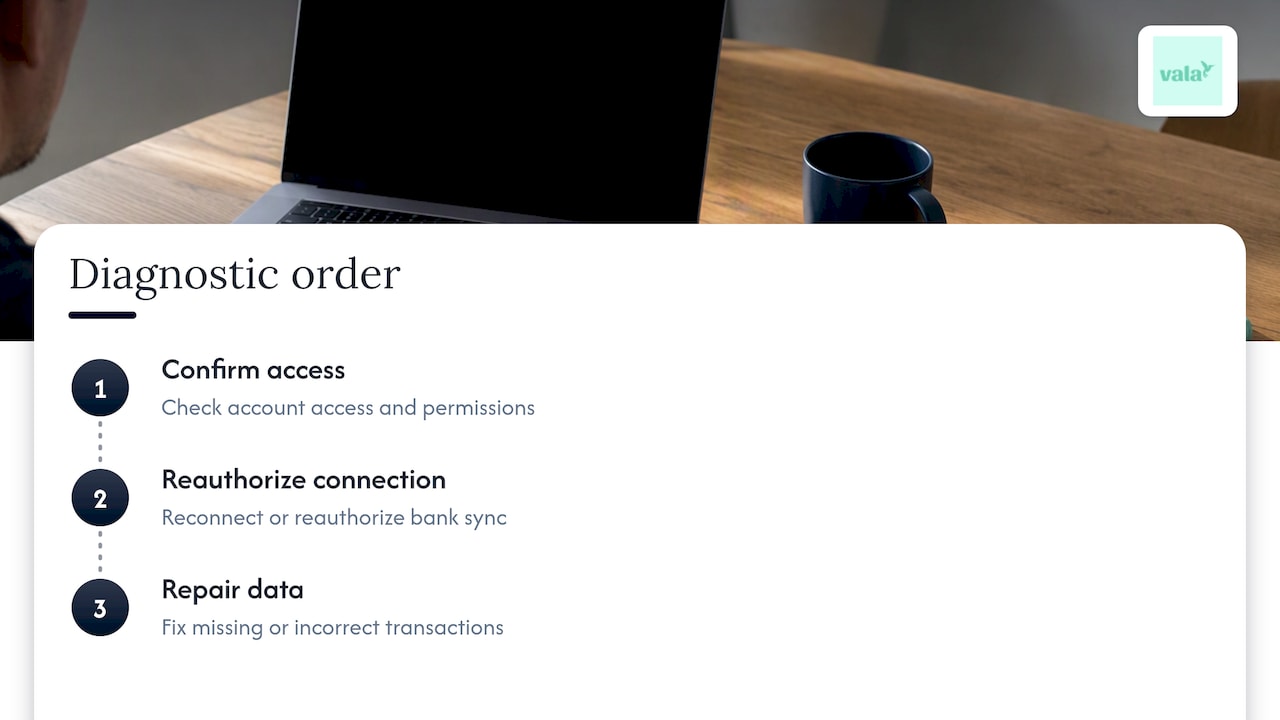
This walkthrough follows the same diagnostic order SaverStride and the Vala team use when readers report broken feeds: confirm access, reauthorize, then repair data. For related how-tos, see Vala’s guides on importing bank transactions automatically and keeping your budgeting app secure.
Why tokenized connections are worth prioritizing
Tokenized, API-based connections turn reauthorization into routine housekeeping instead of a security scare, since no password ever changes hands. Standards like FDX and the CFPB’s data rights rule are pushing the whole industry toward this model because it’s more reliable and more transparent about what data moves where.
— SaverStride
How Vala helps you stay ahead of sync problems

Vala uses secure, tokenized bank connections and monitors your feeds in real time, so a broken sync shows up before it costs you a missed bill or a hidden fee. Running a Money Leak Check flags the kind of gaps that a stalled feed can hide.
| What you get | Why it matters |
|---|---|
| Secure, tokenized bank linking | Fewer password resets, fewer broken connections |
| Real-time feed monitoring | Catch a stopped sync before it hides a missed payment |
| Money Leak Check | Surfaces recurring charges and gaps a bad sync can mask |
| SaverPro plan | Full-featured tracking and insights beyond the free tier |
Run a free Money Leak Check to see what your current feed might be missing, or check out SaverPro for the full toolkit.
Sources
This guide draws on IRS guidance on backups, the CFPB’s final rule and executive summary on data rights, and FDX’s background on tokenized API access.
- Use of electronic accounting software records: Frequently asked questions and answers | IRS
- Notice of Final Rulemaking – Required Rulemaking on Personal Financial Data Rights | CFPB
FAQ
What is the $3,000 rule for banks?
There’s no universal rule tied to bank syncing or account access; such figures typically come up in unrelated contexts like currency transaction reporting. If you’ve seen any specific thresholds mentioned for your bank or app, check that source directly since it isn’t a standard sync or connectivity limit.
How do I sync my bank account?
Open your finance app, choose your bank from its connection list, and log in with your online banking credentials, including any MFA step your bank requires. Once linked, most apps sync automatically on a schedule, though you can usually trigger a manual refresh from the account settings screen.
Why isn’t my bank transfer coming through?
A delayed transfer is often separate from a sync error. It can reflect your bank’s own processing time, a holiday delay, or a hold rather than a problem with your finance app’s connection. Check your bank’s transfer status directly before assuming your tracking app is at fault.
Why can’t I see all my transactions?
Missing transactions usually come from a stalled sync, an expired login token, or older items your software condensed during routine maintenance. Reauthorizing the connection and checking your last sync timestamp resolves most cases; for older missing history, the IRS recommends restoring from a full backup rather than relying on a condensed file.