
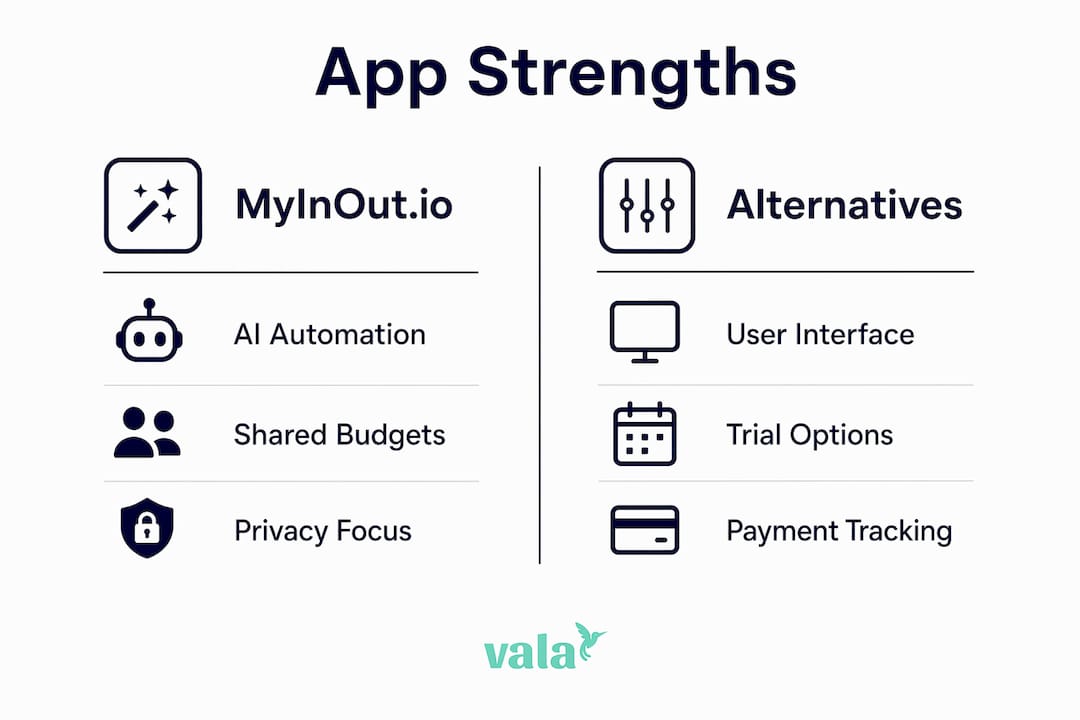
The best MyInOut.io alternatives right now are Vala, YNAB, Monarch Money, Copilot, Goodbudget, and Mint. If you want AI-driven insights with shared pockets, start with Vala or Monarch Money. If you prefer envelope-style discipline, Goodbudget or YNAB fit better. Privacy-first users who want full data ownership should look at open-source options before committing to any SaaS app.
Quick picks by user type:
- AI automation + collaboration (couples/families): Vala or Monarch Money
- Strict envelope budgeting: YNAB or Goodbudget
- Polished iOS experience with smart categorization: Copilot
- Free, simple tracking (no frills): Mint
- Privacy-first / data ownership: Open-source self-hosted tools
More than 70% of users abandon finance-tracking apps within the first month. The apps that beat that curve share one trait: they surface small, personalized actions rather than just logging data passively. That’s the lens to use when evaluating any MyInOut.io substitute.
Pro Tip: When searching app stores for MyInOut.io alternatives, verify package IDs carefully — “My InOut” name collisions with unrelated time-tracking tools are common.

Table of Contents
- How do the top MyInOut.io alternatives compare?
- Short profiles: what each app actually does well
- How to choose the right MyInOut.io alternative for your needs
- Why Vala stands out as a MyInOut.io alternative
- What trial periods and demos are available?
- Key Takeaways
- What most people get wrong when switching finance apps
- Vala is worth trying if you want clarity without the complexity
- Useful sources and official resources
How do the top MyInOut.io alternatives compare?
| App | Best for | Free tier | Bank sync | AI / automation | Collaboration | Platforms | Privacy / export |
|---|---|---|---|---|---|---|---|
| Vala | Couples, groups, AI insights | Yes | Yes, multi-account | AI insights, auto-categorization, spending patterns | Shared pockets, group splits | iOS, Android, Web | Data export; no self-host |
| YNAB | Strict zero-based budgeters | 34-day trial | Yes | Rule-based automation | Shared budgets (couples) | iOS, Android, Web | CSV export |
| Monarch Money | Households wanting full financial picture | No (paid only) | Yes, strong | AI spending insights, net worth tracking | Shared accounts, multi-user | iOS, Android, Web | CSV export |
| Copilot | iOS-first power users | 30-day trial | Yes, strong | AI categorization, smart rules | Limited (partner view) | iOS, Web | CSV export |
| Goodbudget | Envelope budgeters, no bank sync needed | Yes (limited) | No (manual entry) | None | Shared envelopes across devices | iOS, Android, Web | CSV export |
| Mint | Free, basic tracking | Free | Yes | Basic auto-categorization | None | iOS, Android, Web | Limited export |
Dimension winners at a glance:
- Best bank sync: Monarch Money or Copilot
- Best for shared budgets: Vala or Monarch Money
- Best free tier: Vala or Goodbudget
- Best AI automation depth: Vala or Copilot
- Best for privacy / data control: YNAB or Goodbudget (manual entry = no third-party sync)
Pricing shapes vary widely. YNAB runs around $14.99/month (or $99/year). Monarch Money is roughly $14.99/month. Copilot is around $13/month. Goodbudget’s free tier covers 20 envelopes; the Plus plan is about $10/month. Mint is free. Vala offers a free tier with a paid upgrade for full AI features.
Short profiles: what each app actually does well

Vala
Vala is an AI-powered expense tracker built for individuals, couples, and groups who want more than a ledger. It tracks spending automatically, splits group costs, and surfaces hidden financial patterns you’d otherwise miss. The shared pockets feature makes it genuinely useful for households managing money together, not just solo budgeters.
- Pros: Real-time AI insights, group cost splitting, multi-account sync, clean mobile UI
- Cons: Newer app; ecosystem integrations still growing
- Platforms: iOS, Android, Web
- Free tier: Yes
Pro Tip: Connect all your accounts in the first session. Vala’s AI needs at least two weeks of transaction history to start surfacing meaningful spending patterns.
YNAB (You Need A Budget)
YNAB is built around zero-based budgeting: every dollar gets a job before you spend it. It’s the most disciplined system on this list, and it works well for couples who share a budget login. The learning curve is real, but users who stick past the first month tend to stay for years.
- Pros: Proven methodology, strong community, reliable bank sync, CSV export
- Cons: No free tier after trial; methodology requires active engagement
- Platforms: iOS, Android, Web
- Paid plan: ~$14.99/month or ~$99/year
Monarch Money
Monarch Money gives households a full financial picture: spending, net worth, investments, and goals in one place. Multi-user access is genuinely built in, not bolted on. It’s the strongest option if you and a partner want to see everything together without workarounds.
- Pros: True multi-user collaboration, strong bank sync, net worth tracking
- Cons: No free tier; higher monthly cost
- Platforms: iOS, Android, Web
- Paid plan: ~$14.99/month
Pro Tip: Use Monarch Money’s “rules” engine to auto-tag recurring transactions on day one. It cuts manual cleanup significantly.
Copilot
Copilot is an iOS-first app with some of the sharpest AI categorization available. It learns your habits quickly and lets you build custom rules. The tradeoff: it’s Apple-only (no Android), and shared access is limited to a partner view rather than full collaborative budgeting.
- Pros: Excellent AI categorization, polished design, strong bank sync
- Cons: iOS/Mac only; limited collaboration
- Platforms: iOS, Web (Mac)
- Paid plan: ~$13/month
Goodbudget
Goodbudget skips bank sync entirely and uses the envelope budgeting method with manual entry. That sounds like a limitation, but it’s actually a privacy feature: no third-party access to your accounts. Shared envelopes sync across devices, making it solid for couples who prefer hands-on tracking.
- Pros: No bank sync required (privacy), shared envelopes, cross-platform
- Cons: Manual entry only; no AI features
- Platforms: iOS, Android, Web
- Free tier: Yes (20 envelopes)
For users who also need lightweight payment tracking alongside budgeting, it’s worth checking whether managing payments without spreadsheets fits your workflow before adding a separate tool.
Mint
Mint is the simplest free option. It connects accounts, auto-categorizes transactions, and shows spending trends. It’s not built for collaboration or deep AI insights, but it covers the basics at zero cost. Worth trying if you just want visibility without committing to a paid plan.
- Pros: Free, easy setup, decent bank sync
- Cons: No collaboration, minimal AI, limited export
- Platforms: iOS, Android, Web
- Free tier: Yes (fully free)
How to choose the right MyInOut.io alternative for your needs
The right app depends on three things: how you manage money (solo vs. shared), how much automation you want, and whether you’re comfortable linking bank accounts. Work through these questions before your trial.
Decision checklist:
- Do you share finances with a partner or household? Prioritize Vala or Monarch Money.
- Do you want AI to surface insights automatically, or do you prefer manual control? AI-first: Vala or Copilot. Manual: Goodbudget or YNAB.
- Is data privacy a hard requirement? Consider Goodbudget (no sync) or a self-hosted open-source tool.
- Do you need cross-platform (iOS + Android)? Rule out Copilot.
- Do you want a free tier with no expiration? Vala, Goodbudget, or Mint.
- How important is CSV export and data portability? Check this before you commit.
Your 7–14 day trial plan:
- Connect at least two accounts on day one and let auto-categorization run for 48 hours.
- On day three, review the categories and correct any errors to train the AI.
- By day five, set up one shared pocket or envelope if collaboration matters to you.
- On day seven, test the CSV export. If it’s missing or locked behind a paywall, that’s a signal.
- By day ten, check whether the AI has surfaced any spending insight you didn’t already know.
- On day fourteen, assess: are you opening the app daily, or did you forget it existed?
Red flags to watch for:
- No data export or export locked to the highest tier
- Bank sync that breaks more than once per week
- Shared access that requires sharing a single login (not true multi-user)
- Pricing that changes after the trial without clear notice
- No way to delete your account and data permanently
For a broader expense tracking comparison before you install, that checklist approach applies across all the apps listed here.
Why Vala stands out as a MyInOut.io alternative
Vala’s core positioning is straightforward: AI-driven personal finance with collaborative pockets, real-time tracking, and automation that works without requiring you to change how you spend. It’s built for the same user MyInOut.io targets, with deeper collaboration and more actionable AI output.
Feature highlights mapped to the comparison dimensions:
- AI automation: Automatic categorization, spending pattern detection, and personalized insights surfaced daily
- Collaboration: Shared pockets for couples, families, and groups; group cost splitting built in
- Bank sync: Multi-account connection across checking, savings, and credit
- Platforms: iOS, Android, and Web, so nothing is locked to one device
- Export / privacy: Data export available; no requirement to share credentials beyond standard Open Banking connections
How to run a 7-day Vala test:
- Sign up and connect one primary account.
- Let the AI categorize your last 30 days of transactions.
- Create one shared pocket with a partner or household member.
- Check the AI insights panel daily for one week.
- Export your data on day seven to confirm portability.
Pro Tip: Check Valapoint’s budgeting app comparison to see how Vala’s AI features stack up against the broader field before you sign up.
What trial periods and demos are available?
Most of the apps on this list offer a way to test before paying. Here’s what to expect:
- Vala: Free tier available with no time limit; paid AI features accessible on upgrade
- YNAB: 34-day free trial, no credit card required at sign-up
- Monarch Money: No free tier; paid subscription starts immediately, but a refund window applies
- Copilot: 30-day free trial on iOS
- Goodbudget: Free tier with 20 envelopes, no trial expiration
- Mint: Fully free, no trial needed
The 34-day YNAB trial is notably generous because it covers a full budget cycle plus a few days of adjustment. Copilot’s 30-day window is enough to evaluate its AI categorization properly. For Monarch Money, check the current refund policy before subscribing since there’s no free tier to fall back on.
Key Takeaways
The best MyInOut.io alternative depends on your top priority: AI automation, shared budgets, or data privacy — and the right pick becomes clear once you run a structured 7–14 day trial.
| Point | Details |
|---|---|
| AI automation matters most | Apps with personalized AI micro-actions keep users engaged past the 70% 30-day drop-off point. |
| Collaboration needs a real multi-user build | Shared pockets or true multi-user access (not shared logins) are the key test for couples and families. |
| Privacy tradeoff is real | No-sync apps like Goodbudget protect your data; SaaS apps with bank sync offer more automation but require trust in the provider. |
| Trial the export on day seven | If CSV export is locked or missing, switching later becomes painful — test it early. |
| Vala covers the full range | Vala combines AI insights, shared pockets, and multi-platform sync with a free tier, making it a direct starting point for MyInOut.io users. |
What most people get wrong when switching finance apps
The most common mistake isn’t picking the wrong app. It’s setting up too much at once. Users who connect every account, create ten budget categories, and invite three household members on day one almost always abandon the app by week two. The setup feels productive, but the cognitive load kills the habit.
The smarter move: connect one account, let the AI run for a week, and add complexity only after the daily check-in feels natural. This is exactly what the data on more than 70% abandonment within the first month points to. The apps that retain users longest are the ones that reduce friction in the first week, not the ones with the most features.
A second pitfall is mixing personal and small-business transactions in the same pockets. It feels convenient until tax time, when untangling the two costs more time than the convenience saved. Keep them separate from day one, even if that means two apps or two accounts within the same app.
Finally, ignoring the export function until you want to leave is a trap. Test it during the trial. If the data isn’t portable, you’re not a user — you’re a subscriber with no exit.
Pro Tip: For crowdsourced takes on which apps actually stick long-term, the Reddit-sourced app reviews on the Valapoint blog surface patterns that app store ratings miss.
Vala is worth trying if you want clarity without the complexity
Every app on this list solves a real problem. But if you want AI-driven insights, shared pockets for your household, and a free starting point that doesn’t require a credit card, Vala is the most direct path from MyInOut.io.

Here’s what your first seven days look like: connect one account, let Vala’s AI categorize your recent transactions, and set up a shared pocket if you manage money with someone else. By day seven, you’ll have a clear picture of where your money actually goes, not where you think it goes. The personal finance app is free to start, and your data stays exportable from day one. No long-term commitment required. If you want to go deeper before signing up, the personal finance tools page covers the full feature set including calculators and goal tracking.
Useful sources and official resources
| Source | Why it’s useful |
|---|---|
| MyInOut.io — Official site | Feature verification and official app description for MyInOut.io |
| My InOut on Google Play | Official Android listing for confirmed features: multi-pocket, receipt scanning, shared pockets |
| My InOut on the App Store | iOS listing confirming quick entry, receipt scanning, and cross-platform availability |
| OpenInstead — open-source alternatives index | Index of self-hosted and open-source finance tools for privacy-first users |
| Insteadly — app alternatives directory | Community-reviewed alternative app listings with voting and comparison features |
| Routin developer insight on abandonment | Developer data on more than 70% 30-day app abandonment; supports the case for AI micro-actions |