Why Group Financial Planning Matters for Ages 20–40

Group financial planning is defined as a coordinated approach where two or more people align their money decisions, shared expenses, and long-term goals together rather than in isolation. Why group financial planning matters becomes clear fast: families who engage in collaborative financial planning report 62% less financial stress and are three times more confident in their financial future. That kind of result does not come from budgeting harder alone. It comes from planning together. Whether you share rent with roommates, split bills with a partner, or save toward a family vacation, coordinated planning produces outcomes that solo management simply cannot match.

What are the core benefits of group financial planning?

Group financial planning produces measurable advantages across emotional, practical, and long-term financial dimensions. The most direct benefit is stress reduction. When everyone in a household or group understands the shared financial picture, anxiety drops because uncertainty drops.

Couples who combine finances for shared goals like housing, vacations, and retirement report significantly higher satisfaction than those who manage money separately. That satisfaction comes from alignment, not just pooled income. When two people are working toward the same target, every dollar feels purposeful.

Couple coordinating shared finances at kitchen table

The importance of group financial planning also shows up in conflict prevention. Transparent shared budgets remove the guesswork about who paid what and who owes whom. That clarity stops resentment before it starts. A shared expense tracker, for example, makes it obvious when one person consistently covers more than their share.

Key benefits of collaborative financial management include:

  • Reduced financial stress. Shared visibility into group finances lowers anxiety for every member.
  • Aligned priorities. Group planning forces conversations that surface competing goals early, before they become arguments.
  • Better coverage of shared expenses. Groceries, utilities, rent, and eldercare costs get assigned clearly rather than falling through the cracks.
  • Stronger long-term outcomes. Coordinated group planning aligns all financial decisions to shared objectives, preventing individual choices from undermining group goals.
  • Estate and emergency preparedness. Groups that plan together are more likely to address insurance, wills, and emergency funds as a unit.

The team financial planning benefits extend beyond money. Regular financial conversations build communication habits that strengthen relationships across the board.

How do group financial planning frameworks actually work?

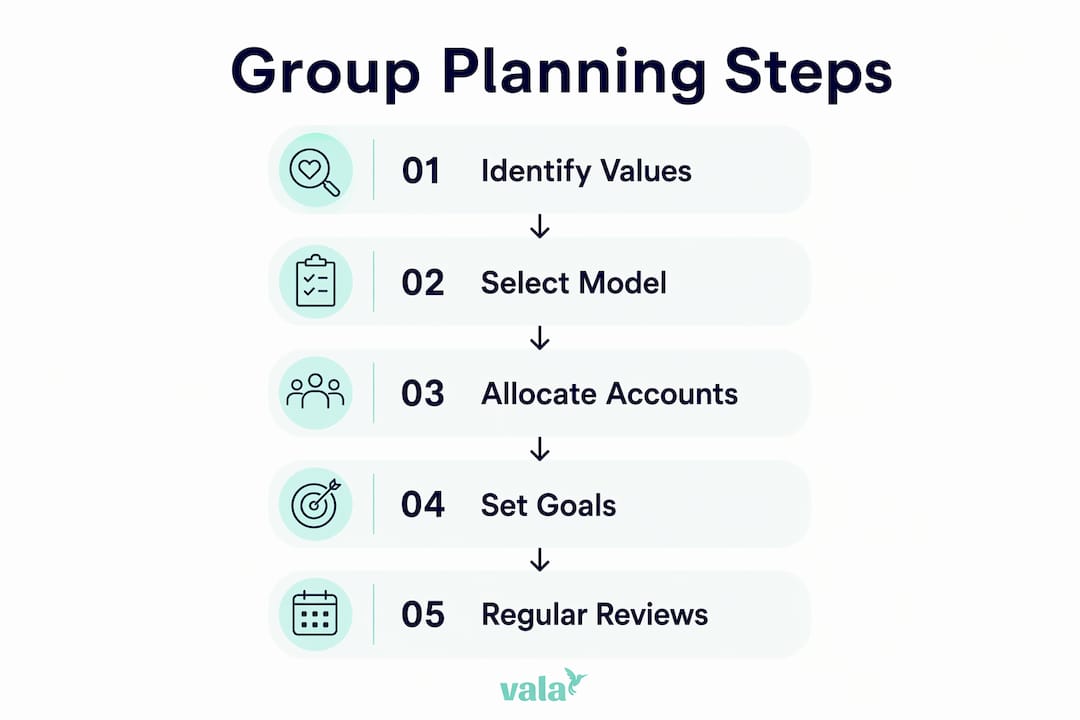
Two frameworks stand out for young adults building collaborative financial habits: the three-account model and family mapping.
Infographic illustrating group financial planning process

The three-account model

The three-account structure divides finances into “yours,” “mine,” and “ours.” Each person keeps a personal account for individual spending. A shared account covers joint expenses like rent, groceries, and utilities. This model is more sustainable than merging all finances immediately. It preserves individual autonomy while creating a clear, functional system for shared costs.

Account Purpose Who contributes
Yours Personal spending, individual savings Individual only
Mine Personal spending, individual savings Individual only
Ours Rent, groceries, utilities, shared goals Both or all members

This structure works for couples, roommates, and even adult siblings sharing a household. The “ours” account becomes the operational center of the group’s financial plan.

Family mapping from Fidelity

Family mapping is a concept developed by Fidelity that visualizes financial connections across group members over time. It helps a group see how one person’s financial decision affects everyone else. For example, if one roommate takes on significant debt, that affects the group’s ability to save for a shared security deposit on a new apartment. Mapping makes those ripple effects visible before they cause problems.

Pro Tip: Before any numbers discussion, have each group member write down their top three money values. Security, freedom, generosity, and adventure are common answers. Mismatched values cause more financial conflict than mismatched incomes.

Recurring review meetings are the third pillar of effective group financial strategies. Regular check-ins on a quarterly or biannual schedule keep the plan current as life changes. A job change, a new roommate, or a planned move all require the group to revisit and adjust. Without scheduled reviews, even a well-built plan drifts out of sync with reality.

What common challenges arise in group financial planning?

The most common mistake groups make is skipping the values conversation and jumping straight to numbers. A technically sound budget fails when one person feels their priorities were ignored. Emotional buy-in is not optional. It is the foundation that keeps a plan working when circumstances get difficult.

A second challenge is premature full financial merging. Moving too fast into a single shared account, without establishing individual boundaries, creates friction. One person may feel monitored. Another may feel their spending habits are being judged. The three-account model exists precisely to solve this problem.

Here are the four most effective ways to avoid group financial planning pitfalls:

  1. Discuss money values before money amounts. Ask each member what financial security means to them personally. This surfaces assumptions that would otherwise cause conflict later.
  2. Schedule non-negotiable review meetings. Put them on the calendar like any other commitment. Monthly or quarterly works for most groups. The frequency matters less than the consistency.
  3. Assign clear financial roles. Decide who tracks shared expenses, who initiates bill payments, and who monitors the shared account balance. Ambiguity creates resentment.
  4. Use transparent tools. Apps that show real-time shared balances and expense histories remove suspicion. When everyone can see the same data, accusations of unfairness drop sharply.

Pro Tip: Set a “financial floor” rule for your group: any individual purchase above a set amount (say, $200) that affects shared finances gets discussed before it happens. This one rule prevents most major conflicts.

Proactive expectation-setting around shared expenses like groceries, utilities, and eldercare prevents financial instability and household conflict. Groups that define these expectations upfront spend far less time arguing about money later.

Which tools support effective group financial planning for young adults?

Digital tools are the practical backbone of effective group financial management. The right app removes the friction of tracking shared expenses manually and gives every group member real-time visibility into the shared financial picture.

Valapoint’s Vala app is built specifically for this use case. It supports expense tracking, shared budgeting, bill splitting, and goal tracking in one place. You can split shared expenses clearly among roommates, partners, or family members without spreadsheets or awkward conversations about who owes what.

Key features to look for in any group financial planning tool:

  • Real-time expense tracking. Every member sees transactions as they happen, not at the end of the month.
  • Bill splitting with clear records. The app should show who paid, what for, and what each person owes.
  • Shared goal tracking. A vacation fund or emergency fund should be visible to all contributors so everyone stays motivated.
  • Spending pattern analysis. Tools that surface hidden spending habits help groups identify financial leaks before they compound.
Tool feature Why it matters for groups
Real-time shared balance Prevents overspending and reduces check-in friction
Expense categorization Clarifies where shared money actually goes
Bill split history Creates an auditable record that prevents disputes
Goal progress tracker Keeps all members engaged and accountable

Valapoint also offers a budget goal tracker that lets groups set savings targets and monitor progress together. For young adults saving toward a first home, a group trip, or a shared emergency fund, that shared visibility is a direct motivator. You can also explore financial planning tools designed specifically for the 18–45 age group to find the right fit for your situation.

Choosing the right tool comes down to two factors: how tech-comfortable your group is and how complex your shared finances are. A couple splitting rent needs less than a four-person household managing utilities, groceries, and a shared car payment. Start with the simplest tool that covers your actual shared expenses, then add features as your group’s needs grow.

Key Takeaways

Group financial planning reduces stress, prevents conflict, and builds long-term financial confidence by aligning shared goals, establishing clear roles, and maintaining regular communication across all group members.

Point Details
Stress drops with collaboration Groups that plan together report 62% less financial stress than those who manage finances separately.
Use the three-account model Separate “yours,” “mine,” and “ours” accounts balance individual autonomy with shared financial responsibility.
Values before numbers Discuss money values first to build emotional buy-in before setting any shared budget or savings target.
Schedule regular reviews Quarterly or biannual check-ins keep the plan current as income, expenses, and group circumstances change.
Use transparent digital tools Real-time expense tracking and bill-splitting apps reduce disputes and keep every member accountable.

The shift I keep seeing in how young adults handle money

The most underrated change in personal finance right now is not a new app or a new investment strategy. It is the growing willingness of people in their 20s and 30s to talk openly about money with the people they live and plan alongside.

For years, the cultural norm was to keep finances private, even from close partners. That norm produced a lot of technically independent people who were quietly stressed, resentful, and financially misaligned with the people they shared their lives with. Wealth decisions are interconnected. Uncoordinated plans risk sabotaging long-term goals, even when each individual plan looks fine on its own.

What I find most encouraging is that the fix is not complicated. Groups that start with a simple shared account and a monthly 20-minute check-in make real progress. They do not need a financial advisor on day one. They need a shared commitment to transparency and a tool that makes the numbers easy to see.

The emotional clarity that comes from knowing your group is on the same page is genuinely undervalued. It changes how you spend, how you save, and how you talk about money. Start simple. Build the habit. The financial results follow.

— SaverStride

How Valapoint makes group financial planning practical

Managing shared finances gets much easier when you have one clear place to track everything. Valapoint’s Vala app gives couples, roommates, and families the tools to split costs, set shared goals, and monitor spending together in real time.
https://valapoint.com

With Vala, you can track every shared expense, see who owes what, and watch your group’s savings goals grow without chasing anyone for updates. The app’s AI-powered spending insights also surface patterns you would not catch manually, so your group can fix financial leaks before they add up. Try Vala’s personal finance app to bring your group’s financial plan to life with tools built for the way you actually manage money today.

FAQ

What is group financial planning?

Group financial planning is a coordinated process where two or more people align their shared expenses, savings goals, and financial decisions together. It applies to couples, roommates, families, and any group managing money collectively.

Why does financial collaboration reduce stress?

Families and groups that plan collaboratively report 62% less financial stress compared to those managing finances individually. Shared visibility into finances removes uncertainty, which is the primary driver of money-related anxiety.

What is the three-account model in group financial planning?

The three-account model uses separate “yours,” “mine,” and “ours” accounts to balance individual autonomy with shared financial responsibility. The joint account covers shared expenses while personal accounts preserve individual spending freedom.

How often should a group review its financial plan?

Groups should review their shared financial plan at least quarterly or biannually. Regular check-ins keep the plan aligned with changes in income, expenses, and group circumstances.

What app works best for tracking shared group expenses?

Valapoint’s Vala app supports real-time expense tracking, bill splitting, and shared goal monitoring for couples, roommates, and families. For a broader comparison of options, the shared budget guide on Valapoint covers methods and tools in detail.


Types of Shared Household Expense Categories Explained

Shared household expense categories are classifications that group recurring and one-time costs by type so roommates can divide them fairly and track them clearly. Without a clear system, even close friends end up arguing over who owes what for paper towels or a streaming subscription. The good news is that expense categories are a proven framework, and applying them to shared living is straightforward once you know the main types. Tools like Splitwise, Venmo, and Valapoint make the process faster, but the categories themselves are the foundation.

1. What are the major types of shared household expense categories?

Shared household costs fall into six core groups. Shared categories typically include utilities, internet, rent, cleaning supplies, pantry staples, and common subscriptions. Personal expenses like individual groceries and toiletries stay outside the shared pool.

Here is a breakdown of each category:

  • Rent or mortgage. The largest and most predictable shared cost. It is emotionally loaded, so agreeing on the split method before move-in prevents resentment later.
  • Utilities. Electricity, gas, water, and trash collection. These fluctuate monthly, so flexible agreements work better than fixed amounts.
  • Internet and cable. A flat monthly bill that is easy to split equally since everyone uses it.
  • Household supplies. Cleaning products, toilet paper, dish soap, and trash bags. These benefit everyone and are a clear shared cost.
  • Shared pantry staples. Cooking oil, salt, coffee, and condiments that the whole household uses. Individual specialty items stay personal.
  • Repairs and maintenance. Unexpected costs like a broken appliance or a plumbing fix. These require a group decision before spending.
  • Common subscriptions. Shared streaming services, music apps, or a shared meal kit delivery. Only count services the whole household agreed to share.
  • Discretionary shared items. Party supplies, shared décor, or a group dinner. These are optional and should be agreed on in advance.

Pro Tip: Write down every shared category and each person’s responsibility before anyone moves in. A written list, even a simple one in Google Docs, cuts disputes by making expectations explicit.

2. How different splitting methods apply to each expense category

Hands writing shared expense checklist

The four most common methods for fair expense splitting are equal 50/50 splits, proportional splits, category splits, and shared spending pools. Each method fits certain expense types better than others.

Equal split. Works best for internet, streaming subscriptions, and household supplies where usage is roughly the same for everyone. Two roommates with similar incomes can apply this to rent as well.

Proportional split. Ties each person’s share to their income or usage. A roommate earning twice as much might pay 60% of rent. This method fits rent and utilities in households with noticeable income gaps.

Category split. Each person owns a specific bill entirely. One roommate pays internet, another pays the electric bill, and they balance out over time. This works well for couples or two-person households where bills are roughly equal in size.

Shared spending pool. Everyone contributes a fixed amount monthly to a joint account or app wallet. The pool covers household supplies, repairs, and shared pantry items. This method reduces the need to track every small purchase individually.

Here is how to match the method to the expense type:

  1. Rent. Use an equal or proportional split. Decide before signing the lease.
  2. Utilities. Use an equal split for simplicity or a usage-based split if one person works from home and uses more power.
  3. Internet. Equal split. No one uses it more than anyone else in a meaningful way.
  4. Household supplies. Use a shared spending pool. Tracking individual paper towel purchases creates unnecessary friction.
  5. Shared pantry. Use a shared spending pool or rotate who buys basics each month.
  6. Repairs. Equal split unless one person caused the damage. Agree on this rule in writing upfront.
  7. Subscriptions. Equal split among those who use the service.

Pro Tip: Put expense agreements in writing and include due dates for each bill. A simple shared note or a roommate agreement template from a site like Experian covers the basics.

3. Common challenges and gray areas in shared household expenses

The hardest part of managing shared household costs is not the math. It is deciding what counts as shared in the first place. The clearest test is this: would you need it living alone? If yes, it is likely a personal expense. If the whole household benefits, it is shared.

Gray areas come up constantly. Here are the most common ones:

  • Premium or gourmet items. One roommate buys expensive organic dish soap and puts it in the shared supplies budget. The others feel it is unfair. The fix is agreeing on a standard product tier for shared items.
  • Personal upgrades. Someone wants a faster internet plan for gaming or remote work. The upgrade cost above the standard plan is their personal expense, not a shared one.
  • Cleaning products with strong preferences. One person insists on a specific brand. If it costs more than the group standard, they cover the difference.
  • Irregular or surprise expenses. A broken dishwasher or a pest control visit. These are genuinely shared, but the surprise factor causes tension.

The strongest shared expense categories are those that benefit all roommates equally. That clarity prevents disputes before they start.

Setting purchase caps on surprise shared expenses, such as a $50 limit before group approval is required, prevents one person from making a costly decision and expecting everyone to split it. This rule is simple and effective. Groceries are the most complicated category. The cleanest options are fully separate grocery shopping, a shared budget for basics only, or fully shared groceries for households that cook together regularly.

4. How to manage and track shared household expense categories

Tracking shared expenses requires a system, not just goodwill. Apps like Splitwise, Splittr, and Settle Up track expenses and calculate who owes what. Venmo, Cash App, and Zelle handle the actual transfers. Valapoint combines tracking, splitting, and real-time insights in one place, which reduces the number of apps you need to manage.

Here is a comparison of common tracking approaches:

Method Best for Drawback
Expense tracking app (Splitwise, Valapoint) Groups of 2 or more Requires everyone to log expenses consistently
Shared spreadsheet Tech-comfortable households Manual entry leads to errors over time
Shared bank account Long-term roommates or couples Requires trust and a joint account setup
Rotating bill ownership Two-person households Works only when bills are roughly equal

Monthly money meetings of about 20 minutes help review spending against budgets, address one-off costs, and settle outstanding debts promptly. Settling debts within 3 business days is standard practice to avoid financial tension. A short monthly check-in prevents small balances from piling up into awkward conversations.

The net settlement model is the most efficient approach. Each person’s total debts and credits are calculated once a month, and only the net amount changes hands. This cuts down on the number of transfers and reduces the chance of anyone feeling nickel-and-dimed.

Pro Tip: Assign one person to collect and log all shared receipts each week. Rotate this role monthly so no one feels like the household accountant.

5. How to choose the right expense categories and splitting method for your household

The right system depends on your household size, income differences, and lifestyle. A couple with similar incomes and one shared account needs a different setup than four friends with different jobs and schedules.

Household type Recommended split method Best tracking tool
Couple, similar income Equal split or category split Shared account or Valapoint
Two friends, income gap Proportional split Splitwise or Valapoint
Three or more roommates Shared spending pool plus equal split Splitwise, Valapoint, or Splittr
Mixed income group Proportional split for rent, equal for supplies Valapoint with custom categories

Start with these steps to set up a fair system:

  1. List every recurring shared expense and assign it to a category.
  2. Agree on a splitting method for each category before the first bill arrives.
  3. Choose one tracking tool and make sure everyone uses it.
  4. Set a monthly settlement date and stick to it.
  5. Review the system every three months and adjust for any changes in income or usage.

Upfront agreements matter more than the specific method you choose. A household that talks openly about money and tracks shared purchases consistently will have far fewer conflicts than one with a perfect system that nobody follows.

Key takeaways

Shared household expense categories work best when every roommate agrees on what is shared, how it is split, and when debts are settled.

Point Details
Six core categories Rent, utilities, internet, supplies, pantry staples, and subscriptions cover most shared costs.
Match method to expense Use equal splits for flat bills and proportional splits for rent with income gaps.
Set purchase caps A $50 approval threshold prevents surprise expenses from causing conflict.
Settle monthly A 20-minute money meeting and net settlement keeps balances clear and relationships intact.
Write it down A written agreement listing responsibilities and due dates reduces disputes from day one.

What I have learned from years of watching shared households succeed and fail

Most roommate money conflicts are not about the money itself. They are about unspoken expectations. I have seen households with complicated proportional splits run smoothly for years because everyone talked openly. I have also seen equal splits collapse in two months because nobody agreed on what “shared” actually meant.

The single most underrated practice is the monthly money meeting. Twenty minutes once a month sounds like a chore, but it is the difference between a $12 debt becoming a $200 resentment and catching it early. Regular check-ins and transparent records build trust faster than any app or spreadsheet.

Technology helps, but it does not fix a communication problem. Valapoint, Splitwise, and similar tools work only when everyone commits to logging expenses honestly. If one person stops updating the app, the whole system breaks down. The tool is not the solution. The habit is.

My honest advice: start simple. Pick three or four clear shared categories, agree on one splitting method, and use one app. Add complexity only when you need it. Most households never need more than that. Stay flexible as your situation changes, because incomes shift, people move out, and lifestyles evolve. A system that worked at 22 might not fit at 28.

— SaverStride

Valapoint makes shared expense tracking straightforward

Managing shared household costs gets easier when you have one place to log, split, and settle everything. Valapoint is an AI-powered personal finance app built for exactly this. You can track every shared expense by category, split costs with roommates in seconds, and get real-time insights into where your household money is going.

https://valapoint.com

Valapoint’s automation flags recurring shared bills, calculates net balances monthly, and sends reminders before settlement day. No more chasing people for $18 or losing track of who paid for the cleaning supplies last month. If you want a cleaner, more confident way to manage your shared finances, the Vala personal finance app is worth a look. You can also explore Valapoint’s personal finance tools to find calculators and budgeting resources that fit your household setup.

FAQ

What is a shared expense category?

A shared expense category is a classification that groups costs benefiting all household members, such as rent, utilities, or cleaning supplies. It separates communal spending from personal spending to make fair splitting possible.

What expenses should roommates always split?

Rent, utilities, internet, household cleaning supplies, and shared pantry staples are the most common expenses roommates split. Personal items like individual toiletries and specialty groceries stay separate.

What is the fairest way to split shared household bills?

The fairest method depends on income and usage. Equal splits work for flat bills like internet; proportional splits based on income work better for rent when there is a significant earnings gap.

How do roommates handle surprise or irregular expenses?

Setting a purchase cap, such as $50, means any shared expense above that amount requires group approval before anyone spends. This prevents one person from making a costly decision and expecting others to cover their share.

How often should roommates settle shared expenses?

Monthly settlement is the standard. A short money meeting of about 20 minutes covers spending review and debt clearing. Settling balances within 3 business days of the meeting prevents tension from building.

How to Track Group Spending in Real Time

Tracking group spending in real time is the process of recording shared expenses the moment they happen, so every member of your group sees updated balances instantly. Whether you are splitting a hotel room, covering a group dinner, or managing costs across a weekend trip, real-time expense tracking removes the guesswork from shared money. Apps like Splitwise, Trispend, and Divide-and-Conquer make this possible by pushing balance updates to every device the second an expense is added. The result is fewer arguments, faster settlements, and a group that stays on budget together.

What tools and apps let you track group spending in real time?

Real-time group expense tracking works through a specific technical process. When one person logs an expense, the app instantly pushes that update to every group member’s device, recalculates balances, and sends a notification. No one has to refresh the screen or wait for a manual update. The industry term for this is collaborative expense management, and the best apps for expense tracking are built around it.

Close-up hands typing expenses on laptop keyboard

Splitwise

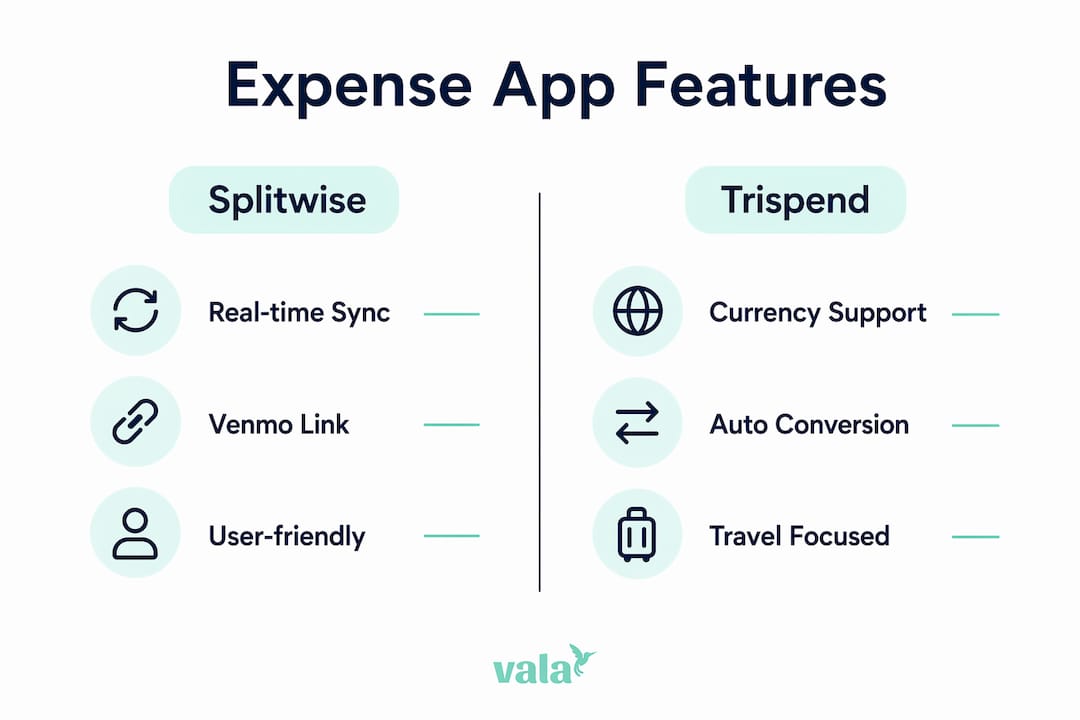
Splitwise is the most widely recognized group spending management tool for friends and roommates. It syncs with Venmo so every member can see exactly who owes whom at any time. Splitwise handles bill management, recurring expenses, and multi-person splits without requiring everyone to pay upfront.

Trispend

Trispend is built for groups that travel internationally. It supports 150+ currencies with automatic real-time exchange rate conversion, which means your group balances stay accurate even when you are paying in euros one day and yen the next. Trispend also offers equal, custom amount, and share-based split modes, covering almost every real-world scenario.

Divide-and-Conquer

Divide-and-Conquer is an open-source app built specifically for real-time group expense sharing. Its architecture uses WebSocket-based real-time syncing to push expense changes to all group members the moment they occur. It also includes scheduled reminders and instant notifications when any transaction or settlement changes.

Feature comparison

Feature Splitwise Trispend Divide-and-Conquer
Real-time sync Yes Yes Yes (WebSocket)
Multi-currency support Limited 150+ currencies Depends on setup
Split modes Equal, custom Equal, amount, share Equal, custom
Payment app integration Venmo Not listed Not listed
Reminders and notifications Yes Yes Yes (scheduled)
Cost Free / paid tiers Free / paid tiers Free (open source)

Infographic comparing features of Splitwise and Trispend apps

Pro Tip: If your group travels internationally, Trispend’s automatic currency conversion saves you from manually recalculating exchange rates after every purchase.

How do you set up an app to monitor group expenses step by step?

Getting a group expense app running takes less than ten minutes. The key is setting it up before the trip or event starts, not after the first bill arrives.

  1. Choose the right app for your group. Small groups of two to four people can use any of the major apps. Larger groups or international travelers should prioritize Trispend for currency support or Splitwise for its payment integrations. Read the group expense tracking basics before committing to a tool.

  2. Create a group and invite every member. Open the app, create a named group (for example, “Barcelona Trip 2026”), and send invite links to each person. Every member needs an account for real-time updates to work.

  3. Add expenses immediately after they happen. Log the cost, select who paid, and choose a split mode. Apps that use real-time balance updates recalculate what everyone owes the moment you hit save. Waiting until the end of the day to log expenses is the single biggest cause of errors and disputes.

  4. Choose the right split type for each expense. Use equal splits for shared meals where everyone ate the same. Use custom amount splits when one person ordered more. Use share-based splits for hotel rooms where some people stayed an extra night. Multiple splitting options exist because expenses rarely divide evenly in real life.

  5. Monitor balances and act on notifications. Check the balance screen daily during a trip. When the app sends a reminder that you owe someone, settle it through the linked payment app right away. Letting small debts accumulate makes the final settlement feel much larger than it actually is.

  6. Settle up at natural checkpoints. Do not wait until the end of a two-week trip to settle all debts at once. Settle after each major leg of the trip, such as after the hotel checkout or after a group dinner.

Pro Tip: Link Splitwise directly to Venmo so you can pay balances in one tap without switching between apps.

What are the common challenges when tracking group expenses in real time?

Even the best apps run into friction when groups are large, trips are long, or members are not consistent about logging expenses. Knowing these challenges in advance helps you avoid them.

  • Syncing delays when offline. Real-time apps require an internet connection to push updates. If someone logs an expense in a location with no signal, the update will sync once they reconnect. Always confirm that an expense has synced before assuming everyone sees it.

  • Disputes over unequal splits. Changing a split after the fact is possible in most apps, but it creates confusion if the original entry has already been seen by the group. Agree on split rules before the trip starts. For example, decide upfront whether shared taxis split equally or by number of stops.

  • Currency conversion errors. Groups traveling across multiple countries face rounding differences when exchange rates shift between the time an expense is logged and the time it is settled. Trispend handles this with real-time exchange rate conversion, but manual methods like spreadsheets do not. Well-designed apps also store money values as integer minor units (like cents) to prevent floating-point rounding errors in group balances.

  • Missed payments from unclear notifications. Not everyone checks app notifications with the same frequency. Use the app’s built-in reminder feature to send follow-up nudges. Apps like Divide-and-Conquer use automated reminder loops that recalculate balances after each expense and nudge the responsible payer until they settle.

  • Pending versus confirmed settlements. A common source of confusion is when someone marks a payment as sent but the recipient has not confirmed it. Good apps distinguish between pending and confirmed transactions in the balance view. This settlement state management prevents double-counting and keeps the group ledger clean.

Pro Tip: Schedule a mini settlement every two to three days during a long trip. Clearing small debts frequently keeps the final balance manageable and reduces the chance of anyone feeling blindsided.

Can you use spreadsheets to track group expenses collaboratively?

Shared spreadsheets are a workable option for small groups or one-time events when everyone is comfortable with Google Sheets. They are free, flexible, and require no app installation.

A basic group expense spreadsheet needs four columns: date, description, who paid, and total amount. From there, you add formulas to calculate each person’s share. Google Sheets supports SUMIFS and QUERY formulas for category totals and grouped summaries, and a simple division formula handles per-person splits automatically.

Spreadsheet feature What it does
SUMIFS formula Totals expenses by category or person
QUERY function Groups and summarizes data by date or payer
Per-person split formula Divides total by number of members
Shared access (Google Drive) Lets all members view and edit the same file

The limitations are real. Spreadsheets do not send notifications when someone adds an expense. They do not remind anyone to pay. And they do not sync in real time the way dedicated apps do. Manual group tracking works best for groups of two to three people with a single shared event, like splitting rent for one month.

When your group has four or more members, multiple currencies, or ongoing expenses, a dedicated app beats a spreadsheet every time. The benefits of automated expense tracking become clear the moment you try to chase down a missing entry in a shared Google Sheet at the end of a trip.

Key takeaways

Real-time group expense tracking works best when every member logs expenses immediately, uses the right split mode for each purchase, and settles balances at regular intervals rather than waiting until the end.

Point Details
Log expenses immediately Delays in logging cause errors and disputes that are hard to resolve after the fact.
Match the app to your group Use Trispend for international travel, Splitwise for Venmo integration, and spreadsheets only for very small groups.
Use the right split mode Equal, custom, and share-based splits each serve different expense types.
Settle in stages Mini settlements every few days prevent large, stressful final balances.
Enable notifications Automated reminders reduce missed payments without anyone having to chase the group.

What I have learned from tracking group expenses the hard way

The biggest mistake groups make is treating the expense app as a record-keeping tool rather than a communication tool. Logging an expense is only half the job. The other half is making sure everyone in the group sees it, agrees with the split, and knows when they need to pay.

I have seen groups fall apart over $12 owed from a shared Uber three weeks ago. The debt was not the problem. The silence around it was. Real-time apps solve this by making the balance visible to everyone at all times, but only if every member actually uses the app consistently. One person logging everything while others ignore the app defeats the purpose entirely.

The tool you choose matters less than the habit you build. A group that logs every expense within five minutes of paying, checks balances daily, and settles at natural checkpoints will have zero money disputes. A group with the best app in the world but inconsistent logging will still argue at checkout. Pick a tool everyone is comfortable with, even if it is not the most feature-rich option. Adoption beats capability every time.

One more thing: do not skip the confirmation step. Apps that distinguish between pending and confirmed settlements prevent the classic “I sent you the money” misunderstanding. Always confirm receipt inside the app, not just via text.

— SaverStride

How Valapoint helps you split costs and stay on budget

Valapoint’s personal finance app is built for exactly this kind of group money management. It combines real-time expense tracking, equal and custom bill splitting, and budget monitoring in one place.

https://valapoint.com

With Valapoint, you can create a group, log shared expenses, and see updated balances the moment anyone adds a cost. The bill split app supports equal splits, custom amounts, and percentage-based shares, covering every scenario from a group dinner to a two-week road trip. Reminders keep everyone accountable without you having to send awkward follow-up messages. If you want a single tool that handles both personal budgeting and group expense tracking, the Valapoint personal finance app is worth a look.

FAQ

What is real-time group expense tracking?

Real-time group expense tracking is the process of logging shared costs the moment they occur so that every group member sees updated balances instantly on their device. Apps like Splitwise, Trispend, and Divide-and-Conquer use live syncing to make this possible.

How do I split costs with friends fairly?

Choose a split mode that matches the expense. Use equal splits for shared items, custom amount splits when people spent different amounts, and share-based splits when contributions are proportional. Most group expense apps support all three modes.

What is the best app for tracking group travel expenses?

Trispend is the strongest option for international travel because it supports 150+ currencies with automatic real-time exchange rate conversion. Splitwise is better for domestic groups that want direct Venmo integration for fast settlements.

Can I track group expenses without an app?

Yes. A shared Google Sheets file with SUMIFS formulas and shared access works for small groups with simple expenses. The trade-off is no automatic notifications, no real-time sync, and no reminders, which makes it harder to manage for groups of four or more.

Is Tricount still free to use?

Tricount’s premium tier has been deprecated. The app now offers its full feature set without a paid subscription, making it a fully free option for group expense tracking.

The Role of Spending Insights in Budget Optimization

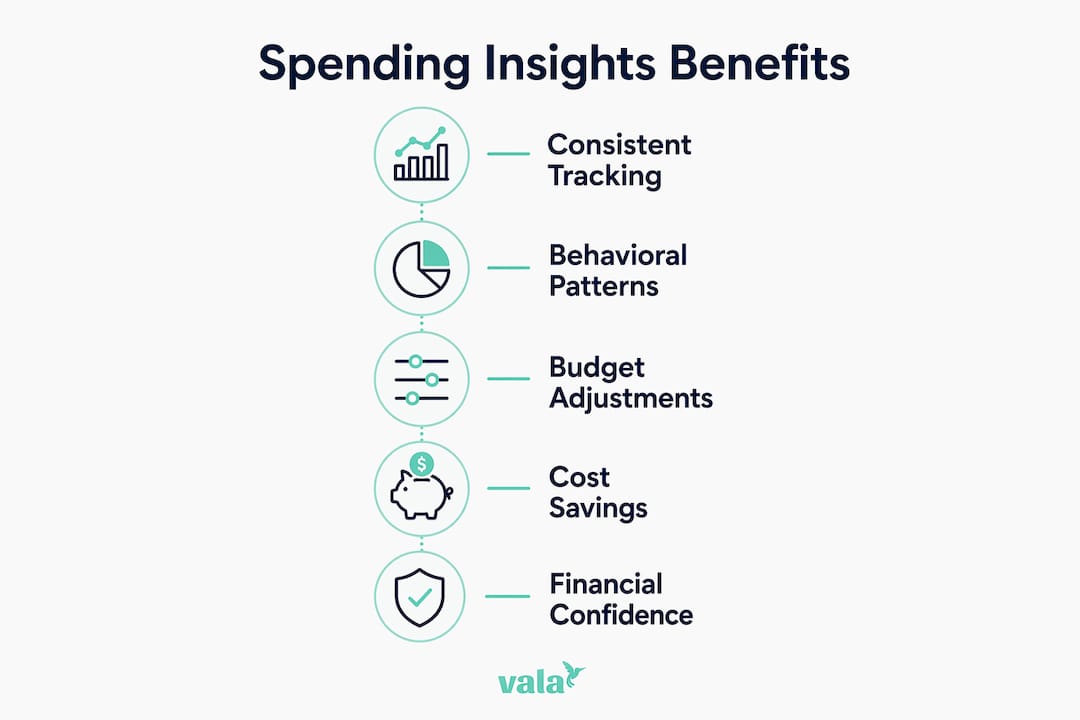
Spending insights are defined as the structured analysis of your transaction data to reveal patterns, leaks, and opportunities in your personal finances. The industry term for this process is spend analysis, and it covers everything from categorizing daily purchases to forecasting next month’s cash flow. When you apply spend analysis consistently, you stop guessing where your money goes and start making decisions based on real evidence. Tools like Valapoint, NeoChain, and Blackbee AI have built entire platforms around this idea, because the data proves it works. Structured spend analysis can reduce personal costs by 5–15% by surfacing inefficiencies and duplicate subscriptions you would never catch by eyeballing a bank statement.

What is the role of spending insights in personal budgeting?

Spending insights do one core job: they turn raw transaction data into decisions you can act on today. Without that translation, your bank statement is just a list of numbers. With it, you can see that you spent $340 on food delivery last month, that three streaming subscriptions overlap, and that your grocery bill spikes every third week.

The importance of spending analysis lies in closing the gap between measurement and action. Most people measure their spending occasionally, usually after a stressful month. Spend analysis makes that measurement continuous and purposeful, so you catch problems early instead of reacting to them after the damage is done.

Hands tracking expenses in ledger

How does structured tracking and categorization improve your finances?

Repeatable tracking beats ad hoc review every time. When you record expenses on a consistent schedule and sort them into meaningful categories, patterns emerge that a one-time audit would miss entirely.

The biggest pitfall in categorization is relying on generic merchant tags. Your bank might label a charge as “miscellaneous retail,” which tells you nothing useful. Standard banking categories often miss the personalized detail necessary for real behavior change. Categories aligned with your actual life goals, such as “date nights,” “professional development,” or “home maintenance,” give you context that motivates action.

Here are the core steps for effective tracking and categorization:

  • Connect all accounts in one place so no transaction slips through untracked.
  • Create goal-aligned categories that reflect your priorities, not just merchant types.
  • Review and reclassify transactions weekly to keep your data clean and accurate.
  • Flag recurring charges separately so subscriptions are always visible and easy to audit.
  • Compare month over month within each category to spot upward drift before it becomes a problem.

Pro Tip: Treat data hygiene as a weekly habit, not a monthly chore. Correcting one misclassified transaction takes 10 seconds. Correcting three months of bad data takes an hour and kills your motivation.

Spending insights benefits compound over time. The more consistent your categorization, the more accurate your patterns become, and the more confident your budget decisions get.

Infographic highlighting spending insights benefits

Real-time vs. periodic monitoring: which one actually works?

Monthly budget reviews feel productive, but they are mostly forensic. You are examining what already happened, not influencing what happens next. Real-time spending monitoring increases cash flow predictability by around 25% compared to periodic reviews. That gap is significant. It means you can anticipate shortfalls and redirect spending before the month ends in deficit.

Feature Periodic review Real-time monitoring
Timing Monthly or weekly lookback Continuous, transaction by transaction
Best for Trend analysis and reporting Catching leaks and impulse spending
Subscription control Easy to miss mid-cycle charges Flags new charges immediately
Cash flow accuracy Estimated, often off Predictive and current
Behavioral impact Low, after the fact High, in the moment

Real-time tools are especially useful for two problem areas: subscription creep and impulse buying. A new $12.99 subscription is easy to forget. A real-time alert the moment it charges is hard to ignore. The same logic applies to impulse purchases. Seeing your dining budget hit 80% on the 15th of the month changes your behavior for the rest of the month in a way that a retrospective report never could.

How do you identify hidden spending patterns and leaks?

Maverick spending is defined as small, impulsive purchases made outside your planned budget. Individually, each transaction feels harmless. Collectively, maverick spending quietly erodes your financial goals in ways that are hard to detect without structured analysis.

The problem is not the $6 coffee or the $14 app purchase. The problem is that these transactions are invisible in aggregate until you map them. As financial analysts put it: the goal of spend analysis is to turn messy transaction data into a clear spending map where every dollar has a visible address.

The most common hidden spending patterns, and how to address each one:

  1. Subscription overlap. You pay for two services that do the same thing. Audit every recurring charge quarterly and cancel duplicates immediately.
  2. Lifestyle inflation. Your income grew, and so did your spending, but your savings rate stayed flat. Set a savings percentage target before adjusting any lifestyle category.
  3. Convenience spending. Food delivery, ride shares, and last-minute purchases cost 20–40% more than planned alternatives. Track these in a dedicated category to see the true monthly total.
  4. Forgotten trials. Free trials convert to paid subscriptions silently. Flag every trial start date with a calendar reminder set three days before the billing date.
  5. Category bleed. Purchases that belong in one budget category get charged to another, hiding overspending. Weekly reclassification keeps this under control.

Behavioral spending insights must go beyond static category totals to align with your personal priorities. Knowing you spent $200 on “entertainment” is less useful than knowing $140 of that was impulse purchases on nights you were stressed.

How does AI change the way you analyze spending?

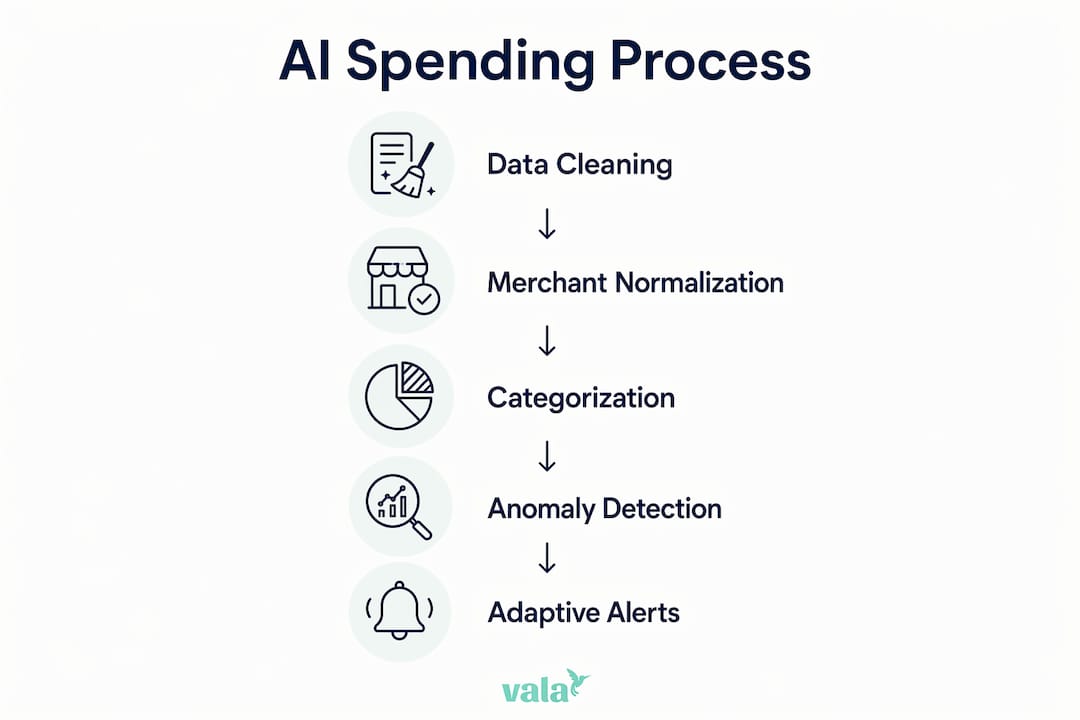
AI transforms spend analysis from a manual, backward-looking task into an automated, forward-looking system. AI-powered spend intelligence automates data ingestion, classification, anomaly detection, and decision guidance with measurable outcomes. That means the system catches a duplicate charge, flags an unusual restaurant spike, and suggests a budget adjustment, all without you opening a spreadsheet.

The shift that matters most is from hindsight reporting to decision intelligence. Decision intelligence means using spending data to ask predictive questions: “Will I hit my savings goal this month?” instead of “Why did I overspend last month?” That reframe changes how you use financial data entirely.

Key capabilities to look for in an AI-driven spending insights app:

  • Automatic categorization that learns your habits and improves over time.
  • Anomaly alerts that flag charges outside your normal patterns within hours.
  • Spending forecasts that project your month-end balance based on current behavior.
  • Goal tracking that connects daily spending decisions to longer-term financial targets.
  • Personalized recommendations that suggest specific cuts, not generic advice.

Pro Tip: Choose an app that gives you recommendations, not just reports. A chart showing you overspent on dining is information. A notification saying “You have $43 left in your dining budget for the next 12 days” is guidance you can act on.

Valapoint’s AI spending pattern detection works exactly this way, connecting daily transactions to your budget goals in real time.

How to use spending insights daily to optimize your budget

Daily use of spending insights does not require an hour of analysis. It requires a short, consistent routine built around three actions: check, adjust, and plan.

Check your spending dashboard each morning. A 60-second review of yesterday’s transactions keeps your awareness current. You will catch errors, spot patterns, and stay connected to your budget without stress.

Adjust your behavior based on what you see. If your grocery category is trending high by the 10th of the month, shift one planned restaurant meal to cooking at home. Small adjustments made early prevent large corrections at month end.

Plan your next week based on your current position. If you are ahead of your savings target, you have room to spend freely in a discretionary category. If you are behind, you know exactly where to pull back.

Practical habits that sustain momentum:

  • Set a weekly budget review appointment in your calendar, 15 minutes every Sunday.
  • Use spending alerts to get notified when any category hits 75% of its monthly limit.
  • Review your top three spending categories each month and ask whether the total reflects your actual priorities.
  • Set one financial goal per quarter and track it through a dedicated budget line.

Expense tracking best practices for your age group consistently show that the biggest gains come not from drastic cuts but from small, repeated adjustments guided by clear data. The impact of spending data is greatest when pattern recognition is continuous, not a one-time event.

Key Takeaways

Spending insights deliver the most value when they are continuous, personalized, and connected directly to your daily financial decisions.

Point Details
Define your categories personally Generic merchant tags hide behavior; use goal-aligned categories to see what your spending actually reflects.
Switch to real-time monitoring Continuous tracking increases cash flow predictability by around 25% compared to monthly reviews.
Target maverick spending first Small, impulsive purchases accumulate into significant leaks; identify and label them to control the total.
Use AI for forecasting, not just reporting AI tools shift spend analysis from backward-looking reports to forward-looking budget guidance.
Build a daily check-in habit A 60-second daily review keeps your awareness current and prevents end-of-month budget surprises.

Why I think most people are using spending insights wrong

Most people treat spend analysis as a diagnostic tool. They open their budgeting app after a bad month, feel bad about what they see, and close it again. That is the wrong model entirely.

The real power of spending insights is not in the diagnosis. It is in the feedback loop. When you check your data daily and make micro-adjustments in real time, your behavior changes without requiring willpower. You do not need to “try harder.” You just need better information, delivered at the right moment.

I have watched people go from financial anxiety to genuine confidence not because they earned more money, but because they finally understood where their money was going. The shift from reactive to proactive is not about discipline. It is about visibility. When you can see your financial position clearly, you make better decisions automatically.

The other mistake I see constantly is treating spending insights as a one-time fix. You clean up your categories, cancel a few subscriptions, and feel good for a week. Then the data goes stale, new subscriptions creep in, and three months later you are back where you started. Identifying spending patterns must be continuous and repeatable to catch financial leaks early. That is not a product feature. It is a mindset.

The tools available now, including Valapoint’s AI-driven platform, make continuous monitoring genuinely easy. The barrier is no longer technical. It is behavioral. Commit to the daily check-in, trust the data, and let the insights do the work.

— SaverStride

See your spending clearly with Valapoint

Valapoint gives you real-time expense tracking, AI-driven categorization, and personalized budget recommendations in one place. You do not need to build a spreadsheet or manually sort transactions. The app does the analysis automatically, so you can focus on the decisions, not the data entry.

https://valapoint.com

Whether you want to cut subscription costs, track progress toward a savings goal, or simply understand where your money goes each month, Valapoint’s personal finance app gives you the clarity to act with confidence. You can also explore Valapoint’s AI financial intelligence tools to get personalized spending insights built around your actual habits and goals.

FAQ

What are spending insights in personal finance?

Spending insights are the results of analyzing your transaction data to identify patterns, leaks, and budget opportunities. The formal term is spend analysis, and it covers categorization, trend tracking, and forecasting.

How much can spending analysis actually save you?

Structured spend analysis can reduce personal costs by 5–15% by identifying inefficiencies, duplicate subscriptions, and unplanned purchases you would otherwise miss.

What is maverick spending and why does it matter?

Maverick spending refers to small, impulsive purchases made outside your planned budget. These transactions are individually minor but accumulate into significant leaks that quietly undermine your financial goals over time.

How is real-time monitoring different from a monthly budget review?

Real-time monitoring tracks every transaction as it happens and alerts you to budget issues immediately. Monthly reviews are retrospective and miss opportunities to adjust behavior mid-month before overspending occurs.

Do I need an AI app to get useful spending insights?

AI apps make spend analysis faster and more accurate, but the core process works with any consistent tracking tool. AI adds value by automating categorization, detecting anomalies, and generating forecasts that manual tracking cannot match at scale.

The Role of Automatic Bill Tracking in Your Finances

Automatic bill tracking is defined as a system that uses software to monitor, organize, and pay recurring bills without requiring manual input for each transaction. The role of automatic bill tracking goes far beyond convenience. Payment history accounts for 35% of your FICO score, meaning a single missed payment can drop your credit score by 60–110 points. Late fees on credit cards and utilities typically cost $25–$40 per incident, which adds up to nearly $1,000 in wasted spending each year. Tools like Monarch Money, Empower, and Rocket Money have made personal finance automation accessible to anyone with a smartphone and a bank account.

What is the role of automatic bill tracking in personal finance?

Automatic bill tracking is the practice of using bill management software or apps to detect recurring charges, schedule payments, and alert you before due dates. The industry term for the broader category is automated billing solutions, which covers everything from simple reminder apps to full autopay systems connected directly to your bank.

The core function is replacing human memory with a consistent, rules-based process. You connect your bank accounts and credit cards to an app, and the software identifies recurring transactions automatically. From there, it builds a payment calendar, flags upcoming due dates, and either sends you a reminder or initiates the payment itself.

Hands sorting bills on wooden table

This matters because most people manage 10 or more recurring bills each month. Rent, utilities, streaming subscriptions, insurance, loan payments, and credit cards all have different due dates. Keeping track of all of them manually is where mistakes happen.

How does automatic bill tracking work?

Most bill tracking apps operate through one of two methods: read-only account syncing or direct payment authorization.

Infographic comparing benefits and risks of automatic bill tracking

Read-only syncing connects to your bank and credit card accounts through secure data aggregators. The app reads your transaction history, identifies recurring charges, and builds a bill calendar. Monarch Money and Zumfi both use this approach, offering calendar views and price alert features that flag when a subscription increases in price or a new recurring charge appears.

Direct payment authorization goes one step further. You grant the app or your bank permission to initiate payments on your behalf. This is how traditional bank autopay works, and it is also how apps like Empower and Rocket Money handle bill payments.

Here is a breakdown of the key features to look for:

  • Due date calendar: Displays all upcoming bills in one view so you can plan cash flow around paydays
  • Price increase alerts: Notifies you when a recurring charge goes up, which is common with streaming services and insurance renewals
  • Insufficient funds warnings: Checks your account balance before a payment is scheduled and alerts you if funds are low
  • Subscription detection: Scans transaction history to surface recurring charges you may have forgotten about
  • Payment scheduling: Lets you set payment dates that align with your paycheck deposits

The difference between a reminder-only system and a fully automated one is significant. Reminder apps tell you a bill is due. Automated systems pay it for you. Both have a place in a healthy financial setup, and the right choice depends on how much control you want to maintain.

What are the benefits and risks of automatic bill tracking?

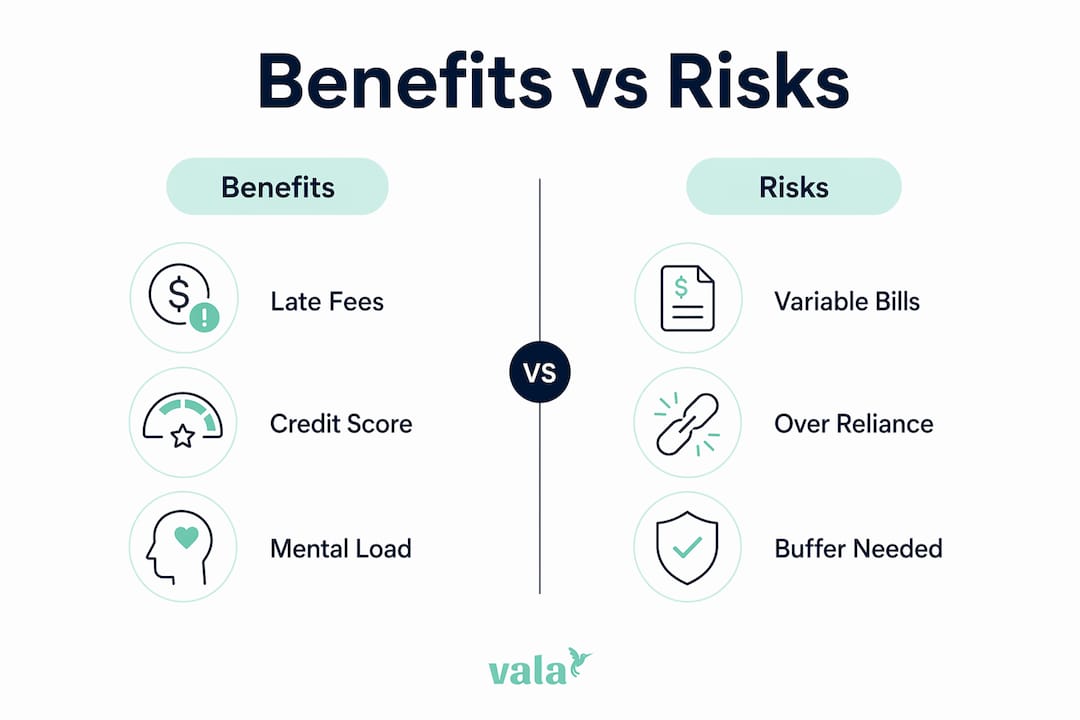
The benefits of automatic bill tracking are concrete and measurable. The risks are real too, but manageable with the right setup.

Key benefits

Late fee elimination is the most immediate win. At $25–$40 per missed payment, even avoiding two or three late fees per year pays for most premium app subscriptions. Over a full year of consistent misses, the savings can reach close to $1,000.

Credit score protection is the longer-term benefit. Because payment history drives 35% of your FICO score, consistent on-time payments are one of the most reliable ways to build or maintain good credit. Automation removes the human error that causes most missed payments.

Mental load reduction is underrated. Automating bills frees mental energy that you would otherwise spend remembering due dates, logging into portals, and worrying about whether a payment went through. That freed attention can go toward budgeting, saving, or investing instead.

Risks to watch

Automating variable bills without monitoring is the most common mistake. Utility bills, phone bills, and insurance premiums can change month to month. If your balance is tight and a bill comes in higher than expected, automating variable bills without monitoring can trigger an overdraft and a fee that wipes out the savings you were trying to protect.

Over-reliance on automation is the other risk. Some users set up autopay and never check their accounts again. Subscriptions accumulate, prices increase, and billing errors go unnoticed for months.

Pro Tip: Keep at least one month’s worth of fixed expenses as a buffer in your checking account. This single habit prevents the majority of overdraft issues that come from automated payments hitting before your paycheck clears.

Financial experts recommend a hybrid automation strategy: automate fixed, predictable expenses completely, and keep variable expenses on minimum autopay or manual control. This gives you the reliability of automation without the blind spots.

How to set up automatic bill tracking effectively

Setting up a system that works requires more than downloading an app and connecting your bank. Follow these steps to build a setup that protects you from overdrafts and missed payments.

  1. List every recurring bill. Write down every monthly charge: rent or mortgage, utilities, insurance, subscriptions, loan payments, and credit card minimums. Include the amount, due date, and whether the amount is fixed or variable.

  2. Categorize bills as fixed or variable. Fixed bills like rent and loan payments are safe to automate fully. Variable bills like electricity and phone plans need monitoring before you automate them.

  3. Connect your accounts to a tracking app. Use a tool like Monarch Money, Empower, or Valapoint to sync your bank and credit card accounts. The app will detect most recurring charges automatically.

  4. Set up autopay for fixed bills. Use your bank’s autopay feature or the biller’s own portal for fixed expenses. Schedule payments two to three days after your paycheck deposits to avoid timing mismatches.

  5. Set reminders for variable bills. For bills that change month to month, use app alerts to notify you three to five days before the due date. Review the amount before it processes.

  6. Build a cash buffer. Maintain at least one month’s worth of bill payments in your checking account. This buffer method safeguards against timing mismatches with paychecks and prevents overdrafts.

  7. Schedule a monthly review. Spend 15 minutes each month checking your bill calendar. Look for price increases, new subscriptions, and any charges that look unfamiliar.

Pro Tip: Align your payment due dates with your paycheck schedule whenever possible. Most billers will let you change your due date with a single phone call or online request. This one change eliminates most cash flow timing problems.

Understanding budget and spending before relying on automation is critical. Automation enforces structure, but it cannot fix a budget that does not have enough room for all your bills. Know your numbers first.

Which automatic bill tracking tools are worth using?

The right tool depends on whether you want reminders only, full autopay, or a complete personal finance dashboard. Here is a comparison of the most widely used options.

App Cost Key features Best for
Monarch Money $14.99/month Bill calendar, subscription tracking, AI analysis Full financial dashboard users
Empower Free (investing features extra) Bill tracking, net worth, cash flow alerts Users who want free core features
Rocket Money Free or $6–$12/month Bill negotiation, cancellation, autopay Subscription management focus
Zumfi Free Price alerts, recurring charge detection Simple bill monitoring

A few factors matter beyond the feature list:

  • Bank integration: The app needs to connect reliably to your specific bank and credit card accounts. Check compatibility before committing.
  • Security: Look for apps that use bank-level 256-bit encryption and read-only access for syncing. Direct payment features require a higher level of trust.
  • Interface clarity: A bill calendar you will actually check is more valuable than a feature-rich app you find confusing.

For a deeper look at how these apps compare across budgeting and expense categories, the best budgeting and tracking apps guide covers the full landscape. You can also explore how AI detects spending patterns to understand what the smarter apps are doing behind the scenes.

The benefits of automated expense tracking extend beyond bills alone. The best tools connect bill tracking to your broader budget so you can see how fixed obligations affect what you have left for savings and discretionary spending.

Key takeaways

Automatic bill tracking works best when it combines full automation for fixed bills with active monitoring for variable ones.

Point Details
Payment history is critical 35% of your FICO score depends on on-time payments, making automation a credit protection tool.
Late fees add up fast Missing payments costs $25–$40 per incident, reaching nearly $1,000 annually without a system.
Use a hybrid approach Automate fixed bills fully and monitor variable bills manually to prevent overdrafts.
Build a cash buffer Keep one month of bill expenses in checking to protect against timing mismatches.
Review monthly Spend 15 minutes each month checking for price increases, new charges, and billing errors.

Automation is a tool, not a substitute for knowing your finances

I have worked with enough personal finance setups to say this clearly: automation is only as good as the financial foundation underneath it. People who set up autopay before they understand their cash flow often discover the problem the hard way, through an overdraft notice or a credit card balance that crept up while they were not looking.

The mental energy freed by automation is real and valuable. But that energy needs to go somewhere productive. The best users of bill automation are not the ones who forget about their finances. They are the ones who use automation to handle the routine so they can focus on the decisions that actually build wealth.

My honest recommendation: start with a read-only tracking app before you turn on any autopay. Spend one month just watching where your money goes and when bills hit. Then automate the fixed bills you fully understand, and keep your hands on the variable ones until you have seen enough months of data to trust the pattern.

Personal finance automation benefits are real across every age group, but they compound fastest for people who treat automation as a monitoring system, not a hands-off solution. The goal is confident control, not passive delegation.

— SaverStride

Take control of your bills with Valapoint

Valapoint is an AI-powered personal finance app that brings your bills, budget, and savings goals into one clear view. You can sync your bank accounts and credit cards, track recurring expenses automatically, and get alerts before payments are due.

https://valapoint.com

Valapoint goes beyond basic bill reminders. The app surfaces hidden spending patterns, flags subscriptions you may have forgotten, and connects your bill tracking to your broader budget so you always know where you stand. Whether you are managing finances solo, as a couple, or in a group, Valapoint gives you the clarity to stay ahead of every payment. Try the Vala personal finance app and see how much easier managing monthly bills can be.

FAQ

What is automatic bill tracking?

Automatic bill tracking is a system that uses software to detect recurring charges, organize due dates, and either remind you to pay or initiate payments automatically. It replaces manual bill management with a consistent, technology-driven process.

How does automatic bill tracking protect your credit score?

Payment history accounts for 35% of your FICO score. Automating bill payments removes the human error that causes missed payments, which can drop your score by 60–110 points per incident.

What is the biggest risk of automating bill payments?

The biggest risk is automating variable bills without monitoring your account balance. If a bill comes in higher than expected and your balance is low, the payment can trigger an overdraft fee.

Should I automate all my bills at once?

No. Start by automating fixed, predictable bills like rent and loan payments. Keep variable bills like utilities on manual review until you have enough monthly data to understand the typical range.

How often should I review my automated bill setup?

A monthly review of 15 minutes is enough for most people. Check for price increases, unfamiliar charges, and any bills that processed at unexpected amounts.

Trip Budget Planner: Your Complete Guide for 2026

A trip budget planner is a structured financial tool designed to estimate, organize, and track travel expenses like flights, lodging, and activities before and during a trip. In the travel finance world, the recognized term is “travel budget framework,” but “trip budget planner” is how most travelers search for and use these tools in practice. Whether you rely on a Google Sheets template, a dedicated app like YNAB or Travel Spend, or a travel expense calculator, the goal is the same: know where your money is going before it disappears.

What is a trip budget planner and why does it matter?

A trip budget planner is more than a spending record. It is a decision tool that shapes your destination choice, travel timing, and overall style before you book a single flight. That distinction matters. Most travelers treat budgeting as a post-trip accounting exercise. The ones who actually stay on budget treat it as a pre-trip planning document.

Travel strategist Michael Kovnick identifies the most common mistake travelers make: treating all travel spending as one single amount. That approach creates confusion after the trip and makes it nearly impossible to identify where money was wasted. Categorizing your spend by type gives you real visibility and real control.

The core function of any travel budget framework is simple. You set a total spending limit, break it into categories, track actual costs against those categories, and adjust as you go. Tools like Google Sheets, Excel, and apps like Tripcoin or Travel Spend each support this process in different ways.

Hands sorting travel budget category cards

What should you include in a trip budget?

A complete trip budget covers more than flights and hotels. Leaving out even one category is how travelers end up $300 over budget on a trip they thought was fully planned.

Here are the core categories every travel budget needs:

  • Transportation: Flights, trains, buses, rental cars, and local rideshares
  • Lodging: Hotels, hostels, Airbnb, or any overnight accommodation
  • Food and drink: Daily meals, coffee, snacks, and restaurant dinners
  • Activities: Tours, museum entries, national park fees, and entertainment
  • Travel insurance: Medical, trip cancellation, and baggage coverage
  • Connectivity: SIM cards or eSIM plans for international data access

Beyond those core categories, silent costs like airport transfers, baggage fees, city taxes, and mandatory eSIM costs are the most frequent causes of budget overruns. These expenses are real and predictable, yet most travelers skip them entirely when planning.

Pro Tip: Budget for a travel eSIM data plan as a fixed line item. International roaming charges or last-minute SIM purchases at airports cost significantly more than pre-purchased eSIM plans.

Infographic showing travel budget percentage allocations

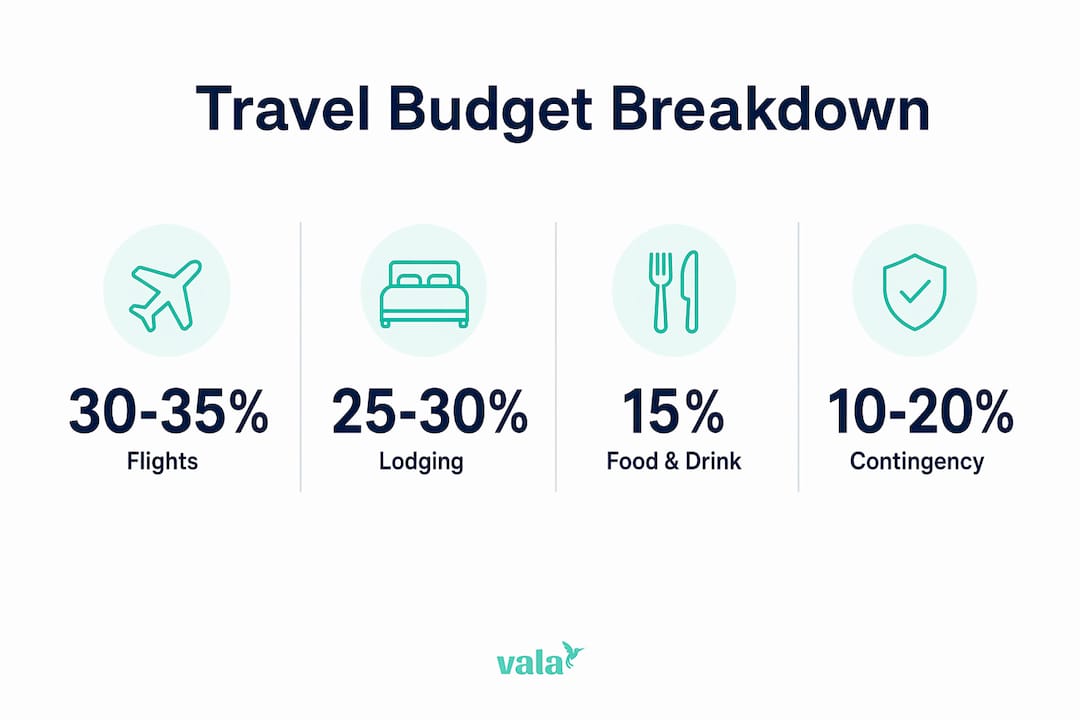
The table below shows a sample budget breakdown for a 10-day international trip at a mid-range spending level:

Category Estimated % of Total Budget
Flights 30–35%
Lodging 25–30%
Food and drink 15–20%
Activities 10–15%
Transport (local) 5–8%
Contingency buffer 10–15%

Travel industry guidance recommends adding a contingency buffer of 10–20% to any travel budget. For complex international trips, 15% is the safest choice. That buffer covers currency fluctuations, price changes, and last-minute itinerary edits.

How do trip budget planners help with solo and group travel?

Solo travel budgeting is straightforward. You track one person’s spending across your chosen categories and adjust when needed. Group travel is a different challenge entirely. Shared expenses like accommodation, rental cars, and group dinners create confusion fast if there is no system in place.

A good travel budget planner for groups does three things:

  • Tracks shared costs separately from individual spending so everyone sees what is owed
  • Splits expenses fairly based on who paid and who benefited
  • Settles balances clearly at the end of the trip or in real time

Apps designed for group expense splitting remove the awkward money conversations that ruin trips. Instead of someone keeping a mental tally, every shared purchase is logged, split, and visible to the whole group.

For couples, the benefit is slightly different. A shared budget view creates financial transparency without requiring constant check-ins. Both people can see the running total, which reduces anxiety and prevents one person from unknowingly overspending.

Pro Tip: Assign one person in the group to log shared expenses daily. Waiting until the end of the trip to reconstruct who paid for what leads to errors and disagreements.

Individual travelers benefit most from expense tracking best practices that focus on daily logging rather than weekly summaries. Small purchases add up fast. A coffee here, a metro ticket there, and a souvenir or two can add $30 to $50 per day that never gets recorded.

What are the best tools for creating a trip budget planner?

The right tool depends on how much control you want and how much setup time you are willing to invest.

Tool Type Best For Key Limitation
Google Sheets / Excel Full customization, offline access Manual data entry, no automation
Dedicated apps (Travel Spend, Tripcoin) Real-time tracking, currency conversion Limited group features
YNAB Deep budget methodology, category rules Subscription cost, learning curve
AI-powered apps (Valapoint) Automated tracking, spending insights Requires account setup
Online calculators Quick estimates before booking No ongoing tracking

Google Sheets and Excel templates work well for travelers who want full control over their layout. You can build an overview tab for the total budget and a daily spending tab for real-time logging. Experienced travelers maintain both tabs, logging expenses in local currency daily with current exchange rates. That approach prevents missed small expenses and gives accurate totals at any point in the trip.

Dedicated apps like Travel Spend and Tripcoin handle currency conversion automatically and display running totals by category. They are faster to use on the road than a spreadsheet but offer less flexibility for custom categories.

AI-powered budgeting tools take this further. They analyze your spending patterns, flag unusual expenses, and surface insights you would not catch manually. AI-personalized budgets adapt to your actual behavior rather than forcing you into a rigid template. That is a meaningful advantage for travelers whose spending varies significantly by day or destination.

Flights typically make up 35% of an average traveler’s budget, but booking four months ahead can reduce that share to about 22% of total costs. That kind of saving gives you real room to upgrade other parts of the trip.

How to create a flexible, realistic trip budget

Building a trip budget that actually works requires a specific sequence. Here is the process that holds up in practice:

  1. Set your total spending limit first. Start with the number you are genuinely comfortable spending, not an aspirational figure. This is your hard ceiling.
  2. Assign amounts to each category. Use the percentage breakdown from the table above as a starting point, then adjust based on your destination’s cost of living.
  3. Add a 15% contingency buffer. Calculate 15% of your total and set it aside as a separate line item. Do not fold it into other categories.
  4. Research actual costs before you finalize. Check current flight prices, hotel rates, and activity fees for your specific destination and travel dates.
  5. Log expenses daily during the trip. Use a dedicated tab or app to record every purchase in local currency. Weekly logging misses too much.
  6. Reallocate savings when they appear. If your flights came in under budget, redirect that surplus to activities or a nicer dinner. Do not leave savings idle.

Food budgeting deserves special attention. Assigning spending levels by day type works better than a flat daily food budget. Plan for cheap days (street food, grocery stores), mid-range days (casual restaurants), and one or two splurge meals. That approach matches how people actually eat on trips and prevents the budget failure that comes from fatigue or hunger pushing you toward expensive options.

Pro Tip: A realistic travel budget is a living document. Review it every two to three days during your trip and adjust your remaining categories based on actual spending. This keeps you in control without requiring obsessive daily tracking.

Flexibility is the feature most travelers forget to build in. A budget that has no room to move creates anxiety. A budget with a clear contingency buffer and reallocation rules gives you confidence to spend on the things that matter most.

Key takeaways

A trip budget planner works best when it combines clear category assignments, a 15% contingency buffer, and daily expense tracking rather than a single lump-sum approach.

Point Details
Define categories upfront Assign specific amounts to flights, lodging, food, activities, and hidden costs before booking.
Add a contingency buffer Set aside 15% of your total budget for unexpected costs like fees, taxes, and price changes.
Track expenses daily Log purchases in local currency every day to catch small costs before they compound.
Reallocate savings actively Move budget surpluses from underspent categories to upgrade experiences elsewhere.
Use the right tool Match your tool to your trip: spreadsheets for control, apps for automation, AI tools for insight.

Why I think most travelers budget wrong

Most travelers I have observed make the same mistake: they set a total trip number and then spend without tracking until the money runs out. The budget exists on paper but does nothing during the trip.

The real value of a travel budget framework is not the number you set. It is the category structure underneath it. Treating all travel spending as a blob leads to confusion post-trip and zero ability to course-correct mid-journey. When you know your food category is $40 per day and you have spent $60 today, you make a different choice tomorrow. That is the mechanism that actually keeps you on budget.

The other mistake is treating the budget as a rigid contract. A budget that cannot flex is a budget you will abandon. Build in the contingency buffer, give yourself permission to reallocate savings, and check in every few days rather than obsessing daily. That balance between structure and flexibility is what separates travelers who enjoy their trips from those who spend the whole time anxious about money.

My honest recommendation: start simple. A two-tab Google Sheet with an overview and a daily log beats a complex app you will stop using by day three. Add automation and AI insights once you have the habit of tracking. The tool matters less than the discipline of using it.

— SaverStride

Take control of your travel spending with Valapoint

Planning your next trip is exciting. Watching your budget fall apart mid-trip is not.

https://valapoint.com

Valapoint is an AI-powered personal finance app built for exactly this situation. You can set a trip budget goal, track every expense by category in real time, and split shared costs with travel partners without the awkward math. Valapoint’s AI surfaces spending patterns you would miss on your own, so you know where your money is going before it is gone. Whether you are traveling solo or with a group, the Vala personal finance app gives you the visibility and control to travel confidently within your budget.

FAQ

What is a trip budget planner used for?

A trip budget planner is a financial tool used to estimate, organize, and track travel expenses like flights, lodging, food, and activities before and during a trip. Its core purpose is to keep total spending within a set limit.

How much contingency should I add to a travel budget?

Travel industry guidance recommends adding a 10–20% contingency buffer to any travel budget, with 15% being the safest choice for complex or international trips.

What expenses do most travelers forget to budget for?

Airport transfers, baggage fees, city taxes, SIM or eSIM costs, and travel insurance are the most commonly overlooked expenses. These silent costs are a leading cause of budget overruns.

Is a spreadsheet or an app better for trip budgeting?

Spreadsheets like Google Sheets offer full customization and work offline, while apps like Travel Spend and Tripcoin handle currency conversion automatically. AI-powered tools like Valapoint add automated tracking and spending insights for travelers who want more than manual logging.

How do I split travel costs fairly in a group?

Use a dedicated group expense tool that logs shared purchases, splits them by person, and tracks running balances. Assigning one person to log shared expenses daily prevents errors and disputes at the end of the trip.

What Is a Spending Category? Your 2026 Guide

A spending category is a labeled group that organizes related expenses so you can see exactly where your money goes each month. Think of it as a filing system for your finances. Without these labels, your bank statement is just a list of numbers. With them, it becomes a clear picture of your habits. Financial experts recommend starting with 8–12 core categories to keep things manageable without losing detail. Apps like Valapoint use these categories automatically, sorting your transactions the moment they hit your account. The standard industry term for this practice is expense categorization, and it sits at the heart of every effective personal budget.


What is a spending category and why does it matter?

A spending category is defined as any label that groups similar expenses for tracking and analysis. Housing, food, transportation, and entertainment are classic examples. Spending categories transform raw bank statements into readable pictures of where money actually goes, making it far easier to find waste and hit savings targets.

Woman analyzing expense categories on laptop

The value is practical, not theoretical. When you know that $600 went to “dining out” last month, you have something to act on. Without a category label, that $600 is buried across dozens of individual transactions at restaurants, coffee shops, and food delivery apps. Categorization turns noise into signal.

Expense categories also connect your daily spending to your bigger financial goals. Categories show where money goes; goals describe why it is allocated. Both are necessary for a budget that actually works. A category without a goal is just accounting. A goal without category tracking is just wishful thinking.


What are the main types of spending categories?

All expenses fall into two primary types: fixed and variable. Understanding the difference shapes how you budget for each one.

Fixed expenses

Fixed expenses stay the same every month. Rent, mortgage payments, car loans, and subscription services like Netflix or Spotify all qualify. These are predictable, so budgeting for them is straightforward. You know the amount in advance and can plan around it.

Infographic comparing fixed and variable expense types

Variable expenses

Variable expenses change from month to month. Groceries, gas, utilities, and dining out all fluctuate based on your behavior and circumstances. These categories require closer attention because they are where most overspending happens. A $50 grocery run can quietly become $300 if you are not tracking it.

Periodic expenses

Periodic expenses are easy to forget because they do not show up every month. Annual insurance premiums, holiday gifts, car registration fees, and back-to-school supplies all fall here. The smart move is to divide the annual cost by 12 and set that amount aside monthly so the expense never catches you off guard.

Miscellaneous expenses

A miscellaneous category handles anything that does not fit neatly elsewhere. Using a buffer category for irregular expenses prevents you from getting stuck on hard-to-classify items and keeps your tracking consistent over time.

Type Definition Examples
Fixed Same amount every period Rent, car loan, subscriptions
Variable Fluctuates month to month Groceries, gas, dining out
Periodic Irregular, often annual Gifts, insurance premiums, fees
Miscellaneous Unclassified or one-off Random repairs, unusual purchases

Pro Tip: Assign every expense to a type before you assign it to a specific category. Knowing whether a cost is fixed or variable tells you immediately how much control you have over it.


Spending category examples and how to build your own list

The ten core expense categories that cover most people’s budgets are housing, food, transportation, utilities, insurance, debt payments, savings, health, personal care, and entertainment. These ten buckets handle the vast majority of what most adults spend money on each month.

Subcategories add precision where you need it. Food, for example, splits naturally into “groceries” and “dining out.” That split matters because one is a need and the other is a want. Knowing which is which helps you make faster decisions when you need to cut back.

Here is a practical starter list you can adapt:

  • Housing: Rent or mortgage, renters or homeowners insurance, repairs
  • Food: Groceries, dining out, coffee shops, food delivery
  • Transportation: Gas, car payment, public transit, parking, rideshare
  • Utilities: Electric, water, internet, phone
  • Health: Insurance premiums, prescriptions, gym membership, copays
  • Debt: Student loans, credit card minimums, personal loans
  • Savings: Emergency fund, retirement contributions, short-term goals
  • Entertainment: Streaming services, events, hobbies
  • Personal: Clothing, haircuts, toiletries
  • Miscellaneous: Anything that does not fit above

Beginners may start with 7–8 essential categories; advanced budgeters tracking side hustles or complex goals might use 15 or more. The right number depends on your life, not a formula.

These categories also map directly onto popular budgeting frameworks. The 50/30/20 rule, for instance, groups your categories into needs (50%), wants (30%), and savings or debt (20%). Knowing your category totals makes applying that framework a five-minute exercise instead of an hour-long calculation.

Pro Tip: Organize categories by purpose, meaning where the money goes and why, rather than by merchant or payment method. Buying cleaning supplies and snacks at Target in one trip? Split the transaction by purpose: household supplies and groceries. That keeps your data clean and your insights accurate.


How to categorize spending consistently

Consistency in categorization matters more than perfect taxonomy. A system where Amazon always maps to “household supplies” is more useful than one where you reclassify it based on what you bought that day. Reliable data requires reliable rules.

Here are six best practices that make consistent categorization a habit rather than a chore:

  1. Set a rule for every recurring merchant. Decide once where Starbucks, Amazon, and your gym belong. Write it down. Never revisit it unless your spending habits genuinely change.
  2. Limit your category count. Adding more than 15 categories often causes categorization fatigue, which leads to abandoning the budget entirely. Start lean and expand only when you have a specific reason.
  3. Assign by intent, not by store. Categorize purchases by purpose rather than by merchant or payment channel. A supermarket trip that includes both groceries and a birthday card should be split between “food” and “personal.”
  4. Keep a miscellaneous category. Do not let one confusing transaction derail your whole system. Drop it in miscellaneous, move on, and review it at the end of the month.
  5. Review categories monthly. Spend 10 minutes at the end of each month checking that auto-categorized transactions landed in the right place. Catching errors early prevents compounding inaccuracies.
  6. Adjust categories annually. Your life changes. A category that made sense at 22 may not fit at 32. Review your full list once a year and retire or rename anything that no longer reflects how you actually live.

Limiting categories reduces user burden and increases budget adherence. That is not an opinion. It is a pattern observed consistently across personal finance research. Simpler systems get used. Complex ones get abandoned.


How technology makes spending category management easier

AI and machine learning in personal finance apps improve the accuracy of spending category assignments and help link expenses directly to financial goals. That means less manual work and more reliable insight into where your money actually goes.

Valapoint’s AI expense tracker reads your transactions in real time and assigns them to the correct category automatically. It also flags unusual spending patterns, so you notice a problem before it becomes a real financial setback. Apps like Valapoint also link spending categories to savings goals, so every dollar you track is connected to something you are working toward.

Key advantages of using technology for expense categorization:

  • Auto-classification removes the need to manually sort every transaction
  • Pattern detection surfaces spending trends you would not notice on your own
  • Goal linking connects your category totals to debt payoff or savings targets
  • Real-time alerts notify you when a category is approaching its limit
  • Historical data lets you compare this month’s spending to last month or last year

One caution: always review auto-categorized transactions regularly. Machine learning improves over time, but no algorithm is perfect on day one. A quick monthly review, as described in expense tracking best practices, keeps your data accurate and your budget trustworthy.


Key takeaways

Spending categories are the foundation of any budget that actually works. Without them, you are guessing. With them, you are deciding.

Point Details
Core definition A spending category is a label that groups related expenses for clear tracking and analysis.
Four main types Fixed, variable, periodic, and miscellaneous categories cover every expense you will encounter.
Right category count Start with 7–12 categories to avoid fatigue; expand only when your financial life requires it.
Consistency over perfection Assign the same merchant to the same category every time for reliable, usable data.
Technology as a partner AI tools like Valapoint auto-classify transactions and link spending data to your financial goals.

Why i think most people overcomplicate spending categories

The most common mistake I see is building a category system that looks impressive on paper but falls apart by week three. People create 20 subcategories, color-code everything, and then stop tracking entirely because it takes too long. That is not a budgeting problem. That is a design problem.

The best category system is the one you will actually use six months from now. For most people, that means starting with eight categories and resisting the urge to add more until the habit is solid. Perfection is the enemy of consistency here. A rough system you maintain beats a perfect system you abandon.

I have also noticed that people underestimate how much clarity comes from just naming things. When you label a transaction “dining out” instead of letting it sit as a raw charge from a restaurant, something shifts. You start to see patterns. You start to make different choices. The category does not change your spending automatically. But it makes your spending visible, and visibility is where change begins.

My honest recommendation: start with Valapoint’s auto-categorization, let it do the heavy lifting for the first 30 days, and then review what it found. You will learn more about your spending habits in one month of tracked data than in years of vague awareness. Then adjust your categories to match your real life, not some idealized budget template.

— SaverStride


Take control of your spending with Valapoint

Understanding expense categories is the first step. Tracking them consistently is where the real progress happens.

https://valapoint.com

Valapoint’s personal finance app automatically categorizes your transactions the moment they occur, links your spending data to your savings and debt goals, and surfaces the patterns that cost you money without you realizing it. You do not need to build a spreadsheet or manually sort receipts. Valapoint handles the classification so you can focus on the decisions. Whether you are just starting to budget or refining a system you already have, Valapoint gives you the clarity to move forward with confidence. Start tracking your spending and see exactly where your money goes.


FAQ

What is a spending category in simple terms?

A spending category is a label that groups similar expenses together, such as housing, food, or transportation, so you can see exactly where your money goes each month.

How many spending categories should i use?

Financial experts recommend 8–12 categories for most budgeters. Beginners can start with as few as 7–8, while advanced users tracking complex goals may use 15 or more.

What are the main types of expense categories?

The four main types are fixed (consistent costs like rent), variable (fluctuating costs like groceries), periodic (irregular costs like annual fees), and miscellaneous (unclassified expenses).

How do i categorize spending consistently?

Assign the same merchant to the same category every time, organize by purchase purpose rather than store name, and review your auto-categorized transactions at least once a month.

Does technology help with spending category management?

Yes. AI-powered apps like Valapoint automatically classify transactions into spending categories, detect unusual patterns, and link your expense data to savings and debt payoff goals.

Top 5 Budget-Flow.app Alternatives 2026

Tracking expenses and splitting costs with others while staying on top of savings goals takes too much time and manual effort. Most apps limit bill splitting, require manual categorization, or gate advanced forecasting and automation features behind paid plans or region restrictions. This comparison lists pricing, automation, and shared expense features across five apps so you can choose one that fits your money management needs without trial and error.

Table of Contents

Vala

https://valapoint.com

At a Glance

Automatic expense tracking, subscription monitoring, and built-in bill splitting work together in a single mobile first app. Vala uses AI to surface budgeting suggestions and spot spending trends. The app targets U.S. individuals, couples, and families who want clear daily money management.

Core Features

  • AI Coach App with real time budgeting suggestions that adjust to your income and habits. The coach gives short, actionable tips.

  • Automatic expense categorization and trend analysis so transactions arrive labeled and grouped for quick review. Categories update as your pattern changes.

  • Bill splitting for shared costs with partners or roommates. You can assign expenses and track who owes what.

  • Savings goal tracking with progress visualization to watch milestones and remaining amounts. Goals display clear progress and dates.

  • Secure bank account linking for transaction import so you see a full financial picture in one place.

Key Differentiator

The product pairs AI driven, actionable insights with first class support for shared expenses and goal tracking. That combination focuses on daily decisions and joint money management in a mobile first flow. For couples or families who share bills, this makes splitting and tracking routine costs straightforward.

Pros

  • Easy to use mobile first interface. The layout keeps daily tasks like categorizing and splitting fast.

  • Personalized AI insights for smarter spending. Suggestions adapt to your recent transactions and savings progress.

  • Shared budgeting features built for couples and families. You can compare individual and joint spending in one view.

  • Strong emphasis on security and privacy. Bank linking is positioned as secure and read only for transaction import.

  • Available in free and premium plans. You can start without paying and upgrade for deeper analysis.

Cons

  • Limited international support. The app is primarily tailored for U.S. users and may not handle non U.S. accounts well.

Notable Integrations

Vala supports bank account linking for transaction import so your spending and subscriptions appear automatically. That connection is the primary integration for reconciling balances and generating trends.

Who It’s For

You if you live in the U.S. and want an easy, AI powered app for daily expense tracking. Couples and families who share bills will find the split and shared views useful. You should prefer mobile first tools over manual spreadsheets or complex accounting apps.

Unique Value Proposition

The AI Coach App delivers real time budgeting suggestions tied to live transaction data. That feature trims decision time by suggesting moves you can act on immediately. For households splitting costs, the coach plus shared expense tracking reduces back and forth about who paid what. The result is clearer progress toward savings goals without extra bookkeeping.

Real World Use Case

A couple links both bank accounts to Vala, assigns shared subscriptions, and splits monthly rent and utilities. The app reminds them about upcoming bills and shows savings progress for a planned trip. They use the AI coach to trim small recurring charges and speed up reaching their goal.

Pricing

You can start for free and test core features including tracking, splitting, and basic AI suggestions. A premium upgrade unlocks deeper insights and extended goal analysis for users who want more detailed recommendations. No per seat pricing details are published in the product data.

Website: https://valapoint.com

PocketSmith

https://pocketsmith.com

At a Glance

PocketSmith’s marketing materials state cash flow forecasting up to 60 years into the future. That long horizon aims to help you model retirement, big purchases, and legacy planning. The product pairs those forecasts with live account feeds and custom dashboards so you can check projected balances alongside current activity.

Core Features

PocketSmith offers automatic live bank feeds that let you pull transactions into one place. It supports multi currency accounts and global bank connections for people with finances across borders. You get transaction organization and search, plus custom dashboards and reports for income, expenses, and net worth. The platform also provides cash flow forecasting and a range of graphs that reveal future shortfalls or surpluses.

Key Differentiator

The standout claim is the extended forecasting horizon. PocketSmith emphasizes long term projection as the feature that separates it from ordinary budget trackers. That emphasis makes it useful when you want to plan decades ahead rather than only manage month to month.

Pros

  • Offers detailed forecasting and planning tools beyond basic budgeting. The forecasts help you test what if scenarios for housing, education, or retirement.
  • Supports accounts in multiple currencies and a wide range of bank connections. This matters if you hold accounts in several countries or currencies.
  • Customizable dashboards and visualizations let you focus on the numbers that matter. You can build views for cash flow, net worth, or upcoming bills.
  • Strong focus on security and data privacy. The vendor highlights active development and attention to keeping data safe.
  • The interface balances depth and usability for people who want comprehensive finance tools. You get advanced features without enterprise complexity.

Cons

  • Pricing may be a barrier for casual budgeters or those seeking entirely free tools. You can use a free plan with limits, but core features sit behind paid tiers.
  • The interface and feature set can feel complex for users who only need simple tracking. It requires time to learn and configure for your situation.
  • Integrations with non bank financial services are limited. That gap can create extra manual work for investments or third party accounts.

When It May Not Fit

If you only want a quick, no setup budget app, PocketSmith will likely feel heavy. Users who prefer one click simplicity or only occasional expense checks will find the learning curve too steep. Also, if you rely heavily on specialized investment or bill pay services, the limited non bank integrations may break your workflow.

Who It’s For

PocketSmith fits individuals and households who want forecast driven planning rather than just expense lists. It suits people preparing for long term goals, couples managing shared finances, and expatriates with accounts in multiple currencies. If you enjoy tweaking scenarios and visual reports, you will get value from this tool.

Real World Use Case

A small family uses PocketSmith to map monthly budgets, then projects savings for a home purchase over several years. They compare projected balances under different savings rates. That process gives them clear trade offs and a calendar for when their down payment target becomes realistic.

Pricing

Pricing starts at USD $9.99/month billed annually for the Foundation plan. There are higher tiers that unlock more accounts, longer forecasting options, and additional reporting. A free plan is available with limited features for casual users.

Website: https://pocketsmith.com

Era

https://era.app

At a Glance

Era connects your accounts to any MCP compatible AI, letting multiple AI assistants read and act on your financial data. The platform groups that access under products named Context, Agency, and Thesis for data, proactive money management, and investment research. Era highlights privacy by stating it does not sell user data.

Core Features

  • Connects financial accounts to AI assistants that support MCP, centralizing data for third party agents.
  • Automates transfers and financial actions through AI driven rules and triggers.
  • Provides proactive account monitoring and automated management via Agency.
  • Offers investment research and trading support in Thesis.
  • Uses bank grade encryption and multi aggregator integration for broad institution coverage.

Key Differentiator

Era uses open standards to let any MCP compatible AI connect to your finances. That means you can experiment with different AI agents while keeping a single, encrypted data layer. For users who want to mix and match assistants rather than lock into one vendor, Era makes that workflow possible.

Pros

  • Flexible AI support. You are not limited to one assistant because Era supports any MCP compatible AI.

  • Time saved on routine money tasks. The automation tools handle recurring transfers and basic bill actions.

  • Unified financial view. Era consolidates accounts and presents insights so you can see balances and flows in one place.

  • Privacy focus. The vendor states it does not sell user data and prioritizes secure storage and encryption.

  • Freemium entry. You can start with a free account and test basic features before moving to paid tiers.

Cons

  • AI dependency for full value. Many advanced behaviors require a compatible assistant to be useful.

  • Technical setup. MCP integration can need extra steps that may frustrate less technical users.

  • Feature rollout. Some automation features are still coming and are not available yet.

  • Paid limits. Higher automation capacity and advanced tools live behind paid plans.

When It May Not Fit

If you prefer an app that works fully without any external AI, Era may not be a good match. Users who want simple, hands off budgeting without setup will find the MCP connection adds complexity. Also, teams or households that need plug and play features with no learning curve may prefer a more conventional personal finance app.

Who It’s For

Era fits tech savvy individuals and investors who want AI driven automation tied to their accounts. It also works for small business owners who accept an initial setup step to gain automated transfers and proactive monitoring. If you enjoy testing different AI assistants, Era lets you switch agents without moving account data.

Real World Use Case

A freelance designer links bank and payment accounts to Context to track income and expenses automatically. They use Agency to watch incoming deposits and trigger transfers to a tax savings account. For investment decisions, they run short research queries in Thesis before placing trades.

Pricing

Free access is available for basic accounts. Paid plans start at $7.99 per month and scale up to $79.20 per month for higher automation capacity and advanced features.

Website: https://era.app

Splitwise

https://splitwise.com

At a Glance

Splitwise includes built in payment options through Splitwise Pay and the Splitwise Card, which is unusual for an expense sharing app. The platform focuses on group balances and makes it simple to record who owes what. Basic split tracking is free, and optional paid features add receipt scanning and currency conversion. That mix makes it easy to use for casual groups and upgrade when needed.

Core Features

  • Track balances and who owes whom across multiple groups. This keeps long running debts clear.
  • Organize expenses by trips, housemates, friends, or family. Groups store shared history for later reference.
  • Add expenses quickly on web or mobile. You can assign items to specific people as you go.
  • Settle up via cash, online payment, or Splitwise Pay. The payment options reduce manual reimbursements.
  • Receipt scanning and itemization, currency conversion, and expense insights are available in Splitwise Pro. Those features help when bills get complex.

Key Differentiator

Splitwise pairs traditional expense tracking with built in payment features for group settlements. That combination removes the extra step of asking for reimbursements after a trip or shared bill. The payment tools are most useful for US residents with bank access. For basic group tracking the free core features remain the main draw.

Pros

  • Offers clear, focused expense tracking that makes shared balances easy to follow. The interface highlights who owes whom and reduces argument over totals.
  • Group organization fits trips, roommates, and recurring household bills. You can keep separate ledgers for each social context.
  • Receipt scanning and itemization in Pro help when bills split across items or people. That feature speeds up precise splits.
  • Splitwise Pay and the Splitwise Card let groups settle without external apps. That can remove friction when people prefer in platform payments.
  • Free core functionality covers most casual users. Tracking, adding expenses, and basic settlement do not require a subscription.

Cons

  • Payment features have geographic limits and focus on US banking. That reduces usefulness for international groups wanting in app settlement.
  • Advanced tools like transaction import and currency conversion require Pro and may not be available in all regions. Users outside supported areas will lack those features.
  • Some users report bank connection trouble and possible transaction fees. Those issues can delay settlement or add unexpected costs.
  • Pro subscription is required for several convenience features. Casual users must decide if the upgrades justify the cost.

When It May Not Fit

If most group members live outside the United States, Splitwise may not meet your payment needs. Groups that require automatic transaction imports or multi region currency support should check regional availability first. If you need built in time tracking or business billing features, this consumer focused app will feel limited.

Who It’s For

People who split costs regularly and want a lightweight, shared ledger. Roommates dividing rent and utilities will find the group tools useful. Travelers splitting trip costs get straightforward record keeping and optional in app settlement. Anyone who prefers simple, social expense tracking over accounting style tools will fit well.

Real World Use Case

A group of friends on vacation logs accommodation, rides, and meals as they spend. Each expense goes into the trip group with the payer and participants recorded. At trip end the group uses Splitwise Pay to settle remaining balances or the Splitwise Card for shared purchases, avoiding multiple bank transfers.

Pricing

Basic expense sharing is free and covers tracking, groups, and manual settling. Splitwise Pro is a paid subscription that adds receipt scanning, currency conversion, and detailed analytics. Payment processing and card use may carry separate fees depending on banks and locations.

Website: https://splitwise.com

tricount

https://tricount.com

At a Glance

tricount reports that it is trusted by millions worldwide and that the app is 100 percent free. The standout claim here is that it handles group math for shared costs while converting currencies automatically. That mix of no cost access and built in currency conversion makes it a quick choice for travelers and mixed currency groups.

Core Features

  • Group expense tracking and splitting with automatic calculations. This shows who paid, who owes, and suggested settlements.
  • Multi currency support with automatic conversions so totals stay consistent across travelers or remote roommates. multi currency support appears throughout the app.
  • Offline expense tracking and receipt photo sharing for times without reliable mobile service.
  • Shareable expense links and real time group updates so everyone sees changes as they happen.
  • Import existing expenses from other apps like Splitwise to avoid re entering past data.

Key Differentiator

tricount stands out for its focus on fair splitting and currency handling. The app pairs automatic calculations with currency conversion so you do not manually convert receipts. Its easy import from other expense tools shortens setup for groups that already track costs elsewhere.

Pros

  • Easy math for groups. tricount does the splits and shows a clear balance table so you do not need to do manual calculations.

  • Supports uneven splits. You can split by share, exact amount, or settle who covers specific items for fair results.

  • Import capability reduces setup time. If you tracked expenses in another app you can bring them into tricount rather than re enter everything.

  • Good for travel with currency conversion. The built in conversions save time when group members pay in different currencies.

  • Clear receipts and reports. Receipt photos and group statements make it simple to check any charge later.

Cons

  • Limited information about paid upgrades. The available content mentions free use but gives little detail on optional premium features.

  • Less deep categorization than some rivals. Users who need multi level expense categories or advanced tags may find the feature set thinner than other tools.

  • No built in payment rails. The app does not provide integrated payment processing for settling balances inside the app.

When It May Not Fit

tricount may not fit groups that expect bill paying inside the app or those that need advanced accounting categories. If you require integrated payment options to collect money, this product will leave a gap. Also power users who need granular tagging or multi layer reports may prefer a different tool.

Who It’s For

tricount suits friends traveling together, roommates splitting monthly bills, couples tracking shared purchases, and small project teams managing shared costs. It works well when you want quick, fair math, clear receipts, and automatic currency conversion without paying for a service.

Real World Use Case

A group of six friends uses tricount on a weeklong trip. One person pays the hotel in euros and another buys attraction tickets in local currency. tricount converts those entries, updates the group in real time, and attaches photos of each receipt. After the trip everyone sees what they owe and can settle up outside the app.

Website: https://tricount.com

Comparison of alternatives

When selecting a personal finance management tool, users should consider the diverse features offered by alternatives like Vala, PocketSmith, Era, Splitwise, and tricount. Each platform shines in specific areas perfect for different contexts and preferences.

Customization and AI-driven insights

Vala introduces its unique AI Coach App, which interprets live transactions to provide budgeting advice. This feature helps users track and optimize daily spending intuitively. Era, by allowing integration with multiple AI systems, facilitates dynamic and automated financial behavior, presenting an opportunity for users interested in leveraging diverse technologies. Conversely, Vala simplifies financial management with its ready-to-use AI insights, favoring users who prefer a low-effort experience.

Expense sharing and group dynamics

Splitwise and tricount focus on simplifying cost splitting, and each offers functionalities like automatic settlement and multi-currency conversions, respectively. Splitwise even provides a proprietary payment system for reimbursement handling. In contrast, Vala complements its offerings with tools for financial tracking tailored for households and partnerships, bridging individual and joint expense monitoring efficiently.

Long-term financial planning

PocketSmith excels in projecting finances decades into the future. Ideal for individuals targeting retirement planning or significant purchases, the extensive forecasting tools offer depth. While Vala facilitates immediate and mid-term financial tracking, it’s important to recognize PocketSmith’s unique value in proactive future-proofing for larger financial goals.

Best fit

  • For households or families prioritizing collaborative budgeting with immediate AI-driven insights, Vala provides an intuitive and secure solution.
  • For individuals seeking detailed forecasting for retirement or other significant future milestones, PocketSmith offers tailored tools.
  • For those handling shared expenses while traveling internationally, tricount stands out with its automatic currency conversion capabilities.
  • If AI-powered financial setups appeal, especially with flexibility in assistant integration, Era fits well.
  • For users desiring a straightforward group cost-sharing solution with native payment options, Splitwise holds strong advantages.

Our pick

When emphasizing AI-driven automation with daily expense insights alongside cohesive capacity for shared financial management, Vala emerges as a compelling option. It is especially suitable when immediate recommendations based on live data are desired. However, for purely long-term planning endeavors or international group contexts, exploring PocketSmith or tricount may better align with specific needs.

When choosing a budgeting platform, consider options that combine robust features with personalized insights to best support your financial goals.

Product Core Feature Key Differentiator Pricing Notable Limitation
Valapoint AI-driven real-time financial insights Focus on shared expenses and savings tracking Free; Premium tier available Limited support for international accounts
PocketSmith Long-term cash flow forecasting 60-year financial projection capabilities Starting at $9.99/month Complex setup for casual users
Era MCP-compatible financial integration Flexibility to use multiple AI assistants Starting at $7.99/month Integration requires technical setup
Splitwise Expense sharing and reimbursement Built-in payment options like Splitwise Pay Free; Splitwise Pro available Payment features focus on U.S. banking
tricount Currency-converting shared expense tracking Automatic group math and conversions Free No built-in payment features

Discover a Smarter Way to Manage Your Money with Valapoint

Choosing the right app among budget-flow.app alternatives can feel overwhelming. If you want a tool that goes beyond basic tracking and helps you split shared bills, automatically categorize expenses, and offers AI-driven budget suggestions tailored to your habits, Valapoint is designed just for you. Whether you’re managing finances solo or with a partner, Valapoint brings clarity and control to everyday money management.

https://valapoint.com

Take control of your financial habits today. Visit Valapoint to start tracking expenses, splitting costs, and uncovering savings opportunities with the confidence that your money is working smarter. Get started with personalized insights and real-time updates that help you save more without extra effort.

FAQ

What budgeting features does Valapoint offer for daily money management?

Valapoint provides automatic expense tracking, subscription monitoring, and built-in bill splitting. These features work together to give you a clear financial overview and help you manage your daily expenses efficiently.

How does Valapoint compare to PocketSmith in terms of forecasting capabilities?

PocketSmith excels at cash flow forecasting, allowing projections up to 60 years into the future, which is beneficial for long-term planning. Valapoint, on the other hand, is better suited for individuals looking for real-time budgeting suggestions tailored to their current financial habits and income.

Which platform is easier for couples managing shared expenses, Valapoint or Splitwise?

Valapoint provides shared budgeting features that allow couples to track individual and joint spending in one view. While Splitwise focuses primarily on splitting costs, Valapoint enhances the shared experience with automated budgeting insights that adapt to each user’s financial data.

Does Valapoint support multiple currencies for users with international accounts?

Valapoint is primarily tailored for U.S. users and may not handle non-U.S. accounts effectively, making it less suitable for individuals managing finances in multiple currencies. For those needing multi-currency support, exploring other options like PocketSmith could be beneficial.

Can I track savings goals with Valapoint?

Valapoint includes savings goal tracking with clear milestones and visual progress indicators, helping you monitor your savings journey effectively. This feature ensures you stay motivated and on track to achieve your financial goals.

What Is a Spending Limit? A Personal Finance Guide

A spending limit is a maximum cap on spending for a specific category, transaction, or time period, designed to prevent overspending and build budget discipline. Most people confuse it with a credit limit, but the two are fundamentally different tools. Understanding spending limits gives you direct control over your money, whether you use PayPal, Discover, a digital banking app, or a personal finance tool like Valapoint. The average U.S. credit limit reached approximately $29,855 in 2023. That number shows how much borrowing power most Americans carry, and why a personal spending limit matters even more.

How do spending limits differ from credit limits?

A credit limit is the maximum amount a card issuer allows you to borrow. A spending limit is the maximum you allow yourself to spend, and it sits below that issuer-assigned ceiling. The spending limit definition, in practical terms, is a self-imposed or app-enforced guardrail that keeps your actual charges well under your credit ceiling.

Credit limits vary widely, from $300 for first-time cardholders to $20,000 or more for premium cards. Spending limits, by contrast, are set by you based on your budget, not your borrowing capacity. That distinction matters because your credit utilization ratio, the percentage of your credit line you actually use, directly affects your credit score.

Hands pointing at credit vs spending limit chart on desk

Requesting a lower credit limit from your issuer can actually hurt your credit utilization ratio. A better approach is to keep your issuer-assigned limit intact and set a personal spending cap well below it. Discover’s financial experts recommend this strategy specifically to protect credit health.

Here is a clear comparison of the two concepts:

Feature Credit Limit Spending Limit
Set by Card issuer You or your app
Purpose Defines max borrowing Controls actual spending
Effect on credit score Directly tied to utilization Indirect, protects utilization
Flexibility Requires issuer approval Adjustable anytime
Example $10,000 Discover card limit $500 monthly grocery cap

Infographic comparing credit limits and spending limits

Keeping your spending limit at or below 30% of your credit line is the standard recommendation for maintaining a healthy credit score. That means on a $10,000 credit line, your personal spending cap should stay at or under $3,000 per billing cycle.

What are the common types of spending limits?

Spending limits come in several forms, and each serves a different budgeting need. Knowing which type fits your situation helps you apply them correctly.

  • Per-transaction limits cap a single purchase at a set dollar amount. For example, you might block any single charge above $200 without a secondary approval step.
  • Daily limits restrict total spending within a 24-hour window. Many digital banking apps let you set a $150 daily cap on debit card purchases.
  • Weekly limits divide your monthly budget by approximately 4.3 weeks. This approach gives you more frequent checkpoints than a monthly budget.
  • Monthly limits are the most common personal budget limits. They align with billing cycles and income schedules.
  • Merchant category limits restrict spending by type, such as capping restaurant charges at $200 per month while leaving grocery spending unrestricted.
  • Authorized user limits let account holders assign a lower spending cap to a partner, family member, or employee on the same account.

Offline chip transactions create a specific challenge called “limit drift.” When a card reader processes a transaction offline, the charge does not hit your account in real time. Small offline transactions can temporarily push you past your set limit before the system reconciles. This is a known gap in spending limit enforcement that most budgeters do not anticipate.

Pro Tip: Set your per-transaction alert threshold lower than your actual limit. If your daily cap is $100, set an alert at $75. That buffer gives you time to pause before you hit the ceiling.

How to set a spending limit that actually works

Setting a spending limit takes more than picking a number. A limit that is too tight breaks down under real-life pressure. A limit that is too loose does nothing. Here is a practical process for getting it right.

  1. Calculate your baseline. Review the last 60–90 days of spending in each category. Use an automated expense tracker to pull this data without manual work.
  2. Set limits at 30–40% of your periodic income or credit line. This range protects your credit utilization and leaves room for irregular expenses. Experts recommend building sinking funds alongside your limits to cover costs like car repairs or annual subscriptions.
  3. Choose weekly over monthly limits when possible. Weekly limits give you roughly four recalibration points per month instead of one. If you overspend on Tuesday, you correct by Friday rather than scrambling at month-end.
  4. Enable alerts before you hit the limit. Most mobile banking apps and personal finance tools let you set a notification at 70–80% of your cap. That warning gives you a decision window, not a crisis moment.
  5. Use structural enforcement for high-risk categories. Dedicated prepaid accounts or separate checking accounts stop spending mechanically when funds run out. This method removes the need for willpower entirely.
  6. Adjust limits after major life changes. A new job, a move, or a growing family changes your spending baseline. Review your limits every 90 days and after any significant financial event.

Digital spending limits can be adjusted instantly through your bank’s mobile app or security settings, often with secondary authentication for protection. Most major banks and apps also allow temporary limit increases for planned large purchases, so you are not locked in permanently.

Pro Tip: Couples should set shared category limits in addition to individual ones. A joint grocery cap of $600 per month, tracked in a shared app, prevents the common problem of both partners spending independently without awareness of the combined total.

What are the benefits and limitations of spending limits?

Spending limits serve two distinct functions: budget control and fraud protection. Understanding both helps you use them more effectively.

Benefits:

  • Fraud prevention. Visa’s real-time authorization systems prevent over $40 billion in fraudulent transactions annually. Spending limits add a personal layer on top of that network-level protection by blocking transactions that exceed your set threshold.
  • Automatic budget enforcement. Limits remove the need to manually check your balance before every purchase. The system stops you before you overspend.
  • Credit score protection. Personal spending caps keep your utilization ratio low without requiring you to reduce your credit line.
  • Improved spending awareness. Setting a limit forces you to assign a dollar value to each category, which surfaces hidden spending patterns most people never notice.

Limitations:

  • Limit drift from offline transactions. As noted above, offline chip transactions can temporarily push spending past your cap before reconciliation catches up.
  • Irregular expenses break fixed limits. Annual fees, medical bills, and seasonal costs do not fit neatly into monthly caps. Without sinking funds, these expenses feel like limit failures even when your system is working correctly.
  • Overreliance without budgeting discipline. A spending limit is a tool, not a complete financial plan. Limits work best when paired with regular reviews and a broader budget strategy.

“Spending limits serve as both budget controls and fraud prevention tools, authorized in real time to block suspicious transactions.” — Plasma Card Controls

One often-overlooked benefit: issuers maintain minimum service standards even when limits are active. For example, mandatory minimums like $200 daily ATM access remain available regardless of other spending controls you set. Your limits cannot accidentally lock you out of essential funds.

Key takeaways

A spending limit is the most direct tool you have for controlling personal finances, and it works best when paired with weekly checkpoints, sinking funds, and automated tracking.

Point Details
Spending limit vs. credit limit A spending limit is self-imposed; a credit limit is issuer-assigned and affects your borrowing ceiling.
Protect your credit score Set personal spending caps below 30% of your credit line instead of requesting issuer limit reductions.
Weekly limits outperform monthly Dividing your budget into weekly caps gives you four correction points per month instead of one.
Structural enforcement works best Dedicated prepaid accounts stop spending mechanically, removing reliance on willpower or app alerts alone.
Limit drift is a real risk Offline transactions can temporarily exceed your cap; build a buffer and reconcile regularly to stay accurate.

The honest truth about spending limits most guides skip

I have watched a lot of people set spending limits with genuine intention and then abandon them within six weeks. The limits were not the problem. The structure around them was.

The most common failure pattern is what I call feast-and-famine budgeting. You set a $1,200 monthly grocery and dining limit, spend $900 in the first three weeks, and then either blow past the cap or eat poorly for the last ten days. Weekly limits solve this directly. A $280 weekly food budget resets every Monday. You get four chances to course-correct instead of one.

The second failure I see consistently is treating limits as the entire financial system. A spending limit tells you when to stop. It does not tell you where your money went, whether your savings goals are on track, or whether a recurring subscription quietly doubled in price. Limits need to be paired with automated expense tracking to give you the full picture.

The third issue is irregular expenses. Most people budget for groceries and gas but forget about the $800 car registration, the $400 dental visit, or the holiday spending spike. Build sinking funds for these categories and treat them as separate line items. Your monthly limits will stop feeling arbitrary once they account for the full reality of your spending year.

The bottom line: spending limits are powerful, but only as one layer of a real financial system. Combine them with weekly reviews, automated alerts, and a tool that shows you patterns over time.

— SaverStride

Take control of your spending with Valapoint

Setting a spending limit is the first step. Knowing whether it is actually working is the next one.

https://valapoint.com

Valapoint’s personal finance app lets you set budget limits by category, track spending in real time, and get AI-powered alerts before you hit your cap. You can see exactly where your money goes each week, spot patterns that lead to overspending, and adjust your limits without logging into a bank portal. For couples, Valapoint also tracks shared expenses so both partners stay on the same page. If you want a clearer, calmer relationship with your money, Valapoint gives you the tools to build it. Start with your financial DNA test to understand your spending style before you set your first limit.

FAQ

What is a spending limit in simple terms?

A spending limit is a preset maximum amount you are allowed to spend within a specific time period or per transaction. It is a personal budget control, not a bank-assigned borrowing cap.

How do i set a spending limit on my credit card?

Log into your card issuer’s mobile app or online portal, navigate to card controls or security settings, and set a per-transaction or daily limit. Most issuers, including Discover, allow instant adjustments with secondary authentication.

Does a spending limit affect my credit score?

A self-imposed spending limit does not directly affect your credit score. It helps indirectly by keeping your credit utilization below 30%, which is the threshold most scoring models reward.

What is a spending limit example for a monthly budget?

A practical spending limit example: if your take-home pay is $4,000 per month, you might set a $600 grocery limit, a $300 dining limit, and a $200 entertainment limit. Each category cap keeps total discretionary spending under 28% of income.

Why do spending limits sometimes fail?

Limit drift from offline transactions and unplanned irregular expenses are the two most common causes. Building a small buffer below your actual cap and maintaining sinking funds for irregular costs prevents most limit failures.

How AI Detects Spending Patterns: A Clear Guide

AI spending pattern detection is defined as the process of using machine learning models and large language models to parse, categorize, and analyze bank transactions so you can see exactly where your money goes. This is the technical foundation behind every personal finance app that tells you “you spent 30% more on dining this month.” Understanding how it works gives you real control over your money. Tools like Plaid and frameworks like Red Hat’s agentic AI pipeline have pushed this technology far beyond simple spreadsheet math. The industry term for this field is transaction intelligence, and knowing how it operates helps you choose smarter tools and trust the insights they deliver.

How AI detects spending patterns in raw transaction data

The first challenge AI faces is that your bank data is messy. A charge might appear as “SQ *BLUEBOTTLE SF 94103” instead of “Blue Bottle Coffee.” Before any pattern can be detected, AI must clean and structure that raw text.

Plaid’s UXC v2 pipeline solves this with a two-stage large language model process. Stage one extracts key descriptors from the transaction string, pulling out the merchant name, location signals, and purchase context. Stage two assigns a spending label from a structured taxonomy that includes categories like Food, Transportation, Utilities, and Entertainment. This two-stage LLM pipeline achieves up to 13% higher accuracy on primary categories and 23% higher accuracy on subcategories compared to earlier systems. That improvement means fewer transactions land in the wrong bucket, which directly affects how accurate your budget summary looks.

Merchant normalization is where most of the real work happens. Inconsistent merchant strings create false pattern changes that make it look like your habits shifted when they did not. Plaid addresses this by running web searches and using contrastive learning to resolve cryptic names into consistent labels. Without this step, the same coffee shop could appear under three different category labels across a single month.

Hands typing amid transaction documents at office

Pro Tip: When reviewing your spending categories in any finance app, check whether recurring merchants are labeled consistently month over month. Inconsistent labels are a sign the app’s normalization is weak, and your trend data may not be reliable.

Other systems use a staged approach with a rules engine before machine learning takes over. The transaction-classifier project on GitHub demonstrates this well: a direction detection layer first identifies income versus expense with 0.99 confidence, a rules engine handles structural patterns at 0.98 confidence, and then an ML ensemble assigns the final category from 10 budget buckets. That layered design reduces errors at each step before the harder classification work begins.

Why taxonomy design matters for your budget

The categories AI assigns are only as useful as the taxonomy behind them. A taxonomy that lumps “fast food” and “grocery stores” into one “Food” bucket tells you very little. Better systems separate dining out, groceries, alcohol, and coffee into distinct subcategories. That granularity is what lets you see that your grocery spend is stable while your restaurant spend has climbed 40% over three months. The structured taxonomy approach is the foundation that makes all downstream analysis meaningful.

How does AI spot unusual spending behavior?

Categorizing transactions is only the first step. The more powerful capability is detecting when your spending behavior changes in ways that matter, even when the dollar amounts look normal.

Infographic illustrating AI spending detection steps

Traditional anomaly detection flags transactions that are unusually large. That catches obvious problems but misses a lot. Semantic-Transactional Anomaly Detection (STAD) takes a different approach. It uses Transformer-based models to build a “persona vector” from your historical spending behavior. Think of it as a fingerprint of your financial habits. When a new transaction is semantically incongruent with that fingerprint, the system flags it even if the amount is perfectly ordinary.

The STAD framework combines semantic anomaly scores with an XGBoost classifier to catch fraud and behavioral shifts that fall within normal numeric limits. A $12 charge at a hardware store might be unremarkable in dollar terms, but if your persona vector shows you never shop at hardware stores, the system treats it as worth reviewing. This is a fundamentally different way of thinking about financial monitoring.

Here is what semantic anomaly detection tracks that numeric systems miss:

  • Category drift: You normally spend on groceries, but suddenly charges appear in categories outside your baseline
  • Merchant type shifts: New merchant types appear that have no history in your spending profile
  • Sequence breaks: Your usual weekly spending rhythm changes in a way that suggests a new habit or a problem
  • Time-of-day anomalies: Transactions occur at times that are inconsistent with your historical patterns

Numeric anomaly detection alone fails to catch contextually wrong transactions without adding semantic and sequential modeling layers. Many small financial leaks go unnoticed precisely because they fall within normal dollar ranges. Semantic scoring catches them by comparing behavior, not just amounts.

Pro Tip: If your finance app only alerts you when a transaction is “unusually large,” you are missing the smarter layer of AI analysis. Look for apps that explain why a transaction was flagged, not just that it was flagged.

How does AI turn spending data into alerts you can act on?

Detecting a pattern is useful. Explaining it in plain English is what makes it actionable. This is where agentic AI and natural language processing come in.

Red Hat’s agentic AI pipeline for financial monitoring works in five steps:

  1. Intent classification: The system reads your spending query or alert condition and classifies what you are asking for, such as “notify me when dining spend exceeds last month.”
  2. Query generation: The classified intent is translated into an executable database query that pulls the right transaction data.
  3. Execution and validation: The query runs on your live transaction data, and the result is validated for accuracy before any alert is triggered.
  4. Human-readable messaging: The system generates a plain-English explanation of what triggered the alert, including the specific comparison window and the amounts involved.
  5. Adaptive learning: The system learns from historical data to refine future alerts, so they stay relevant as your habits evolve.

This pipeline directly addresses the “black box” problem in AI finance tools. When an app just says “you overspent,” you have no idea what to do next. When it says “your dining spend this month is $340, which is $95 above your three-month average of $245,” you have a specific number to work with. Turning user intent into plain-English alerts increases trust and makes the insight usable.

The adaptive component matters more than most people realize. Your spending habits in January look nothing like your habits in July. A system that compares your current spending to a fixed annual average will generate alerts that feel irrelevant. Incremental learning and rule adaptation keep AI spending insights accurate as your personal habits shift over time.

What are the privacy risks of AI spending analysis?

AI spending analysis requires access to your transaction data, and that data does not always stay where you expect it to.

Third-party aggregators like Plaid see transactions from one in four U.S. adults. That scale is what makes their AI models accurate, but it also means your financial behavior is part of a very large dataset. Most personal finance apps connect to your bank through aggregators like Plaid, so your data flows through at least one intermediary before it reaches the app you actually use.

Key privacy considerations to review before connecting any finance app:

  • Data retention policies: How long does the app and its aggregators keep your transaction history?
  • De-identification practices: Is your data anonymized before being used for AI model training?
  • Third-party sharing: Does the app share data with marketing partners or AI sub-processors beyond the core service?
  • Opt-out options: Can you request deletion of your data, and does that deletion extend to aggregators?
  • Re-identification risk: Spending patterns are highly personal. Even de-identified data can sometimes be linked back to individuals through behavioral fingerprints.

Privacy policies vary widely across finance apps, and some share data with marketing partners or AI sub-processors in ways that raise real concerns about inferred personal attributes. Reading the privacy policy before connecting your bank account is not optional. You can also learn more about how AI personalizes budgets while keeping your data handling in check.

The right balance is choosing tools that are transparent about data use, offer clear opt-outs, and explain how your information contributes to model training. Privacy should be a feature you evaluate, not an afterthought.

Key takeaways

AI detects spending patterns by combining merchant normalization, taxonomy labeling, semantic anomaly scoring, and adaptive alert generation to turn raw transaction data into clear, personal financial insights.

Point Details
Two-stage LLM categorization AI extracts merchant descriptors first, then assigns spending labels for up to 23% better subcategory accuracy.
Semantic anomaly detection STAD builds a behavioral persona vector to flag unusual spending even when dollar amounts look normal.
Adaptive alert generation Agentic AI translates your spending intent into plain-English alerts that update as your habits change.
Privacy due diligence Review data retention, sharing, and opt-out policies before connecting any finance app to your bank.
Taxonomy granularity Detailed spending categories like dining versus groceries produce more useful budget insights than broad labels.

Why merchant normalization is the unsung hero of spending AI

Most coverage of AI in personal finance focuses on the flashy parts: anomaly detection, predictive budgets, smart alerts. After spending time with how these systems actually work, the part that impresses me most is merchant normalization. It is unglamorous, but it is where the accuracy of everything else is decided.

If “AMZN MKTP US*AB12CD” and “Amazon.com” are not recognized as the same merchant, your shopping category is split across two labels. Your trend data looks wrong. Your alerts fire at the wrong thresholds. The whole downstream analysis is built on a cracked foundation. Plaid’s investment in web searches and contrastive learning to resolve these strings is the kind of infrastructure work that never makes a product demo but determines whether you can actually trust your spending summary.

The other thing I think gets underestimated is the value of explainability. An alert that says “you spent more on food” is nearly useless. An alert that says “your dining spend is $95 above your three-month average” gives you something to act on. The Red Hat agentic pipeline approach, where the system generates a human-readable explanation of exactly what triggered the alert, is the standard every finance app should be held to. If your current app cannot tell you why it flagged something, that is a real limitation worth considering.

My honest advice: treat AI spending insights as a starting point, not a verdict. The AI sees your transactions. You know your life. A charge flagged as unusual might be a one-time gift purchase. The best use of these tools is to let them surface patterns you would not notice on your own, then apply your own judgment to decide what matters. You can explore how AI saves money automatically without requiring you to micromanage every transaction.

— SaverStride

See your spending clearly with Valapoint

Valapoint’s AI-powered finance app does exactly what this article describes, without requiring you to understand the technology behind it. Vala automatically categorizes your transactions, tracks spending trends across custom categories, and surfaces the patterns that lead to financial leaks.

https://valapoint.com

You get clear, plain-English insights into where your money goes each month, plus customizable alerts that compare your current spending to your personal baseline. Vala’s AI learns your habits over time, so the insights stay relevant as your life changes. Connect your accounts and let Vala’s AI financial intelligence show you what your bank statement alone never could. Start tracking smarter with the Vala personal finance app today.

FAQ

How does AI detect spending patterns from bank data?

AI parses raw transaction strings, normalizes merchant names, and assigns spending labels using large language models and machine learning classifiers. Systems like Plaid’s UXC v2 use a two-stage pipeline that achieves up to 23% higher subcategory accuracy than earlier methods.

What is semantic anomaly detection in personal finance?

Semantic anomaly detection uses Transformer-based models to build a behavioral profile from your spending history and flag transactions that do not fit that profile, even when the dollar amount is normal. The STAD framework combines this with XGBoost classification to catch behavioral shifts that numeric-only systems miss.

Can AI predict my future expenses?

AI predicts expenses by analyzing your historical spending sequences and identifying recurring patterns across time windows. Adaptive systems like Red Hat’s agentic AI pipeline refine these predictions as your habits evolve, making forecasts more accurate over time.

Is my transaction data safe with AI finance apps?

Safety depends on the specific app and its aggregators. Third-party services like Plaid process transactions from one in four U.S. adults, and privacy policies vary on data retention, sharing with marketing partners, and opt-out rights. Always review the privacy policy before connecting your bank account.

Why do spending categories sometimes look wrong in finance apps?

Incorrect categories usually result from weak merchant normalization, where the app fails to resolve cryptic transaction strings into consistent merchant names. This creates false pattern changes in your spending history and reduces the accuracy of budget summaries and trend alerts.