What Is a Shared Expense Reminder? A Clear Guide

A shared expense reminder is a notification or system that prompts one or more people to pay their portion of a cost they share with others. Roommates splitting rent, friends dividing a dinner bill, and colleagues sharing travel costs all benefit from this kind of structured nudge. Without a clear system, group expense tracking breaks down fast. Money gets forgotten, balances go unrecorded, and what started as a casual arrangement turns into an awkward conversation. A shared expense reminder replaces the informal IOU with a consistent, documented process.

What is a shared expense reminder and how does it work?

A shared expense reminder is any alert, notification, or scheduled message that tells someone a shared payment is due or overdue. The industry term for the broader system is shared bill management, which covers logging, splitting, tracking, and notifying all parties involved. Both terms describe the same core goal: keeping everyone on the same page about who owes what and when.

The process starts with logging the expense. You record the date, a short description, the total amount, who paid, and how the cost is split. That record becomes the source of truth for every reminder that follows. Without clear documentation, reminders feel accusatory. With it, they feel factual and fair.

Hands entering shared expenses on laptop

Once the expense is logged, you schedule the reminder. Automated reminders reduce payment disputes by 50% compared to manual tracking. That figure reflects a real behavioral shift: when a system sends the nudge instead of a person, the message lands as information rather than pressure.

Reminders work across several delivery channels. Calendar apps send email alerts. Messaging platforms push notifications. Finance apps display running balances. Each channel serves a slightly different group dynamic, and the best setups use more than one.

How does a shared expense reminder work step by step?

Setting up a working reminder system takes less than ten minutes. Here is a practical sequence that works for roommates, friend groups, and small teams alike.

  1. Log the expense immediately. Record the date, amount, payer, and split type as soon as the purchase happens. Waiting until later introduces errors.
  2. Assign a due date. Agree on a payment deadline upfront. For recurring bills like rent or utilities, use the same date every month.
  3. Schedule a pre-due reminder. Send or automate an alert 2–7 days before the payment is due. This gives everyone time to transfer funds without rushing.
  4. Send a follow-up if needed. If payment has not arrived, send a neutral follow-up 3–5 days after the due date. Keep the message factual, not frustrated.
  5. Mark the expense as settled. Update the shared record once payment is confirmed. This closes the loop and keeps the ledger accurate.
  6. Review balances regularly. A weekly or monthly check prevents small balances from stacking up into larger, harder conversations.

Pro Tip: Set your pre-due reminder as a recurring calendar event so you never have to create it manually again. Google Calendar and Apple Calendar both support recurring events with email notifications built in.

Manual tracking leads to 30% of people forgetting to pay utility bills without reminders. That number shows how quickly good intentions fail without a system behind them.
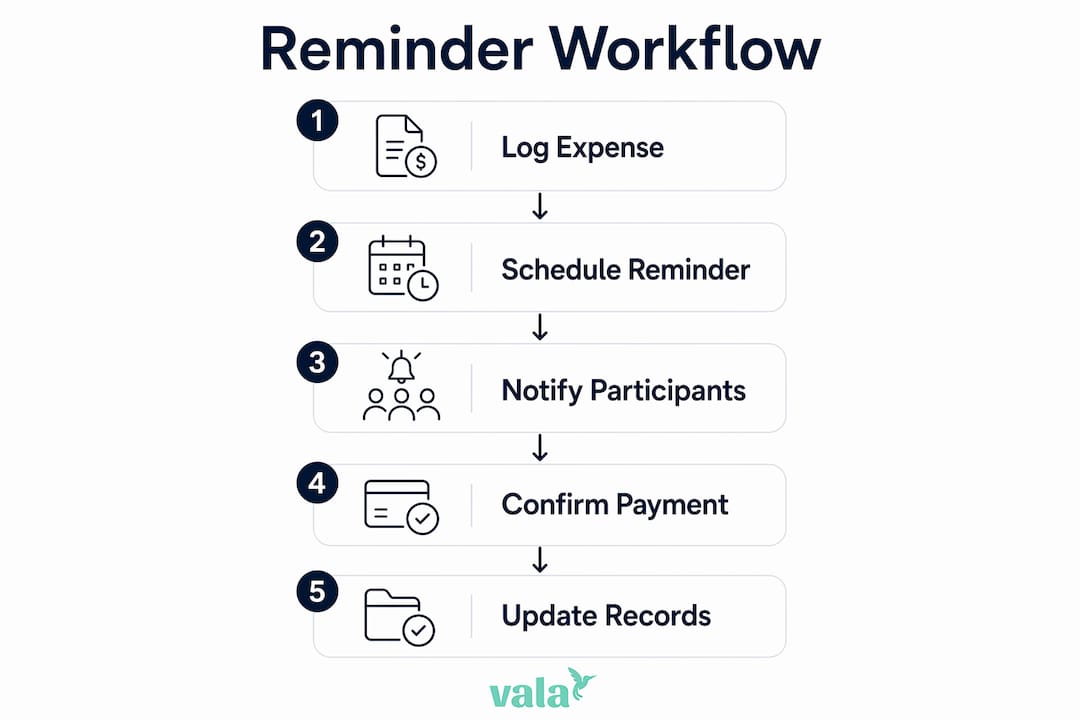
Infographic illustrating shared expense reminder workflow

What are the best practices for sending shared expense reminders?

Tone is the single biggest factor in whether a reminder strengthens or strains a relationship. A factual message referencing a shared agreement lands very differently from one that implies the other person is irresponsible. Etiquette expert Lizzie Post advises anchoring reminders in group agreements and ledgers rather than personal feelings. That approach keeps the conversation about the expense, not the person.

Timing matters as much as tone. For small, casual expenses like a shared dinner or a group gift, a reminder 3 days after the due date feels natural and non-urgent. For larger recurring bills like rent or utilities, a 5–7 day pre-due alert gives everyone enough time to arrange a transfer without last-minute stress.

Here are the core etiquette rules that keep shared expense reminders productive:

  • Use neutral language. Phrases like “friendly reminder” and a clear payment reference encourage a response without assigning blame.
  • Reference the shared record. Mention the specific expense, date, and amount. Vague reminders create confusion.
  • Agree on the system upfront. Decide together how reminders will be sent, how often, and through which channel. This removes the awkwardness of the first reminder.
  • Stay consistent. Send reminders on the same schedule every time. Inconsistency signals that the system is not serious.
  • Follow up once, then talk directly. If a second reminder goes unanswered, a direct conversation is more effective than a third message.

Pro Tip: Before the first shared expense is logged, spend five minutes agreeing on a payment window and reminder schedule with your group. That single conversation prevents most conflicts before they start.

Documenting expenses clearly before sending any reminder is non-negotiable. Routine logging after purchases ensures accuracy and fairness. A reminder tied to a clear record is hard to dispute.

What tools can you use to set up shared expense reminders?

The right tool depends on how your group operates. Some groups prefer a simple spreadsheet. Others want automated notifications without any manual input. Most benefit from a combination of both.

Shared spreadsheets

A Google Sheets document with columns for date, description, amount, payer, and payment status (Paid, Pending, Overdue) gives every group member full visibility. Clear spreadsheet tracking with a payment status column prevents misunderstandings and keeps the ledger honest. The limitation is that spreadsheets do not send reminders automatically. Someone still has to check the sheet and follow up manually.

Calendar apps

Google Calendar, Apple Calendar, and Outlook all support recurring events with built-in email notifications. You can set a monthly event for rent due on the 1st, add a reminder 5 days before, and share the event with every roommate. Google Calendar recurring reminders are free, require no extra app, and work across devices. The downside is that calendar apps do not track balances or log payment status.

No-code automation tools

Zapier and IFTTT connect your expense tracking tools to your calendar or messaging apps. For example, you can build a workflow that creates a calendar reminder automatically every time a new row is added to your shared spreadsheet. This removes the manual step entirely. These tools have free tiers that cover basic workflows, though more complex automations require a paid plan.

Shared expense apps

Dedicated shared expense apps handle logging, splitting, and reminders in one place. Features to look for include recurring bill tracking, uneven split options, group visibility of balances, and push notifications. Entry-level apps cover basic splits and reminders. More full-featured platforms add real-time balance updates, payment history, and integration with bank accounts.

Tool type Best for Reminder automation Balance tracking
Shared spreadsheet Small groups, full control No Yes
Calendar app Recurring bills, simplicity Yes No
No-code automation Tech-comfortable groups Yes No
Shared expense app All-in-one management Yes Yes

How do shared expense reminders reduce conflicts?

Automated reminders shift the dynamic from personal to procedural. When a system sends the nudge, no one feels singled out. The message is about the expense, not about trust or reliability. That shift alone removes a significant source of tension in shared living arrangements.

The numbers back this up. Automated reminders cut payment disputes by 50% compared to manual tracking. Fewer disputes mean fewer awkward conversations, fewer resentments, and a more stable group dynamic overall.

“The biggest pitfall is shifting from factual to passive-aggressive communication when reminding about shared expenses. Referencing agreed group contracts helps maintain neutrality.”

Reminders also create psychological clarity. When everyone knows a reminder will arrive before the due date, the expectation is set. No one has to wonder whether they forgot something or whether someone is quietly annoyed. That clarity reduces background stress, which is especially valuable in shared living situations where financial tension can spill into other areas of the relationship.

Tracking shared household purchases with a consistent system also builds fairness over time. Groups that document and remind consistently report fewer late payments and fewer instances of one person carrying costs longer than agreed.

Key takeaways

A shared expense reminder works best when it combines clear documentation, agreed timing, neutral language, and consistent follow-through.

Point Details
Define the system upfront Agree on payment windows and reminder schedules before the first shared expense is logged.
Time reminders correctly Send pre-due alerts 2–7 days early for large bills; follow up 3–5 days after the due date if unpaid.
Use neutral, factual language Reference the shared ledger and specific expense details to keep reminders informational, not personal.
Automate where possible Calendar apps and no-code tools remove the manual step and reduce forgetfulness by a measurable margin.
Document every expense Log date, amount, payer, and split immediately after purchase to keep the shared record accurate.

My honest take on shared expense reminders

The advice to “just communicate openly” about money sounds right but misses the real problem. Most shared expense conflicts do not start with dishonesty. They start with ambiguity. No one agreed on when payment was due. No one wrote down who paid for what. The reminder arrives and it feels like an accusation because there was never a shared record to point to.

The groups I have seen handle shared costs well all did one thing differently: they set up the system before the first expense, not after the first conflict. They agreed on a spreadsheet format, a payment window, and a reminder channel. That five-minute conversation at the start saved hours of tension later.

Tone is the second piece most people get wrong. The instinct when someone is late is to add urgency or frustration to the message. That almost always backfires. A message that says “Hey, just a reminder that the electric bill split of $47 is due from March 15” lands better than anything that implies the other person is irresponsible. Keep it factual. Keep it brief. Let the record do the work.

Technology helps, but it is not the whole answer. A calendar reminder that no one checks is useless. An app that only one person in the group uses creates more friction than it solves. The best system is the one your whole group will actually use, even if it is just a shared Google Sheet and a monthly calendar event.

— SaverStride

Valapoint makes shared expense tracking clear and simple

Managing shared costs gets complicated fast, especially when multiple people, multiple bills, and multiple payment timelines are involved. Valapoint is built for exactly this kind of financial situation.
https://valapoint.com

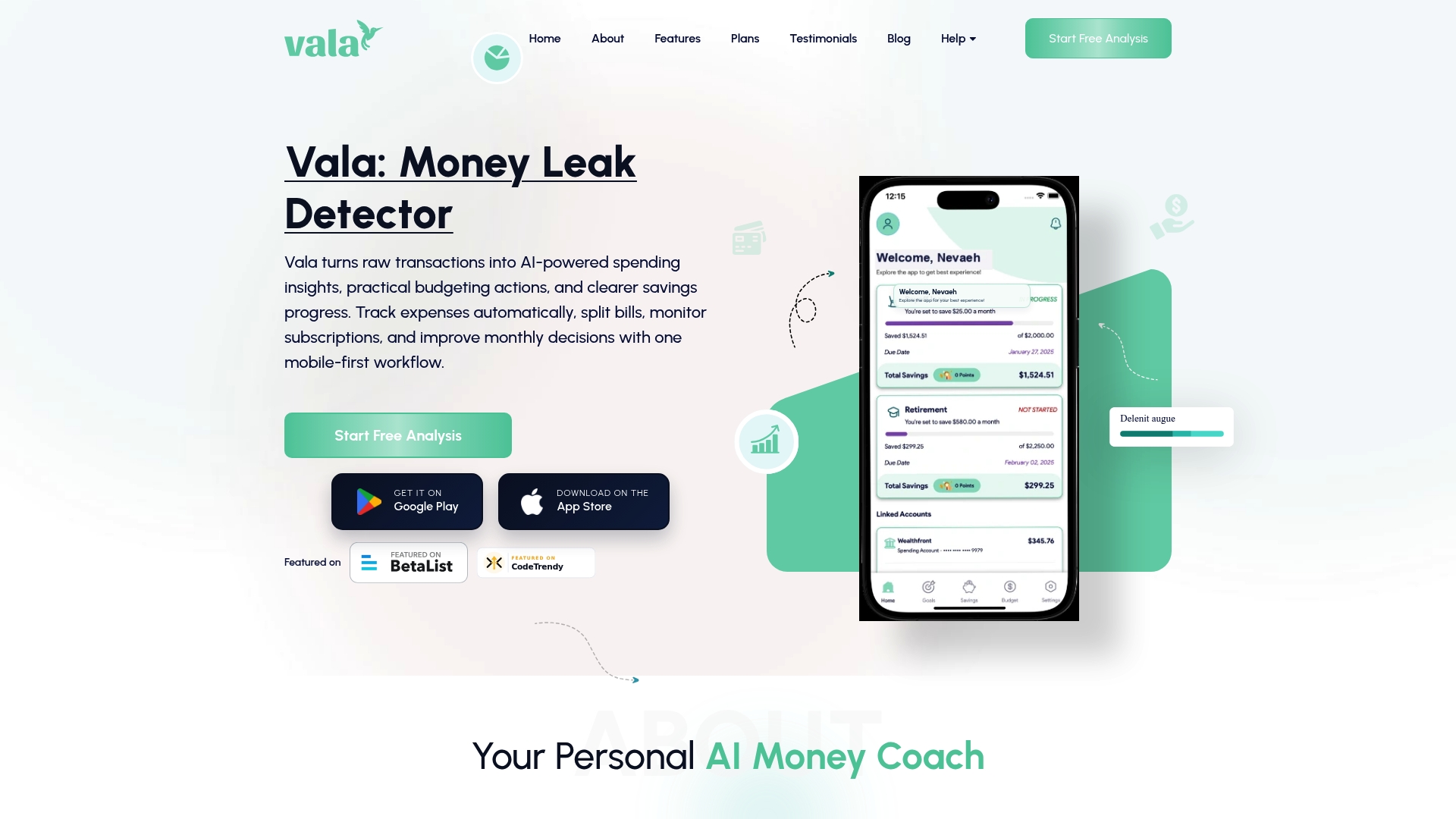
With Valapoint’s personal finance app, you can track expenses, split group costs, and monitor balances in real time. The app surfaces spending patterns you might otherwise miss and gives every member of your group a clear view of what is owed and what has been paid. Whether you are managing rent with roommates or splitting travel costs with friends, Valapoint keeps the numbers clear so the conversations stay easy. Visit Valapoint to see how the expense tracking tools work for shared living situations.

FAQ

What is a shared expense reminder?

A shared expense reminder is a notification or scheduled alert that prompts one or more people to pay their share of a cost they split with others. It can be sent through a calendar app, messaging platform, or dedicated finance app.

How often should you send a shared expense reminder?

Send one pre-due reminder 2–7 days before the payment date and one follow-up 3–5 days after the due date if the payment has not arrived. Sending more than two reminders without a direct conversation rarely improves the outcome.

What is the best way to track shared expenses?

A shared spreadsheet with columns for date, amount, payer, and payment status works well for small groups. Dedicated shared expense apps add automation and real-time balance tracking for groups that want less manual work.

How do you remind someone about a shared expense without being awkward?

Reference the specific expense, date, and amount from your shared record. Use neutral phrasing like “friendly reminder” and avoid language that implies the other person is irresponsible. Factual reminders tied to a shared ledger feel informational, not personal.

Do shared expense reminders actually reduce conflicts?

Automated reminders reduce payment disputes by 50% compared to manual tracking. The reduction comes from shifting the nudge from a person to a system, which removes the personal tension from the exchange.


Why Group Budgets Need Planning: Avoid Conflict and Save

Group budget planning is the structured process of allocating and agreeing on shared financial responsibilities before expenses occur. It is the single most effective way to prevent money conflicts in shared activities like travel, dining, and group events. Without it, groups default to guesswork, awkward real-time negotiations, and resentment that outlasts the trip or dinner. Why group budgets need planning comes down to one fact: unplanned shared spending creates ambiguity, and ambiguity creates conflict. The good news is that a clear plan, agreed on upfront, removes both.

What are the primary benefits of planning group budgets?

Group budget planning delivers financial and social benefits at the same time. On the financial side, collaborative budgeting leads to significant monthly savings compared to isolated budgeting, with open financial sharing helping individuals save $200–$400 more per month through accountability and shared cost-cutting. That is not a small number. It reflects what happens when people stop making spending decisions alone and start making them together.

The social benefits are equally real. Budgeting reduces financial stress and prepares groups better for unexpected expenses, leaving everyone feeling more secure and in control. When a group agrees on a spending limit before booking a vacation rental or choosing a restaurant, no one feels pressured to overspend or embarrassed to speak up.

Woman using budgeting app in café

A concept gaining traction in personal finance circles is “loud budgeting,” which means being openly transparent about your financial limits with the people around you. Shared budgeting conversations reduce money shame, lead to better money habits, and create collective financial wins. Loud budgeting turns what used to be an awkward topic into a group norm.

The core benefits of group budget planning include:

  • Spending visibility: Everyone sees where the money goes, which prevents surprise charges and forgotten costs.
  • Cost savings: Groups that plan together identify cheaper alternatives before committing, not after.
  • Reduced stress: Pre-agreed limits eliminate real-time pressure to spend beyond your comfort zone.
  • Stronger trust: Transparency about money builds confidence between friends, couples, and roommates.
  • Shared accountability: When everyone agrees to a plan, everyone feels responsible for sticking to it.

“Open money conversations shift a group from performative spending to genuine connection. The budget becomes the permission slip to be honest.” — Financial behavior research on loud budgeting

What common mistakes make group budgeting fail?

Most group budgeting failures are not about math. They are about assumptions. The most common mistake is splitting every expense equally without first agreeing on which costs are shared and which are personal. Splitting all expenses equally causes friction. A tiered split system, where shared costs like accommodation and transport are divided equally while personal expenses like spa treatments or extra drinks are paid individually, prevents guilt and resentment before it starts.

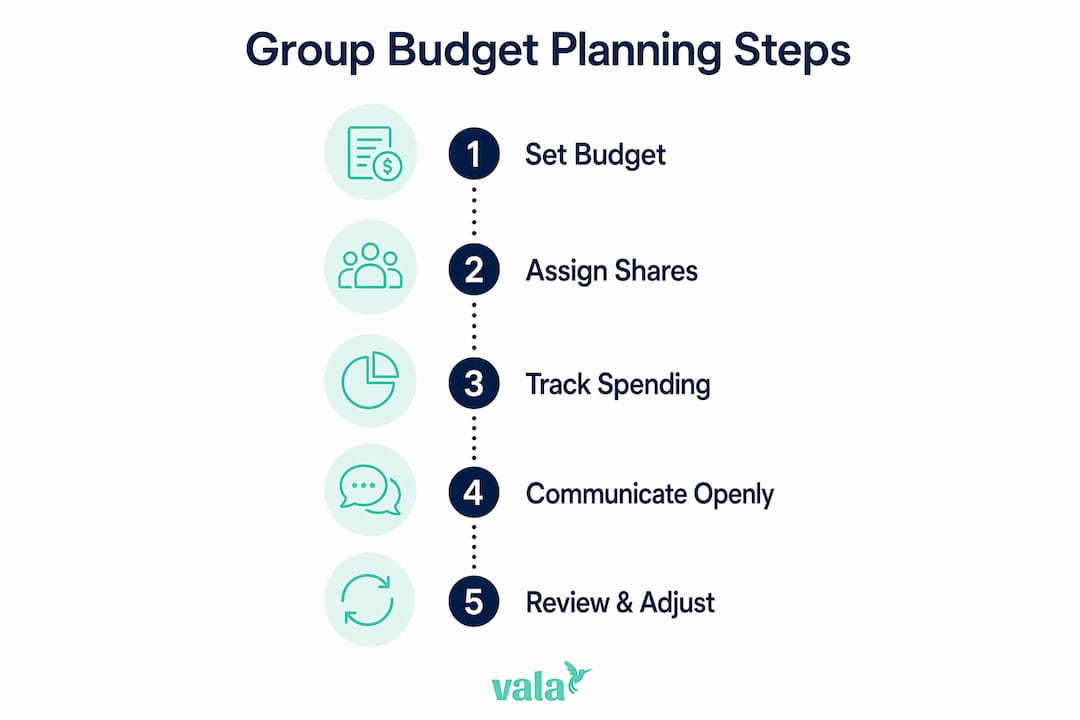
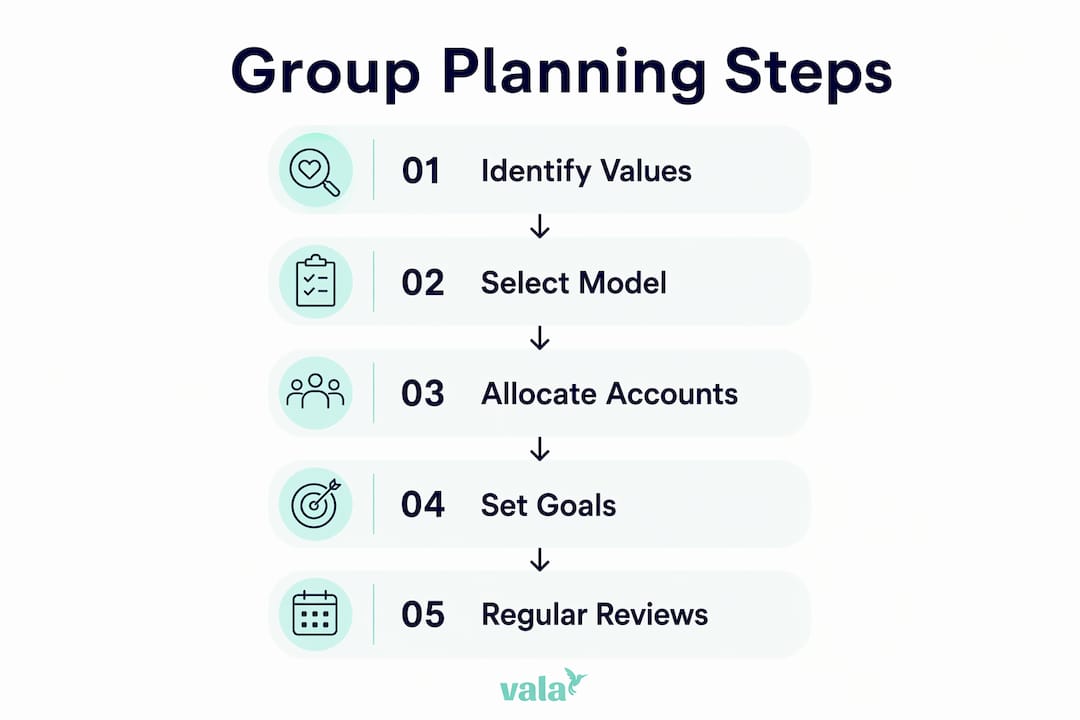
Infographic showing group budget planning steps

A second major mistake is failing to log expenses as they happen. Not logging expenses in real time causes forgotten or disputed costs, which leads directly to resentment after the fact. When someone pays for a group dinner and forgets to mention it until two weeks later, the conversation gets complicated fast.

Here are the most common group budgeting mistakes and how planning prevents each one:

  1. Assuming everyone has the same budget. Groups include people with different incomes and spending habits. Agreeing on a spending range upfront respects those differences without making anyone feel singled out.
  2. Skipping the pre-trip or pre-event money talk. Avoiding the conversation does not make it go away. It just moves it to a worse moment, like when the bill arrives.
  3. No clear owner for shared costs. When no one is responsible for tracking group expenses, costs get lost. Assign one person or use a shared app to log everything.
  4. Mixing personal and group expenses. Buying a souvenir on the group card creates confusion. Separate personal and shared spending from the start.
  5. Settling up at the end without receipts. Memory is unreliable. Real-time logging is the only way to settle fairly.

Pro Tip: Before any group trip or event, send a simple message to the group listing three things: the total estimated budget, how shared costs will be split, and who is responsible for tracking expenses. This one message prevents most conflicts.

The “passive-aggressive gap” is a real pattern in untracked group spending. One person pays for more than their share, says nothing, and grows quietly resentful. Planning closes that gap before it opens.

How to plan an effective group budget

Effective group financial planning follows a clear sequence. Start with a conversation about comfort levels, not costs. Ask each person what they want to spend overall, then build the budget around the most conservative answer. This approach respects everyone and prevents the group from splitting later over money.

The practical steps look like this:

  • Set a total budget first. Agree on the overall spend before breaking it into categories. This prevents category-by-category negotiation, which drags on and creates friction.
  • Categorize expenses. Separate shared costs (accommodation, transport, group meals) from personal costs (individual activities, personal shopping). Use the tiered split system described earlier.
  • Assign a tracker. One person or one shared app logs every group expense in real time. Rotating this role on longer trips keeps it fair.
  • Build in a buffer. Add 10–15% to your estimated total for unexpected costs. Groups that skip this step almost always go over budget.
  • Agree on the settlement method upfront. Decide before the trip whether you will settle daily, at the end, or through a shared app that calculates balances automatically.

The average American spends about $250 per month on social activities, and unplanned social costs are a leading driver of lifestyle creep and financial stress. That figure puts group planning in perspective. If you are spending $250 monthly on social activities without a plan, a significant portion of that is likely wasted on overspending driven by social pressure rather than genuine choice.

Planning step What it prevents
Set total budget upfront Category-by-category arguments
Categorize shared vs. personal Resentment over unequal contributions
Log expenses in real time Disputed or forgotten costs
Build a buffer Last-minute shortfalls
Agree on settlement method Post-event confusion and conflict

Technology makes all of this easier. Apps that track group spending in real time remove the need for manual calculations and give everyone visibility into the shared balance at any moment. Valapoint is built specifically for this, letting groups log expenses, split costs, and see exactly where the money stands without a single spreadsheet.

Pro Tip: Use a shared budgeting app to log expenses the moment they happen, not at the end of the day. Real-time logging takes 10 seconds per transaction and saves hours of argument later.

How does group budget planning strengthen relationships?

Money is one of the top sources of conflict in relationships, and shared group activities put that tension on full display. Group budget planning addresses this directly by replacing assumptions with agreements. When everyone knows the plan, no one has to guess whether their spending is acceptable or feel judged for their financial limits.

Couples who budget together report higher relationship satisfaction and financial harmony. The same principle applies to friend groups and roommates. The act of having the money conversation, even when it feels awkward at first, builds a level of trust that spending without a plan never creates.

Transparent group financial planning moves social groups away from performative spending. Performative spending is buying things to appear generous or avoid looking cheap, rather than because you actually want to. It is expensive, it is stressful, and it does not reflect what anyone actually values. A clear group budget gives everyone permission to spend intentionally instead.

“Vulnerability around money is one of the fastest ways to build real trust in a group. When you say ‘here’s what I can afford,’ you invite others to do the same.” — Research on financial transparency and social bonding

Groups that plan their budgets together also handle disagreements better when they do arise. Because the rules were agreed on upfront, a dispute about a specific expense has a reference point. Without a plan, every disagreement starts from scratch.

Key Takeaways

Group budgets need planning because unstructured shared spending creates conflict, resentment, and financial stress that a simple upfront agreement can prevent entirely.

Point Details
Plan before spending starts Agree on total budget and split logic before any expenses occur to prevent real-time friction.
Use tiered expense splitting Divide shared costs equally and let individuals pay for personal expenses to avoid resentment.
Log expenses in real time Record every group cost as it happens to prevent disputed or forgotten charges.
Loud budgeting builds trust Open money conversations reduce shame, improve habits, and strengthen group relationships.
Technology removes the friction Shared budgeting apps give everyone visibility and automate the math so no one feels shortchanged.

Why I think most groups get this completely backward

Groups treat the money conversation as the awkward part they want to skip. The actual awkward part is the argument at the end of the trip when someone feels they paid more than their share. I have seen this pattern repeat across friend groups, couples, and family vacations. The groups that plan upfront, even with a five-minute conversation, almost always finish the experience closer than when they started. The groups that skip it often do not plan another trip together.

The mistake most groups make is treating budgeting as a sign of distrust, as if asking “what’s everyone comfortable spending?” implies you do not trust your friends to be fair. The opposite is true. Asking that question is the most respectful thing you can do. It tells everyone that their financial reality matters and that no one will be pressured into spending beyond their means.

Consistent budgeting creates financial well-being comparable to households earning $25,000 more without budgeting. That finding applies to groups too. A group that plans its shared spending does not just save money. It builds a financial culture where honesty is normal and pressure is low. That is worth more than any individual line item on a trip budget.

The groups I have seen thrive financially are not the ones with the highest incomes. They are the ones who talk about money openly, agree on a plan, and use tools that keep everyone accountable without making it feel like a chore. Start the conversation early. The rest gets easier from there.

— SaverStride

Valapoint makes group budget planning straightforward

Tracking shared expenses across a group should not require a spreadsheet, a group chat full of Venmo requests, and three follow-up conversations. Valapoint handles the tracking, splitting, and visibility automatically so your group can focus on the experience instead of the math.

https://valapoint.com

With Valapoint’s personal finance app, you can log group expenses in real time, split costs by category, and see exactly who owes what at any moment. The app surfaces hidden spending patterns so your group can make smarter decisions before costs spiral. You can also use Valapoint’s group expense tracking tools to set shared budget limits and get alerts before you go over. Whether you are planning a weekend trip, a group dinner, or a shared household budget, Valapoint gives your group the clarity to spend confidently and settle fairly.

FAQ

Why do group budgets need planning before the activity starts?

Pre-activity planning sets clear expectations for how costs will be split and what the total spending limit is. Groups that agree upfront avoid the real-time pressure and post-event disputes that unplanned shared spending creates.

What is the best way to split expenses in a group?

A tiered split system works best. Divide shared costs like accommodation and transport equally, and let each person pay for their own personal expenses. This approach prevents resentment from unequal contributions.

How does group budget planning reduce financial stress?

Budgeting reduces financial stress by removing uncertainty about what you will spend. When everyone knows the plan, no one feels pressured to overspend or anxious about unexpected costs.

What is loud budgeting and how does it help groups?

Loud budgeting means being openly transparent about your financial limits with the people around you. It reduces money shame, encourages better habits, and helps groups make spending decisions that reflect everyone’s actual comfort level.

How can technology help with group budget planning?

Shared budgeting apps log expenses in real time, calculate who owes what, and give every group member visibility into the shared balance. Real-time logging prevents forgotten costs and removes the need for manual calculations at the end of a trip or event.

How to Set Realistic Savings Targets That Stick

Setting realistic savings targets means defining personalized, achievable financial goals that align with your actual income and expenses. Goal-setters save consistently at a rate of 75% compared to 62% for those without specific goals. That gap is not a coincidence. The SMART framework, the professional standard for setting financial objectives, turns vague intentions into clear plans with deadlines and dollar amounts. Financial professionals also recommend saving 20% of net income as a baseline, though starting as low as 5% is a perfectly valid entry point.

How to set realistic savings targets using the SMART framework

The SMART framework is the most effective structure for converting a savings wish into a working plan. Each letter stands for a quality your goal must have: Specific, Measurable, Achievable, Relevant, and Time-bound. Without all five, your goal is just a hope.

Here is what each element looks like in practice:

  • Specific: Name the exact goal and the exact amount. “Save money” fails. “Save $5,000 for a car down payment” works.
  • Measurable: Attach a number you can track weekly or monthly. If you cannot measure progress, you cannot course-correct.
  • Achievable: Your monthly contribution must fit inside your actual budget. A goal that requires cutting food spending to zero is not achievable.
  • Relevant: The goal must matter to your life right now. Saving for a house makes sense if you plan to buy within three years. Saving for a boat when you have credit card debt does not.
  • Time-bound: Set a firm deadline. “By december 2027” forces you to calculate what you need to save each month.

A vague goal sounds like: “I want to save more this year.” A SMART savings goal sounds like: “I will save $3,600 for an emergency fund by december 2026 by transferring $300 to a dedicated account every month.”

Pro Tip: Name your savings account after the goal, such as “Emergency Fund” or “Vacation 2027.” Labeled accounts reduce the temptation to dip into them because the money feels already spoken for.

One underused SMART tactic is creating separate goal buckets for each objective. Mixing your vacation fund and your emergency fund in one account makes it hard to track either. Separate accounts give you a clear progress bar for every goal you are working toward.

How to determine a realistic savings target based on your budget

Your savings target must be grounded in your actual numbers, not in what you think you should be saving. Financial professionals recommend a 20% savings rate as the baseline, but they also advise starting at 5% and increasing by 1% every three months. That gradual ramp prevents the shock of a sudden lifestyle change.

Hands calculating savings budget at home office desk

The 50/30/20 rule gives you a clear structure for finding that 20%. The rule allocates 50% of your after-tax income to needs, 30% to wants, and 20% to savings and debt repayment. If your take-home pay is $3,500 per month, your savings target under this rule is $700 per month.

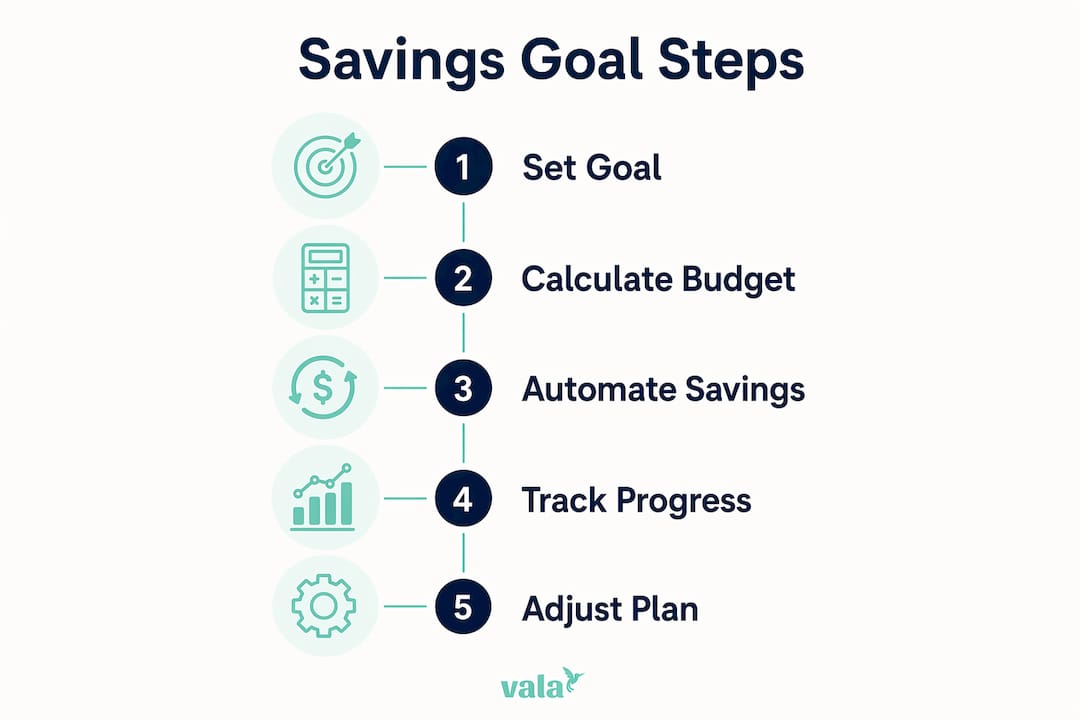
Infographic showing 5 key steps for savings goals

To check if a specific goal is feasible, use this formula: divide the total amount you still need to save by the number of months until your deadline. That gives you your required monthly contribution. If that monthly figure exceeds 20% of your net income, you have two options: extend the deadline or reduce the goal amount. Quitting is not the third option.

Goal Total Amount Timeline Monthly Contribution Needed
Emergency fund $1,000 5 months $200
Vacation $2,400 12 months $200
Car down payment $5,000 18 months $278
Home down payment $20,000 48 months $417

The table above assumes no existing savings toward each goal. Adjust the starting balance to reflect what you already have set aside.

Pro Tip: Use the savings calculator from Valapoint to run these numbers in seconds. Plug in your goal amount, timeline, and current savings to see exactly what monthly contribution you need.

If your math shows you cannot hit a goal at your current income, that is useful information. It tells you to either extend the timeline, reduce the target, or look for ways to increase income before committing to the plan.

What tools and strategies help you automate and track savings goals

Automation is the single biggest predictor of hitting a savings goal. Splitting your direct deposit or scheduling a recurring transfer the day after payday removes the decision entirely. You never see the money in your checking account, so you never spend it.

The most effective automation methods are:

  • Direct deposit splitting: Ask your employer to send a fixed percentage or dollar amount directly to your savings account. This works before you even log in to check your balance.
  • Scheduled transfers: Set a recurring bank transfer for the day after each paycheck arrives. Timing it right after payday mimics the effect of direct deposit splitting.
  • Goal-progress programs: Some banking apps track savings goals every purchase to the nearest dollar and transfer the difference to savings. The amounts are small, but the habit builds over time.
  • Goal-specific accounts: Open a separate account for each major savings goal. Label each one clearly. This makes it easy to see exactly how close you are to each target.

Tracking progress matters as much as automating contributions. Check your savings balances once a month, not once a year. Monthly reviews let you catch problems early, such as a month where an unexpected expense forced you to skip a transfer. Personal finance planning tools built for your age group can show spending patterns that reveal where your money actually goes, which makes it easier to protect your savings contributions.

Adjust your goals dynamically. If you get a raise, increase your monthly contribution. If you face a large unexpected expense, reduce the contribution temporarily rather than stopping entirely. Consistency over time matters more than perfection in any single month.

Common mistakes that make savings targets unrealistic

The most common mistake is setting a total savings goal without calculating the monthly contribution it requires. A $10,000 goal sounds reasonable until you realize it requires $833 per month on a $2,500 take-home salary. Without that monthly calculation, the plan fails before it starts.

  1. Ignoring monthly affordability. Always run the monthly contribution formula before committing to a goal. If the number does not fit your budget, adjust the goal before you start, not after you fail.
  2. Setting aspirational rather than realistic targets. Goal setting works best when it reflects your actual financial situation, not an idealized version of it. Adjusting deadlines or amounts is always better than abandoning the plan entirely.
  3. Skipping the starter emergency fund. A $1,000 emergency fund covers roughly 70% of typical unexpected expenses and builds the savings habit before you tackle bigger goals. Start here if you have nothing saved.
  4. Putting short-term savings in the stock market. For any goal under five years, avoid market exposure and use high-yield savings accounts or certificates of deposit instead. Market volatility can wipe out a down payment fund right before you need it.
  5. Treating a missed month as a failure. One skipped transfer does not ruin a savings plan. Missing six months in a row does. Adjust and continue rather than stopping.

“Savings goals are dynamic and can evolve as life circumstances change. Adopting a flexible approach is a hallmark of sustainable financial health.” — Fidelity

The psychological side of savings is real. When a goal feels too far away, motivation drops. Breaking a large goal into smaller milestones, such as celebrating every $500 saved toward a $5,000 target, keeps the momentum going. Automating savings habits removes the willpower requirement entirely, which is why it works even when motivation fades.

Key Takeaways

Setting realistic savings targets requires a specific monthly contribution plan, a clear deadline, and automation to make the habit stick.

Point Details
Use the SMART framework Define goals with exact amounts, deadlines, and monthly contributions to make them achievable.
Start with 5%, scale to 20% Begin at a savings rate you can sustain and increase by 1% every three months.
Calculate monthly contributions first Divide your total goal by months remaining to confirm the plan fits your budget before committing.
Automate every transfer Schedule contributions right after payday so savings happen before spending decisions do.
Adjust goals, never quit When life changes, extend the timeline or reduce the amount rather than abandoning the plan.

Why I think most savings advice sets people up to fail

Most savings guides lead with the 20% rule and leave it there. That number is a benchmark, not a starting point. Telling someone earning $2,800 a month to save $560 immediately is a fast way to make them feel like budgeting is not for them.

What actually works is starting embarrassingly small. A $50 automatic transfer every two weeks builds the identity of someone who saves. That identity is worth more than any specific dollar amount in the first three months. Once the habit is there, scaling up feels natural rather than forced.

I have also seen how much named savings buckets change behavior. Calling an account “Emergency Fund” instead of “Savings Account 2” makes it psychologically harder to raid. The label creates a mental contract. It sounds minor, but the effect on spending decisions is real.

The other thing most guides skip is the review cadence. Setting a goal in january and checking it in december is not a plan. Monthly reviews, even a five-minute check of your balances, catch problems before they compound. Life changes constantly. Your savings plan should change with it, and flexible savings planning is what separates people who reach their goals from those who restart from zero every year.

Do not be discouraged by a month where you saved nothing. The goal is a long-term average, not a perfect streak. Adjust, continue, and trust that small consistent actions compound into real results.

— SaverStride

Valapoint makes your savings goals visible and automatic

Knowing what to do and actually doing it are two different things. Valapoint’s personal finance app connects your budget, your spending patterns, and your savings goals in one place so nothing falls through the cracks.

https://valapoint.com

With Valapoint, you can set up named goal buckets, track your monthly contributions in real time, and get AI-powered insights that show exactly where your money is going. The app flags spending patterns that quietly drain your savings capacity, so you can redirect that money toward goals that matter. Whether you are building your first $1,000 emergency fund or saving for a home down payment, Valapoint gives you the clarity to stay on track. Try the budget goal tracker and see how close you already are to your next milestone.

FAQ

What is a realistic savings target for beginners?

A realistic starting savings target is 5% of your net income. Increase that rate by 1% every three months until you reach 20%, which is the professional benchmark for long-term financial health.

How do I calculate my monthly savings contribution?

Divide the total amount you need to save by the number of months until your deadline. If that number exceeds 20% of your monthly take-home pay, extend your timeline or reduce the goal amount.

What is the SMART framework for savings goals?

SMART stands for Specific, Measurable, Achievable, Relevant, and Time-bound. Applying all five criteria turns a vague savings intention into a concrete plan with a deadline and a monthly dollar target.

Should I invest my savings for short-term goals?

No. For any goal with a timeline under five years, keep your savings in a high-yield savings account or a certificate of deposit. Stock market volatility can reduce your balance right when you need the funds.

How do I stay motivated when progress feels slow?

Break large goals into smaller milestones and celebrate each one. Automating your contributions removes the need for daily motivation, since the transfer happens whether you feel inspired or not.

Top 3 Banktivity.com Alternatives in 2026

Tracking bills, managing subscriptions, and splitting expenses without clear, unified tools is confusing for many household budgeters. Many personal finance apps make users handle too much manual entry or lock shared budgeting behind costly plans. This comparison covers subscription tracking, bill reminders, and shared expense features so you can match the right app to your group’s workflow.

Table of Contents

Vala

https://valapoint.com

At a Glance

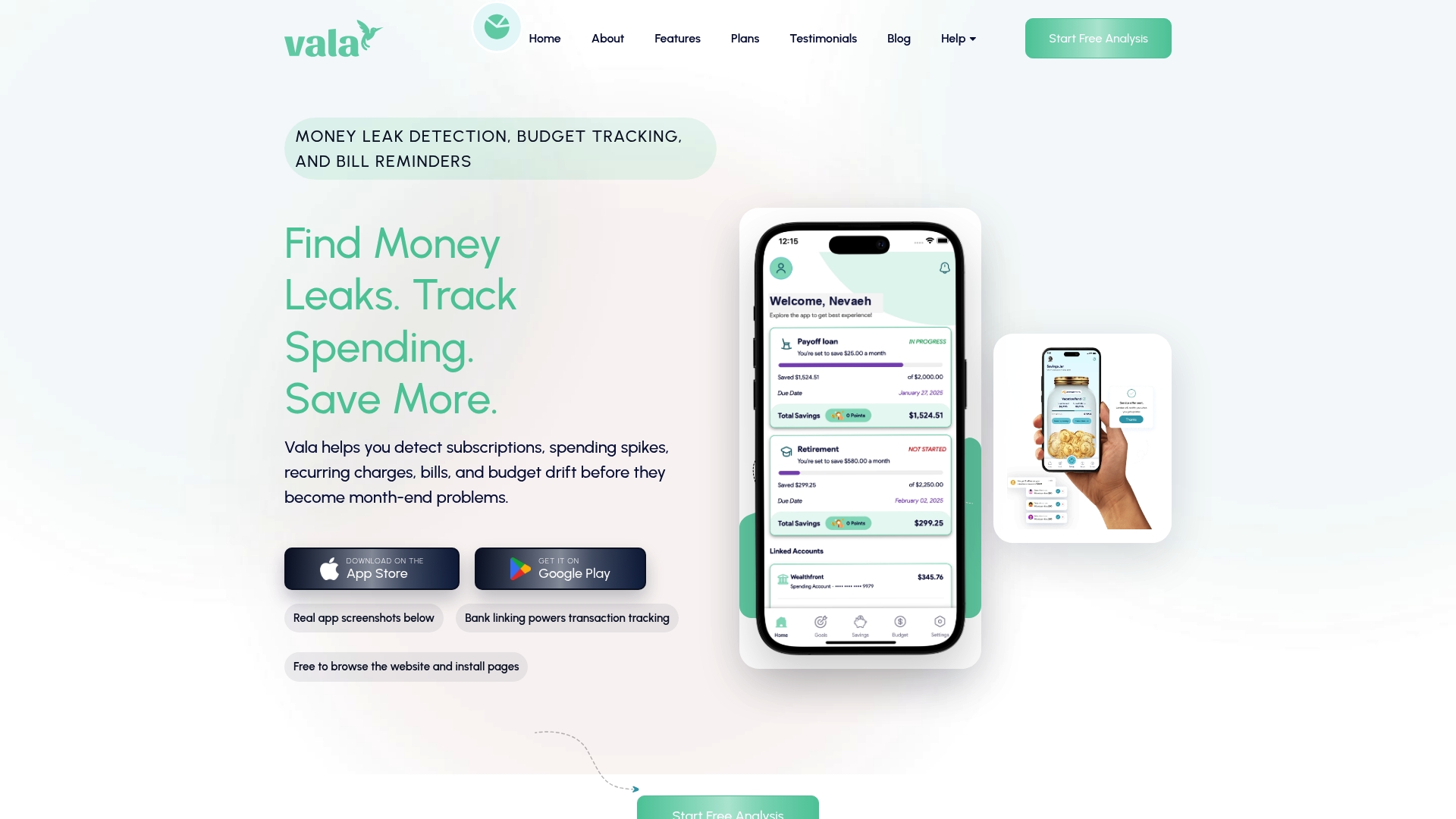
Vala lets you browse educational content and subscription comparisons without an account. Bank linking powers automatic transaction syncing and track savings goals savings so recurring charges appear without manual entry. The app concentrates on household money leaks, bill timing, and shared expense splitting for families and groups.

Core Features

Vala uses bank linking to pull transactions and produce spending and budget insights that highlight subscription overlaps and sudden spending spikes. It offers subscription review and management, bill reminders with due date visibility, track savings goals savings, and tools for splitting shared expenses among household members. Users can set budget goals, browse help content, and upgrade for deeper insights or more advanced reminders.

Key Differentiator

Vala focuses specifically on household money leaks and the timing of recurring charges rather than investment tracking or tax reporting. The interface highlights next due dates and duplicate subscriptions so you can correct cash flow before a bill arrives. The vendor also publishes clear explanations of data handling so privacy conscious householders understand how account linking works.

Pros

The interface makes it easy to spot repeated charges and subscriptions, which helps households stop small leaks before they add up. Automatic transaction syncing and track savings goals savings reduce manual entry and nudge steady saving without extra effort. Clear data handling explanations build trust for people cautious about connecting bank accounts. The shared expense tools let couples and groups split costs and track who owes what each month.

Cons

  • Features may be basic for advanced budgeters or those needing detailed financial analysis.

Who It’s For

Household budgeters, couples, and small groups who want a focused view of recurring charges will find Vala useful. People who prefer simpler tools instead of complex financial modeling will value bill timing visibility and shared expense splitting. Advanced investors or professional financial planners will likely need more powerful analytics.

Unique Value Proposition

Browse without logging in to preview educational guides and subscription comparisons before you connect accounts. That reduces friction for cautious householders and helps you decide which subscriptions to investigate. After you link accounts, automatic syncing and track savings goals features run quietly to surface leaks and upcoming bills so you can act earlier.

Real World Use Case

A family links two checking accounts and a credit card to track recurring charges and upcoming utility bills. Vala flags a duplicate streaming subscription, sends a bill reminder, and shows how track savings goals savings feed a vacation goal. The family splits grocery costs and sees who still owes money at month end.

Pricing

You can browse the app for free and access educational content without creating an account. Premium upgrades unlock deeper insights, advanced reminders, and expanded features; pricing tiers are not publicly listed.

Website: https://valapoint.com

YNAB

https://ynab.com

At a Glance

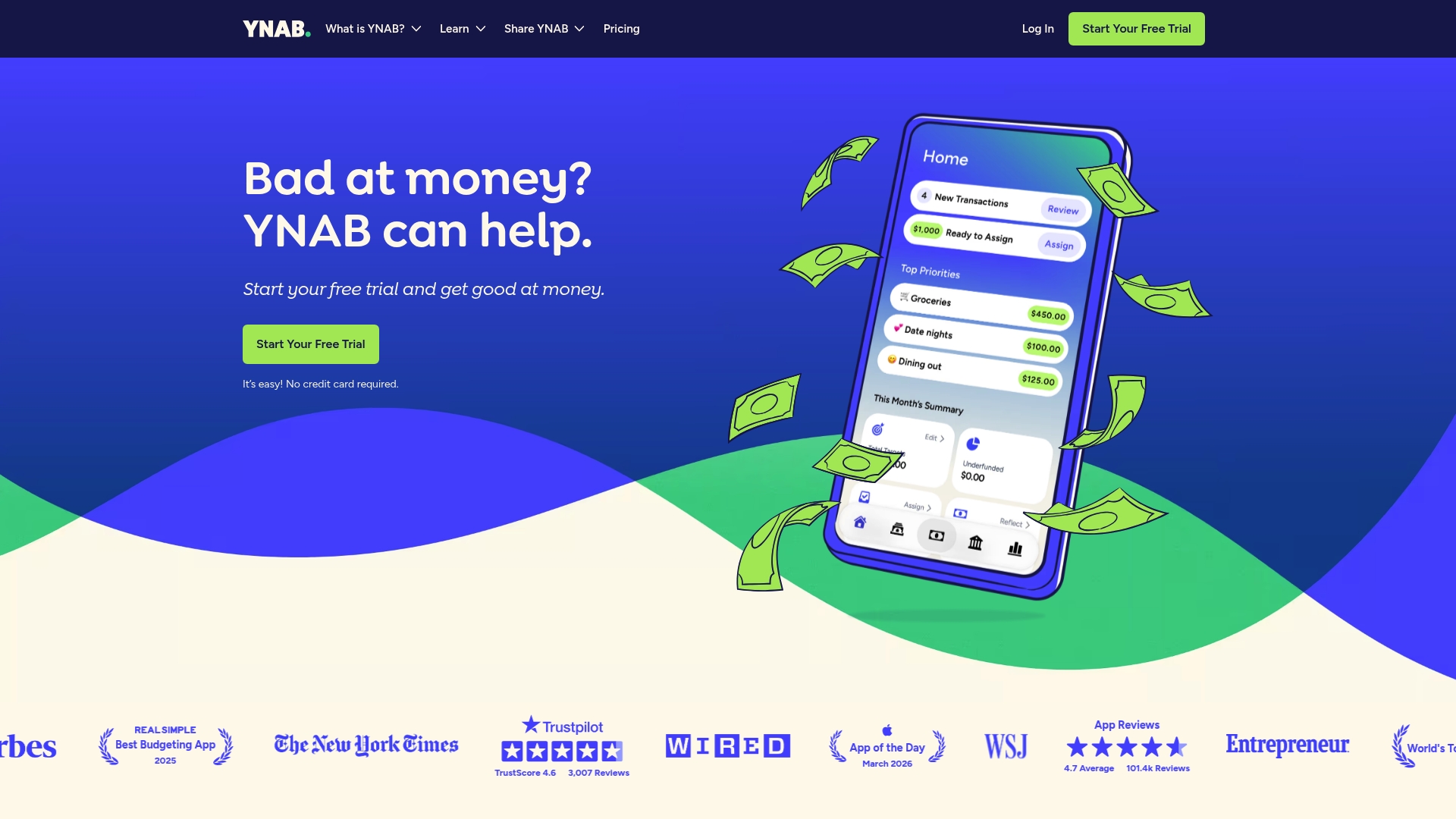
YNAB offers a free 34 day trial with no credit card required. The trial lets you test budgeting tools and real time device sync before committing. Many users praise the focus on practical budget habits rather than strict rules.

Core Features

YNAB centers on the concept Give every dollar a job, which makes allocating income explicit and trackable. It supports real time account linking and transaction import so your balances update across devices. The app includes debt payoff tools, goal tracking, reporting with net worth and spending charts, subscription sharing for up to six people, educational workshops, and an ad free, bank grade security experience.

Key Differentiator

YNAB stands out for its budgeting method that forces allocation of every dollar and combines that method with ongoing learning resources. The emphasis on active money assignment changes how people prioritize spending and saving. Real time syncing and group subscription sharing make that approach usable for couples and families.

Pros

YNAB helps many people reduce financial stress and accelerate debt payoff through disciplined budgeting and visible progress. The interface is simple and flexible, which lowers friction when you start assigning dollars to categories. Community support and practical workshops provide ongoing help for new users. The product offers a free 34 day trial so you can evaluate whether the method fits your household before paying.

Cons

  • Price may be a barrier. The annual and monthly plans sit above some simpler budgeting apps, which matters for tight budgets.
  • Limited multi currency support outside supported regions. That makes it a poor choice for frequent travelers or expatriates.
  • Learning curve at the start. Assigning every dollar takes a habit shift and some initial manual categorization.
  • Feature updates and support are ongoing. Some users report waiting for requested refinements.

When It May Not Fit

If you need native multi currency handling across many countries, this app will feel constrained. If you prefer a free forever tool without subscription costs, the price may not match your needs. If you want automated investment tracking or advanced tax reporting, the focus on hands on budgeting may feel narrow.

Who It’s For

Individuals and families who want a disciplined, hands on approach to budgeting will get the most value. People committed to paying down debt and tracking short term goals will benefit from the method and debt tools. Couples who want shared budgeting and clear money roles will find the group features useful.

Real World Use Case

A family links checking and credit accounts, assigns each paycheck to spending and savings categories, and sets a vacation goal. They use the debt payoff tools to schedule extra payments and watch net worth charts monthly. Within a year they reduce credit balances and build a dedicated travel fund.

Pricing

YNAB charges $109 USD per year or $14.99 USD per month, plus tax where applicable, after the free trial. The model is subscription based and includes syncing, reporting, and educational content. A free trial period lets you test the workflow before subscribing.

Website: https://ynab.com

PocketGuard

https://pocketguard.com

At a Glance

PocketGuard reports connectivity with over 18,000 financial institutions for real time transaction updates. The app groups transactions automatically and shows monthly leftovers to help you spot spare cash. It pairs budgeting, goal tracking, and net worth monitoring in one mobile and web experience.

Core Features

PocketGuard offers budgeting with custom categories, rollovers, and cash flow monitoring that highlights how much you can safely spend each month. It includes SMART criteria for goal setting and pace monitoring to prevent overspending before month end. Automatic categorization, debt payoff plans, bill and subscription management, and financial calculators complete the core toolset.

Key Differentiator

That figure on connectivity makes PocketGuard strong at automated transaction tracking and near real time net worth updates. The app focuses on live account sync so your balances and alerts reflect recent activity. This approach suits people who want low maintenance account tracking rather than manual ledger work.

Pros

According to the company, the app has more than one million members in the US, UK, and Canada. Automated organization and timely alerts reduce the time you spend categorizing transactions and checking balances. Monthly snapshots and leftovers calculation give clear guidance on how much you can spend without breaking your budget.

Cons

  • Some users find the interface complex initially and report a learning curve.

  • Premium subscription required for full features and advanced tools.

  • The free version limits transactions and omits several advanced features.

  • The app depends on bank connectivity quality and that connection can affect accuracy.

When It May Not Fit

If you do not want to link bank accounts this app will not fit because it relies on account connections. If you need every feature without paying you will find the free tier limiting. New budgeters may find the interface initially complex and need time to learn the workflows.

Who It’s For

This app fits personal finance enthusiasts and budget conscious individuals who prefer automated tracking. It works well for people managing multiple accounts and subscriptions who want clear alerts for bills and fees. Financial coaches can use it to monitor client goal progress and shared budgets.

Real World Use Case

A user connects checking and credit card accounts, sets monthly spending goals, and watches transactions categorize automatically. The app calculates leftovers and notifies the user when spending pace risks exceeding the budget. This keeps bills and debt payoff plans visible without manual updates.

Pricing

PocketGuard uses a freemium model with optional paid plans. Paid plans start at $6.25/month or $74.99/year for premium features.

Website: https://pocketguard.com

Comparison of alternatives

Managing personal finances efficiently is more straightforward than ever with applications tailored to distinct styles and circumstances.

Household-oriented features

Vala’s focus on shared expense tracking and subscription management allows households to gain insights into recurring expenditures. YNAB offers a structured approach to budgeting with its “Give Every Dollar a Job” philosophy, ideal for those aiming for a proactive budget. In contrast, PocketGuard’s real-time account management and automated categorization excel for those seeking out instant tracking with minimal manual intervention.

Connectivity and automation

PocketGuard supports a wide range of banking institutions, enabling accurate and real-time financial data synchronization. Vala achieves a balance by encouraging savings through features like track savings goals habits. YNAB emphasizes user experiences guided by manually-applied budget rules, which some may find more effort-intensive but ultimately rewarding.

Best fit

  • Household budgeters looking for tools focused on managing shared expenses and optimizing recurring charges should consider Vala.
  • Budgeters interested in a disciplined system that fosters proactive spending decisions would find value in YNAB.
  • Those desiring a tool with extensive financial institution connections and transaction updates would benefit from PocketGuard.

Our pick

Vala remains the top choice for household budgeters seeking simple, effective tools to enhance savings and reduce financial waste. If you prefer advanced budgeting philosophies or real-time synchronization, consider YNAB or PocketGuard, respectively.

Compare these personal finance apps based on their features, key differentiators, pricing, and limitations.

App Name Core Feature Key Differentiator Pricing Notable Limitation
Valapoint Bank linking with transaction syncing Focuses on household money leaks and shared expenses Price not published Basic features for advanced budgeters
YNAB Real-time account linking and debt payoff “Give every dollar a job” budgeting methodology $109/year or $14.99/month Higher price point; lacks multi-currency support
PocketGuard Budgeting with automated categorization Connectivity with 18,000 financial institutions $74.99/year or $6.25/month Learning curve for new users; dependent on bank sync quality

How to Find a Better Fit Among Banktivity.com Alternatives

Choosing a tool that fits your household budgeting style can be tough. Many want clear visibility into recurring charges and group expense splitting without complicated setup. Valapoint targets these needs by using AI to track expenses, spot hidden subscription leaks, and simplify shared costs for families and couples.

Valapoint offers:

  • Access without mandatory signup to review helpful educational guides
  • Automatic bank syncing with real-time bill reminders
  • Built-in savings nudges and budget goal tracking

If you want to stop small money leaks before they grow and manage your household’s bills with ease, see how Valapoint can fit your needs. Visit Valapoint to browse details and start tracking your money more clearly today.

FAQ

What is Valapoint’s approach to recurring charges and household money leaks?

Valapoint focuses on identifying recurring charges and household money leaks, providing features like bill reminders and subscription management. Its emphasis on spotting repeated charges helps households control their finances effectively. You can rely on Valapoint to continue tracking expenses and alert you about upcoming bills.

How does Valapoint compare to YNAB for budgeting methods?

YNAB is known for its budgeting method that requires users to assign every dollar a job, which can help change spending priorities effectively. Valapoint, on the other hand, simplifies the process by focusing on bill timing and shared expense splitting rather than strict budgeting rules. Choose Valapoint if you prefer a less intensive approach to manage recurring payments.

Which platform offers better subscription management features, PocketGuard or Valapoint?

PocketGuard excels in automated transaction tracking and gives real-time insights into overall cash flow, making it great for budget-conscious individuals. Valapoint aligns more with households looking to manage subscriptions alongside bill reminders and shared expense tools. If managing recurring charges is your main focus, Valapoint will suit you better.

Can I use Valapoint without linking my bank accounts?

You can browse educational content and subscription comparisons on Valapoint without linking your bank accounts. This feature allows cautious households to explore the app’s capabilities before committing to account connections.

How does Valapoint support shared expenses among household members?

Valapoint provides tools for splitting shared expenses, making it easier for couples and groups to track who owes what. This feature enhances collaboration in financial management, allowing better visibility of recurring costs and shared bills.

How to Manage Finances as a Student: 2026 Guide

Managing your finances as a student means building habits around budgeting, tracking spending, and saving before financial pressure forces you to. Student money management is the practice of allocating limited income across fixed costs, variable expenses, and savings goals with enough structure to stay out of debt. Methods like the 50/30/20 rule, zero-based budgeting, and tools like expense tracking apps give you a real system to work with. A starter emergency fund, student discounts, and smart credit habits round out the foundation. Get these right early, and you spend your college years focused on learning, not stressing about money.

How to set up a realistic budget as a student

A budget is not a restriction. Budgeting is a control mechanism that puts you in charge of where your money goes instead of wondering where it went. That shift in mindset changes everything.

Two budgeting methods work best for students. The 50/30/20 rule splits income into 50% for needs, 30% for wants, and 20% for savings. Zero-based budgeting is more effective for students with tight or irregular income because it assigns every dollar a specific purpose, leaving nothing unaccounted for. If your income changes month to month from a part-time job or financial aid, zero-based budgeting keeps you from accidentally overspending.

Here is a step-by-step process to build your first student budget:

  1. List all income sources. Include part-time job pay, financial aid disbursements, family support, and any freelance work. Use the actual amount you receive, not what you expect.
  2. Categorize your fixed expenses. Rent, tuition fees, loan payments, and subscriptions do not change month to month. List these first.
  3. Estimate your variable expenses. Groceries, transportation, dining out, and entertainment shift each month. Look at your last 30 days of bank statements to get realistic numbers.
  4. Separate needs from wants. Rent is a need. A streaming service is a want. This distinction tells you exactly where you can cut if money gets tight.
  5. Set weekly spending limits. Breaking your monthly budget into weekly amounts gives you faster feedback. If you overspend in week one, you can adjust before the month is gone.
  6. Build in a 10% cushion. Add a 10% buffer above your planned expenses to cover the unpredictable costs that always show up. A broken laptop charger or a last-minute textbook should not wreck your budget.

Pro Tip: Track your actual spending for one full week before you write a single budget number. Starting with real data prevents budget abandonment because your plan reflects how you actually live, not how you think you live.

How do you track and control spending as a student?

Tracking spending is where most student budgets succeed or fail. Writing a budget takes 20 minutes. Sticking to it takes daily attention.

Hands sorting receipts and coins over table

Digital tools make expense tracking far easier than spreadsheets. Apps that categorize transactions automatically show you exactly where your money goes without manual entry. A simple expense tracking guide can help you build this habit from scratch. The goal is to check your spending at least once a week, not once a month when the damage is already done.

Key habits that keep spending under control:

  • Separate fixed and flexible expenses. Fixed costs are set. Flexible costs are where you make daily decisions. Focus your attention on the flexible category.
  • Use weekly limits, not monthly totals. Weekly spending limits are more effective for impulse control because the decision window is shorter. Knowing you have $60 left this week feels more real than knowing you have $240 left this month.
  • Apply a 48-hour rule for non-essential purchases. Wait two days before buying anything that is not food, transport, or a bill. Most impulse purchases lose their appeal quickly.
  • Avoid drastic budget cuts. Cutting everything fun at once leads to budget burnout. Reduce one category at a time and give yourself a week to adjust.
  • Review your subscriptions monthly. Streaming services, gym memberships, and app subscriptions add up fast. Cancel anything you have not used in 30 days.

Pro Tip: Automate your bill payments and savings transfers on the day your income arrives. Automation removes the temptation to spend money that was already assigned a job.

Small, consistent tracking steps and paying bills on time build financial confidence over time. Financial coaches consistently point to these two habits as the most reliable way to reduce money stress during college.

How to build savings and an emergency fund on a student budget

Every student needs an emergency fund before they need anything else. The goal is a starter emergency fund of $500 to $1,000 to cover minor unexpected costs without reaching for a credit card or calling home. That range is realistic for a student and achievable faster than most people expect.

Here is how to build it:

  1. Start with $20 per week. Saving $20 weekly adds over $1,000 in a year. That is your full starter emergency fund built in 12 months with one small, consistent action.
  2. Pay yourself first. Transfer your savings amount the moment income hits your account. Do not wait to see what is left at the end of the month. There will never be anything left.
  3. Open a separate savings account. Keeping savings in your checking account makes it invisible and easy to spend. A separate account, even at the same bank, creates a clear boundary.
  4. Mimic a steady income if yours is irregular. If you receive financial aid in a lump sum, transfer it to savings immediately and set up automatic monthly transfers back to your checking account. This prevents the common mistake of spending the whole amount in the first two months of a semester.

Saving consistently matters more than saving large amounts. A student who saves $25 a week builds stronger financial habits than one who saves $200 once and then nothing for three months. Consistency is the skill you are actually building.

What are smart credit and banking habits for students?

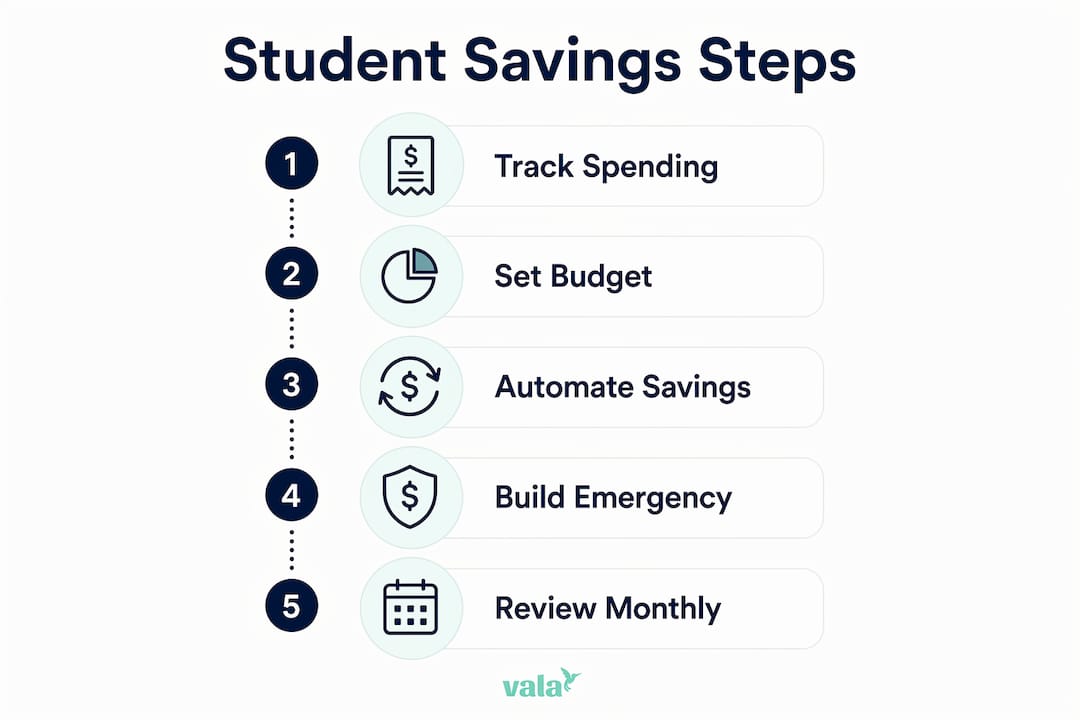
Infographic outlining student savings steps

Credit cards are a high-risk tool for students. Paying your balance in full monthly is the only safe way to use a credit card during college. Carry a balance even once, and interest charges start compounding against you.

Smart credit and banking habits to build now:

  • Treat your credit card like a debit card. Only charge what you already have in your checking account. This builds your credit score without building debt.
  • Set up autopay for the full balance. Never rely on remembering a due date. Autopay removes the risk of late fees and credit score damage.
  • Choose a no-fee checking account. Monthly maintenance fees on checking accounts are money you do not need to spend. Banks like Ally, Chime, and many credit unions offer free student checking accounts.
  • Turn on spending alerts. Most banking apps let you set notifications for every transaction or when your balance drops below a set amount. Use both.
  • Use student discounts actively. Amazon Prime Student, Spotify Student, and Apple Music offer significant discounts with a valid college email. These savings add up across a full academic year.
  • Avoid store credit cards. Retail cards often carry interest rates above 25%. They are designed to generate revenue from people who carry balances, not to help you save money.

Selecting the right budgeting apps for students alongside a no-fee bank account gives you a complete financial setup that costs nothing to maintain.

Key Takeaways

Effective student money management requires a budget, consistent tracking, a starter emergency fund, and disciplined credit habits working together from day one.

Point Details
Choose the right budgeting method Zero-based budgeting works best for students with irregular income; assign every dollar a purpose.
Track spending weekly, not monthly Weekly limits improve impulse control and give you faster feedback before overspending compounds.
Build a $500–$1,000 emergency fund Save $20 per week and reach your starter fund in under a year without disrupting your budget.
Pay credit card balances in full Carrying a balance triggers compounding interest; treat your card like a debit card to stay safe.
Automate savings and bill payments Automation removes temptation and builds consistent habits without relying on willpower daily.

What I have learned about sustainable student money management

Most students fail at budgeting not because they lack discipline but because they start with a plan that does not reflect their real life. They cut coffee, cancel every subscription, and commit to cooking every meal. Two weeks later, the budget is abandoned.

The approach that actually works is smaller and less dramatic. Daily small decisions shape your financial health far more than one big resolution. Choosing to check your bank balance before going out, waiting 48 hours before a non-essential purchase, or moving $20 to savings on payday. These are the decisions that compound over a semester.

Technology makes this much easier than it was five years ago. Automation handles the transfers you would forget. Apps categorize spending you would never manually track. The students who build lasting financial habits are not the most disciplined ones. They are the ones who set up systems that work even on a bad week.

My honest advice: do not wait until you feel ready to start budgeting. Start by tracking what you actually spend for seven days. No cuts, no rules, just observation. What you find will tell you exactly where to focus first. That one week of data is worth more than any budgeting template you can download.

— SaverStride

Valapoint makes student budgeting clearer

Knowing the right strategies is one thing. Having a tool that puts them into practice automatically is another. Valapoint is a personal finance app built to track expenses, categorize spending, and surface the patterns that quietly drain your budget.

https://valapoint.com

For students managing part-time income, financial aid, and shared living costs, Valapoint handles the tracking so you can focus on your goals. You can set savings targets, monitor weekly spending limits, and get real-time visibility into where your money goes. The personal finance app is designed for exactly the kind of irregular, multi-source income that makes student budgeting tricky. You can also explore Valapoint’s free budgeting tools to get started without any commitment.

FAQ

What is the best budgeting method for college students?

Zero-based budgeting is the most effective method for students with tight or irregular income because it assigns every dollar a specific purpose, leaving no room for accidental overspending.

How much should a student save each month?

Saving $20 per week is a realistic starting point. That adds up to over $1,000 annually and builds your starter emergency fund without requiring a large monthly commitment.

Should students use credit cards?

Students can use credit cards safely by paying the full balance every month. Carrying a balance triggers high interest charges that quickly outpace any rewards or benefits the card offers.

How do weekly spending limits help students?

Weekly limits shorten your decision window, making it easier to catch overspending before it compounds. A monthly budget feels abstract; a weekly limit feels immediate and actionable.

What should a student keep in a separate savings account?

Keep your emergency fund and any lump-sum financial aid in a separate savings account. Transferring aid money out of checking immediately prevents you from spending it before the semester ends.

The Role of Instant Expense Logging in Better Budgeting

Instant expense logging is the practice of capturing every purchase at the exact moment it occurs, giving you real-time visibility into where your money goes. This approach, also called real-time expense tracking in financial management circles, closes the gap between spending and awareness. Frequent trackers spend 15–20% less overall without consciously restricting themselves. That single fact explains why the role of instant expense logging has moved from a nice-to-have habit to a core budgeting practice for individuals, couples, and groups who want genuine financial control.

How does instant expense logging improve budgeting accuracy?

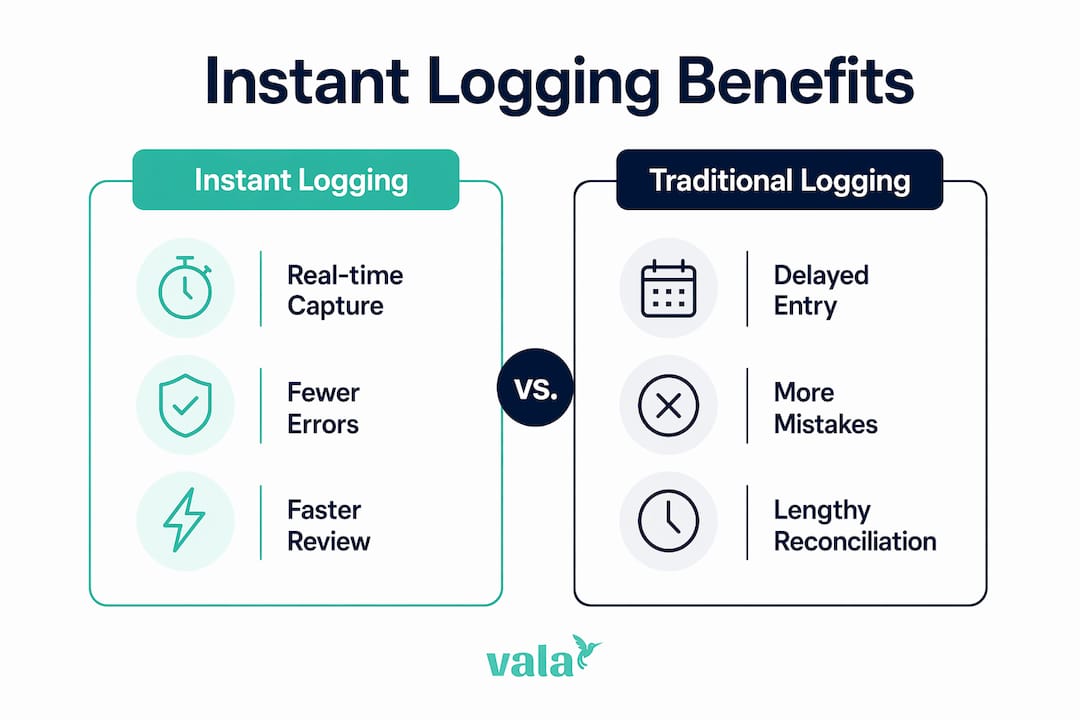
Instant logging beats traditional tracking on one key metric: time between spending and recording. Traditional methods, such as batch entry at the end of the week or month, rely on memory and paper receipts. Both fail regularly. Receipts fade, memories blur, and small purchases disappear entirely from your mental record.

Automated systems capture data in seconds versus a 1–72 hour lag with traditional syncing. That lag is where errors breed. A forgotten $14 lunch, a duplicate subscription charge, or a miscategorized grocery run all slip through when you record expenses days after the fact.

Hands using smartphone and card reader to log expenses

Feature Instant logging Batch/manual entry
Data capture speed Seconds Hours to days
Error rate Low High
Reconciliation time Minutes Hours
Missed transactions Rare Common
Behavioral feedback Immediate Delayed or absent

Automated expense workflows cut days off month-end close cycles by replacing manual steps with real-time categorization. For personal budgeters, the equivalent benefit is a budget that reflects reality at any given moment, not a version of reality from last Tuesday.

Infographic comparing instant vs. traditional expense logging

Pro Tip: Set your expense app to send a push notification after every card transaction. Reviewing the notification takes five seconds and keeps your log current without any extra effort.

What psychological effects does instant logging have on spending?

Instant logging does something no spreadsheet can do on its own: it changes how you feel about spending before you spend. This is the observer effect, sometimes called the Hawthorne effect in behavioral research. Knowing a transaction must be logged creates a psychological pause that deters impulse purchases more effectively than complex budgeting rules.

The mechanism is loss aversion, a well-documented principle in behavioral economics. Losses feel roughly twice as painful as gains of equal size. When you see a $6 coffee appear instantly in your daily total, your brain registers it as a loss, not just a transaction. That feeling is a natural brake on casual overspending.

“Instant visibility activates loss aversion, making invisible expenses tangible and naturally curbing spending without requiring willpower or complex rules.” — Freenance

The practical result is measurable. Consistent expense tracking correlates with 40% higher savings rates among people who track regularly versus those who do not. The savings do not come from deprivation. They come from awareness.

Here is what that awareness produces in daily behavior:

  • You pause before buying because you know the purchase will appear in your log immediately.
  • You spot recurring small costs, like streaming services or daily snacks, that add up to significant monthly totals.
  • You feel the weight of a purchase category when it is already near its limit, which naturally slows spending in that area.
  • You build a clearer picture of which spending brings satisfaction and which is purely habitual.

For groups and couples, this effect multiplies. Shared visibility into a joint log creates mutual accountability without requiring difficult money conversations. Everyone sees the same numbers at the same time.

What routines make instant expense logging sustainable?

The biggest reason people abandon expense tracking is complexity. They set up 30 categories, spend an hour logging one week, and quit by week three. Sustainable logging requires a simple structure and a minimal time commitment.

Using 8–12 spending categories provides enough detail without overload. A practical set for most people includes housing, groceries, dining out, transportation, health, entertainment, subscriptions, personal care, savings, and miscellaneous. That range covers the vast majority of spending without forcing you to decide whether a pharmacy purchase is “health” or “personal care” every single time.

The time commitment is smaller than most people expect:

  1. Log each expense immediately. This takes 10–30 seconds per transaction when you use a mobile app with receipt scanning or card sync.
  2. Spend 5 minutes each week reviewing your category totals. A quick scan tells you whether any category is running ahead of pace.
  3. Complete a 20–30 minute monthly review. This is where real behavior change happens. The monthly review converts raw numbers into spending trends you can act on.
  4. Adjust categories once per quarter. Life changes, and your categories should reflect that. A new gym membership or a side income stream warrants a category update.

Failure to perform regular monthly reviews turns your log into a pointless historical archive rather than a tool for change. The data only works if you look at it with intention.

Pro Tip: Schedule your monthly review like a bill payment. Put it on your calendar for the first Saturday of each month. Treat it as a fixed appointment, not an optional task.

Cash and irregular expenses deserve special attention. Automated card sync handles most transactions, but cash purchases require manual entry. Keep your app open on your phone and log cash immediately after paying. For irregular expenses like annual insurance premiums or car repairs, create a dedicated category and log them as they occur rather than spreading them across months.

Which tools best support real-time expense management?

The right tool removes friction from the logging process. When logging feels effortless, you do it consistently. When it feels like work, you delay and eventually stop.

Live dashboards update spending by category immediately, giving you an accurate picture of your financial position at any moment. The best apps for individuals and groups combine several capabilities:

  • Automatic card and bank sync: Transactions appear in your log within seconds of purchase, with no manual entry required.
  • AI receipt scanning: Point your phone camera at a receipt and the app extracts the amount, merchant, and date automatically.
  • Smart categorization: AI assigns categories based on merchant type and your past behavior, reducing the time you spend sorting transactions.
  • Shared expense tracking: Group and couple features let multiple people log to the same budget, with clear visibility for everyone.
  • Spending insights: Pattern recognition surfaces trends you would not notice manually, such as a 30% increase in dining costs over three months.

Valapoint’s Vala app covers all of these functions in one place. Its AI expense tracker automates capture and categorization, while its group features make shared budgeting practical for couples, roommates, and families. For users who want to understand the deeper logic behind their spending patterns, Valapoint also offers AI-driven budget personalization that adapts recommendations to your actual behavior over time.

Tool feature Benefit for budgeters
Card sync Zero manual entry for most transactions
Receipt scanning Captures cash and paper-based purchases
AI categorization Saves time and reduces sorting errors
Group logging Shared visibility for couples and groups
Monthly insights Turns data into spending trend reports

The combination of automation and AI categorization is what separates modern instant logging tools from basic spreadsheets or older budgeting apps. You get the accuracy of manual tracking without the time cost.

Key takeaways

Instant expense logging works because it closes the gap between spending and awareness, activating behavioral changes that reduce overspending without requiring willpower.

Point Details
Accuracy over batch entry Instant logging captures transactions in seconds, eliminating the errors that accumulate with delayed manual entry.
Behavioral impact Seeing expenses immediately activates loss aversion, which naturally reduces impulse spending over time.
Simple structure sustains habits Using 8–12 categories and just 5 minutes weekly keeps logging manageable and consistent long-term.
Monthly review is non-negotiable A 20–30 minute monthly review converts logged data into spending trends you can act on.
Technology removes friction AI categorization and card sync make real-time logging effortless enough to maintain indefinitely.

Why instant logging is the most underrated budgeting habit

Most budgeting advice focuses on the budget itself: set limits, stick to them, review monthly. That advice skips the step that makes everything else work. You cannot stick to limits you cannot see in real time. The budget is the plan; instant logging is the feedback system that tells you whether the plan is working right now, not at the end of the month when it is too late to adjust.

What surprises me most about instant logging is how quickly the behavioral shift happens. People expect it to feel restrictive. Instead, most find it clarifying. Knowing exactly where your money goes removes the low-level financial anxiety that comes from uncertainty. You stop wondering whether you can afford something because you can check in seconds.

The technology concern I hear most often is over-reliance on automation. Some users set up card sync, watch transactions appear, and never actually look at the data. Automation handles capture; you still have to handle interpretation. The expense tracking best practices that work long-term combine automated capture with intentional weekly and monthly review. Neither alone is sufficient.

Start with one week of consistent logging before worrying about categories, budgets, or goals. The act of logging alone will change how you think about spending. Build the habit first, then layer in the analysis.

— SaverStride

Valapoint’s Vala app: built for instant, effortless expense logging

Valapoint designed Vala specifically for people who want real financial clarity without spending hours managing spreadsheets.

https://valapoint.com

Vala’s personal finance app connects to your accounts, scans receipts, and categorizes spending automatically so your log stays current with no manual effort. AI-powered insights surface hidden spending patterns and flag financial leaks before they compound. For couples and groups, Vala’s shared expense features keep everyone on the same page with one shared view of the budget. Whether you are tracking solo or splitting costs with others, Vala gives you the real-time visibility that turns a budget from a plan into a result.

FAQ

What is instant expense logging?

Instant expense logging is the practice of recording a purchase at the exact moment it occurs, rather than entering expenses in batches later. This approach gives you real-time visibility into your spending and reduces errors caused by memory gaps or lost receipts.

How does instant logging help with budgeting?

Instant logging keeps your budget current at all times, so you always know how much you have spent and how much remains in each category. Frequent trackers spend 15–20% less overall compared to those who track inconsistently or not at all.

How much time does expense logging actually take?

Sustainable logging requires about 5 minutes per week for quick category reviews, plus a 20–30 minute monthly review to identify trends. Individual transaction logging takes 10–30 seconds when you use an app with card sync or receipt scanning.

Does instant logging work for groups and couples?

Shared expense logging apps let multiple people contribute to the same budget log, giving everyone real-time visibility into joint spending. This creates natural accountability without requiring constant check-ins or money conversations.

What is the best way to start logging expenses instantly?

Download an expense tracking app that syncs with your bank and credit cards, then enable transaction notifications. Log any cash purchases immediately after paying. Commit to one week of consistent logging before adjusting categories or setting budget limits.

Why Group Financial Planning Matters for Ages 20–40

Group financial planning is defined as a coordinated approach where two or more people align their money decisions, shared expenses, and long-term goals together rather than in isolation. Why group financial planning matters becomes clear fast: families who engage in collaborative financial planning report 62% less financial stress and are three times more confident in their financial future. That kind of result does not come from budgeting harder alone. It comes from planning together. Whether you share rent with roommates, split bills with a partner, or save toward a family vacation, coordinated planning produces outcomes that solo management simply cannot match.

What are the core benefits of group financial planning?

Group financial planning produces measurable advantages across emotional, practical, and long-term financial dimensions. The most direct benefit is stress reduction. When everyone in a household or group understands the shared financial picture, anxiety drops because uncertainty drops.

Couples who combine finances for shared goals like housing, vacations, and retirement report significantly higher satisfaction than those who manage money separately. That satisfaction comes from alignment, not just pooled income. When two people are working toward the same target, every dollar feels purposeful.

Couple coordinating shared finances at kitchen table

The importance of group financial planning also shows up in conflict prevention. Transparent shared budgets remove the guesswork about who paid what and who owes whom. That clarity stops resentment before it starts. A shared expense tracker, for example, makes it obvious when one person consistently covers more than their share.

Key benefits of collaborative financial management include:

  • Reduced financial stress. Shared visibility into group finances lowers anxiety for every member.
  • Aligned priorities. Group planning forces conversations that surface competing goals early, before they become arguments.
  • Better coverage of shared expenses. Groceries, utilities, rent, and eldercare costs get assigned clearly rather than falling through the cracks.
  • Stronger long-term outcomes. Coordinated group planning aligns all financial decisions to shared objectives, preventing individual choices from undermining group goals.
  • Estate and emergency preparedness. Groups that plan together are more likely to address insurance, wills, and emergency funds as a unit.

The team financial planning benefits extend beyond money. Regular financial conversations build communication habits that strengthen relationships across the board.

How do group financial planning frameworks actually work?

Two frameworks stand out for young adults building collaborative financial habits: the three-account model and family mapping.

Infographic illustrating group financial planning process

The three-account model

The three-account structure divides finances into “yours,” “mine,” and “ours.” Each person keeps a personal account for individual spending. A shared account covers joint expenses like rent, groceries, and utilities. This model is more sustainable than merging all finances immediately. It preserves individual autonomy while creating a clear, functional system for shared costs.

Account Purpose Who contributes
Yours Personal spending, individual savings Individual only
Mine Personal spending, individual savings Individual only
Ours Rent, groceries, utilities, shared goals Both or all members

This structure works for couples, roommates, and even adult siblings sharing a household. The “ours” account becomes the operational center of the group’s financial plan.

Family mapping from Fidelity

Family mapping is a concept developed by Fidelity that visualizes financial connections across group members over time. It helps a group see how one person’s financial decision affects everyone else. For example, if one roommate takes on significant debt, that affects the group’s ability to save for a shared security deposit on a new apartment. Mapping makes those ripple effects visible before they cause problems.

Pro Tip: Before any numbers discussion, have each group member write down their top three money values. Security, freedom, generosity, and adventure are common answers. Mismatched values cause more financial conflict than mismatched incomes.

Recurring review meetings are the third pillar of effective group financial strategies. Regular check-ins on a quarterly or biannual schedule keep the plan current as life changes. A job change, a new roommate, or a planned move all require the group to revisit and adjust. Without scheduled reviews, even a well-built plan drifts out of sync with reality.

What common challenges arise in group financial planning?

The most common mistake groups make is skipping the values conversation and jumping straight to numbers. A technically sound budget fails when one person feels their priorities were ignored. Emotional buy-in is not optional. It is the foundation that keeps a plan working when circumstances get difficult.

A second challenge is premature full financial merging. Moving too fast into a single shared account, without establishing individual boundaries, creates friction. One person may feel monitored. Another may feel their spending habits are being judged. The three-account model exists precisely to solve this problem.

Here are the four most effective ways to avoid group financial planning pitfalls:

  1. Discuss money values before money amounts. Ask each member what financial security means to them personally. This surfaces assumptions that would otherwise cause conflict later.
  2. Schedule non-negotiable review meetings. Put them on the calendar like any other commitment. Monthly or quarterly works for most groups. The frequency matters less than the consistency.
  3. Assign clear financial roles. Decide who tracks shared expenses, who initiates bill payments, and who monitors the shared account balance. Ambiguity creates resentment.
  4. Use transparent tools. Apps that show real-time shared balances and expense histories remove suspicion. When everyone can see the same data, accusations of unfairness drop sharply.

Pro Tip: Set a “financial floor” rule for your group: any individual purchase above a set amount (say, $200) that affects shared finances gets discussed before it happens. This one rule prevents most major conflicts.

Proactive expectation-setting around shared expenses like groceries, utilities, and eldercare prevents financial instability and household conflict. Groups that define these expectations upfront spend far less time arguing about money later.

Which tools support effective group financial planning for young adults?

Digital tools are the practical backbone of effective group financial management. The right app removes the friction of tracking shared expenses manually and gives every group member real-time visibility into the shared financial picture.

Valapoint’s Vala app is built specifically for this use case. It supports expense tracking, shared budgeting, bill splitting, and goal tracking in one place. You can split shared expenses clearly among roommates, partners, or family members without spreadsheets or awkward conversations about who owes what.

Key features to look for in any group financial planning tool:

  • Real-time expense tracking. Every member sees transactions as they happen, not at the end of the month.
  • Bill splitting with clear records. The app should show who paid, what for, and what each person owes.
  • Shared goal tracking. A vacation fund or emergency fund should be visible to all contributors so everyone stays motivated.
  • Spending pattern analysis. Tools that surface hidden spending habits help groups identify financial leaks before they compound.
Tool feature Why it matters for groups
Real-time shared balance Prevents overspending and reduces check-in friction
Expense categorization Clarifies where shared money actually goes
Bill split history Creates an auditable record that prevents disputes
Goal progress tracker Keeps all members engaged and accountable

Valapoint also offers a budget goal tracker that lets groups set savings targets and monitor progress together. For young adults saving toward a first home, a group trip, or a shared emergency fund, that shared visibility is a direct motivator. You can also explore financial planning tools designed specifically for the 18–45 age group to find the right fit for your situation.

Choosing the right tool comes down to two factors: how tech-comfortable your group is and how complex your shared finances are. A couple splitting rent needs less than a four-person household managing utilities, groceries, and a shared car payment. Start with the simplest tool that covers your actual shared expenses, then add features as your group’s needs grow.

Key Takeaways

Group financial planning reduces stress, prevents conflict, and builds long-term financial confidence by aligning shared goals, establishing clear roles, and maintaining regular communication across all group members.

Point Details
Stress drops with collaboration Groups that plan together report 62% less financial stress than those who manage finances separately.
Use the three-account model Separate “yours,” “mine,” and “ours” accounts balance individual autonomy with shared financial responsibility.
Values before numbers Discuss money values first to build emotional buy-in before setting any shared budget or savings target.
Schedule regular reviews Quarterly or biannual check-ins keep the plan current as income, expenses, and group circumstances change.
Use transparent digital tools Real-time expense tracking and bill-splitting apps reduce disputes and keep every member accountable.

The shift I keep seeing in how young adults handle money

The most underrated change in personal finance right now is not a new app or a new investment strategy. It is the growing willingness of people in their 20s and 30s to talk openly about money with the people they live and plan alongside.

For years, the cultural norm was to keep finances private, even from close partners. That norm produced a lot of technically independent people who were quietly stressed, resentful, and financially misaligned with the people they shared their lives with. Wealth decisions are interconnected. Uncoordinated plans risk sabotaging long-term goals, even when each individual plan looks fine on its own.

What I find most encouraging is that the fix is not complicated. Groups that start with a simple shared account and a monthly 20-minute check-in make real progress. They do not need a financial advisor on day one. They need a shared commitment to transparency and a tool that makes the numbers easy to see.

The emotional clarity that comes from knowing your group is on the same page is genuinely undervalued. It changes how you spend, how you save, and how you talk about money. Start simple. Build the habit. The financial results follow.

— SaverStride

How Valapoint makes group financial planning practical

Managing shared finances gets much easier when you have one clear place to track everything. Valapoint’s Vala app gives couples, roommates, and families the tools to split costs, set shared goals, and monitor spending together in real time.

https://valapoint.com

With Vala, you can track every shared expense, see who owes what, and watch your group’s savings goals grow without chasing anyone for updates. The app’s AI-powered spending insights also surface patterns you would not catch manually, so your group can fix financial leaks before they add up. Try Vala’s personal finance app to bring your group’s financial plan to life with tools built for the way you actually manage money today.

FAQ

What is group financial planning?

Group financial planning is a coordinated process where two or more people align their shared expenses, savings goals, and financial decisions together. It applies to couples, roommates, families, and any group managing money collectively.

Why does financial collaboration reduce stress?

Families and groups that plan collaboratively report 62% less financial stress compared to those managing finances individually. Shared visibility into finances removes uncertainty, which is the primary driver of money-related anxiety.

What is the three-account model in group financial planning?

The three-account model uses separate “yours,” “mine,” and “ours” accounts to balance individual autonomy with shared financial responsibility. The joint account covers shared expenses while personal accounts preserve individual spending freedom.

How often should a group review its financial plan?

Groups should review their shared financial plan at least quarterly or biannually. Regular check-ins keep the plan aligned with changes in income, expenses, and group circumstances.

What app works best for tracking shared group expenses?

Valapoint’s Vala app supports real-time expense tracking, bill splitting, and shared goal monitoring for couples, roommates, and families. For a broader comparison of options, the shared budget guide on Valapoint covers methods and tools in detail.

Types of Shared Household Expense Categories Explained

Shared household expense categories are classifications that group recurring and one-time costs by type so roommates can divide them fairly and track them clearly. Without a clear system, even close friends end up arguing over who owes what for paper towels or a streaming subscription. The good news is that expense categories are a proven framework, and applying them to shared living is straightforward once you know the main types. Tools like Splitwise, Venmo, and Valapoint make the process faster, but the categories themselves are the foundation.

1. What are the major types of shared household expense categories?

Shared household costs fall into six core groups. Shared categories typically include utilities, internet, rent, cleaning supplies, pantry staples, and common subscriptions. Personal expenses like individual groceries and toiletries stay outside the shared pool.

Here is a breakdown of each category:

  • Rent or mortgage. The largest and most predictable shared cost. It is emotionally loaded, so agreeing on the split method before move-in prevents resentment later.
  • Utilities. Electricity, gas, water, and trash collection. These fluctuate monthly, so flexible agreements work better than fixed amounts.
  • Internet and cable. A flat monthly bill that is easy to split equally since everyone uses it.
  • Household supplies. Cleaning products, toilet paper, dish soap, and trash bags. These benefit everyone and are a clear shared cost.
  • Shared pantry staples. Cooking oil, salt, coffee, and condiments that the whole household uses. Individual specialty items stay personal.
  • Repairs and maintenance. Unexpected costs like a broken appliance or a plumbing fix. These require a group decision before spending.
  • Common subscriptions. Shared streaming services, music apps, or a shared meal kit delivery. Only count services the whole household agreed to share.
  • Discretionary shared items. Party supplies, shared décor, or a group dinner. These are optional and should be agreed on in advance.

Pro Tip: Write down every shared category and each person’s responsibility before anyone moves in. A written list, even a simple one in Google Docs, cuts disputes by making expectations explicit.

2. How different splitting methods apply to each expense category

Hands writing shared expense checklist

The four most common methods for fair expense splitting are equal 50/50 splits, proportional splits, category splits, and shared spending pools. Each method fits certain expense types better than others.

Equal split. Works best for internet, streaming subscriptions, and household supplies where usage is roughly the same for everyone. Two roommates with similar incomes can apply this to rent as well.

Proportional split. Ties each person’s share to their income or usage. A roommate earning twice as much might pay 60% of rent. This method fits rent and utilities in households with noticeable income gaps.

Category split. Each person owns a specific bill entirely. One roommate pays internet, another pays the electric bill, and they balance out over time. This works well for couples or two-person households where bills are roughly equal in size.

Shared spending pool. Everyone contributes a fixed amount monthly to a joint account or app wallet. The pool covers household supplies, repairs, and shared pantry items. This method reduces the need to track every small purchase individually.

Here is how to match the method to the expense type:

  1. Rent. Use an equal or proportional split. Decide before signing the lease.
  2. Utilities. Use an equal split for simplicity or a usage-based split if one person works from home and uses more power.
  3. Internet. Equal split. No one uses it more than anyone else in a meaningful way.
  4. Household supplies. Use a shared spending pool. Tracking individual paper towel purchases creates unnecessary friction.
  5. Shared pantry. Use a shared spending pool or rotate who buys basics each month.
  6. Repairs. Equal split unless one person caused the damage. Agree on this rule in writing upfront.
  7. Subscriptions. Equal split among those who use the service.

Pro Tip: Put expense agreements in writing and include due dates for each bill. A simple shared note or a roommate agreement template from a site like Experian covers the basics.

3. Common challenges and gray areas in shared household expenses

The hardest part of managing shared household costs is not the math. It is deciding what counts as shared in the first place. The clearest test is this: would you need it living alone? If yes, it is likely a personal expense. If the whole household benefits, it is shared.

Gray areas come up constantly. Here are the most common ones:

  • Premium or gourmet items. One roommate buys expensive organic dish soap and puts it in the shared supplies budget. The others feel it is unfair. The fix is agreeing on a standard product tier for shared items.
  • Personal upgrades. Someone wants a faster internet plan for gaming or remote work. The upgrade cost above the standard plan is their personal expense, not a shared one.
  • Cleaning products with strong preferences. One person insists on a specific brand. If it costs more than the group standard, they cover the difference.
  • Irregular or surprise expenses. A broken dishwasher or a pest control visit. These are genuinely shared, but the surprise factor causes tension.

The strongest shared expense categories are those that benefit all roommates equally. That clarity prevents disputes before they start.

Setting purchase caps on surprise shared expenses, such as a $50 limit before group approval is required, prevents one person from making a costly decision and expecting everyone to split it. This rule is simple and effective. Groceries are the most complicated category. The cleanest options are fully separate grocery shopping, a shared budget for basics only, or fully shared groceries for households that cook together regularly.

4. How to manage and track shared household expense categories

Tracking shared expenses requires a system, not just goodwill. Apps like Splitwise, Splittr, and Settle Up track expenses and calculate who owes what. Venmo, Cash App, and Zelle handle the actual transfers. Valapoint combines tracking, splitting, and real-time insights in one place, which reduces the number of apps you need to manage.

Here is a comparison of common tracking approaches:

Method Best for Drawback
Expense tracking app (Splitwise, Valapoint) Groups of 2 or more Requires everyone to log expenses consistently
Shared spreadsheet Tech-comfortable households Manual entry leads to errors over time
Shared bank account Long-term roommates or couples Requires trust and a joint account setup
Rotating bill ownership Two-person households Works only when bills are roughly equal

Monthly money meetings of about 20 minutes help review spending against budgets, address one-off costs, and settle outstanding debts promptly. Settling debts within 3 business days is standard practice to avoid financial tension. A short monthly check-in prevents small balances from piling up into awkward conversations.

The net settlement model is the most efficient approach. Each person’s total debts and credits are calculated once a month, and only the net amount changes hands. This cuts down on the number of transfers and reduces the chance of anyone feeling nickel-and-dimed.

Pro Tip: Assign one person to collect and log all shared receipts each week. Rotate this role monthly so no one feels like the household accountant.

5. How to choose the right expense categories and splitting method for your household

The right system depends on your household size, income differences, and lifestyle. A couple with similar incomes and one shared account needs a different setup than four friends with different jobs and schedules.

Household type Recommended split method Best tracking tool
Couple, similar income Equal split or category split Shared account or Valapoint
Two friends, income gap Proportional split Splitwise or Valapoint
Three or more roommates Shared spending pool plus equal split Splitwise, Valapoint, or Splittr
Mixed income group Proportional split for rent, equal for supplies Valapoint with custom categories

Start with these steps to set up a fair system:

  1. List every recurring shared expense and assign it to a category.
  2. Agree on a splitting method for each category before the first bill arrives.
  3. Choose one tracking tool and make sure everyone uses it.
  4. Set a monthly settlement date and stick to it.
  5. Review the system every three months and adjust for any changes in income or usage.

Upfront agreements matter more than the specific method you choose. A household that talks openly about money and tracks shared purchases consistently will have far fewer conflicts than one with a perfect system that nobody follows.

Key takeaways

Shared household expense categories work best when every roommate agrees on what is shared, how it is split, and when debts are settled.

Point Details
Six core categories Rent, utilities, internet, supplies, pantry staples, and subscriptions cover most shared costs.
Match method to expense Use equal splits for flat bills and proportional splits for rent with income gaps.
Set purchase caps A $50 approval threshold prevents surprise expenses from causing conflict.
Settle monthly A 20-minute money meeting and net settlement keeps balances clear and relationships intact.
Write it down A written agreement listing responsibilities and due dates reduces disputes from day one.

What I have learned from years of watching shared households succeed and fail

Most roommate money conflicts are not about the money itself. They are about unspoken expectations. I have seen households with complicated proportional splits run smoothly for years because everyone talked openly. I have also seen equal splits collapse in two months because nobody agreed on what “shared” actually meant.

The single most underrated practice is the monthly money meeting. Twenty minutes once a month sounds like a chore, but it is the difference between a $12 debt becoming a $200 resentment and catching it early. Regular check-ins and transparent records build trust faster than any app or spreadsheet.

Technology helps, but it does not fix a communication problem. Valapoint, Splitwise, and similar tools work only when everyone commits to logging expenses honestly. If one person stops updating the app, the whole system breaks down. The tool is not the solution. The habit is.

My honest advice: start simple. Pick three or four clear shared categories, agree on one splitting method, and use one app. Add complexity only when you need it. Most households never need more than that. Stay flexible as your situation changes, because incomes shift, people move out, and lifestyles evolve. A system that worked at 22 might not fit at 28.

— SaverStride

Valapoint makes shared expense tracking straightforward

Managing shared household costs gets easier when you have one place to log, split, and settle everything. Valapoint is an AI-powered personal finance app built for exactly this. You can track every shared expense by category, split costs with roommates in seconds, and get real-time insights into where your household money is going.

https://valapoint.com

Valapoint’s automation flags recurring shared bills, calculates net balances monthly, and sends reminders before settlement day. No more chasing people for $18 or losing track of who paid for the cleaning supplies last month. If you want a cleaner, more confident way to manage your shared finances, the Vala personal finance app is worth a look. You can also explore Valapoint’s personal finance tools to find calculators and budgeting resources that fit your household setup.

FAQ

What is a shared expense category?

A shared expense category is a classification that groups costs benefiting all household members, such as rent, utilities, or cleaning supplies. It separates communal spending from personal spending to make fair splitting possible.

What expenses should roommates always split?

Rent, utilities, internet, household cleaning supplies, and shared pantry staples are the most common expenses roommates split. Personal items like individual toiletries and specialty groceries stay separate.

What is the fairest way to split shared household bills?

The fairest method depends on income and usage. Equal splits work for flat bills like internet; proportional splits based on income work better for rent when there is a significant earnings gap.

How do roommates handle surprise or irregular expenses?

Setting a purchase cap, such as $50, means any shared expense above that amount requires group approval before anyone spends. This prevents one person from making a costly decision and expecting others to cover their share.

How often should roommates settle shared expenses?

Monthly settlement is the standard. A short money meeting of about 20 minutes covers spending review and debt clearing. Settling balances within 3 business days of the meeting prevents tension from building.

How to Track Group Spending in Real Time

Tracking group spending in real time is the process of recording shared expenses the moment they happen, so every member of your group sees updated balances instantly. Whether you are splitting a hotel room, covering a group dinner, or managing costs across a weekend trip, real-time expense tracking removes the guesswork from shared money. Apps like Splitwise, Trispend, and Divide-and-Conquer make this possible by pushing balance updates to every device the second an expense is added. The result is fewer arguments, faster settlements, and a group that stays on budget together.

What tools and apps let you track group spending in real time?

Real-time group expense tracking works through a specific technical process. When one person logs an expense, the app instantly pushes that update to every group member’s device, recalculates balances, and sends a notification. No one has to refresh the screen or wait for a manual update. The industry term for this is collaborative expense management, and the best apps for expense tracking are built around it.

Close-up hands typing expenses on laptop keyboard

Splitwise

Splitwise is the most widely recognized group spending management tool for friends and roommates. It syncs with Venmo so every member can see exactly who owes whom at any time. Splitwise handles bill management, recurring expenses, and multi-person splits without requiring everyone to pay upfront.

Trispend

Trispend is built for groups that travel internationally. It supports 150+ currencies with automatic real-time exchange rate conversion, which means your group balances stay accurate even when you are paying in euros one day and yen the next. Trispend also offers equal, custom amount, and share-based split modes, covering almost every real-world scenario.

Divide-and-Conquer

Divide-and-Conquer is an open-source app built specifically for real-time group expense sharing. Its architecture uses WebSocket-based real-time syncing to push expense changes to all group members the moment they occur. It also includes scheduled reminders and instant notifications when any transaction or settlement changes.

Feature comparison

Feature Splitwise Trispend Divide-and-Conquer
Real-time sync Yes Yes Yes (WebSocket)
Multi-currency support Limited 150+ currencies Depends on setup
Split modes Equal, custom Equal, amount, share Equal, custom
Payment app integration Venmo Not listed Not listed
Reminders and notifications Yes Yes Yes (scheduled)
Cost Free / paid tiers Free / paid tiers Free (open source)

Infographic comparing features of Splitwise and Trispend apps

Pro Tip: If your group travels internationally, Trispend’s automatic currency conversion saves you from manually recalculating exchange rates after every purchase.

How do you set up an app to monitor group expenses step by step?

Getting a group expense app running takes less than ten minutes. The key is setting it up before the trip or event starts, not after the first bill arrives.

  1. Choose the right app for your group. Small groups of two to four people can use any of the major apps. Larger groups or international travelers should prioritize Trispend for currency support or Splitwise for its payment integrations. Read the group expense tracking basics before committing to a tool.

  2. Create a group and invite every member. Open the app, create a named group (for example, “Barcelona Trip 2026”), and send invite links to each person. Every member needs an account for real-time updates to work.

  3. Add expenses immediately after they happen. Log the cost, select who paid, and choose a split mode. Apps that use real-time balance updates recalculate what everyone owes the moment you hit save. Waiting until the end of the day to log expenses is the single biggest cause of errors and disputes.

  4. Choose the right split type for each expense. Use equal splits for shared meals where everyone ate the same. Use custom amount splits when one person ordered more. Use share-based splits for hotel rooms where some people stayed an extra night. Multiple splitting options exist because expenses rarely divide evenly in real life.

  5. Monitor balances and act on notifications. Check the balance screen daily during a trip. When the app sends a reminder that you owe someone, settle it through the linked payment app right away. Letting small debts accumulate makes the final settlement feel much larger than it actually is.

  6. Settle up at natural checkpoints. Do not wait until the end of a two-week trip to settle all debts at once. Settle after each major leg of the trip, such as after the hotel checkout or after a group dinner.

Pro Tip: Link Splitwise directly to Venmo so you can pay balances in one tap without switching between apps.

What are the common challenges when tracking group expenses in real time?

Even the best apps run into friction when groups are large, trips are long, or members are not consistent about logging expenses. Knowing these challenges in advance helps you avoid them.

  • Syncing delays when offline. Real-time apps require an internet connection to push updates. If someone logs an expense in a location with no signal, the update will sync once they reconnect. Always confirm that an expense has synced before assuming everyone sees it.

  • Disputes over unequal splits. Changing a split after the fact is possible in most apps, but it creates confusion if the original entry has already been seen by the group. Agree on split rules before the trip starts. For example, decide upfront whether shared taxis split equally or by number of stops.

  • Currency conversion errors. Groups traveling across multiple countries face rounding differences when exchange rates shift between the time an expense is logged and the time it is settled. Trispend handles this with real-time exchange rate conversion, but manual methods like spreadsheets do not. Well-designed apps also store money values as integer minor units (like cents) to prevent floating-point rounding errors in group balances.

  • Missed payments from unclear notifications. Not everyone checks app notifications with the same frequency. Use the app’s built-in reminder feature to send follow-up nudges. Apps like Divide-and-Conquer use automated reminder loops that recalculate balances after each expense and nudge the responsible payer until they settle.

  • Pending versus confirmed settlements. A common source of confusion is when someone marks a payment as sent but the recipient has not confirmed it. Good apps distinguish between pending and confirmed transactions in the balance view. This settlement state management prevents double-counting and keeps the group ledger clean.

Pro Tip: Schedule a mini settlement every two to three days during a long trip. Clearing small debts frequently keeps the final balance manageable and reduces the chance of anyone feeling blindsided.

Can you use spreadsheets to track group expenses collaboratively?

Shared spreadsheets are a workable option for small groups or one-time events when everyone is comfortable with Google Sheets. They are free, flexible, and require no app installation.

A basic group expense spreadsheet needs four columns: date, description, who paid, and total amount. From there, you add formulas to calculate each person’s share. Google Sheets supports SUMIFS and QUERY formulas for category totals and grouped summaries, and a simple division formula handles per-person splits automatically.

Spreadsheet feature What it does
SUMIFS formula Totals expenses by category or person
QUERY function Groups and summarizes data by date or payer
Per-person split formula Divides total by number of members
Shared access (Google Drive) Lets all members view and edit the same file

The limitations are real. Spreadsheets do not send notifications when someone adds an expense. They do not remind anyone to pay. And they do not sync in real time the way dedicated apps do. Manual group tracking works best for groups of two to three people with a single shared event, like splitting rent for one month.

When your group has four or more members, multiple currencies, or ongoing expenses, a dedicated app beats a spreadsheet every time. The benefits of automated expense tracking become clear the moment you try to chase down a missing entry in a shared Google Sheet at the end of a trip.

Key takeaways

Real-time group expense tracking works best when every member logs expenses immediately, uses the right split mode for each purchase, and settles balances at regular intervals rather than waiting until the end.

Point Details
Log expenses immediately Delays in logging cause errors and disputes that are hard to resolve after the fact.
Match the app to your group Use Trispend for international travel, Splitwise for Venmo integration, and spreadsheets only for very small groups.
Use the right split mode Equal, custom, and share-based splits each serve different expense types.
Settle in stages Mini settlements every few days prevent large, stressful final balances.
Enable notifications Automated reminders reduce missed payments without anyone having to chase the group.

What I have learned from tracking group expenses the hard way

The biggest mistake groups make is treating the expense app as a record-keeping tool rather than a communication tool. Logging an expense is only half the job. The other half is making sure everyone in the group sees it, agrees with the split, and knows when they need to pay.

I have seen groups fall apart over $12 owed from a shared Uber three weeks ago. The debt was not the problem. The silence around it was. Real-time apps solve this by making the balance visible to everyone at all times, but only if every member actually uses the app consistently. One person logging everything while others ignore the app defeats the purpose entirely.

The tool you choose matters less than the habit you build. A group that logs every expense within five minutes of paying, checks balances daily, and settles at natural checkpoints will have zero money disputes. A group with the best app in the world but inconsistent logging will still argue at checkout. Pick a tool everyone is comfortable with, even if it is not the most feature-rich option. Adoption beats capability every time.

One more thing: do not skip the confirmation step. Apps that distinguish between pending and confirmed settlements prevent the classic “I sent you the money” misunderstanding. Always confirm receipt inside the app, not just via text.

— SaverStride

How Valapoint helps you split costs and stay on budget

Valapoint’s personal finance app is built for exactly this kind of group money management. It combines real-time expense tracking, equal and custom bill splitting, and budget monitoring in one place.

https://valapoint.com

With Valapoint, you can create a group, log shared expenses, and see updated balances the moment anyone adds a cost. The bill split app supports equal splits, custom amounts, and percentage-based shares, covering every scenario from a group dinner to a two-week road trip. Reminders keep everyone accountable without you having to send awkward follow-up messages. If you want a single tool that handles both personal budgeting and group expense tracking, the Valapoint personal finance app is worth a look.

FAQ

What is real-time group expense tracking?

Real-time group expense tracking is the process of logging shared costs the moment they occur so that every group member sees updated balances instantly on their device. Apps like Splitwise, Trispend, and Divide-and-Conquer use live syncing to make this possible.

How do I split costs with friends fairly?

Choose a split mode that matches the expense. Use equal splits for shared items, custom amount splits when people spent different amounts, and share-based splits when contributions are proportional. Most group expense apps support all three modes.

What is the best app for tracking group travel expenses?

Trispend is the strongest option for international travel because it supports 150+ currencies with automatic real-time exchange rate conversion. Splitwise is better for domestic groups that want direct Venmo integration for fast settlements.

Can I track group expenses without an app?

Yes. A shared Google Sheets file with SUMIFS formulas and shared access works for small groups with simple expenses. The trade-off is no automatic notifications, no real-time sync, and no reminders, which makes it harder to manage for groups of four or more.

Is Tricount still free to use?

Tricount’s premium tier has been deprecated. The app now offers its full feature set without a paid subscription, making it a fully free option for group expense tracking.

The Role of Spending Insights in Budget Optimization

Spending insights are defined as the structured analysis of your transaction data to reveal patterns, leaks, and opportunities in your personal finances. The industry term for this process is spend analysis, and it covers everything from categorizing daily purchases to forecasting next month’s cash flow. When you apply spend analysis consistently, you stop guessing where your money goes and start making decisions based on real evidence. Tools like Valapoint, NeoChain, and Blackbee AI have built entire platforms around this idea, because the data proves it works. Structured spend analysis can reduce personal costs by 5–15% by surfacing inefficiencies and duplicate subscriptions you would never catch by eyeballing a bank statement.

What is the role of spending insights in personal budgeting?

Spending insights do one core job: they turn raw transaction data into decisions you can act on today. Without that translation, your bank statement is just a list of numbers. With it, you can see that you spent $340 on food delivery last month, that three streaming subscriptions overlap, and that your grocery bill spikes every third week.

The importance of spending analysis lies in closing the gap between measurement and action. Most people measure their spending occasionally, usually after a stressful month. Spend analysis makes that measurement continuous and purposeful, so you catch problems early instead of reacting to them after the damage is done.

Hands tracking expenses in ledger

How does structured tracking and categorization improve your finances?

Repeatable tracking beats ad hoc review every time. When you record expenses on a consistent schedule and sort them into meaningful categories, patterns emerge that a one-time audit would miss entirely.

The biggest pitfall in categorization is relying on generic merchant tags. Your bank might label a charge as “miscellaneous retail,” which tells you nothing useful. Standard banking categories often miss the personalized detail necessary for real behavior change. Categories aligned with your actual life goals, such as “date nights,” “professional development,” or “home maintenance,” give you context that motivates action.

Here are the core steps for effective tracking and categorization:

  • Connect all accounts in one place so no transaction slips through untracked.
  • Create goal-aligned categories that reflect your priorities, not just merchant types.
  • Review and reclassify transactions weekly to keep your data clean and accurate.
  • Flag recurring charges separately so subscriptions are always visible and easy to audit.
  • Compare month over month within each category to spot upward drift before it becomes a problem.

Pro Tip: Treat data hygiene as a weekly habit, not a monthly chore. Correcting one misclassified transaction takes 10 seconds. Correcting three months of bad data takes an hour and kills your motivation.

Spending insights benefits compound over time. The more consistent your categorization, the more accurate your patterns become, and the more confident your budget decisions get.

Infographic highlighting spending insights benefits

Real-time vs. periodic monitoring: which one actually works?

Monthly budget reviews feel productive, but they are mostly forensic. You are examining what already happened, not influencing what happens next. Real-time spending monitoring increases cash flow predictability by around 25% compared to periodic reviews. That gap is significant. It means you can anticipate shortfalls and redirect spending before the month ends in deficit.

Feature Periodic review Real-time monitoring
Timing Monthly or weekly lookback Continuous, transaction by transaction
Best for Trend analysis and reporting Catching leaks and impulse spending
Subscription control Easy to miss mid-cycle charges Flags new charges immediately
Cash flow accuracy Estimated, often off Predictive and current
Behavioral impact Low, after the fact High, in the moment

Real-time tools are especially useful for two problem areas: subscription creep and impulse buying. A new $12.99 subscription is easy to forget. A real-time alert the moment it charges is hard to ignore. The same logic applies to impulse purchases. Seeing your dining budget hit 80% on the 15th of the month changes your behavior for the rest of the month in a way that a retrospective report never could.

How do you identify hidden spending patterns and leaks?

Maverick spending is defined as small, impulsive purchases made outside your planned budget. Individually, each transaction feels harmless. Collectively, maverick spending quietly erodes your financial goals in ways that are hard to detect without structured analysis.

The problem is not the $6 coffee or the $14 app purchase. The problem is that these transactions are invisible in aggregate until you map them. As financial analysts put it: the goal of spend analysis is to turn messy transaction data into a clear spending map where every dollar has a visible address.

The most common hidden spending patterns, and how to address each one:

  1. Subscription overlap. You pay for two services that do the same thing. Audit every recurring charge quarterly and cancel duplicates immediately.
  2. Lifestyle inflation. Your income grew, and so did your spending, but your savings rate stayed flat. Set a savings percentage target before adjusting any lifestyle category.
  3. Convenience spending. Food delivery, ride shares, and last-minute purchases cost 20–40% more than planned alternatives. Track these in a dedicated category to see the true monthly total.
  4. Forgotten trials. Free trials convert to paid subscriptions silently. Flag every trial start date with a calendar reminder set three days before the billing date.
  5. Category bleed. Purchases that belong in one budget category get charged to another, hiding overspending. Weekly reclassification keeps this under control.

Behavioral spending insights must go beyond static category totals to align with your personal priorities. Knowing you spent $200 on “entertainment” is less useful than knowing $140 of that was impulse purchases on nights you were stressed.

How does AI change the way you analyze spending?

AI transforms spend analysis from a manual, backward-looking task into an automated, forward-looking system. AI-powered spend intelligence automates data ingestion, classification, anomaly detection, and decision guidance with measurable outcomes. That means the system catches a duplicate charge, flags an unusual restaurant spike, and suggests a budget adjustment, all without you opening a spreadsheet.

The shift that matters most is from hindsight reporting to decision intelligence. Decision intelligence means using spending data to ask predictive questions: “Will I hit my savings goal this month?” instead of “Why did I overspend last month?” That reframe changes how you use financial data entirely.

Key capabilities to look for in an AI-driven spending insights app:

  • Automatic categorization that learns your habits and improves over time.
  • Anomaly alerts that flag charges outside your normal patterns within hours.
  • Spending forecasts that project your month-end balance based on current behavior.
  • Goal tracking that connects daily spending decisions to longer-term financial targets.
  • Personalized recommendations that suggest specific cuts, not generic advice.

Pro Tip: Choose an app that gives you recommendations, not just reports. A chart showing you overspent on dining is information. A notification saying “You have $43 left in your dining budget for the next 12 days” is guidance you can act on.

Valapoint’s AI spending pattern detection works exactly this way, connecting daily transactions to your budget goals in real time.

How to use spending insights daily to optimize your budget

Daily use of spending insights does not require an hour of analysis. It requires a short, consistent routine built around three actions: check, adjust, and plan.

Check your spending dashboard each morning. A 60-second review of yesterday’s transactions keeps your awareness current. You will catch errors, spot patterns, and stay connected to your budget without stress.

Adjust your behavior based on what you see. If your grocery category is trending high by the 10th of the month, shift one planned restaurant meal to cooking at home. Small adjustments made early prevent large corrections at month end.

Plan your next week based on your current position. If you are ahead of your savings target, you have room to spend freely in a discretionary category. If you are behind, you know exactly where to pull back.

Practical habits that sustain momentum:

  • Set a weekly budget review appointment in your calendar, 15 minutes every Sunday.
  • Use spending alerts to get notified when any category hits 75% of its monthly limit.
  • Review your top three spending categories each month and ask whether the total reflects your actual priorities.
  • Set one financial goal per quarter and track it through a dedicated budget line.

Expense tracking best practices for your age group consistently show that the biggest gains come not from drastic cuts but from small, repeated adjustments guided by clear data. The impact of spending data is greatest when pattern recognition is continuous, not a one-time event.

Key Takeaways

Spending insights deliver the most value when they are continuous, personalized, and connected directly to your daily financial decisions.

Point Details
Define your categories personally Generic merchant tags hide behavior; use goal-aligned categories to see what your spending actually reflects.
Switch to real-time monitoring Continuous tracking increases cash flow predictability by around 25% compared to monthly reviews.
Target maverick spending first Small, impulsive purchases accumulate into significant leaks; identify and label them to control the total.
Use AI for forecasting, not just reporting AI tools shift spend analysis from backward-looking reports to forward-looking budget guidance.
Build a daily check-in habit A 60-second daily review keeps your awareness current and prevents end-of-month budget surprises.

Why I think most people are using spending insights wrong

Most people treat spend analysis as a diagnostic tool. They open their budgeting app after a bad month, feel bad about what they see, and close it again. That is the wrong model entirely.

The real power of spending insights is not in the diagnosis. It is in the feedback loop. When you check your data daily and make micro-adjustments in real time, your behavior changes without requiring willpower. You do not need to “try harder.” You just need better information, delivered at the right moment.

I have watched people go from financial anxiety to genuine confidence not because they earned more money, but because they finally understood where their money was going. The shift from reactive to proactive is not about discipline. It is about visibility. When you can see your financial position clearly, you make better decisions automatically.

The other mistake I see constantly is treating spending insights as a one-time fix. You clean up your categories, cancel a few subscriptions, and feel good for a week. Then the data goes stale, new subscriptions creep in, and three months later you are back where you started. Identifying spending patterns must be continuous and repeatable to catch financial leaks early. That is not a product feature. It is a mindset.

The tools available now, including Valapoint’s AI-driven platform, make continuous monitoring genuinely easy. The barrier is no longer technical. It is behavioral. Commit to the daily check-in, trust the data, and let the insights do the work.

— SaverStride

See your spending clearly with Valapoint

Valapoint gives you real-time expense tracking, AI-driven categorization, and personalized budget recommendations in one place. You do not need to build a spreadsheet or manually sort transactions. The app does the analysis automatically, so you can focus on the decisions, not the data entry.

https://valapoint.com

Whether you want to cut subscription costs, track progress toward a savings goal, or simply understand where your money goes each month, Valapoint’s personal finance app gives you the clarity to act with confidence. You can also explore Valapoint’s AI financial intelligence tools to get personalized spending insights built around your actual habits and goals.

FAQ

What are spending insights in personal finance?

Spending insights are the results of analyzing your transaction data to identify patterns, leaks, and budget opportunities. The formal term is spend analysis, and it covers categorization, trend tracking, and forecasting.

How much can spending analysis actually save you?

Structured spend analysis can reduce personal costs by 5–15% by identifying inefficiencies, duplicate subscriptions, and unplanned purchases you would otherwise miss.

What is maverick spending and why does it matter?

Maverick spending refers to small, impulsive purchases made outside your planned budget. These transactions are individually minor but accumulate into significant leaks that quietly undermine your financial goals over time.

How is real-time monitoring different from a monthly budget review?

Real-time monitoring tracks every transaction as it happens and alerts you to budget issues immediately. Monthly reviews are retrospective and miss opportunities to adjust behavior mid-month before overspending occurs.

Do I need an AI app to get useful spending insights?

AI apps make spend analysis faster and more accurate, but the core process works with any consistent tracking tool. AI adds value by automating categorization, detecting anomalies, and generating forecasts that manual tracking cannot match at scale.