The Real Role of Spending Notifications in 2026

Spending notifications are automated alerts that tell you exactly what is happening with your money, in real time, before a small problem becomes a big one. They cover everything from a low balance warning before an overdraft hits to a flag on an unfamiliar charge you never authorized. Think of them as two broad categories: budget alerts, which fire when you approach or cross a spending limit in a category like groceries or dining, and billing alerts, which confirm a payment went through or catch a charge that looks wrong. Together, they shift you from finding out what happened last month to knowing what is happening right now.

The financial stakes are real. Bankrate’s survey puts the average overdraft fee at $26.77, a cost that a single low balance alert can prevent. Alerts arrive via SMS, email, or push notification, and they act as a personal financial watchdog, replacing the guesswork and memory lapses that trip up even disciplined budgeters.

Key benefits at a glance:

  • Overdraft prevention: Get notified before your balance drops too low to cover a pending charge.
  • Fraud detection: Spot an unauthorized transaction within minutes, not weeks.
  • Budget adherence: Know when you have used 80% of a spending category before you blow past it.
  • Billing error catches: Identify double charges or incorrect amounts from merchants immediately.
  • Financial discipline: Consistent awareness builds better habits over time.

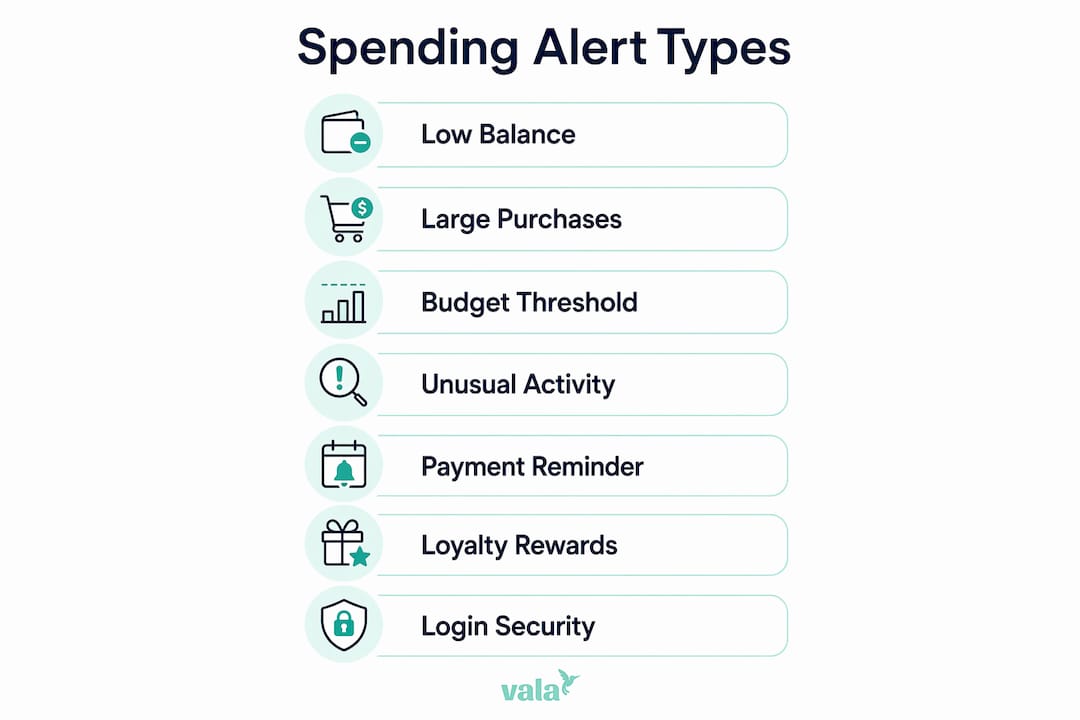
What types of spending notifications should you set up?

Not every alert serves the same purpose, and knowing the difference helps you build a setup that actually works for your life.

1. Low balance alerts

A low balance alert fires when your checking or savings account drops below a threshold you set, say $200 or $500. This is the single most direct defense against overdraft fees. You pick the number, and the alert gives you time to transfer funds before a scheduled payment bounces.

2. Large purchase alerts

These trigger when a single transaction exceeds a dollar amount you define. A $300 charge on your debit card at midnight is worth knowing about immediately, whether you made it or someone else did. Most banks and credit unions let you set this threshold anywhere from $50 upward.
Infographic showing types of spending notifications

3. Budget threshold notifications

This type connects directly to your spending categories. Setting an alert at 80% of a budget category, like dining or entertainment, gives you a window to course-correct before you overspend. It turns a budget from a passive plan into an active guardrail.

4. Unusual activity alerts

Banks flag transactions that fall outside your normal patterns, a charge from a foreign country, a purchase at an unfamiliar retailer, or multiple small transactions in quick succession. These are often the first sign of card testing by fraudsters.

5. Payment reminders

A payment reminder tells you a bill is due in a few days, reducing the chance of a late fee or a ding to your credit score. Credit card issuers, utility apps, and budgeting tools all offer this type.

6. Loyalty and rewards program alerts

Store loyalty programs and credit card issuers send notifications when you earn or are about to lose rewards points. Research published in the Journal of Consumer Behaviour shows that push notifications timed early in a rewards cycle encourage redemption rather than passive accumulation, which is a meaningful behavioral nudge in its own right.

7. Login and security alerts

A notification every time someone logs into your account, especially from a new device or location, is a security layer that catches unauthorized access before any money moves.

How spending notifications influence your financial behavior

The behavioral impact of expense alerts goes well beyond simple awareness. Research on a major fintech app found that overspending messages reduced spending by an average of C$8.15 the following day, with effects that proved permanent in cumulative terms rather than fading after a few days. A back-of-the-envelope calculation from the same study suggests an average user who read all messages sent could reduce spending by C$411 per year, roughly equivalent to a 10.4% decrease in credit card debt.

Man interacting with financial app on tablet

Behavioral effect What the research shows
Immediate spending reduction Overspending alerts cut next-day spending by an average of C$8.15
Permanent cumulative impact Reduced spending did not reverse; cumulative savings held over time
Reward redemption boost Early-cycle push notifications increase loyalty reward use
Ostrich effect risk Frequent negative alerts can reduce how often users check accounts
Spillover to family members Effects spread from one app user to others in the same household

The dual nature of alerts is worth understanding. On one side, a spending alert triggers what researchers call “payment pain,” the psychological discomfort of seeing money leave your account, which tends to slow discretionary purchases. On the other side, rewards program notifications can actually stimulate spending by prompting you to redeem points before they expire.

There is also a real downside to watch for. Frequent negative alerts can cause the “ostrich effect,” where users start checking their accounts less often after receiving too many discouraging notifications. The alert system that was supposed to keep you engaged ends up pushing you away. Tone and volume both matter.

Pro Tip: If you find yourself dismissing alerts without reading them, cut your notification count in half. Keep only the alerts tied to security and your two or three most important budget categories. Fewer, more meaningful alerts get more attention.


Best practices for using spending alerts to manage your finances

Getting the most from expense alerts comes down to setup, response, and integration with a real budget plan.

Hands typing on laptop with budget papers

Choose thresholds that match your actual cash flow. A low balance alert set at $500 is useless if your account regularly sits at $450. Set it at a level that gives you at least 48 hours to act, typically one to two times your average daily spend.

Enable these four alert types as a baseline:

  • Large transactions (set the threshold at roughly twice your typical single purchase)
  • Low balance (tied to your minimum comfortable buffer)
  • Payment reminders (for every recurring bill)
  • Login activity (for every account, every time)

Pair alerts with a written or app-based budget. Alerts work as spending insights that reinforce your plan, not replace it. The budget sets the limits; the alert tells you when you are approaching them.

Respond immediately when an alert fires. The value of a fraud alert drops sharply if you wait 12 hours to act. Debit cards carry less liability protection than credit cards, so rapid detection is especially critical for checking accounts.

Use a $0 transaction threshold via email for maximum fraud coverage. Power users set alerts for every single transaction, which forces a regular review of recurring subscriptions and catches any unauthorized charge the moment it posts.

Pro Tip: Link your alerts to a budgeting app that reads your spending categories automatically. That way, a dining alert at 80% of your monthly limit fires without you manually tracking every restaurant receipt.

Understanding how AI detects spending patterns can also help you get more out of automated alert systems, since modern apps use pattern recognition to flag anomalies your manual thresholds might miss.


Real-world examples of spending notifications working well

The overdraft near-miss: A freelancer with irregular income sets a low balance alert at $300. Mid-month, a client payment delays by a week. The alert fires on a Tuesday morning, giving her time to move money from savings before a $280 software subscription auto-renews. Without the alert, she would have faced an overdraft fee and a declined charge.

Catching a fraudulent charge fast: A professional traveling for work gets a push notification for a $94 charge at a retailer in another state while he is sitting in a meeting. He calls his bank within the hour. Because the charge is flagged so quickly, the bank reverses it the same day. Debit card fraud caught after several days is significantly harder to resolve.

Budget category correction: A couple using a budgeting app sets a dining alert at 80% of their $400 monthly limit. The alert fires on the 18th of the month, with $320 spent. They skip two planned restaurant dinners and cook at home instead, finishing the month at $385. The alert did not stop them from enjoying meals out. It just gave them the information to make a deliberate choice.

Loyalty rewards redemption: A grocery store loyalty program sends a push notification that a customer’s points are about to expire. She redeems them on her next visit, saving $15 on a purchase she was already planning. Without the notification, those points would have lapsed unused.

U.S. Bank Spend Management offers business account holders a dashboard view of employee card spending with real-time alerts, letting finance teams catch out-of-policy purchases the same day rather than during a monthly reconciliation. That shift from monthly review to daily awareness is exactly what spending notifications do at every scale.


Key Takeaways

Spending notifications give you real-time control over your finances by alerting you to transactions, budget limits, and security events before they become costly problems.

Point Details
Overdraft prevention A low balance alert can prevent the average $26.77 overdraft fee by giving you time to act.
Behavioral impact Overspending alerts reduced next-day spending by an average of C$8.15 in fintech research.
Dual notification effect Alerts can curb overspending and boost loyalty reward redemption depending on timing and type.
Ostrich effect risk Too many negative alerts can reduce how often you check your accounts, so keep alert volume focused.
Best practice setup Enable large transaction, low balance, payment reminder, and login alerts as your core four.

https://valapoint.com

Valapoint’s personal finance app brings real-time expense tracking, budget category alerts, and AI-powered spending pattern detection into one place. You set the thresholds, Vala watches the numbers, and you stay in control without checking your accounts every hour. Try Valapoint and see exactly where your money goes.


The Role of Savings Rate in Building Financial Freedom

Your savings rate is defined as the percentage of your income you set aside rather than spend. It is the single most controllable variable in your financial life, and it matters more than your salary or your investment returns. The average US personal savings rate sits at just 3.5% in early 2026, well below the long-term historical average of 8.4%. That gap explains why so many working professionals feel financially stuck despite earning decent incomes. Fidelity recommends a combined 25% savings target for young professionals, covering both retirement and emergency funds. The role of savings rate in your financial plan is not a background detail. It is the engine.

How does the savings rate influence your timeline to financial independence?

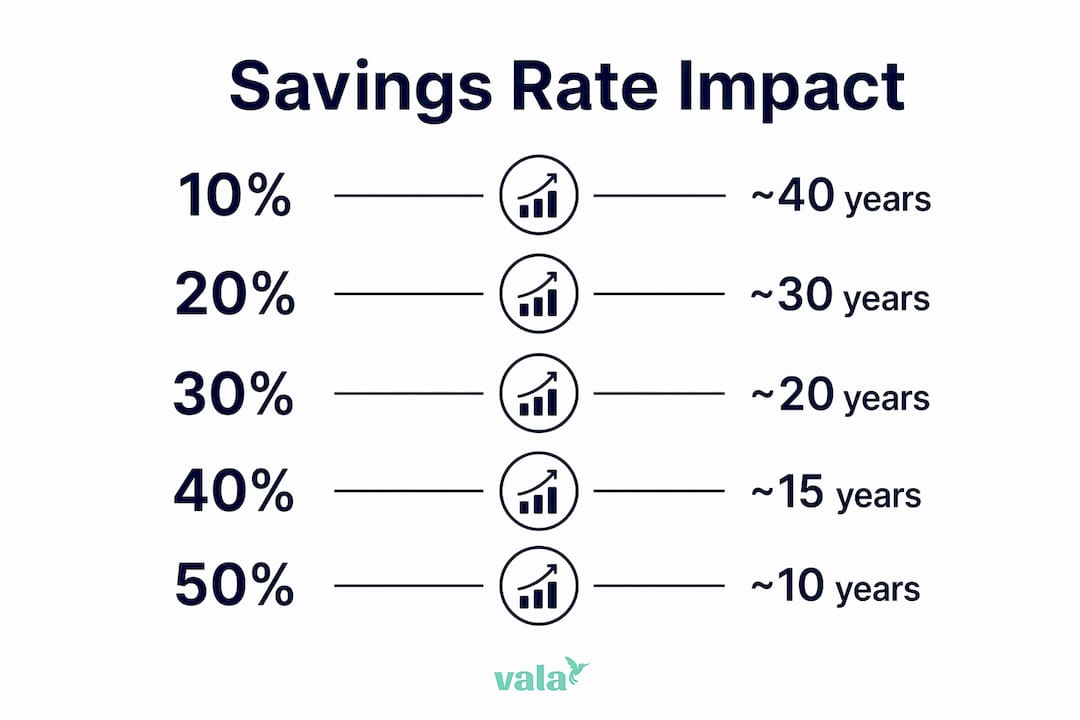
Your savings rate directly controls how fast you reach financial independence. The math is not subtle. Moving from a 10% to a 50% savings rate cuts your time to financial independence from roughly 40 years to just 17 years. That is not a small adjustment. That is a different life.

The effect is non-linear. Compounded benefits accelerate as your savings rate rises, especially once you push past 30–40%. A small increase early produces a large difference later. Every 5-point increase in your savings rate typically shortens your timeline by 1–3 years. Those years add up fast.

Man using smartphone for financial planning outdoors

There is also a dual effect at work. Saving more means you invest more capital. At the same time, spending less means you need a smaller retirement portfolio to sustain your lifestyle. A higher savings rate lowers your required retirement corpus by reducing the expenses your portfolio must cover. You win on both sides of the equation.

Savings Rate Estimated Years to Financial Independence
10% ~40 years
20% ~30 years
30% ~23 years
40% ~19 years
50% ~17 years

Infographic showing years to financial independence by savings rate

Pro Tip: If you can raise your savings rate by just 5% this year, you could shave 1–3 years off your working life. Start with one fixed expense you can cut or one income stream you can add.

Why savings rate matters more than investment returns early on

Your savings rate outweighs investment returns during the first decade of wealth building. The reason is simple: returns on a small portfolio produce limited absolute growth. A 10% return on $5,000 is $500. A 10% return on $50,000 is $5,000. The size of your capital base determines how much compounding can actually do for you.

During the first 10–15 years, raw contribution amounts dominate returns in driving portfolio growth. This means the hours you spend chasing the next hot stock are less productive than the hours you spend finding ways to save more. The capital base you build through consistent saving is what compounding multiplies later.

Here are four reasons your savings rate beats returns in the early years:

  1. Small portfolios limit compounding. A higher return percentage on a small balance still produces a small dollar gain. More savings fixes this faster than better returns.
  2. Savings rate is fully in your control. Market returns are not. You cannot control what the S&P 500 does next year. You can control how much you save this month.
  3. Consistent contributions reduce sequence risk. Regular saving smooths out market volatility by buying at multiple price points over time.
  4. Higher savings builds discipline. The habit of saving a larger share of income creates financial behaviors that compound beyond just the numbers.

“Chasing high investment returns early is less impactful than raising your savings rate. Building the capital base is the prerequisite for compounding to work in your favor. Without a meaningful base, even exceptional returns produce modest absolute gains.”

Young investors should prioritize consistent contributions before chasing higher returns. Get the base right first. The returns will do their job once the foundation is solid.

What is the impact of savings rate on spending habits and economic growth?

At the personal level, your savings rate shapes every spending decision you make. When you commit to saving 20% of your income, you naturally scrutinize where the other 80% goes. That scrutiny is the mechanism. It forces you to distinguish between spending that adds real value and spending that just happens.

Lifestyle inflation is the primary threat to a healthy savings rate. When income rises but spending rises proportionally, your savings rate stays flat. You earn more but get no closer to financial independence. Recognizing this pattern is the first step to breaking it.

At the macro level, aggregate savings fuel investment and economic growth. When households save, those funds flow into banks, capital markets, and businesses that create jobs and productivity. A population with a low savings rate depends heavily on debt to fund consumption, which creates fragility in downturns.

Practical spending habits that protect your savings rate:

  • Automate your savings first. Transfer your target savings amount the day your paycheck arrives. Spend what remains.
  • Track every category. You cannot control what you cannot see. Knowing where your money goes is the foundation of any savings improvement.
  • Delay discretionary purchases by 48 hours. Most impulse spending disappears with a short waiting period.
  • Review subscriptions monthly. Recurring charges are the most common source of invisible spending leaks.
  • Set a lifestyle cap. When income increases, direct at least half of the raise to savings before adjusting your spending.

How to calculate, track, and improve your savings rate

Calculating your savings rate is straightforward. Divide the amount you save each month by your gross monthly income, then multiply by 100. If you earn $5,000 per month and save $750, your savings rate is 15%.

The most common mistake is counting money saved but not invested. Holding savings in low-yield cash accounts delays real wealth accumulation. Real growth requires your savings to work in growth-oriented assets that beat inflation. Saving and investing are not the same action. Both are required.

Follow these steps to build and improve your savings rate consistently:

  1. Calculate your current rate. Use your last three months of income and savings data to get an accurate baseline. A savings rate calculator removes the guesswork.
  2. Identify your biggest spending categories. Rank them by size. The top three categories almost always hold the most room for adjustment.
  3. Set a target rate. Fidelity’s 25% combined savings guideline is a strong benchmark. If you are far below it, aim to close the gap by 2–3 percentage points every six months.
  4. Automate contributions. Set up automatic transfers to savings and investment accounts. Automating your savings goals removes the decision from your monthly routine and prevents spending what you intended to save.
  5. Review and adjust quarterly. Your income and expenses change. Your savings rate target should reflect those changes. A quarterly review keeps you on track.

Pro Tip: Treat your savings contribution like a fixed bill. Schedule it as a non-negotiable payment to yourself on payday. This single habit change is more effective than any budgeting spreadsheet.

The benefits of personal finance automation for young adults go beyond convenience. Automation removes the emotional friction from saving. When the transfer happens automatically, you never have to choose between saving and spending in the moment.

My honest take on savings rate after years of watching people get this wrong

Most young professionals I have observed make the same mistake. They focus on earning more and assume the savings will follow naturally. They rarely do. Income growth without a deliberate savings rate target almost always produces lifestyle inflation instead of wealth.

The misconception I see most often is that a higher salary solves the savings problem. It does not. A person earning $120,000 and saving 5% builds wealth more slowly than a person earning $70,000 and saving 25%. The math is unambiguous. The savings rate is the lever, not the income number.

What actually changes outcomes is treating your savings rate as a non-negotiable percentage, not a leftover. The people who reach financial independence early are not always the highest earners. They are the ones who decided early that their savings rate was a fixed commitment, not a variable that adjusted with their mood or their month.

The mindset shift that matters most is this: your savings rate is a measure of financial efficiency, not deprivation. A high savings rate does not mean you live poorly. It means you have decided what actually matters to you and you fund that deliberately. Everything else gets cut.

Start by measuring your current rate honestly. Then raise it by one percentage point. Then another. The compounding effect of that discipline, applied consistently over a decade, produces outcomes that feel disproportionate to the effort. That is exactly the point.

— SaverStride

How Valapoint helps you track and grow your savings rate

Knowing your savings rate matters. Tracking it consistently is what produces results.

https://valapoint.com

Valapoint’s personal finance app gives you a clear, real-time view of your income, expenses, and savings rate in one place. You can set savings goals, automate contributions, and see exactly which spending categories are holding your rate back. Valapoint’s AI-powered insights surface hidden spending patterns that most people miss entirely. The app is built for working professionals who want clarity without complexity. If you are ready to move your savings rate from where it is to where it needs to be, Valapoint gives you the tools to do it confidently.

Key takeaways

Your savings rate is the most controllable and impactful variable in your financial plan, and raising it consistently produces compounding results that income growth alone cannot match.

Point Details
Savings rate defines your timeline Moving from 10% to 50% savings cuts time to financial independence from 40 years to 17 years.
Early years favor saving over returns Raw contributions matter more than investment returns during the first 10–15 years of wealth building.
Lifestyle inflation is the main threat Spending rising with income keeps your savings rate flat and stalls financial progress.
Automate to stay consistent Scheduling automatic transfers removes the decision and prevents spending what you planned to save.
Invest what you save Savings held in low-yield accounts lose to inflation; growth requires investing in assets that outperform it.

Perspective

The savings rate conversation often gets reduced to a number on a spreadsheet. The real insight is that it reflects your financial priorities in concrete terms. Every percentage point you raise your savings rate is a vote for your future self over your present impulses. That is not a financial concept. It is a values decision.

FAQ

What is a good savings rate for young professionals?

Fidelity recommends a combined savings rate of 25%, split between 15% pre-tax for retirement and 10% after-tax for emergency funds. This benchmark gives young professionals a clear, achievable target for both long-term and short-term financial security.

How does savings rate affect time to financial independence?

A 10% savings rate requires roughly 40 years to reach financial independence, while a 50% savings rate cuts that timeline to approximately 17 years. The relationship is non-linear, meaning each percentage point increase produces a larger benefit as your rate rises.

Why does savings rate matter more than investment returns early on?

Early-stage portfolios are too small for returns to produce meaningful absolute growth. Increasing your savings rate builds the capital base that compounding later multiplies, making contributions far more impactful than return percentages in the first decade.

What is the biggest mistake people make with their savings rate?

The most common mistake is saving money but keeping it in low-yield cash accounts. Real wealth building requires savings to be invested in growth-oriented assets that outpace inflation over time.

How do I calculate my savings rate?

Divide your monthly savings amount by your gross monthly income and multiply by 100. For example, saving $750 from a $5,000 monthly income produces a 15% savings rate.

Best Goodbudget.com Alternatives for 2026: Top Picks

What are the top Goodbudget alternatives in 2026?

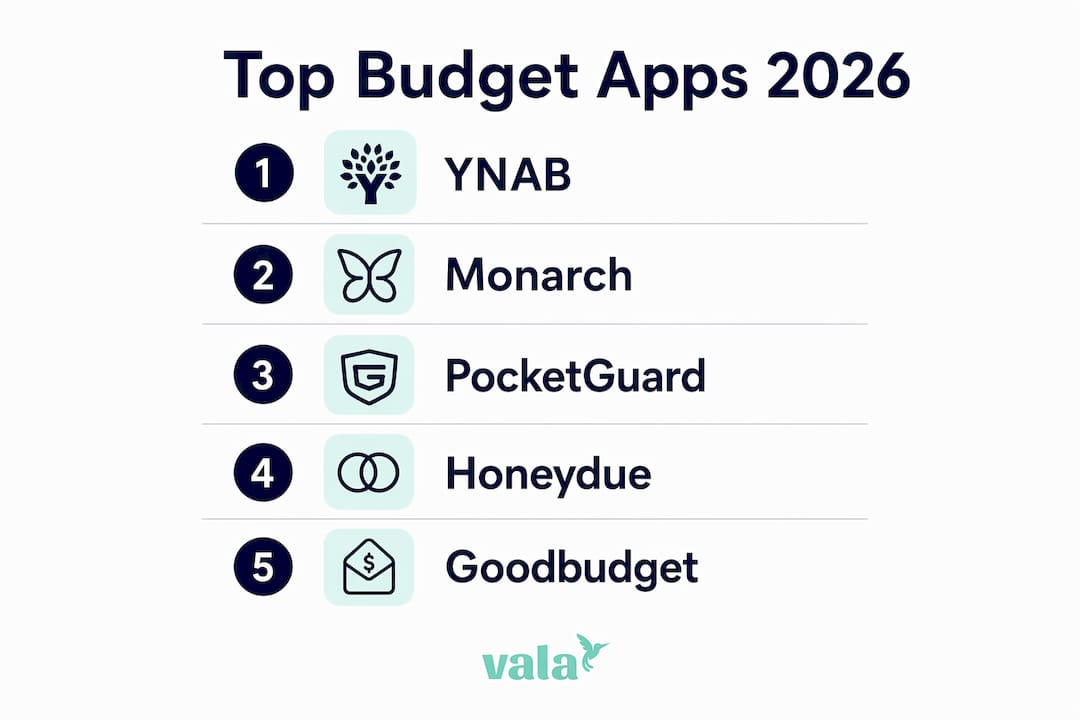
If Goodbudget’s manual entry or device limits are holding you back, four apps consistently stand out as the strongest replacements: YNAB, Monarch Money, PocketGuard, and Honeydue. Each one solves a different problem, so the right pick depends on how you actually budget, not just which app has the most features.

Here’s a quick breakdown of the leading options:

  • You Need a Budget (YNAB): Zero-based budgeting with bank syncing and a 34-day free trial. Best for users who want full control over every dollar.
  • Monarch Money: An all-in-one financial dashboard with automated account tracking. Best for users who want less manual entry and a broader financial overview.
  • PocketGuard: Shows you exactly how much you can safely spend after bills and savings. Best for users who want spending visibility without complexity.
  • Honeydue: A free couples budgeting app with shared expense tracking and built-in chat. Best for partners managing money together.
  • Goodbudget: The envelope budgeting app you’re moving away from. Its free tier allows 10 envelopes across two devices with manual entry only; the $80/year premium tier adds bank syncing and unlimited envelopes.

Pro Tip: Before switching apps, identify your biggest frustration with Goodbudget. If it’s manual entry, go automated with Monarch Money. If it’s the lack of couple features, Honeydue is free and purpose-built for that.

The most effective budgeting app is the one you use consistently. Automation can increase how often you check in, but manual tracking builds spending awareness in a way that automated apps often don’t, as explained in this overview of card or cash payment apps.

How do these Goodbudget competitors compare on features and pricing?

The five apps below cover the full range of budgeting styles, from hands-off automation to deliberate manual tracking. Pricing and platform data come from each app’s published plans.

App Pricing Best For Key Features Platform App Store Rating
You Need a Budget (YNAB) Serious budgeters Zero-based budgeting, bank sync, debt tracking, 34-day trial iOS, Android, Web 4.8/5
Monarch Money $99/year Automated tracking, couples Multi-account dashboard, automation, household sharing iOS, Android, Web 4.8/5
PocketGuard $74.99/year Spending visibility Safe-to-spend snapshot, bank sync, bill tracking iOS, Android 4.6/5
Honeydue Free Couples Shared expenses, bill reminders, in-app chat iOS, Android 4.6/5
Goodbudget Free / $80/year Manual envelope budgeting Virtual envelopes, multi-device sync, manual entry iOS, Android, Web 4.6/5

YNAB: built for people who want to change their habits

YNAB’s zero-based budgeting method asks you to assign a purpose to every dollar before you spend it. That friction is the point. Subscription-based apps with bank sync and debt tracking tend to be more effective at reducing overspending than free apps, and YNAB is the clearest example of that principle in practice. It has the highest subscription cost among these options, but the free trial gives you enough time to know whether the method works for you.

Infographic showing ranked top budgeting apps in 2026

Monarch Money: the closest thing to a full financial picture

Monarch Money integrates multiple accounts and automates transaction categorization, making it the go-to for users who want a comprehensive financial overview without logging every purchase manually. The subscription includes a free household member on every plan, which makes it a strong pick for couples who’ve outgrown Honeydue. Users switching from Goodbudget to Monarch typically cite the reduction in manual entry as the main reason.

Man typing at home office desk with computer

PocketGuard: spending clarity without the learning curve

PocketGuard strips budgeting down to one question: how much can you safely spend right now? It syncs with your bank accounts and calculates that number after accounting for bills, goals, and necessities. At $74.99/year, it’s the most affordable paid option in this comparison. There’s no envelope system, no zero-based methodology. Just a clear number.

Hands on coffee shop table next to smartphone and planner

Honeydue: free and built for two

Honeydue is the only fully free app in this group with a specific design focus. It lets couples link accounts, track shared bills, set spending alerts, and message each other inside the app. No subscription, no premium tier required for core features. For couples who found Goodbudget’s device-sharing setup awkward, Honeydue is a direct upgrade.

Pro Tip: Check whether an app’s free tier includes bank syncing before you commit. Goodbudget’s free plan requires manual entry. PocketGuard, YNAB, and Monarch Money all sync automatically, but only on paid plans.


How to choose the right budgeting app for your needs

The right app depends on three things: how much you want to automate, what devices you use, and how much you’re willing to pay. Getting those three factors right narrows the field quickly.

Automation level

Manual entry, like Goodbudget uses, builds spending awareness because you feel every transaction. But it’s also the reason most people abandon budgeting apps within a month. If you’ve already tried manual tracking and it didn’t stick, an automated app like Monarch Money or PocketGuard removes that barrier. If you want to stay intentional but reduce friction, YNAB’s bank sync combined with its zero-based method gives you both.

Spreadsheets remain a valid option for users who want total control and maximum data privacy. They require manual setup and ongoing maintenance, but they give you flexibility no app can match.

Cost vs. features

Free apps make sense when you’re starting out or have simple finances. As your financial picture gets more complex, paid apps earn their cost through time saved and better visibility. YNAB, Monarch Money, and PocketGuard all offer trial periods, so you can test before paying. Honeydue is the only option here that stays free without limiting core features.

Device and platform compatibility

All five apps work on iOS and Android. YNAB, Monarch Money, and Goodbudget also offer web access, which matters if you prefer managing your budget on a laptop. PocketGuard and Honeydue are mobile-only.

Pro Tip: Start with the simplest app that solves your main problem. You can always add features later. Switching from a free app to a paid one is easy. Switching from a complex app back to something simpler often means losing your data history.

Privacy considerations

If data privacy is a priority, manual-entry apps like Goodbudget keep your bank credentials out of the equation on the free tier. Automated apps require you to connect your bank accounts, which means sharing read-only access with a third-party platform. All five apps here use bank-level encryption, but the privacy tradeoff is real and worth knowing before you connect an account.

Here’s a quick checklist to guide your decision:

  • Do you want automation? Choose Monarch Money or PocketGuard.
  • Are you budgeting with a partner? Start with Honeydue (free) or Monarch Money (paid, with household sharing).
  • Do you want to change spending habits? YNAB’s zero-based method has the strongest track record.
  • Do you prefer manual control? Goodbudget’s free tier or a spreadsheet keeps you in charge.
  • Is cost a dealbreaker? Honeydue is free. Goodbudget’s free tier covers basic needs.

For a broader look at personal budgeting apps across different use cases, the Valapoint blog covers additional options worth considering.

What customer support and community resources do these apps offer?

Support quality varies more than most app reviews acknowledge. Here’s what each app actually provides.

YNAB has the most developed community of the group. It offers live workshops, a YouTube channel with hundreds of tutorials, an active Reddit community, and email support. The learning curve is real, but the resources to climb it are genuinely good.

Monarch Money provides email support and a help center with articles and guides. It doesn’t have YNAB’s community depth, but its interface is intuitive enough that most users don’t need extensive help.

PocketGuard offers email support and a help center. Support response times are not publicly listed, and the community presence is limited compared to YNAB or Monarch Money.

Honeydue provides in-app support and a basic FAQ. Given that it’s a free app, the support tier reflects that. There’s no active public community forum.

Goodbudget stands out for educational content. NerdWallet notes that Goodbudget provides courses on budgeting, paying off debt, and related topics, alongside helpful articles and videos. For a free app, that’s a meaningful resource.

For users who want peer support alongside app features, YNAB’s community is the clear leader. For self-directed learners, Goodbudget’s course library punches above its weight.

What do user reviews say about these budgeting apps?

App store ratings give a useful signal, but the patterns in written reviews tell you more about day-to-day experience.

YNAB earns a 4.8/5 on the App Store and 4.6/5 on Google Play. Users consistently praise the methodology and the sense of control it creates. The most common complaint is the price and the learning curve during the first few weeks.

Monarch Money holds the highest ratings in this group on the App Store and Google Play. Users highlight the clean dashboard and the ease of connecting multiple accounts. Some note that the $99/year price feels steep if you only use basic features.

PocketGuard has good ratings on both the App Store and Google Play. Users appreciate the simplicity. The most frequent criticism is that the free tier is limited, and the paid plan is required for features that feel standard elsewhere.

Honeydue holds solid ratings on both the App Store and Google Play. Couples consistently rate the shared expense tracking and bill reminders highly. Some users report occasional sync issues with certain banks.

Goodbudget’s App Store rating is higher than its Google Play rating, a gap worth noting for Android users. Users who love it cite the envelope method’s clarity. Users who leave cite the manual entry requirement and the device limit on the free tier.

For users exploring budget tracking apps for couples, Honeydue and Monarch Money consistently rank as the top two options in that category.

Vala: an AI-powered alternative worth knowing about

Vala takes a different approach than the apps above. Where most budgeting tools ask you to categorize spending after the fact, Vala uses AI to surface patterns in your spending automatically, including hidden leaks you might not notice on your own.

Key features include:

  • Automated expense tracking with real-time categorization across accounts
  • AI-powered spending insights that flag unusual patterns and recurring costs
  • Group cost splitting for shared expenses among couples, roommates, or groups
  • Goal tracking with progress visibility built into the main dashboard
  • Budget management with customizable categories and spending alerts

Vala works on iOS and Android, with a web interface for desktop access. It’s built for users who want the intentionality of envelope budgeting but without the manual entry that makes Goodbudget’s free tier feel like a chore.

Pro Tip: Use Vala’s spending pattern analysis during your first two weeks. Most users find at least one recurring charge they’d forgotten about. That alone often covers the cost of any budgeting app.

For users who’ve tried Goodbudget and want more automation without losing the sense of control, Vala sits in a useful middle ground. It automates the tracking work while keeping you informed enough to make deliberate decisions. You can explore free budgeting tools on the Valapoint blog to see how Vala compares to no-cost options.

Valapoint offers a different path to the same goal

The apps compared above are all solid choices for different reasons. But if you’d rather have a tool that works with you rather than one you have to manage, Valapoint’s Vala app is worth a look.

https://valapoint.com

Vala gives you automated expense tracking, AI-powered spending insights, and group cost splitting in one place, without the manual entry that makes some budgeting apps feel like a second job. It’s built for people who want clear answers about their money without spending an hour a week maintaining their budget. Whether you’re managing finances solo, with a partner, or across a group, Vala adapts to how you actually live.

Get started with the Vala personal finance app and see what your spending patterns look like when the tracking happens automatically. You can also use Valapoint’s financial planning tools to set goals and track progress alongside your budget.


Key Takeaways

The strongest Goodbudget alternatives in 2026 each solve a specific problem: YNAB for habit change, Monarch Money for automation, PocketGuard for spending clarity, and Honeydue for couples managing shared finances for free.

Point Details
YNAB leads for habit change At — with a 34-day trial, YNAB’s zero-based method is the most effective for reducing overspending.
Monarch Money suits automated tracking At $99/year, it offers the highest app store ratings and includes household sharing on every plan.
Honeydue is the only free couples app No subscription required for core shared expense and bill tracking features.
Goodbudget free tier has real limits The free plan caps you at 10 envelopes, two devices, and manual entry only; bank sync requires the $80/year plan.
Valapoint adds AI-powered tracking Vala automates expense categorization and surfaces hidden spending patterns without manual entry.

The Role of Budget Accountability in Financial Success

Budget accountability is defined as the principle that anyone responsible for managing a budget must answer for their financial decisions, spending choices, and outcomes. This applies equally to a household tracking monthly expenses and a team managing a departmental budget. The role of budget accountability goes beyond simple record keeping. It creates a system where clear ownership, real authority, and regular review combine to produce transparent, trustworthy financial management. Frameworks like the IMF Fiscal Transparency Code and the Public Expenditure and Financial Accountability (PEFA) assessment reinforce this principle at every level of financial governance.

What is the role of budget accountability in financial management?

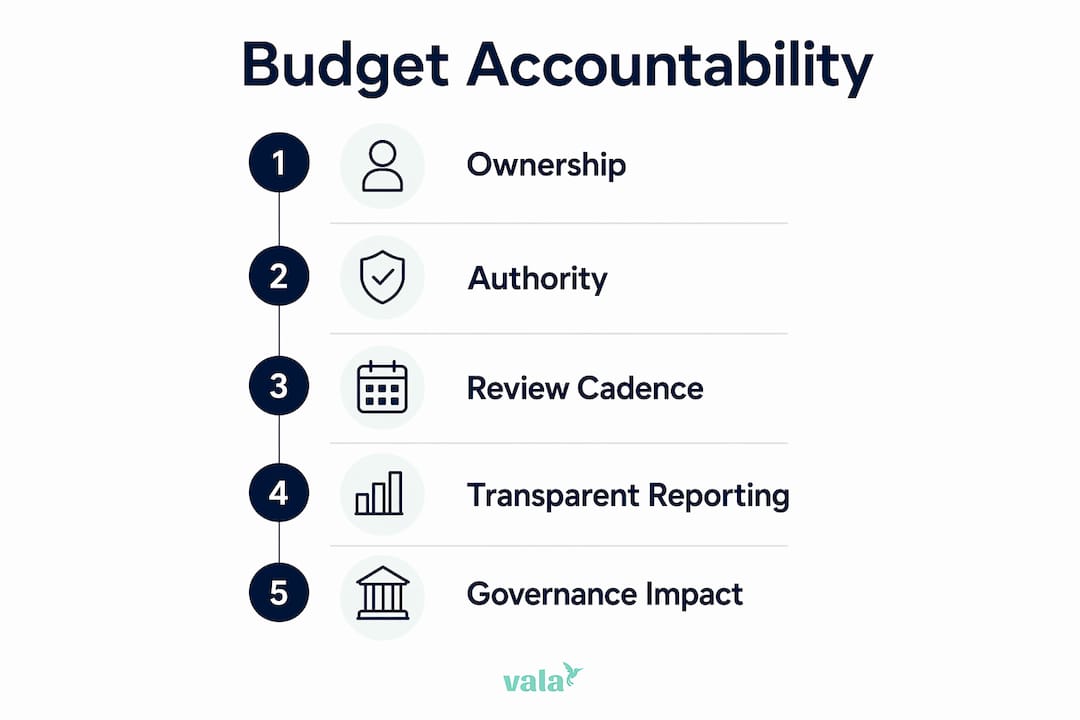
Budget accountability is built on three core components: ownership, authority, and review. Each one fails without the others. A person who owns a budget but cannot approve spending has no real power to manage it. A team that reviews budgets only once a year loses touch with what the numbers actually mean.

The importance of budget accountability starts with clear ownership. Every budget line needs a named person responsible for it. That person must understand what they control, what they can approve, and what requires escalation. Without that clarity, accountability becomes a vague expectation rather than a real commitment.

Team discussing budget ownership in meeting

Authority must accompany responsibility to make accountability meaningful. Assigning someone ownership of a budget without giving them the power to make spending decisions creates a structural failure. The result is learned helplessness, where budget holders stop engaging because they know their input does not change outcomes.

Review cadence is the third pillar. Monthly operational reviews keep spending on track against short-term targets. Quarterly strategic reviews assess whether the budget still reflects current priorities. Both are necessary. Skipping either turns a budget into a static document rather than a living management tool.

Infographic illustrating five pillars of budget accountability

Key budget accountability best practices

Strong budget accountability follows a consistent set of practices:

  • Assign named owners to every budget category, not just departments as a whole.
  • Define approval thresholds so budget holders know exactly what they can authorize without escalation.
  • Schedule reviews in advance and tie them to performance objectives so they actually happen.
  • Treat variance as information, not failure. A budget that never shows variance is a budget no one is watching honestly.
  • Separate controllable from uncontrollable variance. A team that overspends because of a supplier price increase should not be judged the same way as one that overspends due to poor planning.

Pro Tip: Set up a shared budget dashboard that shows real-time variance by category. When everyone sees the same numbers at the same time, conversations shift from blame to problem solving.

How does budget accountability enhance performance and governance?

Budgetary control reduces information asymmetry and improves reporting quality. That finding comes from a decade of peer-reviewed research. It means that when people know they are accountable for a budget, they report more accurately and manage more carefully.

“Embedding accountability at all levels drives trust and consistent financial discipline within organizations. Without it, financial data loses credibility and decision-making suffers.”

The impact of budget accountability on governance shows up in several concrete ways. Transparent reporting builds trust with stakeholders, whether those are executives reviewing a team budget or a partner reviewing household finances. Timely audits and tracking audit recommendations are recognized by the PEFA framework as direct indicators of accountability strength.

Resource allocation also improves. When budget holders are genuinely accountable, they prioritize spending that delivers results. Waste shrinks not because of top-down pressure but because the person closest to the spending has both the incentive and the authority to manage it well.

The table below shows how strong accountability practices translate into measurable governance outcomes.

Accountability practice Governance outcome
Named budget ownership Faster decision-making and clearer escalation paths
Regular variance review Earlier identification of fiscal risk
Authority aligned with responsibility Higher engagement from budget holders
Transparent reporting Improved trust with internal and external stakeholders
Separating controllable variance Fairer performance assessment and honest reporting

Preventing a punitive blame culture is one of the most underrated governance benefits. When budget holders fear punishment for honest reporting, they pad budgets and hide problems. When accountability is designed to support proactive management, people surface issues early and fix them before they grow.

What are the common pitfalls in budget accountability?

Only 20–25% of executives report satisfaction with their budgeting process. The primary cause is ownership gaps, not technical failures. The most common pitfalls follow a predictable pattern.

  1. Responsibility without authority. A budget holder who cannot approve spending cannot manage a budget. This is the single most common structural failure in both organizational and personal finance contexts.
  2. Ownership without review. Assigning a budget owner and then never reviewing performance together turns the budget into shelfware. The owner disengages because nothing happens with the numbers.
  3. Punitive accountability. Blame cultures reduce data quality and honest communication. Budget holders start padding their numbers to create a buffer against criticism rather than reporting what is actually happening.
  4. No action plan after variance. Reviewing a budget and noting that spending is off target without assigning a corrective action and a deadline is a review in name only.
  5. Failing to distinguish variance types. Holding a team accountable for a cost increase driven entirely by external market conditions is unfair and counterproductive. Separating controllable from uncontrollable variance is a non-negotiable practice for fair performance management.

Pro Tip: After every budget review, write down one specific action, one owner, and one deadline. If you cannot do that, the review has not produced accountability. It has produced a conversation.

How to implement budget accountability in teams and personal finance

Practical implementation starts with structure. The ownership triad framework assigns three roles to every budget: a budget holder who manages day-to-day spending, a finance partner who provides analysis and support, and an executive sponsor who removes barriers and escalates decisions. This distributes responsibility without fracturing accountability.

For personal finance, the same logic applies. One person tracks daily spending. A partner or accountability contact reviews monthly totals. A shared goal, like a vacation fund or debt payoff target, acts as the executive sponsor by giving the whole effort a clear purpose.

The following practices build a system that sustains itself:

  • Set authority limits in writing. Define exactly what each budget holder can approve without asking. This speeds up decisions and removes ambiguity.
  • Embed reviews in your calendar. A budget review that is not scheduled does not happen. Monthly check-ins take 30 minutes. Quarterly reviews take 90 minutes. Both are worth the time.
  • Use budget tracking tools that show variance by category in real time. Waiting for a monthly report to discover a problem means the problem has already grown for four weeks.
  • Assign variance owners. When spending goes off track, name the person responsible for the correction and set a deadline. Unowned problems stay unsolved.
  • Reward early warnings. Good accountability design recognizes people who surface problems early, not just those who hit targets. This shifts the culture from hiding issues to managing them.

The comparison below shows how reactive and proactive accountability approaches differ in practice.

Approach Reactive accountability Proactive accountability
Variance response Investigate after the period closes Flag and correct during the period
Reporting culture Minimize bad news Surface issues early
Performance measure Year-end results only Early warning signals valued
Budget relevance Annual document Active management tool

Key Takeaways

Budget accountability works when ownership, authority, and regular review operate together as a system, not as separate tasks.

Point Details
Ownership requires authority Assigning a budget without spending power creates disengagement, not accountability.
Review cadence matters Monthly and quarterly reviews keep budgets active and relevant throughout the year.
Variance is information Treat budget deviations as data to act on, not failures to punish.
Separate variance types Distinguish controllable from uncontrollable variance for fair performance assessment.
Reward early warnings Recognizing early problem reporting builds a culture of honest, proactive management.

Budget accountability is a culture, not a calendar event

Most budget processes fail for the same reason: they treat accountability as a once-a-year exercise. The budget gets built in december, approved in january, and then largely ignored until the year-end review reveals a gap that nobody addressed in time. I have seen this pattern repeat across teams of every size.

The fix is not a better spreadsheet. It is a shift in how you think about the budget’s role. A budget is not a prediction. It is a commitment. And commitments need regular check-ins to stay alive. When I started treating monthly reviews as non-negotiable, the quality of financial conversations changed immediately. People stopped defending variances and started explaining them. That distinction matters more than any reporting format.

The other thing most articles miss is the emotional side of accountability. When people fear being blamed, they hide problems. When they feel supported, they surface them. Building a culture where early warnings are valued over clean numbers is the single highest-leverage change any team or household can make. It does not require new software. It requires a decision about what behavior you reward.

The free budgeting tools available today make the mechanical side of accountability easier than ever. But the culture has to come first. Technology supports accountability. It does not create it.

— SaverStride

How Valapoint supports your budget accountability practice

Valapoint’s personal finance app, Vala, gives you the structure that budget accountability requires without the complexity that makes most people give up.

https://valapoint.com

Vala lets you assign spending categories, set approval alerts, and track variance in real time. You see exactly where your money is going, and you get notified before a small overspend becomes a big problem. For teams and couples, Vala’s group expense features make shared budget ownership clear and transparent. Every member sees the same numbers, which means reviews are faster and more honest. Start building real financial accountability with the Vala personal finance app and see how much easier it is to stay on track when the system works with you.

FAQ

What is budget accountability?

Budget accountability is the principle that anyone managing a budget must answer for their spending decisions and financial outcomes. It requires clear ownership, real authority, and regular review to be effective.

Why does budget accountability matter for individuals?

Budget accountability gives individuals a clear picture of where their money goes and why. It reduces financial leaks, builds saving habits, and creates the transparency needed to reach financial goals.

What are the most common questions on budget accountability?

The most common questions focus on who owns the budget, what they are allowed to approve, and how often performance is reviewed. Answering all three clearly is the foundation of any working accountability system.

How does accountability prevent budget padding?

Punitive accountability causes budget holders to inflate their numbers as a buffer against blame. Replacing blame with a culture that rewards honest reporting removes the incentive to pad budgets.

How often should you review a budget for accountability?

Monthly operational reviews and quarterly strategic reviews are the standard cadence recommended by practitioners. Monthly reviews catch short-term issues early, while quarterly reviews assess whether the budget still fits current priorities.

What Is a Budget Threshold? A Guide for Young Professionals

A budget threshold is a predefined spending limit that triggers an alert, a review, or a hard stop when your expenses approach or exceed a set boundary. Financial planners use the term “spending control limit” interchangeably with budget threshold, but both describe the same core mechanism. Common threshold markers include 50%, 80%, 90%, and 100% of a total budget. These percentages give you early signals before money runs out, not after. For young professionals building financial habits, understanding budget thresholds is the single most practical step toward consistent expense control.

What is a budget threshold and how does it work?

A budget threshold is a specific dollar amount or percentage of your budget that, once reached, prompts a defined action. That action can be a notification, a spending pause, or a self-check conversation with yourself about whether the next purchase is worth it. The threshold itself does not spend money or block your card. It creates a decision point.

Hand holding phone with budget alert in cafe

Think of your monthly grocery budget set at $400. You configure a threshold at 80%, which equals $320. When your grocery spending hits $320, you receive an alert. You still have $80 left, which gives you time to adjust before you overspend, not after. That early warning is the entire value of the system.

Budget thresholds operate in two modes:

  • Soft limits send a warning but allow spending to continue. A notification at 80% of your dining budget is a soft limit. You can still swipe your card.
  • Hard limits stop spending entirely. Some budgeting apps let you lock a category once it hits 100%, preventing any further charges from being logged or approved.

Soft limits work well for discretionary categories like entertainment or clothing, where flexibility matters. Hard limits fit fixed goals like a vacation fund or an emergency savings target, where you cannot afford to dip below the line.

Common types and examples of budget thresholds

Budget thresholds apply across every spending category, from rent to coffee. The key is matching the threshold type to the category’s priority level.

Category Monthly Budget Alert Threshold (80%) Hard Stop (100%)
Groceries $400 $320 $400
Dining out $200 $160 $200
Transportation $150 $120 $150
Entertainment $100 $80 $100
Savings contribution $300 $240 $300

Percentage-based thresholds are the most common format. Setting alerts at 80%, 90%, and 100% of your budget creates a tiered warning system. The 80% alert gives you room to course-correct. The 90% alert signals urgency. The 100% alert confirms you have hit your limit.

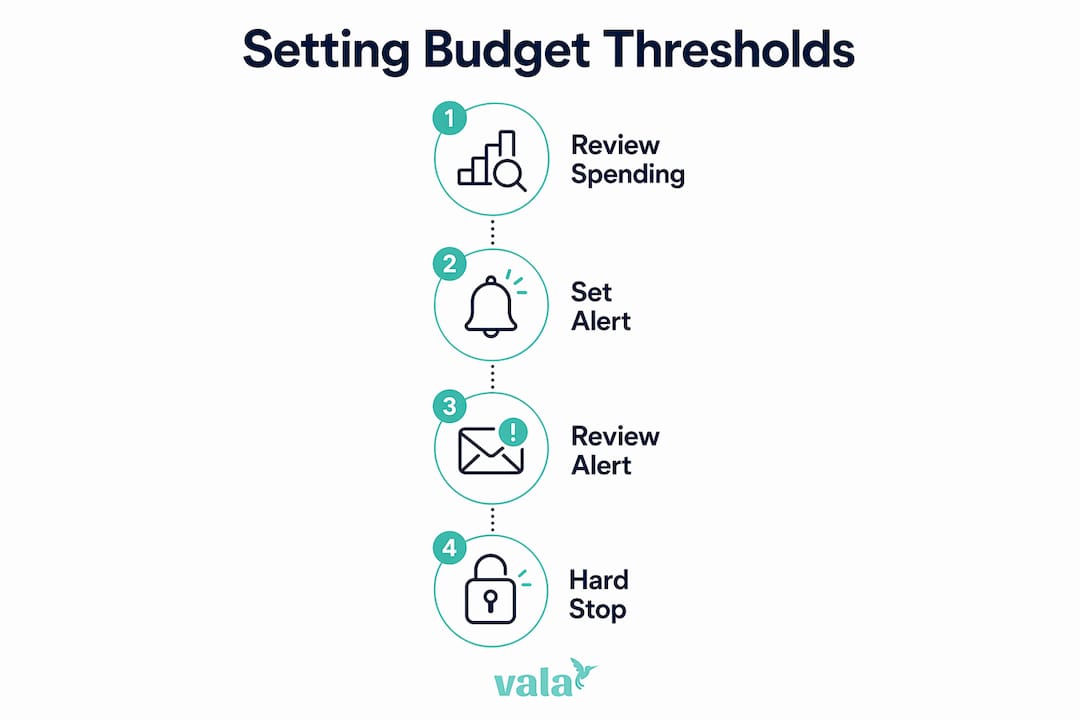
Infographic illustrating steps to set budget thresholds

Dollar-based thresholds work better for fixed expenses. If your electricity bill averages $90 per month, a threshold of $110 flags any unusual spike immediately. You do not need a percentage when the number itself is the signal.

Pro Tip: Review your last three months of bank statements before setting any threshold. Your real spending patterns, not your ideal ones, should anchor your starting numbers. Thresholds built on wishful thinking get ignored within two weeks.

Alert types also vary by purpose. A warning alert at 80% is informational. A review alert at 90% prompts you to check remaining spending for the month. A hard stop at 100% blocks further allocation in that category. Matching the alert type to the category’s flexibility level keeps the system useful without feeling punishing.

Why budget thresholds matter for financial control

Budget thresholds prevent the most common personal finance failure: spending money you did not realize was gone. Without a threshold, you discover the problem at the end of the month when the damage is done. With a threshold, you catch it mid-month when you can still change behavior.

The early-warning function builds financial accountability. When you know a $160 dining alert is coming, you think twice about a $45 dinner on the 20th of the month. That pause is the threshold doing its job. It does not restrict your freedom. It makes the cost of a choice visible before you make it.

Budget thresholds function best as triggers for review and discussion rather than rigid cut-offs. They require assessment of contextual financial factors to remain effective. Sole reliance on a threshold number can legitimize poor spending choices when the underlying expense type is not examined.

Source: Resource allocation decision-making insights00413-9)

Poorly set thresholds create their own problems. Setting thresholds too tight causes alert fatigue, where you receive so many notifications that you start ignoring all of them. A threshold set too high, say at 99% of budget, gives you almost no reaction time. Both extremes undermine the system.

Thresholds must be regularly adjusted to reflect changes in income, inflation, and personal goals. A grocery threshold that worked at $320 in january may need to move to $360 by july if food prices rise. Treating thresholds as permanent settings is the fastest way to make them irrelevant.

How to set effective budget thresholds for your finances

Setting a budget threshold that actually works takes four steps. Each step builds on the last, and skipping any one of them produces a threshold that looks good on paper but fails in practice.

  1. Categorize your expenses. Separate your spending into fixed costs (rent, utilities, loan payments), variable necessities (groceries, transportation), and discretionary spending (dining, subscriptions, entertainment). Fixed costs rarely need thresholds because they do not fluctuate. Variable and discretionary categories are where thresholds earn their value.

  2. Set your baseline numbers. Pull three months of actual spending data for each variable category. Calculate the average. That average becomes your budget for the category. Do not set a budget below your real average unless you have a specific plan to reduce spending in that area.

  3. Choose your threshold percentages. Start with an 80% alert for all discretionary categories. Add a 90% review prompt for any category where you have overspent in the past. Apply a hard stop at 100% for savings goals and debt payments. This tiered structure gives you balanced financial oversight without drowning you in notifications.

  4. Automate the tracking. Manual tracking works for about two weeks before life gets in the way. Automated expense tracking connects your real transactions to your budget categories in real time, so your thresholds fire when they should, not when you remember to update a spreadsheet.

Pro Tip: Set a monthly calendar reminder to review your thresholds. Spending habits shift with seasons, job changes, and life events. A threshold review takes ten minutes and keeps your system accurate.

A common pitfall is setting thresholds too high or failing to communicate them to yourself as a consistent rule. If you set an 80% grocery alert and then override it every single month without adjusting the budget, the threshold is not working. Either your budget is too low or your spending habit needs attention. The threshold reveals which problem you actually have.

Spending patterns detected by AI can also surface categories where you consistently breach thresholds without realizing it. These hidden leaks are exactly what a well-set threshold system is designed to catch.

Key Takeaways

A budget threshold is a predefined spending limit that triggers alerts, reviews, or hard stops to keep your finances on track before overspending occurs.

Point Details
Core definition A budget threshold is a set percentage or dollar limit that triggers a financial action when reached.
Tiered alert structure Set alerts at 80%, 90%, and 100% of budget to balance early warnings with avoiding alert fatigue.
Soft vs. hard limits Use soft limits for flexible categories and hard stops for savings goals or fixed financial targets.
Regular adjustment Review and update thresholds monthly to reflect income changes, inflation, and shifting spending habits.
Automation improves accuracy Automated tracking connects real transactions to thresholds, so alerts fire on time without manual effort.

Thresholds are guides, not gatekeepers

Here is what most personal finance articles get wrong about budget thresholds: they frame them as restrictions. You set a limit, you hit the limit, you feel bad. That framing makes people abandon the system within a month.

The thresholds I have found most useful are the ones set slightly below your comfort zone, not at the edge of your actual limit. If you genuinely spend $200 on dining every month, a threshold at $160 does not punish you. It starts a conversation with yourself two weeks before the end of the month. That conversation is the point.

The other thing worth saying plainly: a threshold you ignore is not a threshold. It is a number you wrote down once. The expense tracking practices that stick are the ones tied to a real consequence, even a small one, like transferring $20 to savings every time you breach a discretionary limit. The threshold becomes a habit loop, not a guilt trip.

Flexibility matters too. Life changes. A threshold that fit your budget at 23 will not fit at 27 when your rent, income, and priorities have all shifted. Build in a quarterly review as a non-negotiable. Treat it like a financial check-in, not a chore. The goal is a system that grows with you, not one you outgrow and abandon.

— SaverStride

Valapoint makes budget threshold management clear

Knowing what a budget threshold is and actually tracking one in real life are two different challenges. Valapoint’s budget goal tracker gives you a single place to set spending limits, configure tiered alerts, and watch your progress in real time.

https://valapoint.com

Valapoint connects to your actual spending, categorizes transactions automatically, and fires alerts when you hit your chosen thresholds, whether that is 80% of your grocery budget or 100% of your entertainment limit. The budget tracking app is built for young professionals who want clear numbers without hours of manual entry. Set your thresholds once, let Valapoint track them, and spend your energy on decisions that matter.

FAQ

What is a budget threshold in simple terms?

A budget threshold is a spending limit you set within a category that triggers an alert or action when reached. It helps you catch overspending before it happens, not after.

What percentage should I set my budget threshold at?

Professionals recommend starting with an 80% alert, a 90% review prompt, and a 100% hard stop for each budget category. This tiered approach gives you time to adjust without creating alert fatigue.

What is the difference between a soft limit and a hard limit?

A soft limit sends a warning but allows spending to continue. A hard limit stops further spending in that category once the threshold is reached.

Do I need a budget threshold for every expense?

Fixed expenses like rent do not need thresholds because they do not change. Variable and discretionary categories, such as groceries, dining, and entertainment, benefit most from threshold controls.

How often should I update my budget thresholds?

Thresholds should be adjusted regularly to reflect inflation, income changes, and shifts in spending habits. A monthly or quarterly review keeps your limits accurate and useful.

Zero Based Budgeting Explained for Families in 2026

Zero-based budgeting is defined as a method where your total monthly income minus every planned expense equals exactly zero. That formula, income minus expenses equals $0, means every dollar you earn gets a specific job before the month begins. Savings, debt payments, and groceries all count as expenses. Nothing floats unassigned. This approach gives you complete visibility into where your money goes, which is exactly why financial planners recommend it for families and individuals who want to stop wondering where their paycheck disappeared.


What is zero based budgeting explained step by step?

The zero-based budgeting process starts with one number: your total monthly take-home pay. Add every income source, including your salary, freelance work, side income, and any government benefits. Use the net figure, meaning what actually lands in your bank account after taxes.

From there, follow these steps:

  1. List your fixed expenses first. Rent, mortgage, car payments, insurance premiums, and loan minimums do not change month to month. Write them down with their exact amounts.
  2. List your variable expenses. Groceries, gas, utilities, dining out, clothing, and entertainment all shift each month. Estimate based on your last two to three months of spending.
  3. Set your financial goals as line items. Experts recommend allocating at least 20% of your budget toward savings, investments, or debt reduction. Treat your emergency fund contribution and retirement deposit as non-negotiable expenses.
  4. Add a sinking fund category. Car repairs, annual subscriptions, holiday gifts, and medical copays are predictable but irregular. Sinking funds prevent mid-month shortfalls by saving a small amount each month for these costs.
  5. Assign every remaining dollar. Keep subtracting categories from your income until you reach zero. If you have money left over, move it to savings or debt payoff rather than letting it sit unassigned.
  6. Track spending throughout the month. Check your budget weekly. When a category runs low, adjust another category to compensate. Mid-month adjustments are normal and expected.

Pro Tip: If you consistently have money left over at month’s end, do not inflate your spending categories to chase zero. Instead, increase your savings or debt payments to meet the balance. That is the correct move.


Close-up of hands calculating budget

How does zero-based budgeting differ from traditional budgeting?

Traditional budgeting uses last month’s numbers as a starting point. You look at what you spent, add a small adjustment, and call it a plan. Zero-based budgeting rejects that entirely. You start from scratch every single month, justifying each category from zero.

The practical difference is significant. Traditional budgets often carry waste forward without anyone noticing. A streaming service you forgot about, a gym membership you stopped using, a grocery budget that crept up by $50 without explanation. Zero-based budgeting forces you to confront every line item monthly.

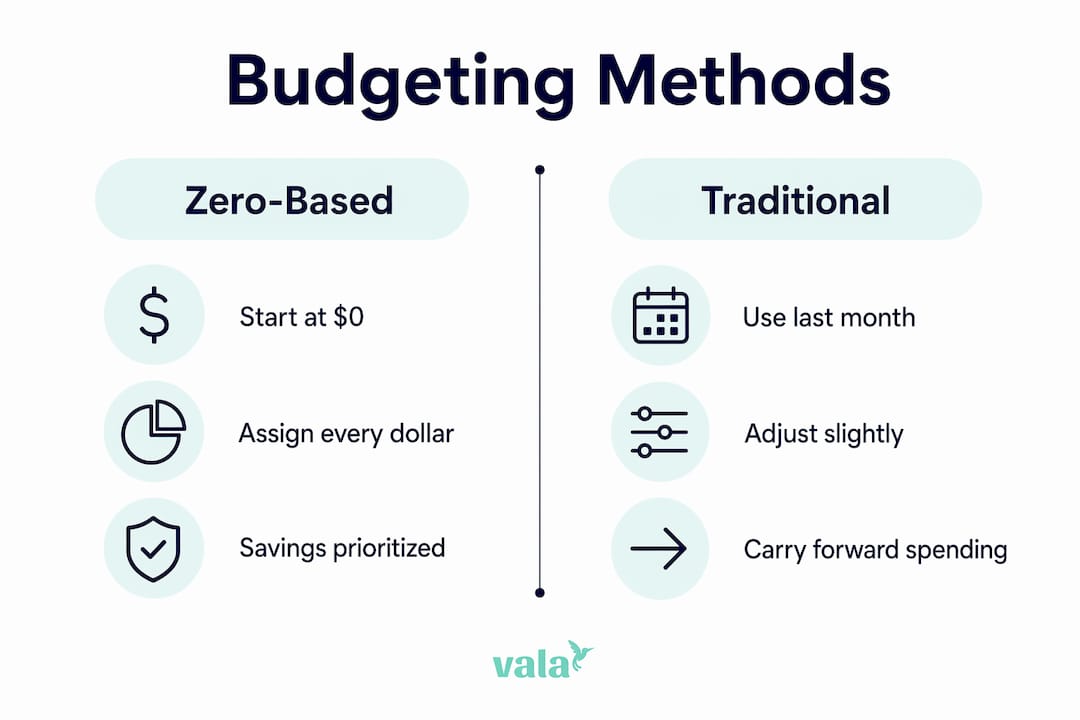
Infographic comparing zero-based and traditional budgeting

Here is how the two methods compare:

Feature Zero-based budgeting Traditional budgeting
Starting point $0 each month Prior month’s budget
Expense justification Required for every category Rarely reviewed
Savings treatment Assigned upfront as an expense Often whatever is left over
Flexibility Adjusts to income changes Can lag behind real life
Time required Higher, especially at first Lower ongoing effort
Accountability High, 100% of dollars tracked Moderate

The most meaningful difference is how savings gets treated. In a traditional budget, savings is what remains after spending. In zero-based budgeting, savings is the first thing you assign. That single shift changes your financial behavior more than any other adjustment.

Zero-based budgeting also handles variable income better than most people expect. If your income drops one month, you rebuild the budget from that lower number. Nothing carries over automatically, so you cannot accidentally overspend based on a prior month’s higher earnings.


What are the benefits and challenges of zero-based budgeting?

Zero-based budgeting delivers clear advantages, but it also comes with real demands. Knowing both sides helps you commit with realistic expectations.

The benefits:

  • Full financial visibility. Tracking 100% of outflows means you always know where your money is going. Nothing hides in a vague “miscellaneous” category.
  • Reduced waste. When you must justify every expense monthly, subscriptions and habits you no longer value get cut.
  • Savings treated as a priority. Assigning savings before discretionary spending means it actually happens.
  • Adaptable to income changes. Freelancers, gig workers, and anyone with irregular income can rebuild the budget each month to match actual earnings.
  • Improved goal achievement. People who track every dollar report stronger progress toward long-term financial goals.

The challenges:

  • Time investment upfront. The initial setup takes real effort, and most new budgeters need two to three months before the process feels natural.
  • Requires consistent tracking. A zero-based budget falls apart if you stop checking it mid-month.
  • Irregular expenses catch people off guard. Underestimating car repairs or annual fees is the most common reason budgets fail.
  • Can feel restrictive at first. Assigning every dollar feels rigid until you realize you are the one deciding where each dollar goes.

“Zero-based budgeting is a tool for intentional money use, not austerity. Assign some surplus to fun and discretionary categories. A budget that has no room for enjoyment will not survive contact with real life.”

Pro Tip: Build a “buffer” category of $50–$100 each month for genuinely unexpected costs. This is not the same as a sinking fund. It is a small cushion that keeps your budget from breaking when something minor and unpredictable comes up.


How to apply zero-based budgeting in real life

Theory is useful. A concrete example is better. Here is a sample monthly budget for a family bringing home $5,000 after taxes:

Category Monthly amount
Rent or mortgage $1,400
Groceries $600
Utilities $200
Transportation $350
Insurance $250
Emergency fund $300
Retirement savings $400
Debt payments $300
Sinking funds (car, gifts, medical) $200
Dining and entertainment $300
Clothing and personal care $150
Buffer $100
Subscriptions $50
Miscellaneous $100
Total $4,700

That leaves $300 unassigned. The correct move is to add it to the emergency fund or debt payoff, not to create new spending. Reallocating surplus to financial goals is what separates a zero-based budget from a spending free-for-all.

A few practical tips for making this work month after month:

  • Review your budget every Sunday. A five-minute weekly check catches overspending before it becomes a problem.
  • Use a budgeting app for real-time tracking. Manual spreadsheets work, but apps that sync with your bank accounts catch transactions you might miss.
  • Rebuild from scratch each month. Do not copy last month’s budget. Spend five minutes reviewing what changed in your income or expenses first.
  • Give yourself a “fun money” line. Zero-based budgeting works best when it includes guilt-free discretionary spending. Assign it deliberately rather than letting it happen by accident.

For families with variable income, use your lowest expected monthly income as the base. If you earn more, assign the extra to savings or debt. This approach keeps the budget conservative and prevents overspending in high-earning months.

Pro Tip: Set up separate expense tracking categories for each sinking fund goal. Seeing “car repairs: $80 saved of $300 target” is far more motivating than a single lump savings number.


Key Takeaways

Zero-based budgeting works because it assigns every dollar a purpose before you spend it, making savings a priority and waste nearly impossible to hide.

Point Details
Core formula Income minus all expenses, savings, and debt payments must equal zero each month.
Savings comes first Treat savings and debt payments as fixed expenses, not leftovers from discretionary spending.
Sinking funds prevent surprises Set aside money monthly for irregular costs like car repairs, gifts, and annual subscriptions.
Rebuild every month Start from zero each month rather than copying the prior budget to stay accurate.
Surplus goes to goals When money is left over, increase savings or debt payments rather than creating new spending.

Why I think most people give up on budgeting too soon

Most people quit a zero-based budget in the first six weeks. Not because the method is flawed. Because they expected it to feel easy immediately, and it does not. The upfront time commitment is real, and the first month’s budget will be wrong in at least three categories. That is not failure. That is data.

The mistake I see most often is treating the budget as a test you pass or fail. You overspend on groceries by $40, and you decide the whole system is broken. The system is not broken. You just learned that your grocery estimate was too low. Adjust it next month and move on.

The other thing most articles will not tell you: the psychological shift takes longer than the financial one. You can set up a technically correct zero-based budget in an afternoon. Getting comfortable with the idea that every dollar has a job, and that you are the one giving it that job, takes two to three months of practice. Adapting the budget each month to your actual life is what builds the habit, not perfecting the spreadsheet on day one.

My honest advice: start simpler than you think you need to. Use eight to ten categories in your first month, not twenty-five. Add detail as you get comfortable. A budget you actually use beats a perfect budget you abandon.

— SaverStride


How Valapoint makes zero-based budgeting easier

Maintaining a zero-based budget manually takes real effort. Valapoint’s personal finance app handles the heavy lifting by automatically categorizing your transactions, tracking spending in real time, and showing you exactly how much remains in each budget category.

https://valapoint.com

You can assign every dollar directly inside the app, set up sinking fund goals, and get alerts before a category runs over. Valapoint also surfaces hidden spending patterns that most people never notice until they review three months of data at once. For families and individuals who want the discipline of zero-based budgeting without the spreadsheet grind, Valapoint’s budget tracking tools give you a clear, real-time picture of your money every single day.


FAQ

What does zero-based budgeting mean?

Zero-based budgeting is a method where every dollar of your monthly income is assigned to a specific category so that income minus all expenses, savings, and debt payments equals exactly zero. No money is left unallocated.

How is zero-based budgeting different from the 50/30/20 rule?

The 50/30/20 rule divides income into three broad buckets: 50% needs, 30% wants, and 20% savings. Zero-based budgeting assigns every dollar to a specific named category, giving you more detailed control and accountability than broad percentage splits.

How long does it take to learn zero-based budgeting?

Most people need two to three months before the process feels natural. The first month requires the most effort, but the time investment decreases significantly once you have a working template to adjust each month.

What happens if I have money left over at the end of the month?

Move any surplus to savings, an emergency fund, or extra debt payments rather than spending it. The goal is to account for every dollar with purpose, not to spend down to zero.

Can zero-based budgeting work with irregular income?

Yes. Build your budget using your lowest expected monthly income as the base. When you earn more than expected, assign the extra to savings or debt payoff before spending it.

Group Trip Budgeting Checklist for Friends Who Travel

A group trip budgeting checklist is a structured tool that helps groups set clear spending limits, track shared expenses transparently, and coordinate payments before money tensions derail the fun. Most group travel conflicts trace back to one root cause: no one agreed on the numbers before booking. This checklist covers every stage of the shared expenses process, from setting your first per-person ceiling to settling the final bill, so your group arrives at the destination with expectations aligned and friendships intact.

1. Your group trip budgeting checklist starts here: set a clear budget first

The single most important step in any group travel budget planner is collecting each person’s honest spending limit before any booking happens. Skip this step, and you will spend the next three weeks managing resentment instead of itineraries.

Ask every traveler to answer three questions privately: What is the most you can spend total? What costs matter most to you (comfort, food, activities)? Are there any costs you want to opt out of entirely? Collecting answers privately removes social pressure and surfaces real numbers.

Once you have individual limits, set a group budget ceiling based on the lowest comfortable figure. Radical transparency about budget differences early in planning lets you build tiered activity options that include everyone without judgment. A tiered approach means some travelers book the private room while others share, and both choices are built into the plan from day one.

  • Total budget components to define upfront: transportation, lodging, food, group activities, and a contingency buffer
  • Per-person ceiling: the maximum any single traveler should spend across all categories
  • Tiered options: at least two price points for lodging and activities to accommodate different comfort levels

Pro Tip: Ask everyone to submit their budget limit via a shared form before the first group call. You get honest numbers, and no one feels pressured to match the biggest spender in the room.

2. Build a cost breakdown for every budget category

A cost breakdown for your group vacation prevents the most common budgeting mistake: underestimating how many small costs stack up. Hidden costs such as airport parking, baggage fees, and ride-share surges can add over $200 per person. Communicate these costs upfront so no one is blindsided at the airport.

Woman working on group travel cost breakdown

Use this structure to build your per-person cost breakdown:

Category Estimated Cost Per Person Notes
Transportation $80–$200 Flights, rail, or chartered coach
Lodging $60–$150 per night Varies by room sharing arrangement
Food and dining $40–$80 per day Mix of groceries and restaurants
Group activities $30–$60 per day Admission, tours, experiences
Contingency buffer 10–15% of total Covers unexpected costs

Treat the total as a hard ceiling, not a suggestion. Once you have the breakdown, share it with the full group in writing. Written cost breakdowns reduce disputes because everyone sees the same numbers at the same time.

  • Round each category up by $5–$10 to absorb small surprises
  • Flag any costs that are optional so travelers can opt in or out
  • Revisit the breakdown after every major booking to update actuals

3. Collect deposits and set firm payment deadlines

Payment collection is where most group trips fall apart. For groups of 15 or more, collect a 50% deposit within 48 hours of booking to secure vacation rentals, with the balance due 30 days before check-in. Apply the same logic to smaller groups: set a deadline, communicate it once, and enforce it.

  1. Send a payment request the same day you confirm the booking. Waiting gives people time to back out.
  2. Specify one payment platform for the entire group. Mixing Venmo, Zelle, and bank transfers creates reconciliation chaos.
  3. Set a non-negotiable deadline with a clear consequence. If payment is not received by the deadline, the spot goes to a waitlisted traveler.
  4. Collect deposits before finalizing any reservation. Mandatory deposits reduce cancellations by approximately 50% compared to informal commitments.
  5. Send one reminder 48 hours before the deadline. One reminder is professional. Three reminders train people to ignore you.

Pro Tip: Designate one person as the trip treasurer before any money moves. That person owns all payment requests, tracks balances, and sends the final settlement. One owner means zero confusion about who paid what.

4. Designate a trip treasurer and use one tracking tool

Designating a trip treasurer and using a single digital tracking tool before departure prevents payment friction and eliminates the “who owes what” conversation at the end of the trip. The treasurer role does not require financial expertise. It requires one organized person willing to log every expense in real time.

The treasurer’s core responsibilities are straightforward: record every group expense as it happens, categorize costs by type, and share a running balance with the group at least once per day. Real-time group spending visibility keeps everyone informed and removes the awkward end-of-trip math session.

For the tracking tool, pick one platform before departure and require everyone to use it. Valapoint’s expense tracking features let the treasurer log shared costs, split them automatically, and show each traveler their running balance without manual calculations. The goal is a single source of truth that every traveler can check at any time.

5. Choose transportation based on group size and cost per person

Transportation accounts for 40%–60% of group outing costs, making it the single largest budget lever you control. The right transport choice depends on group size, distance, and how much flexibility you need.

Group discounts on rail typically start at 6 or more passengers, while admission-based group rates usually require 10–15 people for a 10%–25% discount. A chartered coach runs $15–$28 per person for day trips, compared to $25–$35 per person for group rail tickets. For road trips, calculate fuel and tolls per person based on the actual number of cars, not the theoretical maximum.

  • Under 8 travelers: carpooling or rideshare often beats rail on cost
  • 8–15 travelers: group rail tickets or a rented van offer the best per-person value
  • 15+ travelers: a chartered coach locks in the lowest per-person cost and eliminates coordination overhead
  • Flights: book as a group only if everyone’s schedule aligns; otherwise, individual bookings with a shared airport meetup time work better

Coordinate arrival and departure times to avoid paying for an extra night of lodging because two travelers arrive six hours after everyone else. That coordination detail alone can save $30–$50 per person.

6. Select accommodations that fit your group size and budget

Accommodation is the second-largest cost in any group travel budget planner, and the right choice depends on group size, not personal preference. Book large properties 6–12 months ahead because large vacation home inventory is less than 5% of total rental supply. Waiting until two months out means paying a premium or settling for properties that do not fit your group.

For groups of 8 or more, a single large property almost always costs less per person than booking multiple hotel rooms. A vacation rental also gives you a shared kitchen, which cuts food costs significantly. For groups with mixed budgets, negotiate room assignments based on room size and amenity level so that travelers paying less get a fair space and travelers paying more get the upgrade they want.

Confirm accessibility, parking, and check-in logistics before signing any rental agreement. Hidden fees like cleaning charges, pool heating, and parking passes can add $20–$40 per person to the final bill.

7. Plan meals and food costs with a shared grocery strategy

Food is the most flexible budget category and the easiest place to save money without sacrificing the experience. A shared grocery run on arrival day cuts daily food costs by 30%–40% compared to eating every meal at a restaurant. Assign one person to coordinate the grocery list and split the cost equally across all travelers.

Set a clear rule about how meals work: which meals are group expenses, which are individual, and how restaurant bills get split. Ambiguity about meal costs is one of the top three sources of money tension on group trips. Decide before you leave, document it in your shared budget plan, and refer back to it if a dispute comes up.

For group dinners at restaurants, agree in advance whether you split the bill equally or pay individually. Equal splits work best when everyone orders in a similar price range. Individual payment works better when dietary restrictions or alcohol preferences create large differences in check size.

8. Build a contingency buffer into every group budget

A contingency buffer of 10%–15% of your total trip budget is non-negotiable for any group outing cost management checklist. Unexpected costs hit every trip: a missed connection, a broken item in a rental property, a medical expense, or a weather-related activity cancellation. Without a buffer, the group either absorbs the cost unevenly or someone pays out of pocket and never gets reimbursed.

Collect the buffer as part of the initial payment, not as an afterthought. When travelers see the buffer as a line item in the original cost breakdown, they accept it. When you ask for extra money mid-trip, it feels like a surprise charge.

“Treating the total budget as a strict ceiling, not a flexible guideline, is the single most effective way to prevent unfair surprises and budget stress during group travel. Communicate hidden costs upfront and build the buffer in from day one.”

Return any unused buffer funds to the group after the trip, split equally. This builds trust and makes travelers more willing to contribute to the buffer on the next trip.

9. Set cancellation and refund policies before anyone books

Clear cancellation and refund policies protect the group from financial loss when a traveler drops out. Write the policy in plain language and share it with every traveler before collecting any money. The policy should cover three scenarios: a traveler cancels before the trip, a traveler cancels after the deposit deadline, and the entire trip is canceled.

  • Before deposit deadline: full refund, no questions asked
  • After deposit deadline but before 30 days out: deposit is forfeited; traveler may find a replacement to recover their share
  • Within 30 days of departure: no refund; the group absorbs the cost or the traveler finds a replacement

Require every traveler to acknowledge the policy in writing, even a simple text message reply counts. Written acknowledgment removes the “I didn’t know” defense and keeps relationships intact when money is involved.

Key Takeaways

A group trip budgeting checklist works best when you set a per-person ceiling first, designate a treasurer, and use one digital tool to track every shared expense in real time.

Point Details
Set a budget ceiling first Collect individual limits privately before any booking to avoid social pressure and surface real numbers.
Designate a trip treasurer One person owns all payment requests, expense logs, and final settlements to prevent confusion.
Use mandatory deposits Collecting deposits within 48 hours of booking reduces cancellations by approximately 50%.
Build a 10–15% buffer Include the contingency fund as a line item in the original cost breakdown, not as a mid-trip request.
Write cancellation policies Document refund rules before collecting money so every traveler knows the terms upfront.

Why I think most groups skip the most important step

The most common mistake I see groups make is skipping the private budget survey at the start. Everyone jumps straight to destination ideas and accommodation links, and no one asks the one question that determines whether the trip is actually affordable for the whole group.

I have watched friendships get strained over $40 dinner bills that could have been avoided with a five-minute conversation in week one. The fix is not complicated. It is just uncomfortable, and most people avoid uncomfortable conversations until the money is already spent.

The groups that travel well together are not the ones with the biggest budgets. They are the ones with the clearest agreements. A shared budget plan documented before the first booking removes 90% of the friction that shows up mid-trip. Designating a treasurer removes the other 10%.

Digital tools matter, but they are secondary to the human agreements. Use Valapoint or any solid expense splitting app to automate the math. But the conversations about who pays what, when, and under what conditions still have to happen between real people before anyone boards a plane.

— SaverStride

How Valapoint makes group trip finances easier

Managing shared costs across a group of friends is genuinely hard without the right tool. Valapoint’s personal finance app lets your group track every expense in real time, split costs automatically, and see individual balances without a single spreadsheet.

https://valapoint.com

The app works for the full trip cycle: set your per-person budget before departure, log expenses as they happen, and settle the final balance in one payment at the end. Valapoint also surfaces hidden spending patterns so your group can see exactly where the money went and plan smarter for the next trip. If your group is ready to stop guessing and start tracking, Valapoint gives you the clarity to do it confidently.

FAQ

What is a group trip budgeting checklist?

A group trip budgeting checklist is a structured plan that defines per-person spending limits, organizes shared costs by category, and sets payment deadlines before any booking is made. It prevents money-related conflicts by aligning expectations upfront.

How much buffer should a group travel budget include?

A contingency buffer of 10%–15% of the total trip budget covers unexpected costs like missed connections, property damage, or activity cancellations. Collect it as a line item in the original payment, not as a mid-trip request.

When should a group collect deposits for a trip?

For groups of 15 or more, collect a 50% deposit within 48 hours of booking to secure vacation rentals. Mandatory deposits reduce cancellations by approximately 50% compared to informal commitments.

How do you split expenses fairly in a travel group?

The fairest split method depends on the group. Equal splits work when costs and consumption are similar across travelers. Tiered splits work better when travelers have different budgets or room preferences. Agree on the method before departure and document it in writing.

What is the biggest hidden cost in group travel?

Airport parking, baggage fees, and ride-share surges are the most commonly overlooked costs and can add over $200 per person to the total trip budget. List these costs explicitly in your shared cost breakdown so every traveler accounts for them from the start.

Top 4 PocketGuard Budgeting Alternatives 2026

Managing shared expenses and tracking recurring charges with basic budgeting tools leads to missed subscription waste and month end surprises. Many budgeting apps limit free access to core features or do not show money leaks and shared bill splits clearly. You can pick a budgeting and expense app that fits household use, shared expense tracking, and money leak detection without trial-and-error on limited free tiers.

Table of Contents

Vala

https://valapoint.com

At a Glance

Detects unused subscriptions and recurring charges that cause month end surprises. The product centers on money leak detection, so you spot recurring waste before bills arrive. It targets household and shared finances while emphasizing transparent data handling and privacy.

Core Features

Bank linking syncs transactions and supports track savings goals features while feeding subscription review and categorization. Bill reminders, budget tracking, and savings goals help you plan payments and avoid late fees. Shared expense management and spending analytics let households split costs and see where budgets drift.

Key Differentiator

The app centers on shared expense management and explicit money leak detection for households and couples. That focus aligns tools around recurring charges and split bills rather than complex investment planning. Transparent data practices and a privacy emphasis back the household use case.

Pros

Detects hidden subscriptions and recurring charges so you catch unexpected month end costs. Proactive bill reminders and budget goals reduce the chance of late payments and slipping balances. Shared expense tools and clear spending insights make it practical for couples and families who split bills. A free browse option plus iOS and Android availability lets you try the app before committing.

Cons

  • Some features may require paid plans for full access.

Who It’s For

Individuals, couples, and families who want a practical way to find recurring waste and stay ahead of bills. People who split household costs and prefer short, actionable insights over complex financial planning will get the most value. It is not aimed at users who need investment or retirement features.

Unique Value Proposition

Bank linking combined with household-focused split tools flags repeat charges before they hit your account. That pairing lets you remove unused subscriptions and allocate shared bills quickly. The net effect is fewer surprise charges and clearer monthly cash flow for groups managing one set of household finances.

Real World Use Case

A family links their checking accounts, then runs subscription review each month to remove unused services. They set bill reminders and create a shared savings goal for a vacation, and split recurring utilities inside the app. The setup reduces duplicate payments and keeps everyone aware of upcoming costs.

Website: https://valapoint.com

Buddy Budgeting

https://buddy.download

At a Glance

Buddy Budgeting reports over 3 million users and a 4.7/5 App Store rating. It earned editor’s choice recognition and has traction in Canada and Australia. The app mixes budget creation, quick expense tracking, and shared budgets for partners.

Core Features

Create budgets, track expenses quickly, and set savings goals across multiple accounts including debts and savings. Share budgets with partners or roommates and customize categories, themes, and dark mode. The app also offers shared budgets and community articles that teach basic financial skills.

Key Differentiator

Buddy focuses on a friendly, customizable interface paired with active community content. That combination favors people who want simple collaboration and features tailored for different regions. It aims at households and individuals rather than business or enterprise workflows.

Pros

The app is quick to set up and uses an intuitive layout for budget creation and expense review. Shared budgets let partners or roommates reconcile bills and subscriptions without juggling multiple spreadsheets. Community articles and responsive support help users learn basic money skills. That rating and the user count above reflect wide consumer interest in the app.

Cons

  • Limited free tier functionality restricts access to key features for casual users.
  • Subscription pricing can be expensive for some people compared with simpler apps that do not charge subscriptions.
  • Occasional build failures and complex errors occur without clear logs, which complicates troubleshooting.
  • Region differences mean limited integrations and some missing features in certain countries.

When It May Not Fit

Not the best option if you need a generous free plan or enterprise integrations. Users in some regions may find fewer features or missing integrations. Developers or advanced troubleshooters will be frustrated by intermittent build problems and thin logs.

Who It’s For

People and households who want a simple, collaborative budgeting app get the most value. Couples, roommates, and those tracking debt and savings will appreciate shared budgets and multiple account support. Budget beginners who want community articles and a gentle learning curve also fit well.

Real World Use Case

A couple uses Buddy to coordinate household expenses, track savings goals, and manage subscriptions through shared budgets. They assign categories for utilities, groceries, and entertainment and reconcile transactions weekly. That routine reduces surprises and helps them prioritize debt payoff and short term savings.

Pricing

Buddy offers a free trial and subscription options to unlock full features. The vendor positions paid tiers for people who need shared budgets, extra account support, and premium themes. Some users find the subscription expensive compared with basic budgeting tools.

Website: https://buddy.download

Toshl Finance

https://toshl.com

At a Glance

Multiple currency support with live exchange rates applies across accounts and transactions. The app combines automatic bank imports with manual entry and file import options. Toshl offers a free basic tier and paid Pro and Medici plans with advanced features and a 30-day trial.

Core Features

Toshl syncs with bank accounts to import transactions automatically while also accepting manual entries and receipt photos. It supports budgets with recurring items and rollover behavior, and it applies learned categories and tags to speed classification. The mobile apps and web interface show cash flow graphs, future projections, and allow data export in common file formats.

Key Differentiator

The standout capability is the blend of multiple currencies, automated bank sync, and visually clear cash flow charts. That combination helps users who move money across currencies track balances and trends in one place. Visual tools make it easier to spot currency effects on spending.

Pros

The interface is generally intuitive for personal finance tracking, which helps with daily expense logging and review. Bank synchronization tends to work well, reducing manual imports and keeping balances current. Subscriptions are affordable, and the mobile apps support quick entry when you are on the go, while visualizations clarify cash flow and budgeting progress.

Cons

  • Slow development pace reported by some users, which can leave requested features waiting.
  • UI and workflow redesigns have confused long-term users and disrupted habit-based workflows.
  • Budgeting can behave inconsistently for long-term budgets, according to user reports.
  • Lacks bulk editing tools, making high-volume transaction cleanup slow and manual.

When It May Not Fit

If you rely on complex, long-term budgets that must stay perfectly consistent, this product may frustrate you. Users who need to edit hundreds of transactions at once will miss bulk edit functions. People who prefer a stable, unchanging interface may find periodic redesigns disruptive.

Notable Integrations

  • Bank account APIs for automated transaction import
  • File import formats such as CSV, QIF, and XLS for offline data transfer

Who It’s For

Individuals who need an easy-to-use personal finance app with support for several currencies will find this useful. Frequent travelers, expatriates, and those with multiple currency accounts benefit from live exchange rate tracking. Casual users who want clean visual reports and mobile entry will enjoy the workflow.

Real World Use Case

A user connects checking and credit card accounts from two countries and sees balances converted with live rates. They tag recurring rent and subscriptions, attach receipts to purchases, and use the cash flow chart to decide whether to shift savings into an emergency fund. Exporting a CSV lets them share transaction history with an accountant.

Pricing

Toshl provides a free plan with core features for basic tracking. Paid Pro and Medici subscriptions unlock unlimited accounts, automated bank sync, and export options. A 30-day free trial lets you test the paid features before committing.

Website: https://toshl.com

Envelope Budgeting App

https://envelopebudgeting.com

At a Glance

The subscription fee is waived if you spend $5,000 annually with the Envelope card. The app pairs envelope style budgeting with a checking account and Visa debit cards so you can move money and pay from the same place. Funds are reported as FDIC insured up to $250,000 through Pacific West Bank. Many users report the app helps visualize cash flow, though it takes effort to learn.

Core Features

Envelope uses a digital envelope budgeting system that updates in real time and shows visual expense charts. The app includes a built-in checking account, virtual and physical Visa debit cards, mobile check deposit for iOS, and fee free ATM access nationwide. It also offers early direct deposit and a high yield savings option that advertises 3.07% APY.

Key Differentiator

Envelope combines envelope budgeting with integrated banking so budgets and spendable balances live together. That single app approach means you do not keep separate budgeting tools and bank accounts. It aims to reduce guesswork by showing how envelope balances affect available cash.

Pros

The envelope method helps you visualize money flow and allocate funds to goals and bills, which supports disciplined spending. The app blends budgeting and banking so you can move cash between envelopes and spend with virtual cards for online purchases. A savings option with a stated 3.07% APY and fee free ATM access add tangible financial value for people who keep cash in the app.

Cons

  • Steep learning curve. The envelope method requires setup and regular maintenance to work well.
  • Complexity up front. New users may find the app more detailed than basic trackers.
  • Paid subscription. You pay $10 per month or $40 per year unless you hit the card spend waiver.
  • Not ideal for quick, throwaway budgets. Casual users may prefer simpler apps.

When It May Not Fit

If you want an ultra simple tracker with no subscription, this app will feel heavy. If you rarely use a debit card or prefer separate banks, combining budgeting and banking may not suit you. People who want read only reports rather than active envelope management should look elsewhere.

Notable Integrations

  • Apple Pay. Use Envelope cards with Apple Pay for mobile wallet purchases.
  • Google Pay. Add Envelope cards to Google Pay for contactless and online payments.

Who It’s For

Tech savvy individuals or couples who want direct control over money movement will get the most from Envelope. People who already like envelope budgeting and want to centralize accounts and cards will benefit. Households planning bills, savings goals, or debt payoff will find the app practical.

Real World Use Case

A family allocates paychecks into envelopes for mortgage, groceries, and emergency savings. They use virtual cards for online shopping and physical cards for in store purchases. Real time updates help them avoid overspending and track progress toward a vacation or renovation goal.

Pricing

The app costs $10 per month or $40 per year. The fee is waived when you spend $5,000 in a year using the Envelope card. That pricing covers individual and joint accounts, unlimited envelopes, and card access.

Website: https://envelopebudgeting.com

Comparison of alternatives

Amid the diverse offerings in the budget management landscape, four notable options provide unique benefits aimed at various user needs. Each application has distinct advantages catering to specific financial scenarios.

Insights into usability and core functionalities

Vala excels with its focus on identifying recurring waste and unnoticed subscriptions, perfectly tailored for households and shared expenses. This feature significantly impacts its effectiveness in avoiding surprise costs. Meanwhile, Buddy Budgeting prioritizes personal engagement through customization options like themes and community-driven content. This makes it appealing for individuals and households creating personalized budgets while learning financial strategies. Toshl Finance’s multiple-currency tracking capability positions it as an excellent choice for users managing finances across international borders. With visualization tools and detailed insights, it supports users needing dynamic and versatile financial oversight. Lastly, the Envelope Budgeting App links digital envelope systems directly with integrated banking features, providing a unique blend of budgeting and transactional convenience.

Pricing model and accessibility comparison

Each application adopts varied cost structures, impacting their suitability for different user groups. Vala offers a free browse option for initial experience and transparent pricing, enabling user-centric decisions. Buddy Budgeting requires subscriptions for extended features, which might not align with basic tracker users. Toshl Finance offers scalable payment tiers, including a free plan for foundational functionalities. On the other hand, Envelope Budgeting App balances its subscription model with waived fees for meeting spend conditions on proprietary cards, beneficial for users already aligned with its operational standard.

Best fit

  • For those focusing on reducing unnoticed recurrent expenses and enhancing shared cost management, Vala provides a experience with minimal learning curve.
  • If a visually engaging interface and tailored community advice are priorities, then Buddy Budgeting aligns well with engaging management approaches.
  • To manage financial intricacies across global currencies with dynamic insights, Toshl Finance offers diverse, applicable features.
  • Those aiming to directly align budget tracking and transactional spending will find Envelope Budgeting App appealing due to its integrated account features.

Our pick

Vala stands out due to its dedicated approach to household finance management, emphasizing recurring charge detections and shared financial insights. For families and groups managing collective expenses, this app provides specific tools lacking in its competitors. However, if a diverse and internationally adaptable platform is a priority, Toshl Finance may offer additional value.

These budgeting and expense management apps help users streamline their financial planning and track recurring costs.

Product Name Key Feature Best For Pricing Notable Limitation
Valapoint Money leak and subscription detection Households and couples Price not published Some advanced features require paid plans
Buddy Budgeting Customizable shared budgets Budgeting beginners and roommates Subscription required Limited free tier functionality
Toshl Finance Multi-currency tracking Frequent travelers and expatriates Free or paid plans Lacks bulk editing for transactions
Envelope Budgeting App Real-time envelope budgeting system Tech-savvy individuals or couples $10/month or $40/year Steep learning curve for setup

How To Spot Hidden Money Leaks and Manage Shared Finances More Clearly

Many people struggle to detect unused subscriptions and surprise recurring charges that disrupt their monthly budgets. This challenge grows when managing household finances shared between couples or families. Valapoint offers a focused solution designed to help individuals, couples, and families uncover these hidden financial drains with intelligent tracking and clear bill reminders.

Valapoint uses AI to track expenses, split shared costs, and highlight recurring waste before your bills arrive. You gain simple tools to keep budgets on track and plan savings goals without complex setups or investment features. For practical money leak detection and shared expense management, visit Valapoint and see how your group can reduce surprises and improve monthly cash flow.

Start with free account setup and see your subscription review in minutes.

FAQ

What features make Valapoint suitable for detecting wasted subscriptions?

Valapoint is ideal for spotting unused subscriptions and recurring charges that can lead to unexpected costs. The app focuses on money leak detection, ensuring you identify recurring expenses before they impact your budget. Users can take action to remove unnecessary charges and manage finances more effectively.

How does Valapoint compare with Buddy Budgeting’s shared budget capabilities?

Buddy Budgeting offers a customizable interface and community content that helps users learn basic financial skills. However, Valapoint excels in shared expense management and proactive monitoring of recurring charges. This focus makes Valapoint a better fit for households and couples looking to manage shared finances without the need for extensive instructional content.

Can I track savings goals with Valapoint?

Yes, Valapoint allows users to set savings goals and track their progress. This feature integrates with budget tracking and bill reminders, enabling better financial planning and management. Expect a smooth experience as the app organizes your financial objectives.

What makes Envelope Budgeting App’s features unique for budgeting?

Envelope Budgeting App pairs envelope budgeting with integrated banking to manage expenses visually. This method differs from Valapoint’s approach, which focuses on money leak detection and shared expense management. Users seeking a simple budgeting method who prefer separate bank accounts may find the Envelope app a better choice.

Is Valapoint available on both iOS and Android devices?

Yes, Valapoint is available on both iOS and Android platforms, allowing users to try the app for free before committing to any paid plans. This accessibility lets you test its features at no cost.

Types of Savings Goals by Age: Your Decade-by-Decade Plan

Savings goals by age are defined as the specific financial targets you set based on your current life stage, income level, and upcoming priorities. The types of savings goals by age shift significantly from your 20s through your 40s, because your financial risks, responsibilities, and opportunities change with every decade. A 23-year-old building an emergency fund faces a completely different challenge than a 42-year-old maxing out retirement contributions. Getting your goals right for your stage, not someone else’s, is what separates consistent wealth builders from people who feel like they are always starting over.

1. What are the types of savings goals by age?

Age-specific savings plans fall into four broad categories: protection goals (emergency funds, insurance), debt reduction goals, wealth-building goals (retirement, investments), and milestone goals (home purchase, education, family). Every age group uses all four, but the weight you give each one shifts dramatically across your 20s, 30s, and 40s. Understanding which category deserves your focus right now is the first step toward building a plan that actually works.

Two men discussing age-specific savings goals in office

Savings benchmarks by age provide useful guidelines, but they should be personalized based on employment history, debt levels, and cost of living. A benchmark is a compass, not a contract.

2. What savings goals should you prioritize in your 20s?

Your 20s are the most powerful decade for building financial habits. The decisions you make now compound for 40 years, which means even small, consistent actions produce outsized results later.

The core savings goals for your 20s include:

  • Emergency fund: Save 3–6 months of expenses in a high-yield savings account before anything else. This fund protects every other goal you set.
  • Retirement contributions: Start contributing to a 401(k) or Roth IRA immediately, even if it is only 3–5% of your paycheck. Early retirement contributions build wealth through compound growth that no catch-up contribution can replicate.
  • High-interest debt elimination: Credit card debt at 20%+ interest destroys savings faster than any investment can build them. Pay it off aggressively before increasing retirement contributions beyond any employer match.
  • Budget framework: Apply the 50/30/20 rule: 50% to needs, 30% to wants, and 20% to savings and debt repayment. This framework gives you structure without requiring a finance degree.
  • Goal planning: Set up automatic transfers to savings and retirement accounts on payday. Automating savings removes the monthly decision barrier and builds consistent habits without relying on willpower.

The biggest advantage you have in your 20s is time. As author Erin Lowry notes, time is your greatest financial asset at this stage. A $200 monthly contribution at age 22 grows to far more than the same contribution started at 35, purely because of compounding.

Pro Tip: Even if you can only contribute 1% of your salary to retirement, start now. Increase the contribution by 1% every time you get a raise. You will barely notice the difference in your paycheck, but your future self will.

3. How to set and grow savings goals in your 30s

Your 30s are when financial goals for different ages start to diverge sharply. Some people are buying homes, others are raising children, and others are focused on career growth. The common thread is that your savings rate needs to increase, and simple saving is no longer enough.

Key savings objectives for your 30s include:

  • Savings rate increase: Target 15–25% of gross income directed toward savings and investments combined.
  • Retirement milestone: Aim to have 1–2 times your annual salary saved for retirement by age 40.
  • Home down payment: If homeownership is a goal, build a dedicated savings account targeting 10–20% of your target home price.
  • Expanded emergency fund: Grow your emergency fund to 6–9 months of expenses as your responsibilities increase. A job loss hits harder when you have a mortgage or dependents.
  • Student loan strategy: Refinance or accelerate repayment on student loans to free cash flow for investing.
  • Investment transition: Move beyond savings accounts into diversified portfolios. Transitioning to strategic investing is essential to combat inflation and grow wealth effectively.

The 30s also introduce family planning costs that many people underestimate. Childcare, healthcare, and life insurance all compete for the same dollars as retirement and home savings. The solution is not to deprioritize retirement. It is to build a budget that treats retirement contributions as a fixed expense, not a discretionary one.

Pro Tip: Work with a fee-only financial planner at least once in your 30s. A single session can identify gaps in your savings plan and help you allocate raises and bonuses more effectively than any rule of thumb.

Tracking where your money actually goes is the foundation of any savings rate increase. Tools like Valapoint’s financial planning resources help you see spending patterns clearly so you can redirect money toward your goals.

4. What are the key savings objectives for people in their 40s?

Your 40s represent peak earning years for most people. This is the decade to accelerate retirement savings, eliminate consumer debt, and position yourself for financial independence.

The priority savings goals for your 40s are:

  • Retirement acceleration: Target 3–4 times your annual salary saved for retirement by age 50. If you are behind, use catch-up contributions allowed in tax-advantaged accounts.
  • Consumer debt elimination: Pay off all consumer debt except your mortgage by your mid-40s. Credit card balances and personal loans at this stage directly reduce your retirement readiness.
  • Investment risk rebalancing: Gradually shift your portfolio toward a mix that balances growth and stability. You still have 20+ years until retirement, so do not go too conservative too early.
  • Healthcare savings: Fund a Health Savings Account (HSA) if you have access to one. Healthcare costs in retirement are one of the largest and most underestimated expenses.
  • Education savings: If you have children, 529 plan contributions in your 40s can still grow meaningfully before college costs arrive.
  • Emergency fund maintenance: Keep 6–9 months of expenses liquid. At this stage, an income disruption has larger consequences.

The 40s are also when lifestyle creep does the most damage. Higher income often brings higher spending on housing, cars, and vacations. Every dollar of lifestyle inflation in your 40s is a dollar that cannot compound for retirement.

Pro Tip: Automate catch-up contributions at the start of each year and review your investment allocation every 12 months. Set a calendar reminder. Most people who fall behind on retirement savings do so because they never revisit their allocation, not because they lack the income.

5. Common mistakes that derail age-specific savings plans

Most savings failures across ages 18–45 come from a small set of repeatable mistakes. Recognizing them is the first step to avoiding them.

  1. Lifestyle creep: Spending increases proportionally with raises, silently limiting savings growth. The fix is to direct at least 50% of every raise to savings before adjusting your lifestyle.
  2. Skipping automation: Manually transferring money to savings each month fails consistently. Paycheck automation removes the behavioral barrier and makes saving the default, not the exception.
  3. Treating benchmarks as rigid rules: A benchmark like “1x salary by 30” is a guideline, not a verdict. People with student loans, career gaps, or high cost-of-living situations may reach milestones later without being in financial trouble.
  4. Ignoring inflation: Holding too much cash in a standard savings account loses purchasing power every year. Money beyond your emergency fund needs to be invested.
  5. Not revisiting goals after major life events: Marriage, divorce, a new child, a job change, or a health event all require a goal reset. A plan built for your life at 28 may be completely wrong for your life at 34.

Pro Tip: Schedule a 30-minute financial review every six months. Review your savings rate, emergency fund balance, and retirement contributions. Small adjustments made consistently outperform dramatic overhauls made once.

Reviewing your savings milestones by age regularly keeps your plan aligned with where you actually are, not where you were when you first set your goals.

Key Takeaways

The most effective age-specific savings plan treats emergency funds, debt reduction, and retirement contributions as non-negotiable priorities, adjusted in proportion to your current life stage and income.

Point Details
Emergency fund first Build 3–6 months of expenses in your 20s; grow to 6–9 months by your 30s and 40s.
Start retirement early Small contributions in your 20s outperform larger contributions started in your 30s due to compound growth.
Increase savings rate in your 30s Target 15–25% of gross income and shift from saving to investing to outpace inflation.
Eliminate consumer debt by your 40s Paying off credit cards and personal loans frees cash flow for retirement acceleration.
Automate and review regularly Automation builds consistency; a twice-yearly review keeps goals aligned with your actual life.

Why I think most savings advice misses the point

Most articles on savings goals by age group hand you a list of benchmarks and call it a plan. Hit 1x your salary by 30. Save 15%. Max your 401(k). The numbers are correct. The framing is wrong.

What I have found actually works is building your savings around your specific life, not a generic timeline. I have seen people with $80,000 salaries hit every benchmark on paper while carrying $30,000 in credit card debt. I have also seen people who “fell behind” in their 20s because of student loans or medical bills build genuinely strong financial positions by their late 30s because they focused on the right goals for their situation.

The benchmarks matter. But they are a starting point, not a finish line. The readers who make the most progress are the ones who treat their savings plan as a living document. They update it after a raise, after a baby, after a job change. They do not wait for a crisis to revisit their numbers.

The behavioral side of saving is also underrated. Automation is not a convenience. It is the single most reliable way to save consistently across every income level and age group. If you are relying on monthly willpower to transfer money to savings, you will lose that battle more often than you win it.

My honest advice: pick two goals that matter most to your current life stage, automate progress toward both, and review them every six months. That simple system beats any elaborate plan you build once and never look at again.

— SaverStride

How Valapoint helps you track savings goals at every age

Setting the right goals is only half the work. Tracking them consistently is where most people struggle.

https://valapoint.com

Valapoint’s personal finance app gives you a clear view of your spending, savings rate, and goal progress in one place. You can set up dedicated savings goals for your emergency fund, home down payment, or retirement contributions, and track them automatically as you spend. The app surfaces hidden spending patterns that quietly drain your savings, so you can redirect that money toward what actually matters. Whether you are 24 and building your first emergency fund or 43 and accelerating retirement contributions, Valapoint adapts to your priorities. Start tracking your goals with Valapoint today, or use the savings and budget calculators to run the numbers on your current plan.

FAQ

What are the main types of savings goals by age?

The main types are protection goals (emergency funds), debt reduction goals, wealth-building goals (retirement, investments), and milestone goals (home purchase, education). The priority you give each category shifts as you move through your 20s, 30s, and 40s.

How much should I have saved by age 30?

Financial guidelines recommend having at least 1 times your annual salary saved for retirement by age 30, along with a 3–6 month emergency fund. These are benchmarks, not requirements, and should be adjusted for your personal circumstances.

When should I start investing instead of just saving?

Wealth managers recommend transitioning from basic savings to strategic investing in your 30s to outpace inflation and build long-term wealth. Money held in cash beyond your emergency fund loses purchasing power over time.

How do I avoid lifestyle creep as my income grows?

Direct at least 50% of every raise to savings or debt repayment before adjusting your spending. Automating the increase to your savings rate immediately after a raise is the most reliable way to prevent lifestyle inflation from absorbing the extra income.

What is the fastest way to catch up on retirement savings in your 40s?

Maximize contributions to tax-advantaged accounts, eliminate consumer debt to free up cash flow, and use catch-up contribution limits available to people over 50. Reviewing and rebalancing your investment allocation annually also ensures your money is working as hard as possible.

How to Review Monthly Finances Effectively

A monthly financial review is a structured check-in of your income, expenses, savings, and debt. Done consistently, it replaces guessing with knowing. You can review monthly finances effectively in as little as 15 minutes, and the habit alone shifts how confidently you manage money. This guide walks you through every step: what to gather, how to analyze your numbers, which metrics to track, and how to avoid the mistakes that make people quit. Whether you’re managing finances solo or as a couple, the process is the same.

What does it mean to review monthly finances effectively?

Reviewing your monthly finances effectively means running a focused, repeatable check-in that reveals spending trends, catches surprises, and confirms you’re moving toward your goals. Financial planners call this a personal finance audit or monthly budget review. Both terms describe the same practice: a deliberate look at where your money came from and where it went.

Monthly reviews provide a structured moment to see the full financial picture, answering questions you miss during daily activity. That’s the core value. You’re not just checking a balance. You’re reading your financial story for the month.

Hands sorting financial documents on table

The key indicators to watch are net income, savings rate, total debt balance, and any new recurring charges. These four numbers tell you more than any single transaction ever could.

What do you need before starting your review?

Gathering the right data before you sit down saves time and prevents incomplete analysis. Pull these together in one place before your review begins:

  • Bank statements from all checking and savings accounts
  • Credit card statements for the full month
  • Investment or retirement account summaries
  • A list of all active subscriptions and recurring bills
  • Your previous month’s review notes (if you have them)

Digital tools that connect to your accounts and auto-categorize transactions make this step much faster. Automated expense tracking removes the manual work of sorting transactions by category, so you walk into your review with data already organized.

Consistency matters more than the tool you use. Set a fixed day each month, ideally within the first three days. Experts recommend completing your review within this window, while the previous month’s data is fresh and complete.

Pro Tip: Automate transaction categorization and recurring charge tracking before your review day. That way, your review focuses on analysis, not data entry.

Infographic showing steps for monthly finance review

For busy months, a minimal viable review works. Spend five minutes on total spending and any new recurring charges. That’s enough to stay aware without skipping entirely.

How do you analyze income and spending step by step?

A repeatable structure makes your review faster every month. Follow this sequence:

  1. Review total income by source. Add up every dollar that came in: salary, freelance payments, side income, transfers. Compare this month to the prior month and to the same month last year. Income changes are often the first signal of a bigger shift.

  2. Analyze major spending categories. Look at housing, food, transportation, and discretionary spending as groups, not individual transactions. Identify any category that spiked compared to last month. A spike in dining out or online shopping is easier to spot at the category level.

  3. Flag new recurring charges. Scan for any subscription or charge you don’t recognize. Auditing subscriptions helps identify forgotten or unused recurring charges that drain resources every month.

  4. Calculate your savings rate. Subtract total spending from total income, then divide by income. A savings rate above 20% is solid. Above 40% is excellent. Below 10% is a warning sign worth addressing immediately.

  5. Note one trend. Look at 3–6 months of data if you have it. Reviewing trends over multiple months reveals non-random patterns that a single month can hide.

Pro Tip: Track your spending ratio of needs versus wants each month. Aim for no more than 30% of after-tax income going to wants. This single ratio keeps spending aligned with your priorities without requiring a line-by-line audit.

The category approach beats transaction-by-transaction review every time. It’s faster, less stressful, and surfaces the patterns that actually matter.

How do you audit subscriptions and track financial health?

Subscription creep is one of the most common sources of financial leakage. The average household spends a significant amount monthly on subscriptions, and a meaningful portion of those charges go to services that are rarely or never used. A monthly audit takes less than five minutes and consistently pays off.

Subscription audit steps

  • List every recurring charge from your bank and credit card statements
  • Check each one: Did you use it this month?
  • Evaluate necessity: Would you notice if it disappeared?
  • Cancel anything you haven’t used in 30 days or that duplicates another service

Financial health metrics to check

Beyond subscriptions, your monthly review should confirm you’re on track with three core metrics:

  • Debt-to-income ratio. Fidelity recommends keeping total debt payments, including housing, at or below 36% of gross income. Lower ratios give you more flexibility to save and invest.
  • Emergency fund balance. Your target is 3 to 6 months of essential expenses in a liquid, safe account. Check your balance monthly and note progress toward that target.
  • Goal progress. If you’re saving for a vacation, paying down a car loan, or building an investment account, track the balance against your target every month.

After checking these metrics, set one concrete action item. Setting one specific action after each review keeps momentum going. Examples: cancel one unused subscription, increase your savings goals transfer by $25, or pay an extra $50 toward your highest-interest debt.

You can use a budget goal tracker to log these targets and watch progress build month over month. Seeing the numbers move is one of the strongest motivators to keep the habit going.

What mistakes should you avoid during your monthly review?

Most people who quit their monthly review do so because they made it too hard or too stressful. These are the patterns that kill the habit.

  • Mixing data entry with analysis. Data entry belongs in daily or weekly habits, not your monthly review. If you’re still categorizing transactions during your review, you’ll run out of time and patience before you reach the insights.
  • Checking balances daily instead of monthly. Daily balance checks increase financial anxiety without improving your decisions. Monthly reviews replace that anxiety with clarity.
  • Skipping months. One missed month is not a failure. Two or three in a row breaks the habit entirely. Consistency matters more than perfection, and missing a month is not a reason to stop.
  • Tracking every transaction during the review. Category-level analysis is enough. Going line by line during the review wastes time and creates stress without adding insight.

“A monthly review is not about judging every purchase. It’s about seeing the full picture clearly enough to make one good decision. That decision, repeated monthly, is what changes your financial life.”

Pro Tip: Anchor your review to a recurring calendar reminder on the same date each month. Link it to a notification so it becomes automatic. Linking a review to a calendar anchor significantly improves habit consistency over time.

The goal is a sustainable practice, not a perfect one. A five-minute review on a busy month beats no review at all.

Key Takeaways

A consistent monthly financial review, completed in 15 minutes or less, is the single most effective habit for building financial clarity and reducing money-related stress.

Point Details
Start with the right data Gather bank statements, credit cards, subscriptions, and prior notes before your review begins.
Use the savings rate as your compass A savings rate above 20% is healthy; below 10% signals a spending pattern worth correcting.
Audit subscriptions every month Unused recurring charges are the most common source of financial leakage in household budgets.
Track three core health metrics Monitor debt-to-income ratio, emergency fund balance, and goal progress each month.
End with one action item One specific, achievable step after each review builds momentum and improves habits over time.

The habit that changed how I think about money

I spent years believing that financial awareness required constant attention. I checked my balance almost daily, felt anxious when it dipped, and still had no real sense of where my money was going. The monthly review fixed that, and not because it gave me more data. It gave me the right data at the right time.

What I’ve found, working with people who struggle to track their monthly budget, is that the problem is almost never motivation. It’s structure. People want to manage their money well. They just don’t have a repeatable process that fits into real life. A 15-minute review on the first Saturday of each month is a process. Checking your balance every morning is just anxiety dressed up as diligence.

The other thing I’ve learned: automation changes everything. When your transactions are already categorized and your subscriptions are already flagged, the review becomes analysis instead of housework. That shift makes the habit stick. Tools like Valapoint’s personal finance software handle the categorization automatically, so your review time goes toward decisions, not data cleanup.

Start small. Even a five-minute review is better than none. The habit builds on itself. After three months, you’ll know your spending patterns well enough that surprises become rare. That’s when financial confidence starts to feel real.

— SaverStride

Valapoint makes your monthly review faster and clearer

Valapoint’s Vala app brings your income, expenses, subscriptions, and financial goals into one dashboard. Every transaction is categorized automatically, so you walk into your monthly review with the work already done.

https://valapoint.com

Vala tracks recurring charges and flags new subscriptions the moment they appear. Goal trackers show your savings and debt payoff progress in real time. Bill alerts prevent missed payments before they become fees. Most users reduce their monthly review time from 15 minutes to as little as 5. If you want a cleaner, faster way to evaluate personal finances each month, Vala’s finance tools are built for exactly that.

FAQ

How long should a monthly financial review take?

A complete monthly review takes about 15 minutes when your data is already organized. A minimal review focused on total spending and recurring charges takes as little as 5 minutes.

What is a good savings rate to aim for each month?

A savings rate above 20% of after-tax income is considered healthy. Above 40% is excellent. Below 10% signals that spending adjustments are needed.

How do I track my monthly budget without getting overwhelmed?

Review spending by category, not by individual transaction. Set a fixed review date each month, automate transaction categorization, and focus on one action item per review session.

What financial metrics should I check every month?

Check your savings rate, debt-to-income ratio, emergency fund balance, and progress toward any active financial goals. These four metrics give you a complete picture of your financial health.

How often should I audit my subscriptions?

Audit subscriptions once a month during your regular financial review. Check each charge for recent usage and cancel anything unused or duplicated.