What Is a Shared Budget? Methods, Tips, and Tools

A shared budget is a collective financial plan where two or more people pool income and manage expenses together toward common goals. Couples, roommates, families, and project groups all use shared budgets to coordinate spending, reduce financial conflict, and build toward shared milestones like paying off debt or saving for a vacation. The core idea is simple: instead of each person managing money in isolation, everyone involved agrees on how money comes in, where it goes, and what gets saved. Tools like YNAB, Rocket Money, and Valapoint make this process easier by automating tracking and keeping everyone on the same page.

What is a shared budget and how does it work?

A shared budget, also called collaborative budgeting, is a structured agreement between two or more people to jointly track income, divide expenses, and work toward financial goals together. It goes beyond simply splitting a dinner bill. It covers rent, groceries, utilities, savings targets, and discretionary spending, all within one agreed framework.

The shared budget definition centers on three core activities: pooling resources, allocating expenses, and reviewing progress together. Pooling does not always mean combining every dollar into one account. It means agreeing on which expenses are shared and how each person contributes. Allocation sets the rules for who pays what and when. Regular reviews keep everyone honest and aligned.

Hands calculating shared budget with calculator and notes

Common use cases include married couples managing household finances, roommates splitting rent and utilities, families coordinating monthly bills, and even small teams managing project costs. Each group has different needs, but the underlying structure is the same. You define what is shared, agree on contributions, and track together.

The benefits of shared budgeting are concrete. Shared budgets reduce financial surprises, create accountability, and make it easier to reach goals that require sustained effort over time. When both people can see the same numbers, there is less room for misunderstanding and more room for progress.

How to create a shared budget: three proven methods

Three common shared budgeting methods exist: fully joint accounts, fully separate accounts, and a hybrid model. Each suits different income levels, relationship dynamics, and personal preferences.

Method How it works Best for Drawback
Fully joint All income goes into one account; all expenses paid from it Couples with similar incomes and full financial transparency Less individual autonomy
Fully separate Each person keeps their own account and splits bills by agreement Roommates or couples who prefer independence Requires constant coordination
Hybrid Joint account for shared expenses; personal accounts for individual spending Couples with different incomes or spending styles Requires clear rules upfront

The hybrid model is the most widely adopted, particularly when partners earn different amounts. You open one joint account specifically for shared expenses like rent, groceries, and utilities. Each person also keeps a personal account for individual purchases. This structure gives you joint visibility where it matters without turning every coffee purchase into a group decision.

When deciding how much each person contributes to the joint account, two approaches apply. Equal dollar splits work when incomes are similar. Proportional contribution works better when incomes differ significantly. Each person contributes the same percentage of their take-home pay rather than the same dollar amount. If one partner earns $4,000 per month and the other earns $6,000, and shared expenses total $3,000, a 30% contribution rate means each pays $1,200 and $1,800 respectively. The financial burden stays fair even when incomes are not equal.
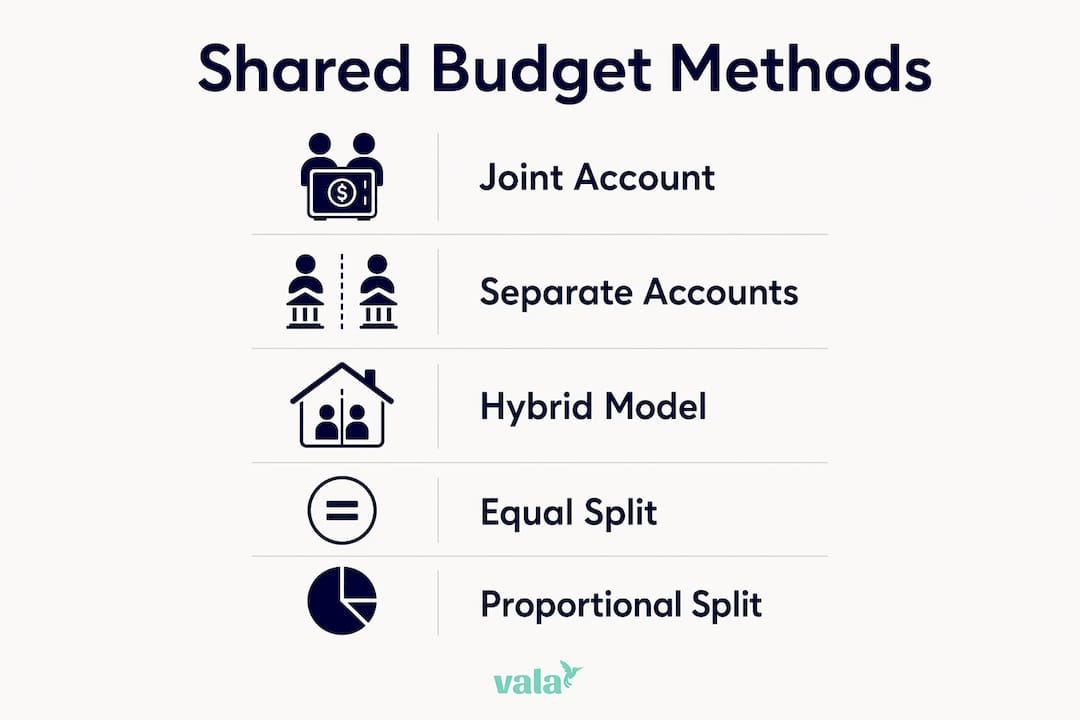
Infographic illustrating shared budgeting methods and tips

Pro Tip: Before opening a joint account, write down your shared expense categories and estimate monthly costs. This one step prevents the most common source of early disagreements: undefined expectations.

How to fairly split expenses in a shared budget

Fair expense splitting is the part of shared budgeting that causes the most friction, and the solution is almost always more structure, not more trust. Giving each partner a no-questions-asked personal spending allowance is one of the most effective ways to preserve both fairness and individual freedom. Each person gets a set amount each month to spend however they choose, with no reporting required. This prevents shared finances from feeling like surveillance.

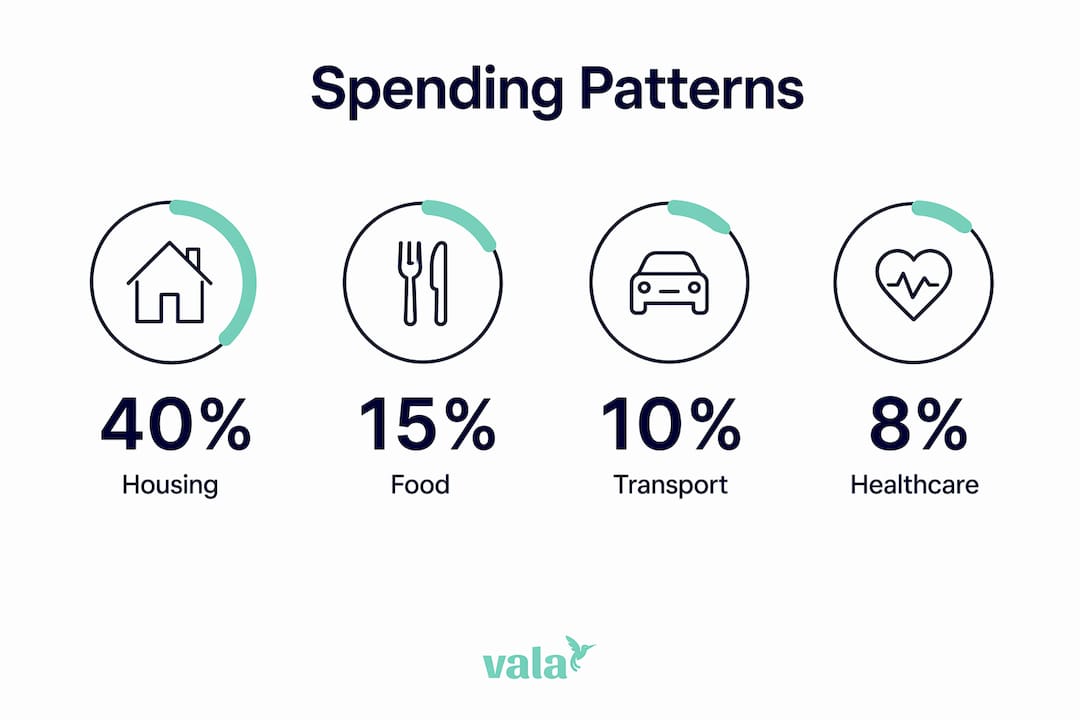
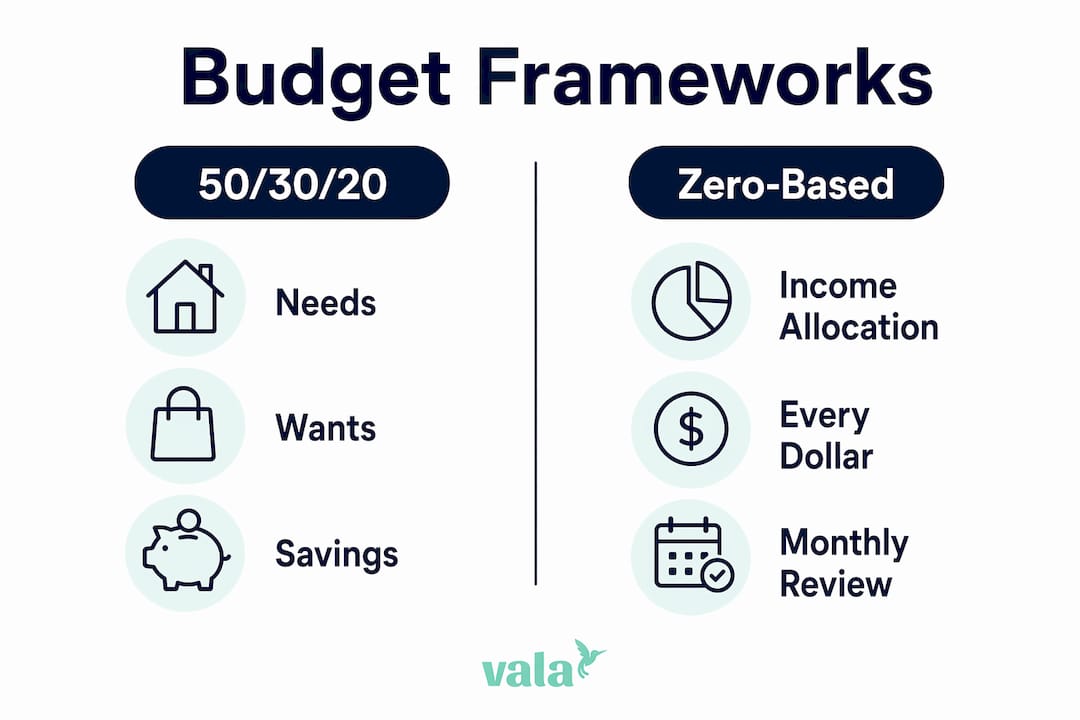
A practical starting framework for couples is the 50/30/20 allocation: roughly 50% of combined income to needs, 30% to wants, and 20% to savings and debt. This is a starting point, not a fixed rule. Your actual numbers will depend on your city, income level, and goals.

Here are the most effective strategies for splitting shared expenses fairly:

  • Use proportional contributions when incomes differ by more than 20%. Each person pays a percentage of their income rather than a flat dollar amount.
  • Assign category ownership for recurring bills. One person handles the electric bill; the other handles the internet. This reduces the mental load of constant negotiation.
  • Set a personal spending threshold. Any individual purchase above a set amount, say $100, gets discussed before it happens. Below that threshold, no explanation needed.
  • Review and rebalance quarterly. Income changes, expenses shift, and goals evolve. A quarterly check keeps the split accurate.
  • Separate shared goals from personal goals. Saving for a joint vacation is a shared expense. Saving for a personal hobby is not. Keep these buckets distinct.

Pro Tip: Track shared expenses in a dedicated budget tracking app rather than a shared spreadsheet. Real-time syncing removes the “I thought you paid that” problem entirely.

Why communication is the real foundation of shared budgeting

Shared budgets require transparent communication, mutual respect, and agreed boundaries to work long term. The numbers are the easy part. Getting two people to talk openly about money, including fears, habits, and priorities, is where most shared budgets succeed or fail.

Framing budget discussions using “we-language” instead of “you-language” is one of the most practical shifts you can make. “Our grocery budget is over this month” lands very differently than “you spent too much on groceries.” The first invites collaboration. The second invites defensiveness. This is not just soft advice. It changes the outcome of the conversation.

Here is a simple structure for running a monthly budget meeting that actually works:

  1. Review last month’s spending against the agreed budget. Note categories that went over or under without assigning blame.
  2. Identify any upcoming expenses for the next 30 to 60 days, such as car registration, annual subscriptions, or travel.
  3. Check progress on shared goals. Are you on track for the emergency fund, vacation savings, or debt payoff target?
  4. Adjust allocations if needed. If one category consistently runs over, either increase its budget or discuss behavior changes.
  5. Each person shares one financial concern or priority for the coming month. This keeps both people feeling heard.

Regular financial check-ins prevent misunderstandings and keep both people aligned on goals. Monthly meetings work well for most groups. Weekly check-ins suit couples who are actively paying down debt or saving aggressively. The format matters less than the consistency.

Successful shared budgeting depends on emotional intelligence and the willingness to discuss fears and preferences openly. One partner may be a natural saver; the other may be more comfortable spending. Neither approach is wrong. A shared budget works when both people feel their values are represented in the plan.

What tools and apps make shared budgeting easier?

Apps like Valapoint, YNAB, and Rocket Money offer features specifically designed for shared expense tracking, bill splitting, and goal monitoring. The right app removes the friction of manual tracking and keeps everyone informed without requiring constant check-ins.

When choosing a tool for collaborative budgeting, look for these features:

  • Real-time syncing so both users see the same data at the same time, not yesterday’s version
  • Expense categorization that lets you separate shared costs from personal spending automatically
  • Bill splitting tools that calculate each person’s share and track who has paid
  • Goal tracking so you can monitor progress on shared savings targets like a home down payment or emergency fund
  • Spending alerts that notify both users when a shared category is approaching its limit

Valapoint’s AI budgeting app goes further by identifying hidden spending patterns that drain shared budgets over time. Instead of just showing you what you spent, it surfaces the patterns behind the spending. That distinction matters when you are trying to make lasting changes rather than just monitor the status quo.

For groups managing shared expenses across multiple people, such as roommates or travel groups, a dedicated split bills app simplifies the math and keeps a clear record of who owes what. This removes the awkward “I think I paid more last month” conversations entirely.

Pro Tip: When evaluating free budgeting tools, prioritize apps that support multiple users natively rather than workarounds like shared logins. Native multi-user support means cleaner data and fewer sync errors.

Key takeaways

A shared budget works when you combine a clear structure for contributions, a fair method for splitting expenses, and consistent communication to keep both people aligned.

Point Details
Shared budget definition A joint financial plan where two or more people manage pooled income and expenses toward common goals.
Best method for most people The hybrid model combines a joint account for shared expenses with personal accounts for individual spending.
Fairest way to split costs Proportional contribution, where each person pays a percentage of their income, balances the burden when incomes differ.
Communication is non-negotiable Monthly budget meetings using “we-language” prevent conflict and keep both people working toward the same goals.
Use the right tools Apps like Valapoint, YNAB, and Rocket Money automate tracking and reduce the friction of managing shared finances manually.

Shared budgeting is a relationship skill, not just a math problem

I have seen a lot of people approach shared budgeting as a spreadsheet problem. They build detailed trackers, color-code categories, and set up automatic transfers. Then it falls apart within three months because nobody talked about what the numbers actually meant to them.

The couples and roommates I have seen make shared budgeting work long term are not the ones with the most sophisticated systems. They are the ones who treat the monthly budget meeting as a normal, low-stakes conversation rather than a performance review. They use proportional contributions not because it is mathematically elegant, but because it removes the underlying resentment that builds when one person feels they are carrying more than their share.

The hybrid model deserves more credit than it gets. It solves the autonomy problem that kills most fully joint budgets. When you have your own spending account with no reporting requirements, you stop feeling monitored. That feeling of financial independence, even within a shared system, is what makes people stick with the plan.

My honest observation: most shared budget failures are communication failures that show up as math problems. The numbers are just the symptom. If you fix the conversation, the budget tends to fix itself.

— SaverStride

Manage your shared budget with Valapoint

Valapoint is built for exactly this kind of financial collaboration. Whether you are splitting expenses with a roommate, managing household finances as a couple, or coordinating group costs, Vala gives you the tools to track, split, and plan with confidence.

https://valapoint.com

With Valapoint’s personal finance app, you can set up shared expense categories, track contributions from multiple users, and monitor progress on joint savings goals in real time. The AI-powered insights surface spending patterns you would not catch manually, so you can make smarter decisions together. Start managing your shared budget clearly and confidently with Valapoint today.

FAQ

What is a shared budget in simple terms?

A shared budget is a financial plan where two or more people agree on how to manage joint income and expenses together. It covers shared costs like rent and groceries while allowing each person to retain some individual spending freedom.

How do you split expenses fairly in a shared budget?

Proportional contribution is the fairest method when incomes differ. Each person contributes the same percentage of their take-home pay to shared expenses rather than an equal dollar amount, balancing the financial burden relative to earnings.

What is the best app for managing a shared budget?

Apps like Valapoint, YNAB, and Rocket Money are designed for shared expense tracking, bill splitting, and goal monitoring. Look for real-time syncing, multi-user support, and expense categorization when choosing a tool.

How often should you review a shared budget?

Monthly budget meetings are the standard recommendation for most couples and groups. Regular check-ins prevent misunderstandings, catch overspending early, and keep both people aligned on shared financial goals.

What is the hybrid budgeting model?

The hybrid model combines a joint account for shared expenses with separate personal accounts for individual spending. It is the most widely used approach, particularly for couples with different income levels or spending habits.


Personal Finance Automation Benefits for Ages 18-45

Personal finance automation is defined as the practice of scheduling recurring money transfers, bill payments, and investment contributions so your financial system runs without manual input. The personal finance automation benefits are direct: you save time, prevent costly errors, and build wealth consistently without relying on willpower. Research shows that automated savers save 2.4x more annually and report lower financial stress than those managing money manually. Tools like Fidelity Investments, 401(k) auto-escalation programs, and apps like Valapoint make this accessible at any income level. The standard industry term for this practice is “automated financial planning,” and it applies whether you are managing rent, retirement, or a shared household budget.

1. Personal finance automation benefits start with time savings

Manual money management costs more time than most people realize. Tracking every transaction, scheduling bill payments, and reviewing account balances can consume several hours each month. Initial automation setup takes roughly 1 to 2 hours, and ongoing maintenance drops to about 15 minutes per month. That is a significant reduction compared to the weekly effort most manual budgeters put in.

The time savings compound over a year. Instead of logging into multiple accounts, cross-referencing statements, and manually moving money, your system handles transfers on a fixed schedule. You free up mental energy for decisions that actually require your attention.

  • Set up direct deposit splits so a percentage of your paycheck goes straight to savings before you see it
  • Schedule bill autopay for fixed expenses like rent, utilities, and insurance
  • Use apps that link bank accounts and categorize spending automatically

Pro Tip: Schedule a 15-minute monthly review to catch any errors, subscription creep, or account changes. Automation handles execution; your monthly check handles oversight.

2. How automation prevents late fees and credit score damage

Hands reviewing financial documents at desk

Payment history accounts for 35% of your FICO credit score. A single missed payment can drop your score by 50 to 100 points depending on your credit profile. That kind of damage takes months to repair and can affect your ability to qualify for loans, apartments, or favorable interest rates.

Automation removes the human error factor entirely. When your mortgage, car payment, and credit card minimum are all on autopay, you cannot forget them. A 2021 Consumer Financial Protection Bureau study found that missed payments caused by forgetfulness, not financial hardship, are a leading driver of credit score damage. Automation closes that gap directly.

Beyond credit protection, autopay eliminates late fees. Most credit cards charge $25 to $40 per late payment. On a utility bill, late fees typically run 1.5% to 2% of the outstanding balance per month. Those amounts are small individually but add up to hundreds of dollars annually if you are managing multiple accounts manually.

3. How automation improves saving habits through psychology

Automation does not just move money. It works with how your brain is wired. Financial automation removes emotional interference by creating default behaviors that run without requiring a conscious decision each time. This matters because willpower is a limited resource. Every time you manually decide whether to transfer money to savings, you are competing against impulse spending, stress, and distraction.

Loss aversion is the psychological principle at work here. Stopping an automated transfer feels like losing money, which makes you far less likely to cancel it. This is the same reason gym memberships get paid even when people skip workouts. Automation uses that same psychological pull in your favor.

“Automation is about protecting yourself from your own lapses in attention rather than laziness or irresponsibility.” — BrokeToBanking

The data backs this up clearly. People who automate their savings save 2.4 times more annually than those who transfer money manually. They also report measurably lower financial anxiety. When saving happens automatically, you stop second-guessing every purchase because your goals are already funded.

4. Dollar-cost averaging through automated investing

Automated investing is one of the most powerful advantages of finance automation for long-term wealth building. Dollar-cost averaging means investing a fixed amount on a regular schedule regardless of market conditions. You buy more shares when prices are low and fewer when prices are high, which reduces the average cost per share over time.

Fidelity Investments recommends automating investments specifically to avoid panic selling and performance chasing, two behaviors that consistently reduce long-term returns. When you automate a monthly contribution to a Roth IRA or index fund, you remove the temptation to time the market. Most retail investors who try to time the market underperform a simple automated monthly contribution strategy.

Practical examples include setting up automatic 401(k) contributions with employer matching, scheduling monthly transfers to a Roth IRA, and using brokerage platforms that support recurring investment purchases. Even $50 per month invested automatically at age 22 compounds to a significantly larger amount by retirement than the same $50 invested manually and inconsistently. For readers new to automated investing, reviewing a trading platform checklist before selecting a brokerage helps you choose a platform that supports recurring contributions.

5. Budgeting automation and the reverse budget approach

Budgeting automation organizes your spending without requiring you to track every dollar manually. Apps that link directly to your bank accounts categorize transactions in real time, flag unusual charges, and show you exactly where your money goes each month. This replaces the spreadsheet approach that most people abandon within two weeks.

The reverse budget method is the most effective framework for automating budgeting. You automate your savings goals and fixed expenses first, immediately after each paycheck arrives. Whatever remains is yours to spend without guilt or tracking. This approach reduces budgeting burnout because you are not monitoring every coffee purchase. Your priorities are already funded.

Budgeting method How it works Best for
Traditional budget Track every expense category manually Detail-oriented planners
Reverse budget Automate goals first, spend the rest freely People who hate tracking
Envelope method Allocate cash to physical or digital envelopes Overspenders needing hard limits
Zero-based budget Assign every dollar a job each month High earners with variable expenses

Multiple savings buckets add another layer of clarity. Instead of one general savings account, you create separate accounts labeled “Emergency Fund,” “Vacation,” and “Car Repair.” Automated transfers feed each bucket on payday. Seeing progress toward specific goals is more motivating than watching a single savings balance grow slowly.

Pro Tip: Use AI-personalized budgeting tools to automatically adjust your budget categories based on your actual spending patterns rather than estimates.

6. How automation reduces financial anxiety and decision fatigue

Automation promotes emotional wellbeing by removing the constant low-level stress of financial decision-making. When you manage money manually, every purchase carries a mental tax. You are always calculating whether you can afford something, whether you remembered to pay a bill, or whether your savings are on track. Automation eliminates most of that background noise.

Decision fatigue is a real cognitive phenomenon. The more financial decisions you make in a day, the worse your judgment becomes on subsequent ones. Automating recurring transactions removes dozens of micro-decisions from your week. Manual budgeting mistakes, emotional spending, and missed deadlines all stem from cognitive overload. Automation addresses the root cause rather than the symptoms.

Users who automate their finances consistently report feeling more confident and in control, even when their income has not changed. The system creates a sense of order that manual management rarely achieves.

7. Common misconceptions about automating personal finances

Several myths prevent people from starting financial automation. Addressing them directly removes the barriers.

  • “Set it and forget it forever.” Automation is “set it and review it.” A monthly 15-minute check catches errors, expired cards linked to autopay, and subscriptions you no longer use. The system runs itself; you just verify it periodically.
  • “You need a high income to automate.” Automation works especially well on tight budgets because loss aversion psychology enforces consistency. Even automating $25 per paycheck builds a habit and a balance. The Save More Tomorrow principle shows that small, incremental automation beats waiting for the “right time” to start.
  • “Automation locks up your money.” Every automated transfer is reversible. You can pause, cancel, or redirect funds at any time. Automation creates structure, not restriction.
  • “I need to get my finances in order first.” Starting with imperfect automation is better than waiting for perfect conditions. Delay consistently leads to never starting at all.
  • “Apps are not secure enough for my accounts.” Reputable personal finance tools use bank-level encryption and read-only account access for tracking. Your money stays in your bank; the app only reads the data.

Key takeaways

Personal finance automation works because it removes human error, leverages loss aversion psychology, and creates consistent financial behavior that compounds over time.

Point Details
Time savings are immediate Setup takes 1 to 2 hours; ongoing maintenance is just 15 minutes per month.
Credit protection is automatic Autopay prevents the missed payments that account for 35% of your FICO score.
Automated savers save more People who automate savings save 2.4 times more annually and report less financial stress.
Reverse budgeting reduces burnout Automate goals first, then spend the remainder freely without tracking every purchase.
Small starts beat perfect timing Incremental automation using the Save More Tomorrow principle outperforms waiting to begin.

Why I think most people overcomplicate the starting point

Most articles about automating personal finances spend too much time on advanced strategies and not enough on the first 48 hours. In my experience, the biggest obstacle is not knowledge. It is the false belief that you need a perfectly organized financial life before automation can help you.

The truth is the opposite. Automation is most valuable precisely when your finances feel chaotic. The first time I set up a direct deposit split and watched savings land in a separate account without any effort on my part, the relief was immediate. Not because the amount was large, but because the decision was made once and then never had to be made again.

The emotional payoff of removing recurring financial decisions is underrated in most personal finance writing. You stop dreading payday logistics. You stop the mental math before every discretionary purchase. That cognitive space gets redirected toward things that actually matter.

My honest recommendation: start with one automation this week. One autopay. One savings transfer. Build from there. The personal finance tools available today make the setup faster than ever. The compounding effect of consistent, automated behavior over 12 months will outperform any manual budgeting system you have tried and abandoned.

— SaverStride

Take control of your finances with Valapoint

Valapoint’s personal finance app is built for exactly this kind of setup. You can track expenses, set savings goals, and connect your accounts to see where every dollar goes in real time.

https://valapoint.com

The app’s automation features handle the recurring work so you focus on the big picture. Whether you are building an emergency fund, paying down debt, or saving for a specific goal, Valapoint gives you the structure to make it happen without overhauling your lifestyle. Start with the Vala personal finance app and have your first automation running within the hour. You can also explore the budget goal tracker to monitor progress toward every financial target you set.

FAQ

What are the main personal finance automation benefits?

The core benefits are time savings, error prevention, improved saving consistency, and reduced financial stress. Automated savers save 2.4 times more annually than those managing money manually.

How does financial automation save money?

Automation prevents late fees, protects your credit score by ensuring on-time payments, and removes emotional spending decisions that lead to overspending. Payment history accounts for 35% of your FICO score, making autopay one of the highest-impact financial habits you can build.

Do you need a high income to start automating your finances?

No. Automation is effective at any income level. The Save More Tomorrow principle shows that small, incremental automated transfers build stronger habits than waiting until you earn more.

How much time does it take to set up financial automation?

Initial setup takes 1 to 2 hours. After that, a 15-minute monthly review is all you need to keep your automated system running correctly and catch any issues like expired payment methods or unwanted subscriptions.

What is the reverse budget method in personal finance automation?

The reverse budget automates your savings goals and fixed expenses immediately after each paycheck, then lets you spend whatever remains freely. It reduces tracking fatigue and works well for people who find traditional category-based budgeting unsustainable.

How Group Expense Tracking Works for Shared Costs

Group expense tracking is the practice of recording shared costs in real time, assigning each payment to a payer, and splitting the total fairly among all participants. Understanding shared expenses this way prevents the awkward end-of-trip math, the forgotten $40 dinner, and the friendships that quietly sour over money. Apps like Splitwise, Tricount, and Settle Up have made this process faster and more transparent than any spreadsheet ever could. This article breaks down exactly how group expense tracking works, which tools do it best, and how to avoid the mistakes that cause most group money stress.

How group expense tracking works: the core process

Group expense tracking operates as a shared ledger. Every time someone pays for the group, that transaction gets recorded with three pieces of information: who paid, how much, and who shares the cost. The system then calculates each person’s net balance, showing who owes money and who is owed money at any given moment.

The key distinction here is between gross payments and net balances. You might pay for dinner on Monday and your friend covers the hotel on Tuesday. Instead of two separate payments back and forth, the system nets those amounts and produces one smaller payment. This is what makes tracking group spending so much more efficient than splitting every bill on the spot.

Hands exchanging payment to settle expenses

Each expense entry functions as an immutable ledger line. According to the design logic behind apps like Splitwise, each expense records the payer, the list of participants, and the split rule. This structure keeps balances auditable and prevents the manual tally errors that plague group chats and handwritten notes.

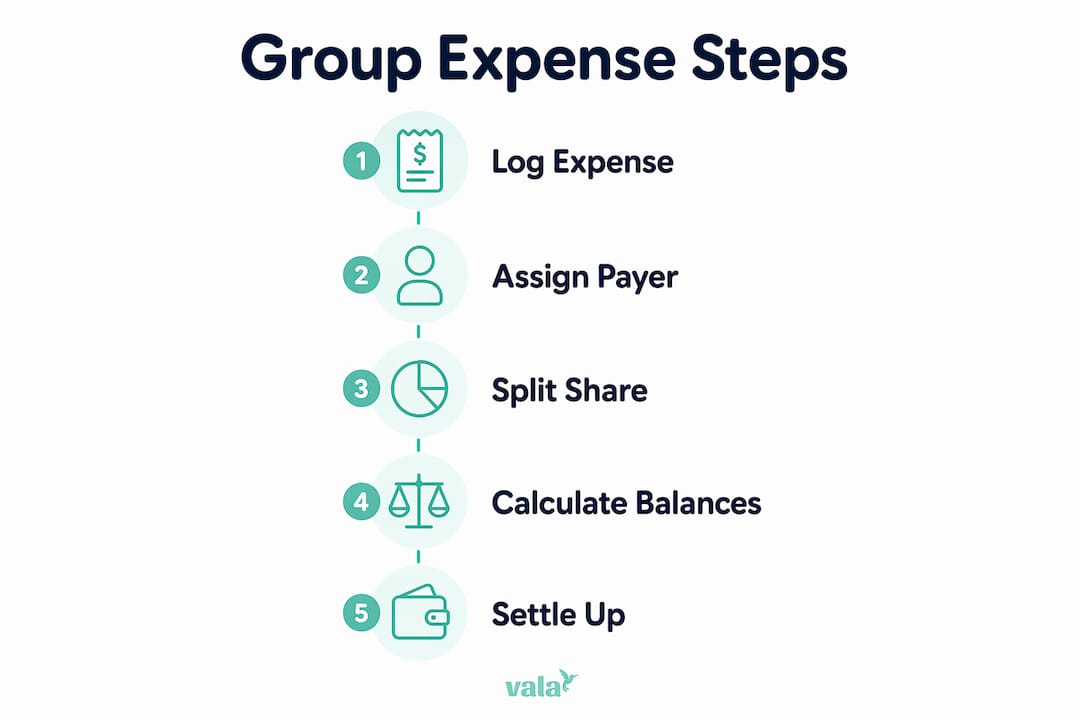
Infographic displaying five steps of group expense tracking

What are the key steps in group expense tracking?

Effective group expense management follows a clear sequence. Skip any step and the whole system breaks down.

  1. Set up the group before spending starts. Add all participants to a shared app or spreadsheet. Agree on the split method: equal shares, usage-based splits, or percentage-based contributions. Deciding this upfront removes the biggest source of disputes later.

  2. Log every expense immediately. Log expenses immediately on the same day they occur. Waiting until the end of a trip to reconstruct five days of spending from memory is a recipe for conflict. The moment money is spent, open the app and record it.

  3. Capture receipts at the point of purchase. Take a photo of the receipt or screenshot the payment confirmation. This creates a paper trail that resolves disputes before they escalate.

  4. Clarify shared versus personal expenses. Not every cost is group-related. Defining shared vs. personal expenses clearly and consistently keeps balances transparent and prevents resentment.

  5. Set a settlement deadline. Agree on when and how balances will be settled. Venmo, PayPal, or bank transfers all work. What matters is that everyone knows the deadline before the trip ends.

Pro Tip: Create a group chat rule: anyone who pays for a group expense posts the receipt photo and the amount in the chat within 10 minutes. This keeps everyone informed and makes logging faster for whoever manages the app.

How do apps simplify group expense management?

Digital tools handle the math that makes group expense management tedious by hand. Here is what the best apps actually do for you:

  • Automatic balance calculation. Every new expense updates each person’s running balance instantly. You never need to add up a column of numbers manually.
  • Debt simplification. Rather than tracking every bilateral debt, apps compute net positions across the whole group and suggest the minimum number of payments to settle everything.
  • Receipt capture. Most leading apps let you photograph receipts directly in the app. Note that OCR receipt scanning can introduce errors, so always review auto-filled amounts before saving.
  • Multiple currencies. For international trips, apps like Tricount and Settle Up handle currency conversion automatically.
  • Offline mode and real-time syncing. Expenses logged without Wi-Fi sync to the group once you reconnect, which matters in remote locations.

Pro Tip: For groups larger than six people, dedicated apps outperform spreadsheets significantly. Shared spreadsheets like Google Sheets work for medium-sized groups with moderate expenses, but they require manual updates and offer no automatic debt simplification.

Dedicated apps vs. spreadsheets

Feature Dedicated apps (Splitwise, Tricount) Google Sheets
Automatic balance calculation Yes Manual formulas required
Debt simplification Yes Not available
Receipt capture Yes Manual attachment only
Real-time syncing Yes Yes (with sharing)
Multiple currencies Yes Manual conversion
Best for Groups of any size, complex trips Small groups, simple budgets

For anyone managing group budgeting across a multi-day trip or recurring shared costs, a dedicated app is the clear choice.

What methods minimize payments when settling up?

This is where group expense tracking gets genuinely clever. Most people assume settling a group means everyone pays everyone else back individually. That produces a lot of small transactions and a lot of confusion.

The better approach is net balance settlement. Each person’s total payments are compared against their total share of group costs. The difference is their net position: either a creditor (owed money) or a debtor (owes money). Apps then match net creditors and debtors to minimize the total number of transactions the group needs to make.

The technical name for this is the minimum cash flow algorithm. Here is a simple example of how it works in practice:

Person Total paid Fair share Net position
Alex $300 $200 +$100 (creditor)
Jordan $100 $200 -$100 (debtor)
Sam $200 $200 $0 (settled)

In this scenario, Jordan pays Alex $100 and the group is fully settled. No payment from Sam is needed. Without the net calculation, you might attempt three separate transactions. The minimum cash flow algorithm reduces the debt network to the smallest possible payment set by matching creditors and debtors directly.

This matters because fewer transactions mean less friction, fewer reminders, and less chance that someone forgets to pay. The math is the same whether you use an app or calculate it manually, but apps do it instantly across groups of any size.

What common challenges come up in group expense tracking?

Even with the right tools, group expense management runs into predictable problems. Knowing them in advance means you can prevent most of them.

  • Late logging. The most common failure. Someone pays for lunch and forgets to log it until three days later. By then, the amount is fuzzy and the receipt is gone. Immediate logging is the single most effective habit you can build.
  • Ambiguous expenses. A spa treatment one person wanted but others joined reluctantly. A room upgrade only two people used. Unclear payment origins and ambiguous expense categorization cause more group financial stress than the total cost amount ever does.
  • Disputes over amounts. When someone questions a logged expense, the resolution process is straightforward: review the receipt, confirm the agreed split rule, and update shared logs transparently. Written resolution prevents the same argument from recurring.
  • Manual adjustments breaking totals. Editing a logged expense without notifying the group creates confusion. Most apps log changes with a timestamp, which helps, but the best practice is to add a note explaining any correction.
  • Unequal participation. Some group members pay more often and others rarely open the app. Assigning one person as the group treasurer to track, tally, and facilitate settlements keeps the process moving without relying on everyone’s equal participation.

Pro Tip: Before any group trip or event, send a two-sentence message to the group: “We’ll use [app name] to track all shared costs. Please log any group payment within the hour.” Setting that expectation once prevents 90% of the friction.

Key takeaways

Effective group expense tracking requires immediate logging, clear split rules, and net balance settlement to keep shared costs fair and disputes minimal.

Point Details
Log expenses immediately Record every shared payment the moment it happens to keep balances accurate.
Define split rules upfront Agree on equal, usage-based, or percentage splits before spending begins.
Use net balance settlement Apps calculate minimum payments needed, reducing transactions for the whole group.
Capture receipts at purchase Photos and screenshots resolve disputes before they escalate into conflict.
Assign a group treasurer One person tracking and facilitating settlements keeps the process consistent.

What I’ve learned from years of tracking group expenses

The biggest mistake I see people make is treating group expense tracking as a post-trip task. They spend five days on a trip, collect a pile of receipts, and then try to reconstruct everything in one sitting. That approach guarantees arguments. The numbers never add up cleanly, someone’s memory differs from someone else’s, and the whole process feels punishing.

What actually works is treating the app like a group receipt box. Every time money changes hands, it goes in the box immediately. The trip ends and settlement takes ten minutes because the work was already done.

I also think most people underestimate how much the choice of tool matters for group size. For two or three people splitting a weekend trip, a shared note or Google Sheets is fine. For six people on a ten-day international trip with mixed currencies and unequal room costs, you need a dedicated app. Using the wrong tool for the complexity of your situation creates more work, not less.

One more thing: grace matters. Someone will forget to log an expense. Someone will enter the wrong amount. The goal of group expense tracking is not perfect accounting. It is good enough accounting that no one feels taken advantage of. Build in a small buffer of patience and the whole system works better for everyone.

— SaverStride

Track shared costs without the stress using Valapoint

Managing shared expenses with friends or colleagues gets a lot easier when you have the right tool. Valapoint’s personal finance app is built for exactly this: real-time expense logging, automatic split calculations, and transparent balances that everyone in your group can see.

https://valapoint.com

With Valapoint, you can capture receipts, categorize shared costs, and track who owes what without a single manual calculation. The app handles group events, travel, dining, and recurring shared costs in one place. Whether you’re splitting a weekend trip or managing monthly household expenses, Valapoint gives you the clarity to stay on top of shared finances confidently. Start tracking with Valapoint and turn group expense management from a source of stress into a simple, automated habit.

FAQ

What is group expense tracking?

Group expense tracking is the process of recording shared costs in real time, assigning each payment to a payer, and calculating how much each participant owes or is owed. Apps like Splitwise and Tricount automate this process across groups of any size.

How do apps calculate who owes what?

Apps compute each person’s net balance by comparing what they paid against their fair share of total group costs. The minimum cash flow algorithm then matches creditors and debtors to produce the smallest possible set of payments needed to settle the group.

What is the best way to avoid disputes in group expenses?

Log expenses immediately, capture receipts at the point of purchase, and agree on split rules before spending begins. When a dispute does arise, review the receipt and update the shared log transparently so the correction is visible to everyone.

Should I use an app or a spreadsheet for group expense tracking?

Dedicated apps like Tricount or Settle Up are better for groups larger than four or for trips with multiple currencies and complex splits. Google Sheets works for small groups with simple, equal splits but requires manual updates and offers no automatic debt simplification.

How do I handle personal versus shared expenses in a group?

Define which costs are shared before the trip or event starts. Any expense that benefits only one person should be logged as personal and excluded from the group split. Clear categorization upfront prevents the ambiguity that causes most group money stress.

Best Practices for Daily Expense Logging in 2026

Daily expense logging is the practice of recording every purchase, bill, and financial transaction as it happens, giving you a real-time picture of where your money goes. Most people overestimate how much they save and underestimate how much they spend on categories like dining, subscriptions, and impulse purchases. The best practices for daily expense logging combine the right tool, a simple category structure, and a consistent review routine. Together, these three elements build the financial awareness that makes budgeting actually work.

1. Best practices for daily expense logging start with choosing the right tool

The tool you use to log expenses shapes whether the habit sticks or collapses within two weeks. Your options fall into two broad categories: manual methods and automated methods. Each has real trade-offs worth understanding before you commit.

Hands using expense tracking app and notebook

Manual methods include pocket notebooks, printed ledgers, and spreadsheet templates in Google Sheets or Microsoft Excel. They cost nothing, require no account access, and force you to consciously record each transaction. That friction is actually a feature. Writing down a $6 coffee makes you notice it in a way that a background sync never does.

Automated methods include bank-syncing apps that pull transactions directly from your accounts. Automated apps offer convenience but may not catch all cash transactions, while manual entry adds awareness but requires effort. This means automation works best for people with mostly digital spending, while manual tracking suits those who use cash regularly or want deeper behavioral awareness.

  • Notebooks: free, private, no setup required, but slow to review and easy to lose
  • Spreadsheets: flexible, customizable, good for visual learners, but require manual entry every time
  • Bank-syncing apps: fast, automatic, great for digital transactions, but blind to cash and require account linking
  • Hybrid approach: use an app for card transactions and a quick note for cash

Pro Tip: Before downloading any app, spend one hour pulling your last 30 days of bank statements and categorizing those transactions manually. This single exercise gives you instant insight into your spending without needing any new tool.

The most important principle here: consistency outweighs tool complexity for sustainable tracking. A simple notebook updated daily beats a sophisticated app opened once a month.

2. How to structure your daily expense logging system effectively

A well-structured system removes the guesswork from every entry. When you sit down to log a purchase, you should never have to wonder where it belongs.

The first decision is your category list. Research shows you should start with 8 to 12 broad categories to reduce decision fatigue and improve long-term tracking sustainability. More than 20 categories creates administrative overload. Fewer than 6 is too coarse to reveal useful patterns.

Here is a practical starting framework for your categories:

  1. Housing (rent, mortgage, HOA fees)
  2. Utilities (electricity, water, internet, phone)
  3. Groceries (supermarket and food store purchases)
  4. Dining out (restaurants, cafes, takeout, delivery)
  5. Transportation (gas, public transit, rideshare, parking)
  6. Health (prescriptions, gym, copays, dental)
  7. Subscriptions (streaming services, software, memberships)
  8. Personal care (haircuts, toiletries, clothing)
  9. Entertainment (events, hobbies, books, games)
  10. Savings and investments (transfers to savings, retirement contributions)
  11. Miscellaneous (anything that does not fit elsewhere)

Creating too many categories early causes decision fatigue and leads to abandonment. Think of it this way: 40 categories mean 40 micro-decisions per transaction. That cognitive load kills the habit fast. Start with this list, then split a category only when you have a clear reason to, such as separating groceries from dining after noticing you spend more than expected on delivery apps.

Once your categories are set, define your data fields. For a spreadsheet or notebook, each entry needs four things: the date, the amount, the category, and a short description. That is it. Keep the entry format identical every time so logging takes under 30 seconds per transaction.

3. What daily habits and routines lead to successful expense tracking

The structure of your system matters, but your daily behavior determines whether it survives past the first month. Effective expense management is a habit before it is a skill.

Track expenses daily for the first 30 days to build awareness, then shift to weekly reviews if you use bank-sync tools to avoid burnout. This two-phase approach is deliberate. The first 30 days are about rewiring your attention so you notice spending as it happens. After that, a weekly review of 10 to 20 minutes maintains data accuracy better than trying to squeeze in a few minutes every single day.

Here are the habits that make the difference:

  • Set a fixed logging time. Morning coffee or right after dinner works well. Consistency in timing reduces the mental effort of remembering to do it.
  • Log immediately after spending. Memory fades fast. A $23 lunch becomes a vague “food expense” by evening if you wait.
  • Never skip cash. Log cash withdrawals immediately or keep receipts for later entry. Cash is invisible to bank-syncing apps unless you add it manually.
  • Use phone reminders. A simple daily alarm at 9 PM labeled “log today’s spending” removes the reliance on willpower.
  • Forgive gaps without quitting. Missing two days does not ruin your system. Estimate what you spent and move forward.

Pro Tip: Pair your expense logging with something you already do every day, like making coffee or brushing your teeth. Habit stacking, attaching a new behavior to an existing one, dramatically increases follow-through in the first month.

The behavioral insight behind all of this: simple, repeatable systems are more effective than complex but abandoned ones. You do not need a perfect log. You need a consistent one.

4. How to review and use your expense logs to improve budgeting

Logging without reviewing is like taking notes and never reading them. The review process is where raw data becomes financial clarity.

Review type Frequency What to look for Time needed
Quick check Daily (first 30 days) Missing entries, cash gaps 5 minutes
Weekly review Every Sunday Category totals, overspending alerts 10 to 20 minutes
Monthly review First day of each month Trends, subscriptions, goal progress 30 to 45 minutes

Monthly reviews with five key questions improve budgeting effectiveness significantly. Those questions are: What did I spend in total? What surprised me? Which expenses were one-time versus recurring? Which subscriptions am I still using? Am I on track with my savings goal? Written answers to these questions over three months give deeper financial insight than gut feeling alone.

Your weekly review should focus on category totals. If dining out is running 40% over your target by Wednesday, you can adjust before the week ends. That real-time correction is the core advantage of tracking expenses consistently. Monthly reviews reveal the bigger patterns: the subscription you forgot about, the grocery creep that added $80 to last month’s total, or the month you actually hit your savings target.

Use your monthly data to adjust your budget forward, not backward. If you consistently spend $340 on groceries but your budget says $250, the budget is wrong. Update it to reflect reality, then work on reducing from a realistic baseline.

5. How to handle cash and irregular expenses without losing accuracy

Cash and irregular expenses are the two biggest accuracy killers in any expense log. Most bank-syncing apps capture electronic transactions automatically but are completely blind to cash spending. This creates a false picture of your finances.

The fix for cash is simple and non-negotiable. Log cash withdrawals the moment they happen, even if you do not yet know exactly what you will spend them on. When you return home, split the withdrawal across the relevant categories. Keeping a small paper receipt in your wallet for the day works just as well. The goal is to never let cash disappear from your record.

Irregular expenses, things like annual insurance premiums, car registration, holiday gifts, or medical bills, trip up even experienced trackers. The best approach is to create a dedicated “irregular” or “annual” category and log these as they occur. Then, during your monthly review, divide the total by 12 and factor that monthly equivalent into your budget planning. A $600 car insurance bill is really $50 per month. Seeing it that way changes how you budget for it.

6. When to upgrade your system and what to look for in expense tracking apps

Most people start with a spreadsheet or notebook and outgrow it within 60 to 90 days. The signs that you are ready to upgrade are clear: you are spending more than 20 minutes per week on manual data entry, you are missing transactions regularly, or you want to see visual spending trends without building your own charts.

When evaluating expense tracking apps, look for four things. First, bank sync reliability: the app should connect to your accounts without frequent errors. Second, automatic categorization: it should correctly sort most transactions without you editing every entry. Third, a clean review interface: weekly and monthly summaries should be visible in two taps or less. Fourth, privacy and data security: check whether the app sells your transaction data or uses read-only bank access.

Free tools like Google Sheets with a pre-built budget template work well for beginners. For those ready to automate, personal budgeting apps that sync with bank accounts reduce manual entry time significantly while keeping your category structure intact. The upgrade decision should be driven by friction, not features. If your current system is working, do not change it.

Key takeaways

The most effective daily expense logging system combines a simple category structure, a consistent logging habit, and a scheduled weekly review to turn raw data into real budget control.

Point Details
Choose based on consistency Pick the tool you will actually use daily, not the most feature-rich option.
Use 8 to 12 categories Fewer categories reduce decision fatigue and keep the habit sustainable long-term.
Track daily for 30 days first Daily logging in the first month builds the spending awareness that makes budgeting work.
Never ignore cash Log cash withdrawals immediately to prevent accuracy gaps that distort your budget picture.
Review weekly and monthly Weekly check-ins catch overspending early; monthly reviews reveal patterns and subscription leaks.

What I have learned from years of tracking every dollar

Most personal finance advice treats expense logging as a data problem. Get the right app, set up the right categories, and the numbers will fix themselves. That has not matched my experience at all.

The real challenge is behavioral. I have watched people set up elaborate spreadsheets with color-coded categories and custom formulas, only to abandon them by week three because the system required too much daily attention. I have also seen people track expenses in a plain notes app on their phone for two years straight and completely transform their savings rate. The difference was never the tool.

What actually works is starting smaller than you think you need to. One category for “food” instead of splitting groceries, dining, and delivery from day one. One weekly review session instead of daily logging pressure. The system you can maintain for 90 days will teach you more about your spending than the perfect system you quit after 10.

The other thing I would push back on: do not wait until you feel “ready” to start. Pull your last month of bank statements right now and spend 30 minutes categorizing what you already spent. That exercise alone will show you two or three things that genuinely surprise you. That surprise is the motivation that makes the habit stick.

— SaverStride

Take control of your spending with Valapoint

If you are ready to move beyond spreadsheets and manual entry, Valapoint’s personal finance app brings your expense logging, budgeting, and spending reviews into one place.

https://valapoint.com

Vala automatically categorizes your transactions, flags unusual spending, and gives you a clear weekly and monthly summary without the manual work. You can set category budgets, track progress toward savings goals, and spot subscription leaks before they drain your account. Whether you are just starting out or looking to sharpen a system you already have, Vala’s budget tracking tools are built to support the habits this article covers. Download Vala and start your first 30-day tracking challenge today.

FAQ

What is the best way to start logging expenses daily?

Pull your last 30 days of bank statements and categorize those transactions manually before adopting any new tool. This one-hour exercise gives you immediate spending insight and makes the habit feel less abstract from day one.

How many spending categories should I use?

Start with 8 to 12 broad categories. More than 20 creates decision fatigue that leads most people to quit tracking within weeks.

Do I need an app to track expenses effectively?

No. A notebook or Google Sheets spreadsheet works just as well as any app, provided you use it consistently. The tool matters far less than the habit of logging regularly.

How do I track cash spending without losing accuracy?

Log cash withdrawals immediately when they happen, then split the amount across categories when you return home. Keeping receipts for the day is an equally effective backup method.

How often should I review my expense log?

Review daily for the first 30 days to build awareness, then shift to a weekly review of 10 to 20 minutes. Add a monthly review session to catch subscription leaks and longer spending trends.

How to Save Money on a Tight Budget in 2026

Saving money on a tight budget is defined as building consistent financial reserves through small, repeatable habits rather than drastic lifestyle cuts. The 50/30/20 rule, pay-yourself-first automation, and targeted spending audits are the three frameworks that make this possible for most people. Stacking 5 to 10 small habit changes can save $200 to $500 per month even on a limited income. That means tools like Valapoint, subscription audits, and cheap meal planning are not optional extras. They are the core of any plan that actually works.

How to save money on a tight budget with a realistic budget

Building a budget that holds is less about willpower and more about structure. The 50/30/20 rule gives you that structure: 50% of income for needs, 30% for wants, and 20% for savings or debt repayment. If your income fluctuates, use the average of your last three months or your lowest recent paycheck as the baseline. This prevents you from over-committing in a good month and blowing your plan in a slow one.

Most budgets fail not because of overspending on big categories, but because of unplanned costs. Without a $50 to $200 monthly buffer built into the plan, 80 to 90% of people abandon their budget entirely. A buffer line is not a luxury. It is the single feature that keeps your plan alive when the car needs a repair or a medical copay shows up.

The pay-yourself-first method solves the “I’ll save whatever’s left” trap. Automating $10 to $50 transfers on payday removes the decision entirely. You never see the money, so you never spend it. Pair this with a budgeting app comparison to find the right tracking tool for your situation.

Here is what a functional tight-budget framework looks like in practice:

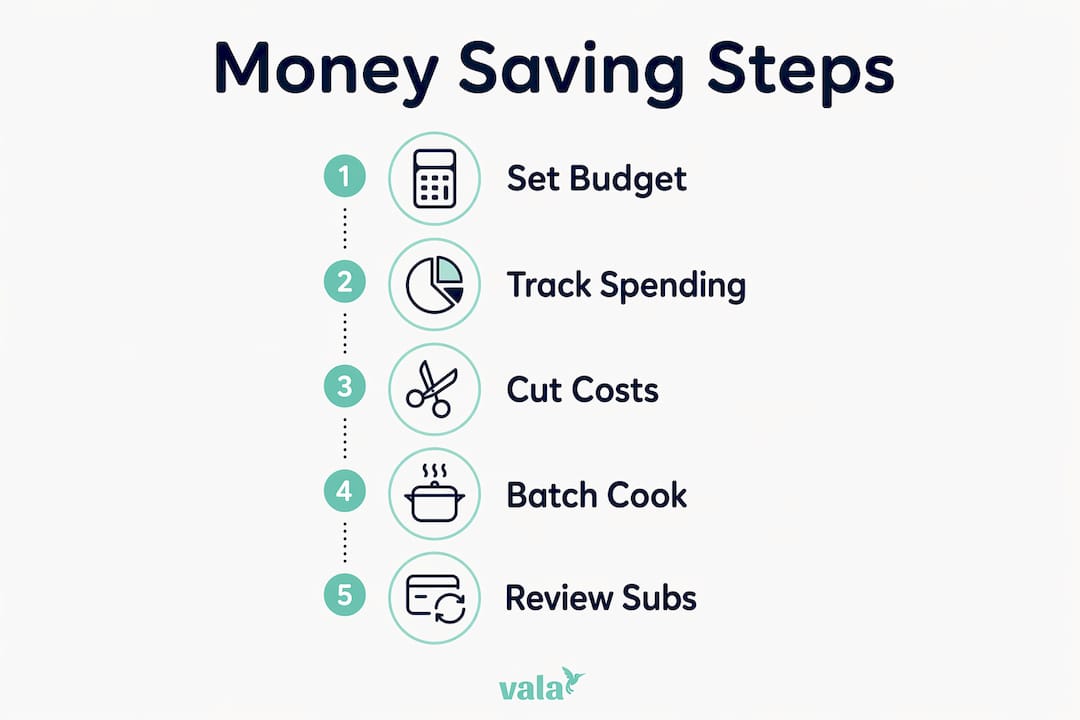
  • Track every expense for 30 days before setting any limits. You cannot cut what you cannot see.
  • Categorize spending into fixed (rent, utilities), variable (groceries, gas), and discretionary (dining out, subscriptions).
  • Set a buffer category of at least $50 per month for unplanned costs.
  • Automate savings on payday, even if it is only $10 to start.
  • Review weekly, not monthly. Weekly check-ins catch problems before they compound.

Pro Tip: Treat your budget as a living document. Add a small guilt-free category for fun spending. Budgets that allow zero enjoyment fail faster than ones that budget for it intentionally.

What are the smartest ways to cut costs without feeling deprived?

Cutting costs works best when you target high-frequency, low-awareness spending first. These are the purchases you make on autopilot. Groceries, subscriptions, and recurring bills are the three categories where most people find the most room.

Here is a ranked approach to cutting costs effectively:

  1. Audit your subscriptions first. Canceling unused subscriptions typically frees $50 to $150 per month. Pull up your last two bank statements and highlight every recurring charge. You will likely find two or three services you forgot you were paying for.

  2. Plan your meals for the week. Meal planning with discount grocers like Aldi saves $80 to $150 monthly on groceries alone. Discount grocers run 20 to 40% cheaper than conventional supermarkets, and a written meal plan eliminates the impulse buys that inflate your cart.

  3. Negotiate your recurring bills. Negotiating internet and phone bills saves $25 to $75 per month, and the success rate for these calls runs between 70 and 80%. Call your provider, mention a competitor’s rate, and ask for a loyalty discount. Most representatives have the authority to reduce your bill on the spot.

  4. Use cashback apps for everyday purchases. Apps like Rakuten and Ibotta return a percentage of what you already spend on groceries and online shopping. This is not a savings strategy on its own, but layered on top of meal planning and coupon use, it adds up.

  5. Apply the 48-hour rule for non-essential purchases. Wait two full days before buying anything that is not a planned need. Most impulse purchases lose their appeal within 48 hours. This one habit alone can save $50 to $100 per month for the average person.

Pro Tip: Set a calendar reminder to review subscriptions every 90 days. Services you use regularly today may go unused in three months. Quarterly audits keep your subscription list lean.

How do daily habits affect your monthly savings?

Daily habits create the most consistent savings because they compound over time without requiring ongoing decisions. The goal is to build thrifty spending habits that run on autopilot.

Cooking in bulk and packing lunch daily is one of the highest-return habits available. Batch cooking saves $150 to $300 per month compared to eating out, and it also reduces food waste and the temptation to order takeout on tired evenings. Spend two hours on Sunday preparing meals for the week and you remove the daily decision of what to eat, which is where most food spending leaks occur.

Hands packing bulk cooked meals into containers

DIY minor repairs are another underused savings lever. Simple home and car repairs like unclogging a drain or replacing a toilet flapper cost $10 to $50 in parts. A professional service call for the same job runs $150 to $400. Learning three to five basic repairs through YouTube tutorials pays for itself the first time you use the skill.

Utility bills respond well to small behavioral changes. Switching to LED bulbs, adjusting your thermostat by two degrees, and unplugging devices on standby each contribute modest savings. Combined, these changes typically reduce a monthly utility bill by $15 to $30. That is not life-changing on its own, but it is consistent and requires no ongoing effort after the initial setup.

  • Pack lunch at least four days per week instead of buying it. Even a $7 lunch adds up to $140 per month.
  • Combine errands into one trip to reduce fuel costs and impulse stops.
  • Use free entertainment options like public libraries, free museum days, and community events instead of paid alternatives.
  • Unplug chargers and appliances when not in use. Standby power accounts for roughly 10% of home electricity use.

What should you do when cutting expenses is not enough?

When reducing monthly expenses still leaves you short, the answer is to increase your savings capacity from the income side. This does not require a second full-time job. It requires targeted, short-term action.

  1. Sell unused belongings. Selling items on Facebook Marketplace or eBay generates $200 to $500 in one-time cash and clears space in your home. Start with electronics, clothing, and furniture you have not used in six months. Use a tool like DealFlipAI to check current market prices for electronics before listing.

  2. Add gig income for 30 to 60 days. Platforms like DoorDash, TaskRabbit, and Fiverr allow you to earn on your own schedule. Even $100 to $200 per month in supplemental income can cover your buffer category and accelerate savings.

  3. Check eligibility for public assistance programs. SNAP, LIHEAP, and local utility assistance programs exist specifically for people managing tight finances. Many eligible individuals never apply. A single SNAP benefit can offset $150 to $250 in monthly grocery costs.

  4. Run a 30-day spending freeze on non-essentials. Commit to zero discretionary spending for one month. No dining out, no entertainment subscriptions, no clothing. The cash freed up during this period can seed an emergency fund or pay down high-interest debt.

  5. Start automatic transfers at any amount. Automating savings at even $5 per week builds the habit and the account balance simultaneously. Increase the transfer by $5 every month. After six months, you are saving $30 per week without noticing the difference.

Key takeaways

Saving money on a tight budget requires a structured framework, targeted spending cuts, and consistent daily habits that collectively produce $200 to $500 in monthly savings without major lifestyle sacrifice.

Point Details
Use the 50/30/20 rule Allocate 50% to needs, 30% to wants, and 20% to savings with a built-in buffer.
Audit subscriptions first Canceling forgotten subscriptions frees $50 to $150 per month with minimal effort.
Automate savings on payday Transferring even $10 automatically removes the temptation to spend it first.
Batch cook and pack lunch Cooking in bulk saves $150 to $300 monthly compared to regular takeout habits.
Sell unused items when short Facebook Marketplace and eBay can generate $200 to $500 in quick one-time cash.

What I have learned from budgeting on almost nothing

I spent two years tracking every dollar on an income that left very little room for error. The biggest lesson was not a tactic. It was a mindset shift. I stopped thinking about budgeting as restriction and started treating it as direction. Every dollar I assigned a purpose felt like a decision I made, not a sacrifice imposed on me.

The automation piece changed everything practically. Before I set up automatic transfers, I saved whatever was left at the end of the month. That was usually nothing. The moment I moved $25 to savings on payday, my behavior around the remaining money shifted. I spent more carefully because I knew the savings were already handled.

The hardest part of budgeting on a tight income is the early months when the wins are small. You cancel a subscription and save $12. You pack lunch three days and save $21. None of it feels significant. But small, consistent wins compound into real financial stability over time, and the habits you build in lean months carry forward when your income grows. Persistence matters more than perfection here. A budget you stick to 80% of the time beats a perfect budget you abandon after two weeks.

— SaverStride

Take control of your finances with Valapoint

Knowing what to do is one thing. Having a tool that makes it automatic is another.

Infographic showing step-by-step money saving process

https://valapoint.com

Valapoint is an AI-powered personal finance app that tracks your expenses in real time, flags hidden spending leaks, and helps you run subscription audits without digging through bank statements manually. You can set up automated savings goals, monitor your 50/30/20 split at a glance, and get intelligent insights on where your money is actually going. Whether you are managing a solo budget or splitting costs with a partner, Valapoint gives you a clear, confident view of your finances. Start taking control today with Valapoint’s personal finance app or explore the full suite of budgeting and savings tools built for real-life money management.

FAQ

What is the fastest way to save money on a tight budget?

Auditing your subscriptions is the fastest single action. Canceling unused services typically recovers $50 to $150 per month with one hour of work and no change to your daily routine.

How does the 50/30/20 rule work for low incomes?

The 50/30/20 rule allocates 50% of income to needs, 30% to wants, and 20% to savings or debt. On a low income, adjust the percentages so needs are covered first, then automate even a small savings transfer before spending on wants.

How much can meal planning actually save?

Meal planning combined with shopping at discount grocers like Aldi saves $80 to $150 per month on groceries. Batch cooking on top of that saves an additional $150 to $300 by replacing takeout meals with prepared food already in your fridge.

Is it worth trying to negotiate bills?

Negotiating internet and phone bills has a 70 to 80% success rate and saves $25 to $75 per month on average. One 15-minute phone call can reduce a recurring expense you pay every month for years.

How do I start saving when I have nothing left over?

Start with automated transfers of $5 to $10 on payday before any other spending. The pay-yourself-first method works because it removes the decision entirely. Even a small automatic transfer builds the habit and the balance over time.

What Is a Financial Goal Timeline? Your 2026 Guide

A financial goal timeline is a structured schedule that assigns specific deadlines and saving targets to each of your money goals, turning vague intentions into a measurable saving schedule. Without a timeline, goals like “save more” or “pay off debt” stay abstract. With one, you know exactly how much to set aside each month and when you expect to reach each milestone. This guide covers how to build a financial goal timeline from scratch, which accounts to use, and how to keep your plan on track as life changes. Whether you are 22 or 42, the framework is the same.

What is a financial goal timeline and why does it matter?

A financial goal timeline is the time-bound framework that connects your money goals to specific deadlines and saving strategies. Fidelity describes this as giving each goal a “due by” date that makes it quantifiable and trackable. That shift from “someday” to “by March 2028” changes how you budget, save, and prioritize.

Financial timelines also reduce decision fatigue by helping you sequence goals across short, medium, and long-term horizons. Instead of trying to fund everything at once, you work through a logical order. Emergency fund first, then a car, then a home down payment, then retirement. Each milestone builds on the last.

Hands arranging financial goal sticky notes

The importance of financial timelines goes beyond motivation. A timeline forces you to calculate a real saving rate. Fidelity illustrates this clearly: “save for a down payment” is a wish, but “$24,000 in 4 years at $500 per month” is a plan. That specificity is what separates people who reach their goals from those who keep postponing them.

What are the common financial goal timeline horizons?

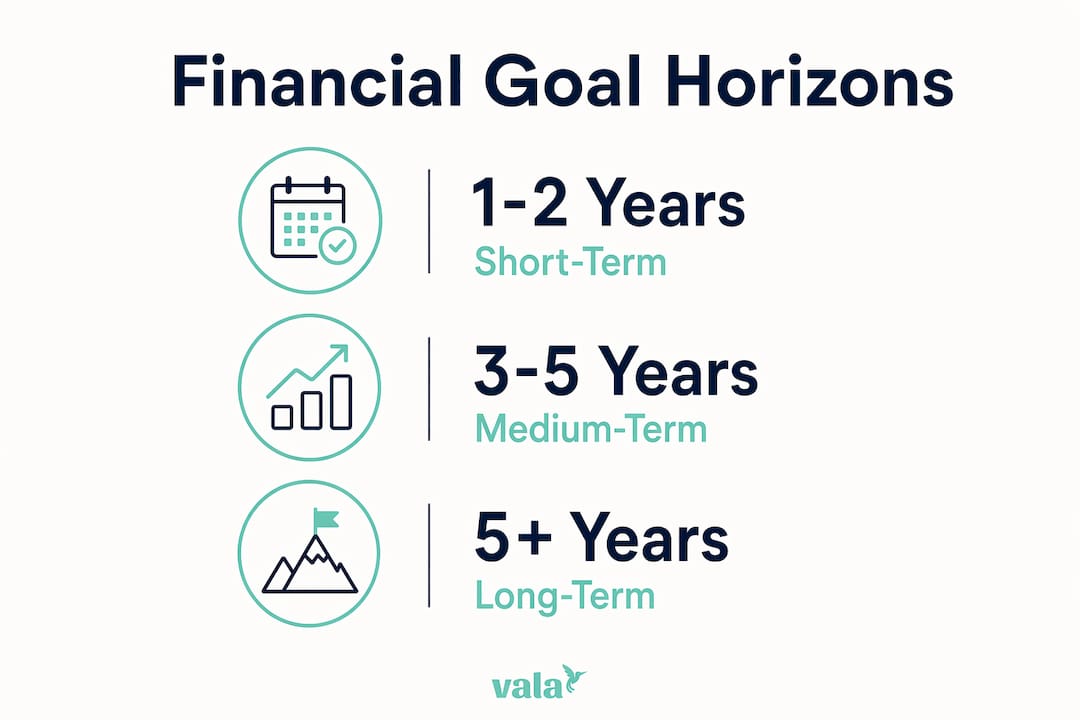
Financial goals are organized into three standard horizons: short-term (up to 1 to 2 years), medium-term (3 to 5 years), and long-term (5 or more years). Each horizon calls for a different savings approach, account type, and level of urgency.

Short-term goals are immediate priorities. Building a $1,000 starter emergency fund, paying off a credit card, or saving for a vacation all fit here. These goals need liquid accounts because you will access the money soon. Medium-term goals require more planning. Buying a car, funding a home down payment, or covering a wedding typically take 3 to 5 years of consistent saving. Long-term goals, like retirement or funding a child’s college education, benefit from investment growth over decades.

The table below maps each horizon to typical examples and the saving approach that fits best.

Timeline horizon Typical examples Recommended approach
Short-term (1 to 2 years) Emergency fund, credit card payoff, vacation High-yield savings account, money market
Medium-term (3 to 5 years) Car purchase, home down payment, wedding CDs, short-term bond funds, high-yield savings
Long-term (5+ years) Retirement, college funding, financial independence 401(k), IRA, index funds, brokerage accounts

Understanding these categories is the first step in creating a financial roadmap that actually works. You stop treating all goals as equally urgent and start funding them in the right order with the right tools.

Infographic illustrating financial goal timeline horizons

How to create a financial goal timeline using SMART goals

Building a financial planning timeline is a step-by-step process. The SMART framework, which stands for Specific, Measurable, Achievable, Relevant, and Time-bound, is the most widely recommended structure. NerdWallet and Fidelity both suggest SMART-style goal setting as the foundation for clear tracking and realistic planning.

Here is how to build your timeline from the gtrack savings goals:

  1. List every financial goal you have. Write them all down without filtering. Include small goals like a new laptop and large ones like buying a home.
  2. Assign a target amount to each goal. Vague goals cannot be funded. “Save for retirement” becomes “accumulate $800,000 by age 65.”
  3. Set a specific deadline for each goal. Use a month and year, not just “in a few years.” This creates the time-bound element that makes SMART goals work.
  4. Calculate the monthly saving rate required. Divide the total amount by the number of months until your deadline. This tells you exactly what each goal costs per month.
  5. Prioritize goals by urgency and importance. An emergency fund comes before a vacation fund. Retirement saving starts before a luxury purchase.
  6. Link each goal to a budget category. Fidelity’s 60/30/10+15 budgeting framework allocates income across essentials, nonessentials, near-term goals, and retirement. Plugging your goals into a budget structure keeps them funded consistently.
  7. Schedule quarterly check-ins. Set a recurring calendar reminder every three months to review progress and adjust contributions if needed.

Pro Tip: Automate your contributions the day after your paycheck lands. Tools like Valapoint’s goal planning features remove the temptation to spend first and save what is left. Automation is the single most reliable way to stay on schedule.

Why regular reviews keep your timeline on track

A financial goal timeline is not a contract. It is a living plan that needs regular attention. Ann Dowd, CFP, frames financial planning as an ongoing, adaptable process that must be revisited as life events occur. A job change, a new baby, or an unexpected expense can all shift your priorities overnight.

The right review cadence depends on your goal horizon:

  • Monthly: Check your spending against your budget and confirm contributions are hitting each goal account.
  • Quarterly: Review short-term goal progress. Catch drift early before it compounds into a missed deadline.
  • Semiannually: Assess medium-term goals. Adjust contribution amounts if your income or expenses have changed.
  • Annually: Conduct a full review of all goals. Fidelity recommends annual reviews that include rebalancing risk, reassessing priorities, and updating deadlines.

Common mistakes include treating timelines as rigid schedules that cannot flex, ignoring cash flow changes until a goal falls apart, and skipping reviews entirely because progress feels slow. Frequent milestone checks prevent goals from drifting behind even when contributions continue. The numbers can look fine on paper while the timeline quietly slips.

Pro Tip: Use a budget goal tracker that sends automated reminders for your review dates. Valapoint’s app lets you set milestone alerts so you never miss a scheduled check-in.

How to match your timeline to the right accounts

Choosing the right account for each goal is as important as setting the deadline. Separating goals by account liquidity prevents two costly problems: paying penalties for early withdrawal and missing growth opportunities by keeping long-term money in low-yield accounts.

Short-term goals need accounts you can access quickly without penalty. A high-yield savings account or money market account works well here. These options offer better interest than a standard checking account while keeping your money available. Certificates of deposit, or CDs, work for medium-term goals when you know you will not need the money for 12 to 36 months. The fixed rate and term structure match the predictable nature of medium-term saving.

Long-term goals belong in investment accounts. A 401(k) or IRA gives your money decades to grow through compound returns. The risk tolerance is higher because you have time to recover from market dips. Keeping retirement money in a savings account, by contrast, costs you years of compound growth.

The table below maps goal types to the accounts that fit each timeline best.

Goal type Recommended account Key benefit
Emergency fund (short-term) High-yield savings account Liquid, no penalty, earns interest
Vacation or car fund (short-term) Money market account Accessible with slightly higher yield
Home down payment (medium-term) CD or short-term bond fund Fixed growth, predictable timeline
Retirement (long-term) 401(k) or IRA Tax advantages, compound growth
College funding (long-term) 529 plan or brokerage account Tax-free growth for education expenses

Mismatching accounts to timelines is one of the most common and costly planning errors. Pulling money from a 401(k) early triggers a 10% penalty plus income tax. Keeping a 20-year goal in a savings account means leaving significant growth on the table. Connecting your timeline goals to specific accounts is what turns a good plan into one that actually delivers.

You can use Valapoint’s financial planning tools to calculate how much each goal requires and which account structure fits your timeline.

Key takeaways

A financial goal timeline works because it converts abstract goals into specific amounts, deadlines, and monthly contributions tied to the right accounts and reviewed on a consistent schedule.

Point Details
Define goals with deadlines Assign a specific amount and target date to every goal to make it fundable and trackable.
Use the three-horizon model Organize goals as short-term (1 to 2 years), medium-term (3 to 5 years), and long-term (5+ years).
Apply SMART goal structure Time-bound, measurable goals with monthly contribution targets prevent underfunding and missed deadlines.
Match accounts to timelines Use liquid accounts for short-term goals and investment accounts for long-term growth to avoid penalties.
Review on a regular cadence Monthly spending checks, quarterly goal reviews, and annual full assessments keep your timeline realistic.

My honest take on financial goal timelines

I have seen a lot of people build detailed financial timelines and then abandon them within three months. The reason is almost never a lack of discipline. It is that the timeline was built as a rigid contract instead of a flexible framework.

The most important shift you can make is treating your timeline as a guide, not a grade. Missing a monthly contribution because of an unexpected car repair does not mean your plan failed. It means you adjust the deadline by a month and keep moving. Treating timelines as adjustable frameworks rather than fixed contracts is what separates people who eventually reach their goals from those who give up after the first setback.

I also believe most people underestimate how much the emergency fund changes everything. Fidelity recommends starting with $1,000 and building toward 3 to 6 months of expenses. That first milestone is not just a financial cushion. It is the gate that protects every other goal on your timeline. Without it, one bad month wipes out months of progress on your other goals.

Start simple. One goal, one account, one automated transfer. Add complexity as your confidence grows. The timeline is there to support you, not stress you out.

— SaverStride

Track your financial goal timeline with Valapoint

Building a timeline is the first step. Sticking to it is where most people need support.

https://valapoint.com

Valapoint’s personal finance app gives you the tools to set goals, assign deadlines, and track progress in real time. You can link each goal to a budget category, set automated contribution reminders, and get alerts when a milestone is approaching or at risk. The app surfaces spending patterns that quietly drain your goal funds, so you can redirect that money where it actually matters. Whether you are saving for an emergency fund or planning for retirement, Valapoint keeps your financial goal timeline visible and on track every single day.

FAQ

What is a financial goal timeline?

A financial goal timeline is a structured plan that assigns specific deadlines and saving targets to each financial goal, turning intentions into a measurable schedule. Fidelity defines this as giving each goal a “due by” date that makes progress quantifiable and trackable.

What are short-term vs long-term financial goals?

Short-term goals cover a 1 to 2 year horizon and include things like building an emergency fund or paying off a credit card. Long-term goals span 5 or more years and typically include retirement savings, college funding, or financial independence.

How often should I review my financial goal timeline?

Fidelity recommends reviewing your full financial plan at least annually, with more frequent checks quarterly for short-term goals and semiannually for medium-term ones. Regular reviews catch drift early and keep your timeline realistic as income or expenses change.

What accounts should I use for different financial goals?

Short-term goals belong in high-yield savings or money market accounts for easy access without penalties. Long-term goals like retirement are best held in a 401(k) or IRA where compound growth and tax advantages work in your favor over decades.

How do I start building a financial goal timeline?

List every goal, assign a specific dollar amount and deadline to each, calculate the monthly saving rate required, and link each goal to a budget category. Starting with a monthly budget planner helps you see exactly how much room you have to fund each goal on your timeline.

What Is a Spending Pattern? Your 2026 Guide

A spending pattern is defined as the consistent way you allocate money across categories of spending over time. It is not a single purchase or a bad month. It is the repeating structure of where your money goes, from rent and groceries to subscriptions and weekend dining. The Consumer Financial Protection Bureau recommends reviewing your current spending to build an “as-is” monthly budget that reflects actual behavior, not wishful thinking. Understanding your spending pattern is the foundation of every budgeting decision you will ever make.

What is a spending pattern and how is it defined?

A spending pattern is best understood as how a person or household allocates money across categories over a defined period, typically monthly or annually. The pattern reveals not just totals, but proportions. You might spend 40% on housing, 15% on food, and 10% on transportation without ever consciously deciding those were your priorities.

In personal finance, the standard industry term for this analysis is spending behavior analysis. It covers both the categories you spend in and the frequency, regularity, and triggers behind those purchases. Recognizing this structure gives you real leverage over your budget because you are working with facts, not assumptions.

Analyst reviewing spending charts in home office

The CFPB’s guidance frames this clearly: your spending pattern is your financial reality before any changes are made. That baseline is what makes budgeting honest and effective.

How are spending patterns measured and categorized?

Governments and financial institutions use standardized frameworks to measure and compare spending across populations. The most widely used is COICOP, the Classification of Individual Consumption According to Purpose. The UK Office for National Statistics applies COICOP in its annual Family Spending bulletin to segment household expenditure into consistent, comparable categories.

One detail that surprises most people: capital mortgage repayments are excluded from these measurements. That is because paying down a mortgage builds wealth rather than consuming it. Consistent spending definitions prevent analysts from mistaking wealth-building transactions for consumption changes. For your personal budget, this same logic applies. Paying off debt is not a spending category in the same sense as groceries or utilities.

Here is how standardized spending categories typically break down:

  • Housing and utilities: Rent, mortgage interest, electricity, water, and internet
  • Food and non-alcoholic beverages: Groceries and household food purchases
  • Transport: Car payments, fuel, public transit, and ride-sharing
  • Recreation and culture: Streaming services, gym memberships, hobbies, and travel
  • Restaurants and hotels: Dining out, takeout, and overnight stays
  • Miscellaneous goods and services: Personal care, financial services, and other irregular costs

The table below shows how these categories translate into a personal budget context:

Spending category What it typically includes
Housing Rent or mortgage interest, utilities, home insurance
Food Groceries, meal delivery, dining out
Transport Fuel, car insurance, public transit passes
Health Insurance premiums, prescriptions, gym memberships
Discretionary Entertainment, clothing, subscriptions, gifts

Infographic highlighting key spending categories and percentages

Household surveys collect this data by tracking receipts, bank statements, and self-reported purchases over weeks or months. The goal is consistency over time, not a single snapshot. That same principle applies when you track your own spending habits.

How do spending patterns vary across income groups?

Spending patterns differ significantly by income level, and recent data makes this more concrete than ever. New York Fed research from 2026 identifies a K-shaped spending divergence across income brackets, where high-income households increased retail and discretionary spending while lower-income households pulled back, particularly on gasoline. This is not a minor statistical gap. It reflects structurally different financial realities playing out in real time.

Average spending trends can mask significant differences between income groups, which means national averages are often misleading for your personal planning. If you earn $45,000 a year and read that the average American spends 30% on housing, that number may be completely irrelevant to your situation.

Beyond income, behavioral factors shape spending patterns just as powerfully. Emotional triggers, social norms, subscription creep, and convenience spending all push budgets off course without any single large purchase being the culprit. Understanding your own group spending habits, especially if you share finances with a partner, roommates, or a household, requires tracking collective behavior, not just individual transactions.

Income bracket Typical spending focus Common pattern shift
Lower income Essentials dominate (housing, food, transport) Cuts discretionary spending under pressure
Middle income Balanced mix with some discretionary Vulnerable to lifestyle inflation
Higher income Larger discretionary and investment share Increases spending during economic uncertainty

Pro Tip: Do not benchmark your spending against national averages. Compare your current pattern to your own previous months. That comparison is far more useful for spotting real changes in your behavior.

How to track and analyze your personal spending patterns

Tracking your spending pattern starts with pulling three to six months of bank and credit card statements. One month is not enough. A single month might include an unusual expense like a car repair or a birthday gift that distorts the picture. Multiple months reveal the true baseline.

Follow these steps to build an accurate picture of your spending behavior:

  1. Gather your statements. Download three to six months of transactions from every account you use, including checking, savings, and all credit cards.
  2. Categorize every transaction. Group purchases into the standard categories: housing, food, transport, health, and discretionary. Be honest about where things belong.
  3. Add irregular expenses. The CFPB specifically advises including infrequent payments like insurance, gifts, and vacations by averaging them into your monthly figures. Skipping these is the most common reason budgets feel inaccurate.
  4. Create a miscellaneous category. Some spending resists neat labels. A miscellaneous bucket prevents you from ignoring these costs entirely.
  5. Compare your budget to your bank balance. The CFPB recommends validating your budget against actual cash flow each month. If your account balance does not match your projections, something is misclassified or missing.
  6. Adjust and repeat. Spending analysis is not a one-time task. Review your categories every quarter to catch new patterns before they become problems.

Technology makes this process significantly faster. Apps that automate expense categorization reduce the manual burden and surface patterns you might miss when reviewing statements line by line. An expense tracker app can flag when a category spikes unexpectedly, giving you real-time visibility instead of a monthly surprise.

Pro Tip: Set a recurring 20-minute calendar block each month to review your spending categories. Consistency matters more than perfection. A quick monthly check catches drift before it compounds.

Here is what to look for once your data is organized:

  • Categories that consistently exceed your expectations
  • Subscriptions or recurring charges you forgot about
  • Months where discretionary spending spiked and why
  • The gap between what you planned to spend and what you actually spent

How understanding spending patterns improves your budgeting

Once you know your actual spending pattern, you can choose a budgeting framework that fits your life rather than forcing yourself into a generic template. The most widely used frameworks each serve a different financial personality.

  • 50/30/20: Allocates 50% to needs, 30% to wants, and 20% to savings or debt repayment. Works well for people with stable income and moderate discretionary spending.
  • Zero-based budgeting: Every dollar is assigned a purpose before the month begins. Best for people who want maximum control and are willing to plan in detail.
  • Reverse budgeting: You pay yourself first by moving savings to a separate account immediately after each paycheck, then spend the rest freely. Works well for people who struggle with restriction but are consistent savers.
  • Money mapping: A visual approach that maps all income flows and spending categories to identify leaks and priorities at a glance.

Analyzing your spending pattern creates a realistic picture of current behavior that empowers more effective future decisions. This matters psychologically as much as financially. When your budget reflects how you actually live, you stop feeling guilty about every purchase and start making deliberate choices instead.

Savings and emergency funds become easier to build once you see exactly where your money goes. Most people who struggle to save are not spending recklessly. They are simply unaware of the cumulative weight of small, recurring costs. Spending behavior analysis makes those costs visible and manageable.

Key takeaways

Knowing your spending pattern is the single most important step toward building a budget that actually works for your life.

Point Details
Define your baseline first Review three to six months of transactions before building any budget.
Include irregular expenses Average infrequent costs like gifts and insurance into your monthly figures to avoid underestimating.
Income group averages mislead Your pattern may differ sharply from national data due to income, region, and behavior.
Validate against your bank balance Compare budget projections to actual account outcomes monthly to catch errors fast.
Match your framework to your pattern Choose a budgeting method that fits your real spending behavior, not an idealized version of it.

Why most people misread their own spending

Most people believe they know where their money goes. In practice, they know where the big items go. Rent, car payments, and utilities are easy to account for. The real surprises live in the middle: the $14 subscriptions, the $40 takeout orders that happen three times a week, the irregular costs that never make it into the mental budget.

What I have found consistently is that people underestimate discretionary spending by 20 to 30 percent when they rely on memory alone. The moment they pull actual statements, the gap becomes undeniable. That gap is not a character flaw. It is a data problem, and data problems have data solutions.

The 2026 K-shaped spending divergence from New York Fed research is a useful reminder that economic context shapes your pattern whether you realize it or not. If your income has stayed flat while prices have risen, your spending pattern has shifted even if your habits have not. Recognizing that shift is the first step toward responding to it deliberately.

The other mistake I see often is treating budgeting as a one-time exercise. You set a budget in January, ignore it by March, and feel like you failed. The better approach is to treat your spending pattern as a living document. Review it quarterly. Adjust categories when life changes. Use tools that do the tracking automatically so the friction stays low. Small, consistent habits outperform ambitious plans that collapse under real-world pressure.

Start with one month of honest categorization. That single exercise will tell you more about your finances than any budgeting article ever could.

— SaverStride

See your spending clearly with Valapoint

Understanding your spending pattern is straightforward when you have the right tools doing the heavy lifting.

https://valapoint.com

Valapoint’s personal finance app automatically categorizes your transactions, tracks spending across every account, and surfaces patterns you would otherwise miss. Whether you are managing solo finances, splitting costs with a partner, or tracking group expenses with roommates, Vala gives you a clear, real-time view of where your money goes. You can also use Valapoint’s finance calculators and tools to model budgets, set savings targets, and stress-test your spending plan before committing to it. No spreadsheets. No guesswork. Just clear numbers and confident decisions.

FAQ

What is a spending pattern in simple terms?

A spending pattern is the consistent way you distribute your money across categories like housing, food, transport, and discretionary purchases over time. It reflects your actual financial behavior, not your intentions.

What is a group spending pattern?

A group spending pattern describes how a household, couple, or shared living arrangement collectively allocates money across shared expenses. Tracking group spending habits requires combining all members’ transactions into unified categories to see the full picture.

How do I find my personal spending pattern?

Pull three to six months of bank and credit card statements, categorize every transaction, and include irregular expenses by averaging them monthly. The CFPB recommends comparing your projections to your actual account balance to validate accuracy.

Why do spending patterns differ between income groups?

New York Fed research shows a K-shaped divergence where higher-income households increase spending while lower-income households cut back, particularly on fuel and discretionary items. Income level, regional costs, and behavioral habits all drive these differences.

Which budgeting framework works best for my spending pattern?

The best framework depends on your actual pattern. The 50/30/20 rule works for stable incomes, zero-based budgeting suits detail-oriented planners, and reverse budgeting fits people who save consistently but resist strict category limits. Start by analyzing your real spending before choosing a method.

How to Build a Monthly Budget from Scratch

Building a monthly budget from scratch is the process of creating a personalized financial plan by listing your take-home income, categorizing fixed and variable expenses, allocating savings and debt payments, and adjusting based on real spending data. Personal finance budgeting is not about restriction. It is about giving every dollar a clear purpose so your money works for you. Whether you use Google Sheets, a free NerdWallet worksheet, or an app like Valapoint, the framework you choose matters less than the habit of starting. This guide walks you through every step, from your first income entry to a budget that holds up month after month.

What are the essential components of a monthly budget?

The foundation of any solid monthly budget is your actual take-home pay, not your gross salary. Gross income inflates what you think you have available. Your take-home figure, after taxes and deductions, is the only number that reflects real spending power. Start there, every time.

Once you have that number, build your budget in this order:

  1. Monthly take-home income — Add all income sources: salary, freelance work, side income, or benefits.
  2. Fixed expenses — Rent or mortgage, car payments, insurance premiums, and subscriptions. These do not change month to month.
  3. Variable expenses — Groceries, dining out, gas, and personal care. These shift each month and need estimates based on past behavior.
  4. Savings contributions — Emergency fund, retirement accounts, or a specific savings goal.
  5. Debt payments — Minimum payments plus any extra you plan to put toward credit cards or student loans.

After listing all planned outflows, subtract the total from your income. The result tells you whether you have a surplus, a balanced budget, or a shortfall. A surplus or shortfall analysis is not just a math exercise. It shows you exactly where your plan is realistic and where it needs work.

Variable categories are where most first-time budgeters underestimate. Use your last three months of bank and credit card statements to set realistic limits for groceries, transportation, and dining. Guessing without data almost always leads to a budget you abandon by week two.

Hands inputting expenses in budget spreadsheet on laptop

One category people consistently forget: irregular expenses. Car registration, annual subscriptions, holiday gifts, and medical co-pays do not show up every month, but they will show up. Sinking funds solve this by dividing annual costs into monthly contributions. If your car insurance renews for $900 in December, set aside $75 every month starting in January.

How do budgeting frameworks like 50/30/20 and zero-based budgeting compare?

Choosing a framework gives your budget structure. Without one, you are just listing numbers. The three most practical frameworks for beginners are the 50/30/20 rule, Fidelity’s 60/30/10 guideline, and zero-based budgeting.

Framework Needs Wants Savings/Debt Best For
50/30/20 50% 30% 20% Beginners wanting simplicity
Fidelity 60/30/10 60% 30% 10% Higher cost-of-living areas
Zero-based budgeting Variable Variable Variable Detail-oriented planners

Infographic comparing 50/30/20 and zero-based budgeting frameworks

The 50/30/20 rule splits your income into needs at 50%, wants at 30%, and savings or debt payoff at 20%. It is the most widely recommended starting point because it is forgiving enough to work across different income levels. You begin by pulling three months of bank and credit card statements, then sort every transaction into one of the three buckets.

Fidelity’s 60/30/10 guideline shifts more income toward essential expenses and reduces the savings target to 10%. This version suits people in high-cost cities like San Francisco or New York, where housing alone can consume more than half of take-home pay. It is a more realistic starting point if the standard 50/30/20 leaves you with a shortfall in the needs category.

Zero-based budgeting assigns every dollar a purpose so that income minus all expenses equals zero. Nothing is left unassigned. This method builds strong financial accountability and works well for people who want full control over their spending. The trade-off is time. Zero-based budgeting requires regular check-ins and detailed tracking, which can feel heavy during busy months.

  • 50/30/20 pros: Simple, flexible, works for most income levels
  • 50/30/20 cons: The 50% needs cap is unrealistic in expensive cities
  • Zero-based pros: Maximum accountability, no money “disappears”
  • Zero-based cons: Time-intensive, requires consistent tracking
  • 60/30/10 pros: Practical for high-cost areas, lower savings pressure
  • 60/30/10 cons: Smaller savings buffer can slow wealth-building

Pro Tip: If you are new to step-by-step budgeting, start with the 50/30/20 rule using a free tool like the NerdWallet budget worksheet. It lets you enter income, expenses, and savings in one place and shows you immediately whether your spending aligns with the framework.

How do you build a budget spreadsheet from scratch?

A well-designed spreadsheet is one of the most reliable DIY budgeting tools available, and Google Sheets makes it free and accessible from any device. The key is structure. A four-tab spreadsheet setup with Dashboard, Income, Expenses, and Yearly Overview tabs covers everything you need.

Here is how to set it up step by step:

  1. Create the Income tab — List every income source with the amount and date received. Include salary, freelance payments, and any recurring transfers.
  2. Create the Expenses tab — Log each transaction with the date, amount, category, and a short description. Use a dropdown menu for categories to keep entries consistent.
  3. Set up your categories — Divide expenses into three groups: essential (rent, utilities, groceries), discretionary (dining, entertainment, clothing), and financial goals (savings, debt payments).
  4. Build the Dashboard tab — Use formulas to pull totals automatically from the Income and Expenses tabs. This is where you see your full financial picture at a glance.
  5. Add a Yearly Overview tab — Track monthly totals side by side to spot seasonal patterns and long-term trends.

For automation, formulas like SUMIFS and SUMPRODUCT calculate category totals and monthly summaries without manual addition. SUMIFS lets you total expenses by category and month simultaneously. SUMPRODUCT handles more complex calculations across multiple columns. Both reduce errors and make your monthly review faster.

Tab Purpose Key Formula
Income Track all income sources SUM
Expenses Log every transaction Data entry with dropdowns
Dashboard Auto-summary of budget health SUMIFS, SUMPRODUCT
Yearly Overview Month-by-month comparison SUMIFS by month

The design principle that separates a useful spreadsheet from a frustrating one: your dashboard should generate automatically from raw data, not from manual entry. If you have to type totals into the dashboard yourself, you will make errors and eventually stop using it.

Pro Tip: Set up category dropdowns in your Expenses tab using Google Sheets’ data validation feature. Consistent category names are what make your SUMIFS formulas work correctly. One typo in “Groceries” versus “groceries” will break your totals.

If spreadsheets feel like too much to maintain, a dedicated budget tracking app handles the data entry and categorization automatically, freeing you to focus on the decisions rather than the math.

How can tracking and adjusting your budget help you stick with it?

A budget you set once and never revisit is not a budget. It is a wish list. Tracking actual spending against your planned amounts each month is what turns a financial plan into a real tool for change.

Set aside 15 to 20 minutes at the end of each month for a budget review. During that review, ask yourself:

  • Which categories went over budget, and why?
  • Which categories had money left over consistently?
  • Did any irregular expenses catch you off guard?
  • Did your income change from what you expected?

When you find a category that is consistently over budget, you have two choices: cut spending in that area or increase the budget allocation and reduce it somewhere else. Both are valid. The goal is accuracy, not punishment. A sustainable budget is one you can maintain, not one that looks perfect on paper but fails in practice.

Irregular expenses are the most common reason budgets fall apart in the first three months. If your car needs a repair or a medical bill arrives, it feels like the budget failed. It did not. You just did not plan for it. Build a buffer category of $50 to $100 per month labeled “unexpected expenses” and treat it as a non-negotiable line item. Over time, this buffer absorbs the surprises that used to derail your plan.

Flexibility is not failure. Adjusting your budget categories as your life changes is exactly what monthly financial planning is supposed to look like. Your first budget will not be perfect. Your third one will be much closer.

Pro Tip: Use the first two to three months of your budget as a calibration period. Do not judge yourself against the targets. Use that data to set realistic limits going forward, especially for variable categories like dining and entertainment.

Key takeaways

A budget built on real take-home income, realistic category estimates, and monthly reviews is the most reliable path to lasting financial control.

Point Details
Start with take-home pay Use net income, not gross, to set realistic spending limits from day one.
Choose a framework that fits The 50/30/20 rule works for most beginners; zero-based budgeting suits detail-oriented planners.
Plan for irregular expenses Use sinking funds to spread annual costs across 12 months and avoid budget surprises.
Automate your spreadsheet Use SUMIFS and SUMPRODUCT formulas so your dashboard updates from raw data automatically.
Review and adjust monthly Compare planned versus actual spending each month and update categories to reflect reality.

What I have learned from building budgets that actually last

Most people approach their first budget the way they approach a diet: strict rules, high expectations, and a crash within 30 days. The budgets that actually work look nothing like that.

The most important shift I have seen is moving from a “perfect budget” mindset to a “useful budget” mindset. Your first version does not need to account for every dollar perfectly. It needs to be honest about your income and give you a rough map of where your money goes. That alone puts you ahead of most people.

The second lesson: automate everything you can. Savings contributions that require a manual transfer get skipped. Debt payments that depend on you remembering get delayed. Setting up automatic transfers on payday removes the decision entirely. You cannot spend money that has already moved to savings before you see it.

I have also found that people who use a personal budgeting app alongside their spreadsheet tend to stick with their budgets longer. The app handles daily tracking. The spreadsheet handles monthly analysis. They serve different purposes and work better together than either does alone.

The uncomfortable truth about budgeting is that the tool matters far less than the habit. A simple notes app with your income and three expense categories beats a sophisticated spreadsheet you open twice a year. Start simple. Review monthly. Adjust honestly. That is the entire system.

— SaverStride

Take control of your budget with Valapoint

You have the framework. Now you need a tool that keeps up with your real life.

https://valapoint.com

Valapoint’s personal finance app tracks your income and expenses automatically, categorizes your spending in real time, and shows you exactly where your money goes each month. No manual data entry. No formula errors. Just a clear picture of your finances whenever you need it. Valapoint also includes a budget calculator to plan income, expenses, and savings goals in one place, plus tools for debt tracking and subscription management. If you are ready to move from a spreadsheet to a smarter system, Valapoint is built for exactly that.

FAQ

What is the first step to build a monthly budget from scratch?

Start by calculating your actual monthly take-home income after taxes and deductions. This is the only number that reflects what you genuinely have available to spend, save, and invest.

Which budgeting framework is best for beginners?

The 50/30/20 rule is the most accessible starting point for beginners. It splits income into needs at 50%, wants at 30%, and savings or debt payments at 20%, and requires no complex tracking to implement.

How do I handle irregular expenses in my monthly budget?

Use sinking funds to divide annual or irregular costs into equal monthly contributions. For example, a $600 annual insurance bill becomes a $50 monthly budget line that prevents end-of-year surprises.

How often should I review and adjust my budget?

Review your budget at the end of every month by comparing planned spending to actual spending. Monthly reviews let you spot patterns, correct overspending, and keep your budget aligned with your real financial situation.

Do I need a spreadsheet or app to create a budget plan?

Neither is required, but both improve accuracy and consistency. Google Sheets with SUMIFS formulas works well for hands-on planners. A dedicated app like Valapoint automates tracking and categorization for people who prefer a lower-maintenance approach.

What Is a Financial Plan? A Guide for Ages 18–45

A financial plan is a structured document that maps your current financial situation, including income, debt, investments, insurance, and taxes, to the goals you want to reach over time. According to Thrivent and Fidelity, this document serves as a decision-making guide for everything from monthly spending to long-term retirement savings. Think of it as the difference between driving with GPS and driving blind. Without one, you make financial decisions in isolation. With one, every choice connects to a bigger picture.

What is a financial plan and what does it actually include?

A financial plan is more than a budget spreadsheet. Fidelity describes it as guidance for allocating money to fund the life you envision, which means it covers far more than just tracking what you spend.

The concept of financial planning spans six core areas:

  • Budgeting and cash flow: Tracking income against expenses to identify where money goes each month
  • Emergency fund: A liquid savings buffer to cover unexpected costs without going into debt
  • Insurance and risk protection: Coverage that shields your income and assets from major setbacks
  • Debt management: A clear payoff strategy prioritizing high-interest balances first
  • Retirement and investment planning: Long-term accounts like 401(k)s, IRAs, and taxable brokerage accounts
  • Tax strategy: Legal methods to reduce your tax burden and keep more of what you earn

The order of these components matters. Fidelity recommends building cash-flow stability and risk protection before focusing on investment optimization. Skipping ahead to investments while carrying high-interest debt or no emergency fund creates fragility. One unexpected expense can force you to sell assets or borrow at high rates, undoing months of progress.

Component Purpose
Budget and cash flow Controls spending and identifies savings capacity
Emergency fund Prevents debt accumulation during income disruptions
Insurance coverage Protects income, health, and assets from major losses
Debt payoff plan Reduces interest costs and frees up monthly cash flow
Retirement savings Builds long-term wealth through compound growth
Tax optimization Maximizes take-home pay and investment returns

Man working on budgeting in a home office

Pro Tip: Start your emergency fund with a $1,000 target before tackling anything else. Once you hit that, build toward 3 to 6 months of essential expenses in a separate, liquid account. This two-stage approach keeps the goal from feeling overwhelming.

Why your financial plan needs to change as your life does

A financial plan is not a document you write once and file away. NerdWallet confirms that plans must be updated after significant life changes to stay relevant and useful. The plan you build at 24 will look completely different from the one you need at 38.

Life events that require a plan update include:

  • Getting married or divorced
  • Having or adopting a child
  • Changing jobs or receiving a major raise
  • Buying a home or taking on a large mortgage
  • Receiving an inheritance or financial windfall
  • Approaching retirement age

Each of these events shifts your income, expenses, tax situation, or risk profile. Updating one component of your plan affects the others. A new mortgage, for example, changes your monthly cash flow, your insurance needs, and the size of emergency fund you require. Integrated financial planning requires systemic revisits rather than isolated changes to a single line item.

“Financial planning is a lifetime journey.” — Ann Dowd, CFP®, Fidelity

That quote captures the importance of a financial plan better than any checklist. The goal is not perfection at a single point in time. The goal is a living document that grows with you.

Pro Tip: Schedule a 30-minute financial review every six months. Put it on your calendar like a doctor’s appointment. Review your budget, check progress toward goals, and ask whether any major life changes require a plan adjustment.

Infographic illustrating steps of financial planning

Professional financial planner vs. DIY: which approach fits you?

Both approaches work. The right choice depends on your financial complexity, your confidence level, and your budget for advice.

A professional financial advisor integrates budgeting, investment management, retirement planning, and risk evaluation into a single coordinated strategy. Fidelity notes that advisors help keep plans aligned and identify opportunities while managing risks you might not see on your own. This is especially valuable when your finances involve multiple income streams, business ownership, or significant assets.

DIY planning, on the other hand, costs less and teaches you more about your own money. Personal finance apps now handle much of the tracking and analysis that once required a professional. Tools like Valapoint’s AI-powered platform and Fidelity’s digital planning tools let you monitor income, expenses, and investment progress in real time.

Feature Professional advisor DIY with apps
Cost $1,000 to $5,000+ per year Free to $15/month
Personalization High, with expert guidance Moderate, based on your inputs
Complexity handled High (tax, estate, business) Low to moderate
Learning opportunity Limited High
Accountability Built-in with advisor check-ins Self-directed

The honest answer is that most people under 35 benefit from starting with DIY tools and graduating to professional advice when their financial picture grows complex. AI-powered budgeting apps now deliver personalized insights that close much of the gap between self-directed and professionally guided planning.

Pro Tip: If you decide to hire a financial advisor, look for a fee-only fiduciary. Fee-only advisors charge flat fees or hourly rates instead of commissions, which means their recommendations are not influenced by product sales.

How to create a financial plan step by step

Building your first financial plan does not require a finance degree. It requires honest numbers and a clear sequence of steps.

  1. Calculate your net worth. Add up everything you own (savings, investments, property) and subtract everything you owe (loans, credit card balances, mortgage). This single number tells you where you actually stand today.

  2. Map your monthly cash flow. Track every dollar of income and every expense for at least one full month. Categorize spending into fixed costs (rent, insurance, subscriptions) and variable costs (food, entertainment, clothing). This step reveals your real spending habits, not the ones you assume you have.

  3. Set specific financial goals. Vague goals like “save more money” do not work. Specific goals do. Write down targets with dollar amounts and deadlines. Examples: “Save $5,000 for a car down payment by December 2026” or “Pay off $8,000 in credit card debt within 18 months.”

  4. Build your budget around those goals. Allocate income to cover fixed expenses first, then savings goals, then discretionary spending. The 50/30/20 rule (50% needs, 30% wants, 20% savings and debt) is a useful starting framework for most people in their 20s and 30s.

  5. Fund your emergency account. Before investing, keep emergency savings liquid and separate from your spending account. A high-yield savings account works well for this purpose.

  6. Address insurance gaps. Review your health, renters or homeowners, auto, and life insurance coverage. Gaps here represent the biggest financial risk most young adults overlook.

  7. Start retirement contributions. If your employer offers a 401(k) match, contribute at least enough to capture the full match. That match is an immediate 50% to 100% return on your contribution, which no investment can reliably beat.

  8. Automate and track. Automation removes the discipline requirement from saving and investing. Set up automatic transfers to savings and retirement accounts on payday. Use a personal finance app to track progress and catch spending leaks before they derail your goals.

NerdWallet emphasizes that a financial plan is a practical tool to track progress and adjust as your situation changes. This is especially true for younger adults whose income, expenses, and goals shift frequently. Treat your plan as a working document. Refine it every six months and rebuild it after any major life change.

Pro Tip: Use Valapoint’s AI money coach to get personalized goal tracking and spending insights without building complex spreadsheets. The app identifies hidden spending patterns and suggests adjustments automatically, which makes it far easier to stay on track.

Key takeaways

A financial plan is the single most effective tool for turning income into long-term financial security, and it works only when you treat it as a living document rather than a one-time task.

Point Details
Definition of a financial plan A structured document covering income, debt, savings, insurance, and goals.
Build in the right order Stabilize cash flow and protect against risk before optimizing investments.
Update after life changes Marriage, job shifts, and major purchases all require a plan revision.
DIY tools close the gap AI-powered apps now deliver personalized insights comparable to basic advisor services.
Automate to stay consistent Automatic transfers and app tracking remove reliance on willpower alone.

My take on what most people get wrong about financial planning

Most people treat financial planning as a one-time project. They sit down, build a budget, open a savings account, and feel done. Six months later, nothing has changed because the plan was never connected to their daily decisions.

The real purpose of financial planning is not to produce a document. It is to build a habit of looking at your money clearly and adjusting when things shift. I have seen people with detailed, color-coded spreadsheets who are still living paycheck to paycheck because they built the plan and then ignored it. I have also seen people with a simple notes app and a clear monthly routine who consistently hit their savings targets.

The uncomfortable truth is that flexibility matters more than precision. A plan that is 80% accurate and reviewed monthly beats a perfect plan that sits untouched for two years. Life changes faster than any spreadsheet can predict, and the people who manage money well are the ones who stay curious about their numbers rather than intimidated by them.

Technology has genuinely changed what is possible for DIY planners. AI-driven tools now surface spending patterns and savings opportunities that used to require a professional to identify. That does not replace the value of a good advisor when your finances grow complex. But for most people in their 20s and 30s, the right combination of a clear plan, consistent tracking, and smart automation is more than enough to build real financial momentum.

— SaverStride

Start building your financial plan with Valapoint

You now know what a financial plan includes and how to build one. The next step is putting it into practice with tools that do the heavy lifting for you.

https://valapoint.com

Valapoint’s personal finance app tracks your income, expenses, and savings goals in one place, using AI to surface spending patterns and suggest adjustments in real time. Whether you are building your first budget or refining a plan you already have, Vala makes it easy to stay on track without spending hours on spreadsheets. You can also use Valapoint’s finance tools and calculators to model debt payoff scenarios, set savings targets, and measure progress toward every goal in your plan.

FAQ

What is a financial plan in simple terms?

A financial plan is a document that outlines your current money situation and the steps you will take to reach your financial goals. It covers income, expenses, savings, debt, insurance, and investments.

What should a financial plan include?

A complete financial plan includes a budget, an emergency fund, insurance coverage, a debt payoff strategy, retirement savings, and a tax plan. Fidelity’s planning guide lists these as the foundational components for most individuals.

How often should you update your financial plan?

You should review your financial plan at least twice a year and update it after any major life event such as a job change, marriage, or the birth of a child. Financial planning is a lifelong process that requires regular adjustments to stay relevant.

Do I need a financial advisor to create a financial plan?

No. Many people build effective financial plans using personal finance apps and free online tools. A professional advisor adds the most value when your finances involve significant complexity, such as business income, estate planning, or large investment portfolios.

What is the purpose of financial planning for young adults?

The purpose of financial planning for young adults is to build a clear path from where you are now to where you want to be financially. Starting early gives compound growth more time to work and helps you avoid costly financial mistakes during high-earning years.

What Is a Personal Finance Dashboard? 2026 Guide

A personal finance dashboard is an account aggregation tool that pulls all your financial accounts into one real-time interface, giving you a clear view of your income, expenses, net worth, and savings goals. Think of it as your financial control center. Instead of logging into five separate apps to check your checking account, credit card, brokerage, and loan balances, a dashboard shows everything in one place. Tools like Valapoint, and newer integrations like ChatGPT’s 2026 personal finance experience, have made this kind of unified financial visibility accessible to anyone with a smartphone.

What is a personal finance dashboard and how does it work?

A personal finance dashboard is defined as a digital interface that aggregates all your accounts including checking, savings, credit cards, loans, and investments into a single real-time view. The industry term for this technology is account aggregation, and it runs on open banking APIs from providers like Plaid and MX. These APIs request read-only access to your account data, meaning the dashboard can see your balances and transactions but cannot move money or make purchases on your behalf.

Close-up of personal finance dashboard on laptop screen

When you connect an account, your login credentials are stored securely outside the dashboard itself. The dashboard receives only a data feed. This is the same architecture that powers apps like Valapoint, which uses automation and real-time tracking to surface spending patterns you might otherwise miss.

Here is what a well-built personal finance dashboard typically shows you:

  • Real-time account balances across all linked accounts
  • Net worth snapshot: total assets minus total liabilities at this moment
  • Cash flow summary: income received versus expenses paid over a selected period
  • Debt tracker: current balances, interest rates, and payoff timelines
  • Investment performance: portfolio value, allocation, and recent returns
  • Spending categorization: AI-assigned labels like groceries, dining, and subscriptions
  • Goal progress: savings targets, debt payoff milestones, and emergency fund status

Pro Tip: Connect your primary checking account and one credit card first. This gives you a meaningful snapshot without overwhelming the dashboard with data before you have tested its categorization accuracy.

How dashboards differ from budgeting apps and spending trackers

A personal finance dashboard and a budgeting app solve different problems, and confusing the two leads to frustration. A dashboard is a visibility layer. It answers the question: “Where do I stand right now?” A budgeting app is a decision-making tool. It answers: “How should I allocate my money going forward?” Both are personal finance tools worth using, but they serve distinct purposes.

Infographic comparing finance dashboards and budgeting apps

The clearest way to see the difference is through two financial metrics: net worth and cash flow. Net worth and cash flow are fundamentally different measures. Net worth is a stock metric. It captures your total assets minus liabilities at a single point in time. Cash flow is a flow metric. It tracks money moving in and out over a period. A dashboard that mixes these two without clear separation can mislead you into thinking you are financially healthy when your monthly spending is actually outpacing your income.

Here is a direct comparison to clarify the distinction:

Feature Personal finance dashboard Budgeting app
Primary function Aggregates and visualizes account data Allocates income to spending categories
Key metric Net worth and real-time balances Budget vs. actual spending
Time orientation Present state (right now) Future planning (this month/year)
Account connections Multi-account aggregation via APIs Often manual or limited connections
Transaction initiation Read-only, no transfers Some apps support bill pay
Best used for Financial health overview Monthly spending control

Dashboards and budgeting apps complement each other. The dashboard tells you what is happening. The budgeting app tells you what to do about it. Using both together gives you the full picture.

Privacy, security, and data control in personal finance dashboards

Data privacy is the most common concern people have before connecting their accounts to any dashboard. The good news is that the architecture is designed with read-only access as a core constraint. Most personal finance dashboards rely on read-only account aggregation and do not support direct money transfers or transaction initiation. Your dashboard cannot pay a bill, send a transfer, or make a purchase. It can only read data.

Plaid, one of the most widely used aggregation APIs, provides a consumer dashboard called Plaid Portal where you can view every app connected to your financial accounts and revoke access at any time. You are in control of which connections stay active. When you disconnect an account, data deletion follows within a defined timeline. For example, ChatGPT’s 2026 personal finance integration through Plaid deletes your data within 30 days after you disconnect your account.

Here are the key privacy practices to follow:

  • Start with one or two accounts. Limiting initial connections lets you test categorization quality and privacy comfort before linking everything.
  • Review connected apps quarterly. Use Plaid Portal or your dashboard’s settings to audit which services have access to your data.
  • Check the data retention policy. Know how long a provider stores your transaction history after you disconnect.
  • Avoid dashboards that request write access. Read-only is the standard. Any app requesting permission to initiate transactions deserves extra scrutiny.

Pro Tip: Set a calendar reminder every three months to log into Plaid Portal and review your active connections. Revoke any you no longer use. This takes five minutes and significantly reduces your data exposure.

How to create or choose the best personal finance dashboard for your needs

Choosing the right dashboard comes down to three factors: the accounts you need to connect, the metrics that matter most to your financial situation, and the quality of the user interface. A good fintech dashboard leads with the right primary metric for the user’s role, answering their most pressing financial question immediately. If your primary goal is tracking net worth growth, the dashboard should show that number prominently. If you are focused on cutting spending, cash flow and category breakdowns should be front and center.

Here is a practical setup process to follow:

  1. Identify your primary financial question. Are you trying to grow net worth, reduce debt, cut spending, or track savings progress? Your answer shapes which dashboard features matter most.
  2. Link your most active accounts first. Start with your primary checking account and your most-used credit card. These two accounts capture the majority of your daily financial activity.
  3. Evaluate categorization accuracy after one week. Check whether the dashboard correctly labels your transactions. Miscategorized spending distorts your cash flow picture.
  4. Add investment and loan accounts. Once you trust the categorization, connect your brokerage, retirement accounts, and any outstanding loans to complete your net worth view.
  5. Set at least one goal. Whether it is building a three-month emergency fund or paying off a credit card, a goal gives the dashboard a purpose beyond passive monitoring.
  6. Review the dashboard weekly. A dashboard that answers your key question immediately improves retention and usability. Make it a habit to check in every Sunday or Monday morning.

When evaluating the best finance dashboard apps, look for clear data visualization, accurate AI-powered categorization, and transparent privacy controls. Valapoint combines real-time expense tracking with intelligent spending pattern detection, making it a strong option for users who want both visibility and actionable insights in one place. For a broader comparison of options, the budgeting and tracking apps guide from Valapoint breaks down the top tools by use case.

Common pitfalls to avoid when using a finance dashboard

The biggest mistake people make with a personal finance dashboard is expecting it to replace a budgeting plan. A dashboard shows you what happened. It does not tell you what to do next. Without a separate budgeting practice, you end up with a clear picture of a problem and no system for fixing it.

Here are the most common pitfalls and how to avoid them:

  • Mixing net worth and cash flow in the same decision. A high net worth does not mean you can afford to overspend this month. Keep these two views separate when making financial decisions.
  • Connecting too many accounts too fast. Linking every account on day one floods the dashboard with data before you can evaluate its accuracy or privacy practices.
  • Ignoring the dashboard after setup. A personal budgeting dashboard only delivers value if you check it regularly. Weekly reviews are the minimum effective frequency.
  • Choosing a dashboard based on features alone. UI design matters. A dashboard that buries your most important metric three taps deep will not get used.

Pro Tip: Pick one primary metric to focus on each month. If you are paying down debt, make the debt tracker your home screen. Focused attention on one number produces faster results than monitoring everything at once.

Key takeaways

A personal finance dashboard delivers value only when you use it consistently, connect the right accounts, and pair it with a budgeting practice that turns visibility into decisions.

Point Details
Core definition A dashboard aggregates all financial accounts into one real-time view using read-only API connections.
Dashboard vs. budgeting app Dashboards show your current financial state; budgeting apps guide future spending decisions.
Privacy best practice Start with one or two accounts, review connections quarterly, and use Plaid Portal to manage access.
Setup priority Link your most active checking and credit accounts first, then evaluate categorization before adding more.
Avoid metric confusion Keep net worth and cash flow views separate to prevent misleading financial interpretations.

Why I think most people are using dashboards wrong

Most people set up a personal finance dashboard, feel a brief sense of control, and then stop checking it after two weeks. The problem is not the tool. The problem is the expectation. A dashboard is not a solution. It is a diagnostic. It tells you where the leaks are. You still have to fix them.

What I have found works is treating the dashboard as a weekly check-in ritual rather than a passive background app. The users who get the most out of financial visibility tools are the ones who pair them with a simple budgeting habit. The dashboard shows the pattern. The budget addresses it. Neither works as well without the other.

I am also more cautious about privacy than most guides suggest. Connecting every account to a new platform on day one is unnecessary. Start with one account, spend a week evaluating the categorization quality and the app’s data practices, then expand. This approach also gives you a much clearer read on whether the dashboard’s UI actually answers your most important financial question or just looks impressive in screenshots.

The AI-powered features in tools like Valapoint are genuinely useful when they surface patterns you would not notice manually, like a subscription you forgot about or a spending category that quietly doubled over three months. That kind of insight is where dashboards earn their place in your financial routine.

— SaverStride

Take control of your finances with Valapoint

If this article clarified what a personal finance dashboard can do for you, Valapoint puts those capabilities into practice. Vala is an AI-powered personal finance app that tracks your expenses in real time, identifies hidden spending patterns, and helps you set and monitor financial goals without requiring you to change your lifestyle.

https://valapoint.com

Whether you are tracking daily expenses, managing a shared budget with a partner, or trying to understand where your money actually goes each month, Vala gives you the clarity to act. The app combines real-time account tracking, intelligent categorization, and goal-setting tools in one place. Start tracking with Vala today and see your full financial picture in minutes.

FAQ

What is a personal finance dashboard?

A personal finance dashboard is an account aggregation tool that connects your checking, savings, credit card, loan, and investment accounts into a single real-time interface. It gives you a unified view of your net worth, cash flow, spending patterns, and financial goals.

Is a personal finance dashboard the same as a budgeting app?

No. A dashboard is a visibility tool that shows your current financial state across all accounts. A budgeting app is a planning tool that helps you allocate future income. The two complement each other but serve different functions.

Are personal finance dashboards safe to use?

Most dashboards use read-only API connections through providers like Plaid, meaning they can view your data but cannot move money. You can disconnect accounts at any time through Plaid Portal, and data is typically deleted within 30 days of disconnection.

How do I start setting up a personal finance dashboard?

Connect your primary checking account and one credit card first. Evaluate the dashboard’s categorization accuracy after one week before linking additional accounts like investments or loans.

What is the difference between net worth and cash flow in a dashboard?

Net worth is a point-in-time measure of your total assets minus liabilities. Cash flow tracks income and expenses over a period. A reliable dashboard keeps these two metrics separate to avoid misleading financial interpretations.